
HP HPE0-S59 Practice Exams
Last updated on Oct 22,2026- Exam Code: HPE0-S59
- Exam Name: HPE Compute Solutions
- Certification Provider: HP
- Latest update: Oct 22,2026
Which statement about HPE Apollo 2000 Gen10 Plus platform is true?
- A . It is equipped with HPE Persistent memory by default
- B . It can support a single processor only and up to 4 per chassis
- C . It is fully managed using HPE OneView including all connections
- D . It offers servers with AMD EPYC and Intel Xeon Scalable CPUs
D
Explanation:
The HPE Apollo 2000 Gen10 Plus platform offers flexibility in processor options, supporting both AMD EPYC and Intel Xeon Scalable CPUs. This allows customers to choose the best processor architecture based on their specific workload requirements and performance needs.
Reference: HPE Apollo 2000 Gen10 Plus QuickSpecs
What is a restriction of using a RoCE network?
- A . It is by default configured as an untagged network and cannot be a part of a network set.
- B . It does not support Private VLAN and Multicast VLAN.
- C . it is not supported with HPE Virtual Connect SE 40 GD F8 Module for HPE Synergy.
- D . It does not support smart link and private network features.
B
Explanation:
A restriction of using a RoCE (RDMA over Converged Ethernet) network is that it does not support smart link and private network features. These features are essential for certain network configurations and use cases, but they are not available in RoCE networks, which are designed for high-performance, low-latency communication.
Reference: HPE Synergy Networking Guide
Your customer added a new Ethernet network in HPE Oneview mat is used to manage their HPE Synergy platform.
When the customer tries to connect one of the compute nodes to this network through the server profile, this network is not available.
What must be done to fix this issue?
- A . Check the Logical Enclosure settings and verify if the maximum number of networks allowed for this LE is reached.
- B . To make this network available to use in the server profile, the customer must enable the Smart Link feature within network definition.
- C . The newly created network must be added to the uplink set within the LIG, and Logical
interconnect configuration must be updated from the LIG. - D . Check within the server profile which server hardware is used and perform the Refresh operation on this compute node to get the latest adapter information.
C
Explanation:
When a new Ethernet network is created in HPE OneView and is not available in the server profile, it is typically because the network has not been added to the uplink set within the Logical Interconnect Group (LIG). To resolve this issue, the network must be included in the uplink set configuration, and then the logical interconnect configuration must be updated from the LIG to propagate the changes.
Reference: HPE OneView Networking Guide
Your customer plans to deploy HPE OneView for VMware vCenter Server together with HPE Storage Integration Pack for VMware vCenter. The customer wants to use them to manage HPE Synergy Gen10 compute modules. HPE ProLiant Gen 10 servers and an MSA array.
Which statement about compatibility of the existing environment with the planned software components is true?
- A . Both HPE Synergy Gen10 full-height compute module plugins will require a license
- B . HPE OneView for VMware vCenter Server does not support standalone HPE ProLiant servers
- C . To use the required plugins HPE ProLiant Gen10 systems must be managed using HPE OneView
- D . HPE Storage integration Pack for VMware vCenter does not support MSA arrays
C
Explanation:
The HPE Storage Integration Pack for VMware vCenter is designed to provide management capabilities for HPE storage arrays within the VMware vCenter environment. However, it does not support MSA arrays. This means that while you can manage HPE Synergy Gen10 compute modules and HPE ProLiant Gen10 servers, the MSA array will not be manageable through the HPE Storage Integration Pack.
Reference: HPE Storage Integration Pack for VMware vCenter User Guide
Your customer plans to deploy a VMware ESXi with HPE Synergy platform. They also plan a vSAN
deployment leveraging HPE D3940 Storage Modules and SSD drives
The customer requested the following components:
– HPE Synergy frame with ten HPE Synergy 480 Gen10 Plus compute modules
– Two HPE Virtual Connect SE 100Gb F32 Modules for Synergy
– An appropriate number of vSAN Standard licenses for each compute node
– One HPE O3940 Storage Module with 40 SSDs – All required cables and options Which statement about this request is true?
- A . vSphere licenses should be added, as vSAN licenses do not replace vSphere licenses
- B . vSphere Standard licenses should be replaced with Enterprise Plus licenses to enable vSAN
- C . One HPE Virtual Connect SE 100Gb F32 Module for Synergy should be replaced with 50GD/S ILM
- D . 20 SSD drives should be removed from this setup, as D3940 supports only 20 SSD or SAS drives.
A
Explanation:
vSAN licenses and vSphere licenses are separate entities. While vSAN licenses cover the storage virtualization aspect of VMware’s hyper-converged infrastructure, vSphere licenses are required for the actual hypervisor operations. Therefore, the customer must ensure they have the appropriate vSphere licenses in addition to vSAN licenses for their compute nodes.
Reference: VMware vSAN Licensing Guide
Your customer plans to setup an HPE Synergy solution based on SY480 Gen10 compute nodes with the following connectivity options – SAS connectivity installed in the first fabric – FC connectivity Installed In the second fabric – Ethernet connectivity installed in the third fabric.
Which statement regarding this setup is true?
- A . Each compute node must have at least 768GB of memory installed
- B . Interconnect modules that provide SAS connectivity should be moved to the third fabric
- C . Each interconnect module in each fabric must be properly licensed in HPE OneView
- D . Compute nodes must have a second CPU installed to access the second fabric.
D
Explanation:
In HPE Synergy configurations, compute nodes must have a second CPU installed to access the second fabric. This requirement is due to the architecture of the Synergy compute nodes, where the second CPU is necessary to enable the additional PCIe lanes required for connectivity to the second fabric.
Reference: HPE Synergy Compute Modules Configuration Guide
HOTSPOT
Click the area within the management interface that will allow you to check whether an HPE OneView SSO certificate is properly applied.
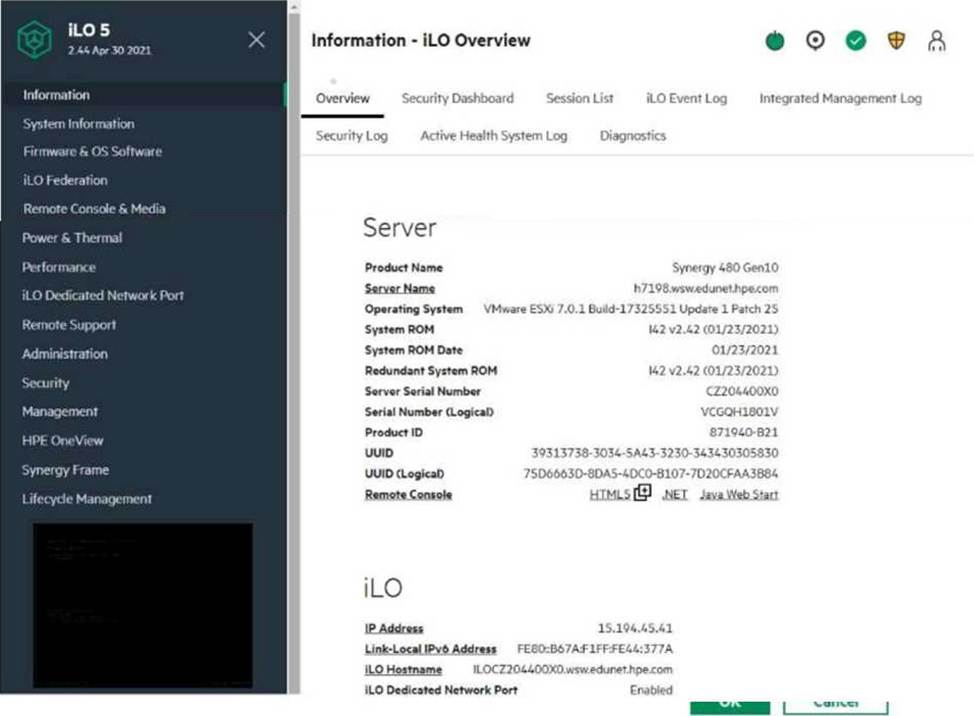
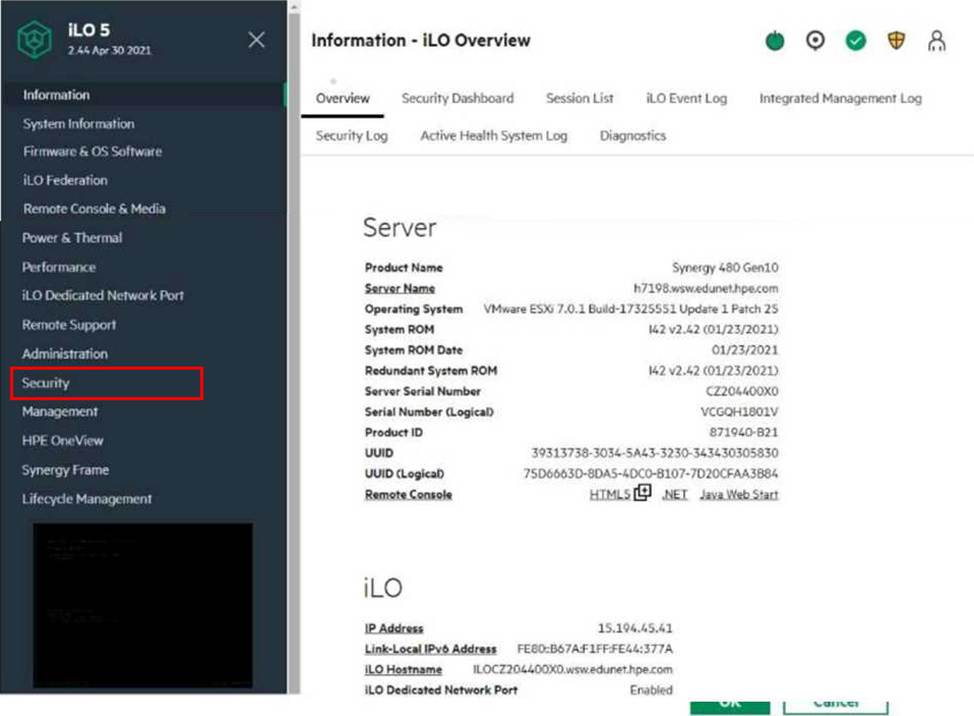
Explanation:
The area to check for the HPE OneView SSO certificate is under Security, then HPE SSO.
Here’s why:
Security: This section deals with all security-related settings, including certificates.
HPE SSO: This stands for "Single Sign-On" and is the specific technology that HPE OneView uses for integrated authentication. The certificate will be listed here if it’s properly applied.
To get to this section, you would click on "Security" in the left-hand navigation menu, and then "HPE SSO" in the main content area.
Your customer has 6 logical enclosures spanning 18 HPE Synergy frames. The customer needs to add one more logical enclosure based on 5 HPE Synergy frames
How will this change impact the customer environment?
- A . The customer can add a new logical enclosure to the existing setup because the maximum number of logical enclosures in a single management ring is not reached.
- B . The customer has to expand the management ring capacity either by adding HPE Composer 2 modules or adding memory to reach 128GB per module.
- C . The customer has to create a new management ring for new logical enclosure because the maximum number of frames m a single management ring is reached.
- D . The customer can add a new logical enclosure to an existing setup once all required licenses are added to HPE OneView and associated with the new frames.
C
Explanation:
HPE Synergy management rings have a maximum capacity for the number of frames they can manage. With 18 frames already managed in 6 logical enclosures, adding 5 more frames would exceed this capacity. Therefore, the customer needs to create a new management ring for the new logical enclosure to ensure proper management and operation.
Reference: HPE Synergy Management Guide
You configured a vVoI datastore using HPE Storage integration Pack for VMware vCenter.
Which storage object should you check using SSMC to verify whether vVol datastore is configured property?
- A . App Volume Set
- B . Storage Container
- C . Virtual Volume Set
- D . virtual Volume
B
Explanation:
When you configure a vVol datastore using the HPE Storage Integration Pack for VMware vCenter, the storage object to check in SSMC (HPE StoreServ Management Console) is the Storage Container. The Storage Container is a logical storage entity that houses virtual volumes (vVols) and represents the vVol datastore in the storage system. Verifying the Storage Container ensures that the vVol datastore is properly configured and managed.
Reference: HPE 3PAR StoreServ Storage Concepts Guide
Your customer plans to deploy VMware ESXi 7. 0 U2, and they are looking for a hardware platform that will allow them to use up to 16 CPU sockets
Which HPE compute system meets the customer requirements?
- A . HPE ProLiant DL580 Gen10
- B . HPE ProLiant OL380 Gen 10 Plus
- C . HPE Synergy 480 Gen10 Plus
- D . HPE Superdome Flex system
D
Explanation:
The HPE Superdome Flex system is the only HPE compute system that supports up to 16 CPU sockets, making it suitable for customers who require a hardware platform with such high scalability. The Superdome Flex is designed for mission-critical workloads and provides exceptional scalability and performance.
Reference: HPE Superdome Flex QuickSpecs