
HP HPE0-S59 Practice Exams
Last updated on Oct 22,2026- Exam Code: HPE0-S59
- Exam Name: HPE Compute Solutions
- Certification Provider: HP
- Latest update: Oct 22,2026
DRAG DROP
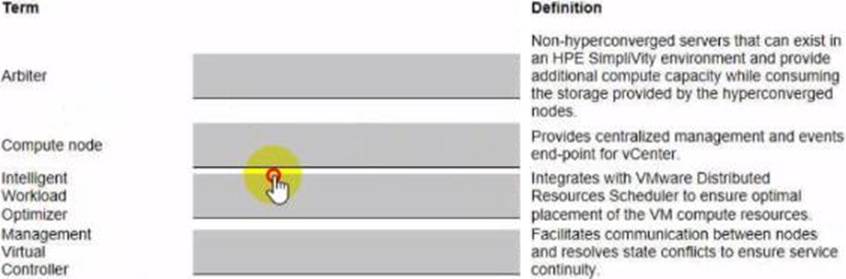
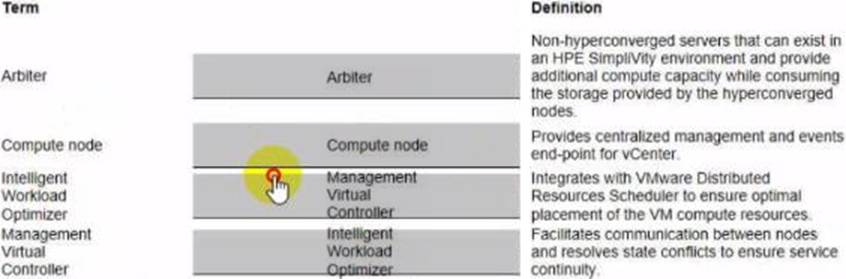
Match HPE SimpliVity team with the definition.
Explanation:
Here are the correct matches for each HPE SimpliVity term with their respective definitions:
Arbiter Definition: Facilitates communication between nodes and resolves state conflicts to ensure service continuity.
Compute node Definition: Non-hyperconverged servers that can exist in an HPE SimpliVity environment and provide additional compute capacity while consuming the storage provided by the hyperconverged nodes.
Intelligent Workload Optimizer Definition: Integrates with VMware Distributed Resources Scheduler to ensure optimal placement of the VM compute resources.
Management Virtual Controller Definition: Provides centralized management and events end-point for vCenter.
Arbiter: The Arbiter in an HPE SimpliVity environment is responsible for ensuring communication between nodes and resolving any state conflicts, which is crucial for maintaining service continuity.
Compute node: In an HPE SimpliVity environment, a compute node refers to non-hyperconverged servers that provide additional compute capacity while utilizing the storage from hyperconverged nodes.
Intelligent Workload Optimizer: This component integrates with VMware’s Distributed Resources Scheduler (DRS) to optimize the placement of virtual machine (VM) compute resources, ensuring they are efficiently distributed across the environment.
Management Virtual Controller: This controller provides centralized management and serves as the events end-point for vCenter, allowing for streamlined management and monitoring of the SimpliVity environment.
Reference: HPE SimpliVity User Guide
Your customer is trying to grow a VMware cluster using HPE OneView for VMware vCenter Server.
They get an error and cannot proceed.
Which tool should you use to troubleshoot the problem?
- A . HPE OneView interface to import an existing cluster using the hypervisor cluster profile functionality.
- B . HPE OneView for VMware vCenter Server to verify if the server profile template is properly imported and registered.
- C . vCenter Server to use the HPE OneView for VMware vCenter plugin to import the cluster for HPE OneView management.
- D . iLO interface of a given HPE Synergy compute node to verify whether this node is registered within HPE OneView.
What is a restriction of using a RoCE network?
- A . This network type does not support sFlow and remote port monitoring.
- B . This network type does not support the smart link and private network features.
- C . This network type is not supported with HPE Virtual Connect SE 100Gb F8 Module for HPE Synergy.
- D . This network type by default is configured as untagged network and cannot be a part of a network set.
Your customer wants to add dedicated Fibre Channel connectivity to the HPE Synergy frame running HPE Synergy 480 Gen10 compute modules, each with one CPU socket populated Currently they use two 12 Gb SAS switches and two HPE Virtual Connect SE 100Gb F32 Modules for HPE Synergy installed in third fabric.
What must be done to enable dedicated FC connectivity for this HPE Synergy frame?
- A . A second CPU must be installed for all HPE Synergy 480 Gen10 compute nodes.
- B . For Brocade switches, a logical interconnect group must be created in HPE OneView.
- C . For VC-FC modules, all of server facing ports must be property licensed.
- D . SAS switches must be moved to second fabric and FC modules Installed in the first one.
A
Explanation:
To enable dedicated Fibre Channel (FC) connectivity in an HPE Synergy frame, if using Brocade switches, it is necessary to create a logical interconnect group in HPE OneView. This group defines the configuration and management of FC connectivity for the compute modules. Properly configuring and managing this logical interconnect group ensures that the compute modules can establish dedicated FC connections.
Reference: HPE OneView for Synergy FC Configuration Guide
DRAG DROP
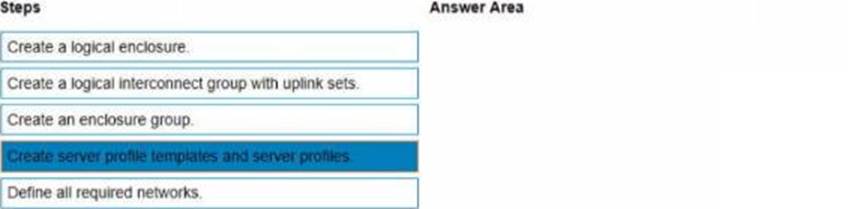
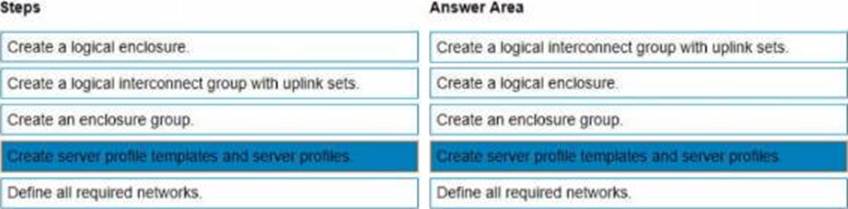
You need to setup HPE Synergy frames after hardware components are discovered within HPE OneView.
Put the steps to achieve this goal into the coned order in the answer area on the right.
Explanation:
To set up HPE Synergy frames after the hardware components are discovered within HPE OneView, the following steps should be followed in the correct order:
Create an enclosure group.
Create a logical interconnect group with uplink sets.
Define all required networks.
Create a logical enclosure.
Create server profile templates and server profiles.
Create an enclosure group: This step involves defining the enclosure group, which includes the configurations for the enclosure such as firmware baselines and logical interconnect groups.
Create a logical interconnect group with uplink sets: Next, set up the logical interconnect group, which includes the uplink sets that define the connectivity from the enclosures to the data center networks.
Define all required networks: After setting up the logical interconnect group, define all the necessary networks that will be used within the HPE Synergy environment.
Create a logical enclosure: Create a logical enclosure by combining the physical enclosures with the defined enclosure group, effectively binding the hardware configuration with the logical settings.
Create server profile templates and server profiles: Finally, create server profile templates and individual server profiles to apply the required configuration settings to the compute modules.
Reference: HPE OneView User Guide
Your customer plans to deploy VMware ESXi 7.0 U2, and they are looking for a hardware platform that will allow them to use up to 24 TB of physical memory.
Which HPE compute system meets the customer’s requirements?
- A . HPE Superdome Flex
- B . HPE ProLiant DL380 Gen 10 Plus
- C . HPE ProLiant DL580 Gen 10
- D . HPE Synergy 480 Gen10 Plus
A junior architect designed a solution based on HPE Synergy that must meet the following requirements:
Support at least 30 HPE Synergy 480 Gen10 Plus compute modules
Interconnect modules must provide MAC and WWN virtualization
All HPE Synergy frames must formulate a single management entity
The management appliance should not be a single point of failure
Connectivity to FC array should be available to all compute nodes
The proposal consists of:
3 HPE Synergy 12000 frames
6 HPE Composer 2 modules
2 HPE Virtual Connect SE 100Gb F32 Module
4 HPE Synergy 50Gb Interconnect Link Module
Which statements about this proposed design are true? (Select two)
- A . FC upgrade licenses for HPE Virtual Connect SE 100Gb F32 Module must be added.
- B . HPE Synergy 50Gb ILMs must be replaced with HPE Virtual Connect SE 100Gb F32 modules.
- C . Remove 4 HPE Composer 2 modules from the design, as they are not required.
- D . The selected interconnect modules do not provide the requested WWN virtualization.
- E . The current setup can support up to 18 HPE Synergy 480 Gen10 Plus compute modules.
Which statement about port flap protection is true?
- A . It can disable link aggregation groups or stacking ports that have gone down and come up in quick succession.
- B . It allows an administrator to suppress excessive inbound multicast, broadcast, and DLF packets.
- C . It allows configuration of hardware Layer 2 switching behavior of multicast traffic to optimize network resource usage.
- D . It allows the creation of LACP groups on the upstream switch that span multiple HPE Synergy Virtual Connect modules.
HOTSPOT
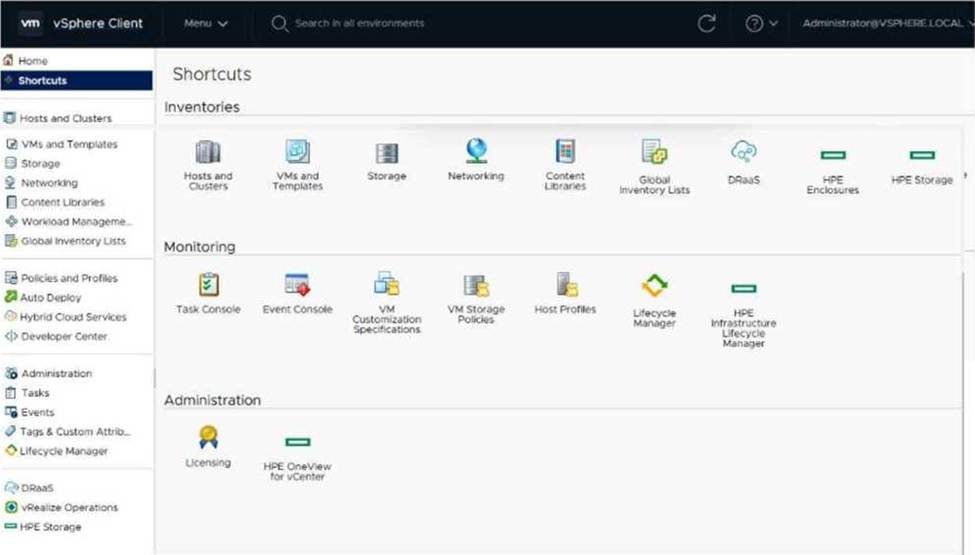
Click the option that will allow you to create an OS Deployment Plan with customized kickstart.
HOTSPOT
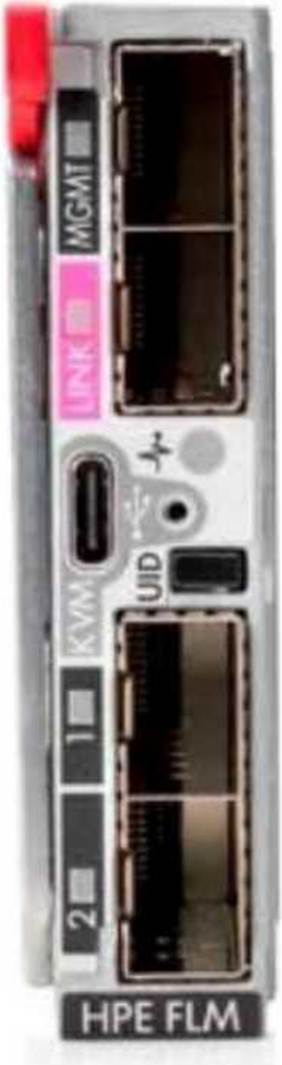
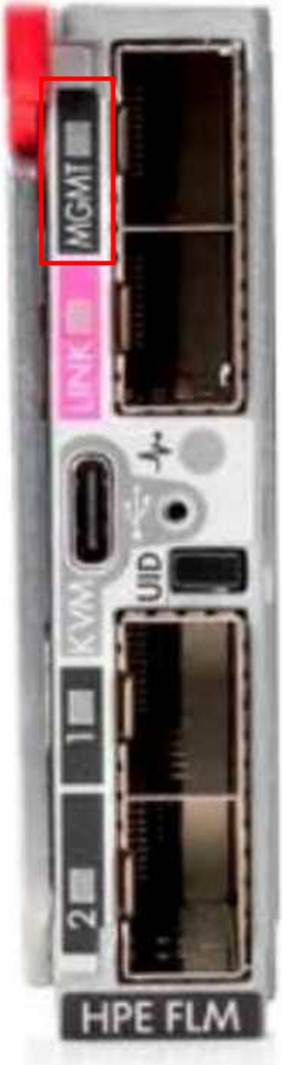
Click the port on the Frame Link Module which is used to include an HPE Synergy frame in the management ring.
Explanation:
The port labeled "MGMT" (Management) in the upper right section of the HPE Frame Link Module (FLM) is the correct port used to include an HPE Synergy frame in the management ring. This port is
crucial for linking the frame into the management network of the Synergy infrastructure.