
HP HPE0-S59 Practice Exams
Last updated on Oct 22,2026- Exam Code: HPE0-S59
- Exam Name: HPE Compute Solutions
- Certification Provider: HP
- Latest update: Oct 22,2026
HOTSPOT
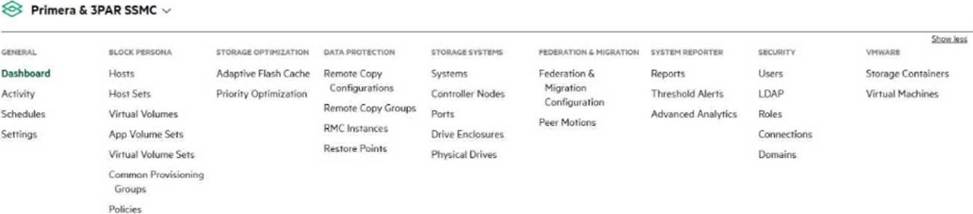
You configured a virtual machine cluster using the HPE Storage Integration Pack for VMware vCenter. Click the option in the SSMC main menu that you can use to verify whether a virtual storage operation is properly created on HPE Primera or 3PAR.
Which statement about an HPE Oneview support dump is true?
- A . Appliance support dump by default contains a logical enclosure support dump
- B . Support dump is a binary file that can be opened only in a dedicated application
- C . Support dump can be created if HPE Virtual Connect modules are installed in the frame
- D . Preview support dump is available only when creating an appliance support dump
A
Explanation:
An HPE OneView support dump includes various diagnostic information, and by default, it contains a logical enclosure support dump. This comprehensive dump helps in troubleshooting by providing detailed logs and configuration data from the appliance and the logical enclosures it manages, enabling effective diagnosis of issues within the managed environment.
Reference: HPE OneView User Guide
Your customer plans to expand an existing nPar based on a single HPE Superdome Flex chassis.
Which statement about workload availability during expansion is true?
- A . Powered nPar can be expanded only if HPE Superdome Flex 280 is used
- B . Online expansion is available only if RMC is used for management.
- C . HPE Superdome Flex does not support expansion of powered on nPars
- D . Powered nPar can be expanded if it does not use HPE Persistent Memory
D
Explanation:
HPE Superdome Flex allows for the expansion of powered-on nPars (nPartitions), but this capability is subject to certain conditions. One of these conditions is that the nPar does not use HPE Persistent Memory. Expanding an nPar with Persistent Memory typically requires a shutdown to reconfigure the memory settings safely.
Reference: HPE Superdome Flex QuickSpecs
Which statement about login redistribution is true?
- A . Login redistribution is available only If HPE Primera or HPE Alletra is connected directly to the HPE Synergy frame
- B . Login redistribution is a licensed feature and the number of licenses required depends on the number of active ports
- C . Login redistribution is supported only on the HPE Synergy Virtual Connect SE 32Gb FC Modules
- D . Login redistribution is used for login balancing when they are not distributed evenly over the FC links
C
Explanation:
Login redistribution is a feature that ensures logins are balanced across available FC (Fibre Channel) links. This process helps maintain optimal performance and redundancy by redistributing logins if they are not evenly distributed. This feature is essential in environments where maintaining balanced load distribution is critical for performance and reliability.
Reference: HPE Primera and Alletra 6000 Storage Guides
HOTSPOT
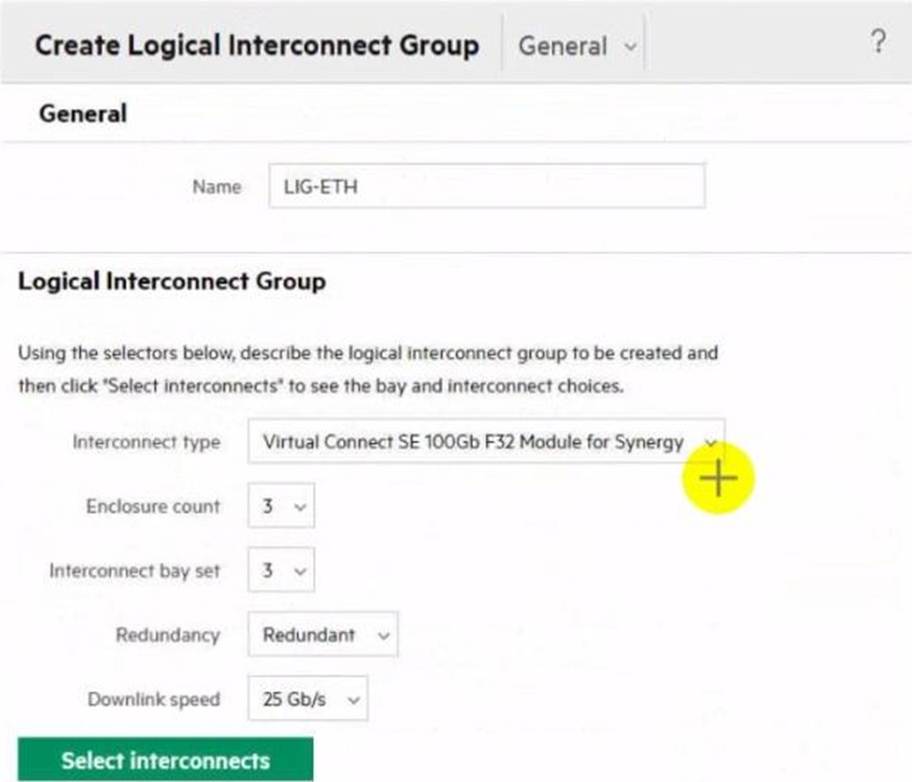
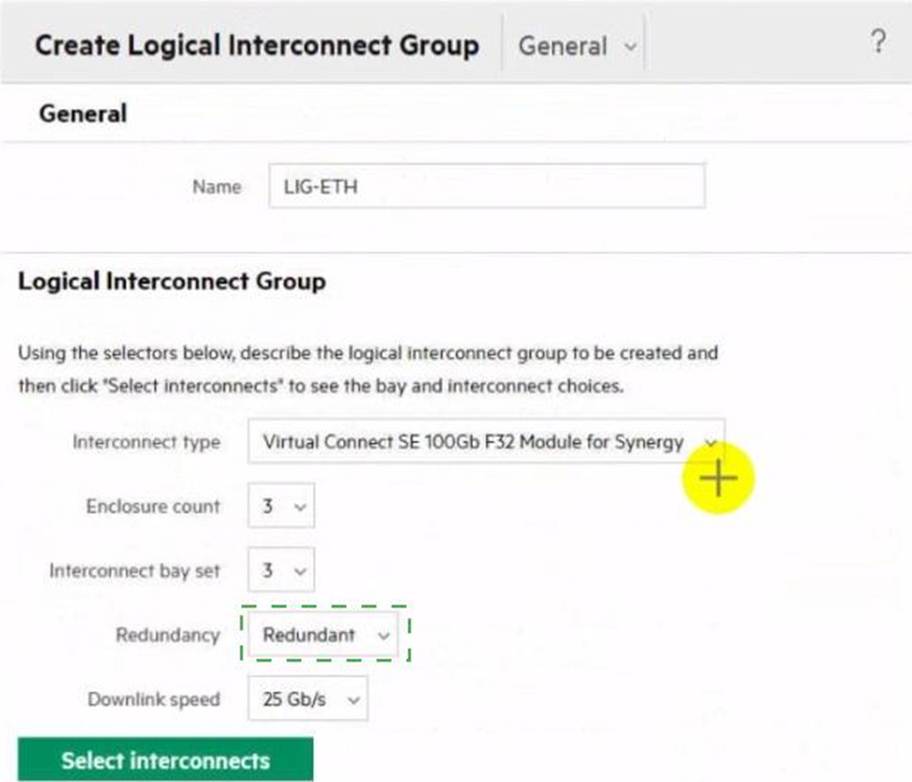
Click the drop-down menu that will allow you to define the location of the master modules within the logical interconnect group.
Explanation:
Click the drop-down menu next to "Interconnect bay set".
To define the location of the master modules within the logical interconnect group, you need to select the appropriate interconnect bay set. The drop-down menu next to "Interconnect bay set" allows you to specify which bays the interconnect modules will be placed in, thereby determining the location of the master modules.
Reference: HPE Synergy Logical Interconnect Group Configuration Guide
Your customer has an HPE Synergy platform deployed and managed using HPE OneView. The customer also has HPE Superdome Flex with RMC deployed They plan to deploy a second nPar and HPE Superdome Flex 280 They plan to manage new components using HPE OneView.
What must be done to achieve this goal?
- A . The customer must use IL05 to add HPE Superdome Flex systems to HPE OneView
- B . The customer should deploy an HPE OneView appliance for HPE Superdome Flex management
- C . The customer must add a second Rack Management Controller for HPE Superdome Flex 280
- D . The customer has to add HPE Superdome Flex to the HPE OneView used to manage HPE Synergy
D
Explanation:
To manage HPE Superdome Flex systems, including the new Superdome Flex 280, using HPE OneView, the customer should deploy a dedicated HPE OneView appliance specifically for HPE Superdome Flex management. This approach ensures that the Superdome Flex systems are properly integrated and managed within the HPE OneView environment, allowing for consistent and centralized management alongside other HPE infrastructure.
Reference: HPE Superdome Flex Management with HPE OneView
You plan to configure a Link Aggregation Group (LAG) for two connections within a server profile for a compute node running an ESXI system.
What is required from the VMware side to enable LAG?
- A . Virtual Distributed Switch
- B . vSphere Standard license
- C . Load balancing cluster
- D . Dedicated VMKernel port
A
Explanation:
To configure a Link Aggregation Group (LAG) for two connections within a server profile for a compute node running an ESXi system, a Virtual Distributed Switch (VDS) is required from the VMware side. VDS allows for the configuration of LAGs and provides advanced network features such as centralized management and monitoring, which are essential for setting up and managing LAGs.
Reference: VMware vSphere Networking Guide
Your customer with an HPE Synergy environment needs to prevent a timeout and loss of communication during an external switch firmware upgrade.
Which parameter can the customer configure within an uplink set to meet their requirements?
- A . The customer should set the connection mode to manual.
- B . The customer should disable LACP failover trigger.
- C . The customer should enable LACP load-balancing.
- D . The customer should set LACP timer to long.
Refer to the exhibit.
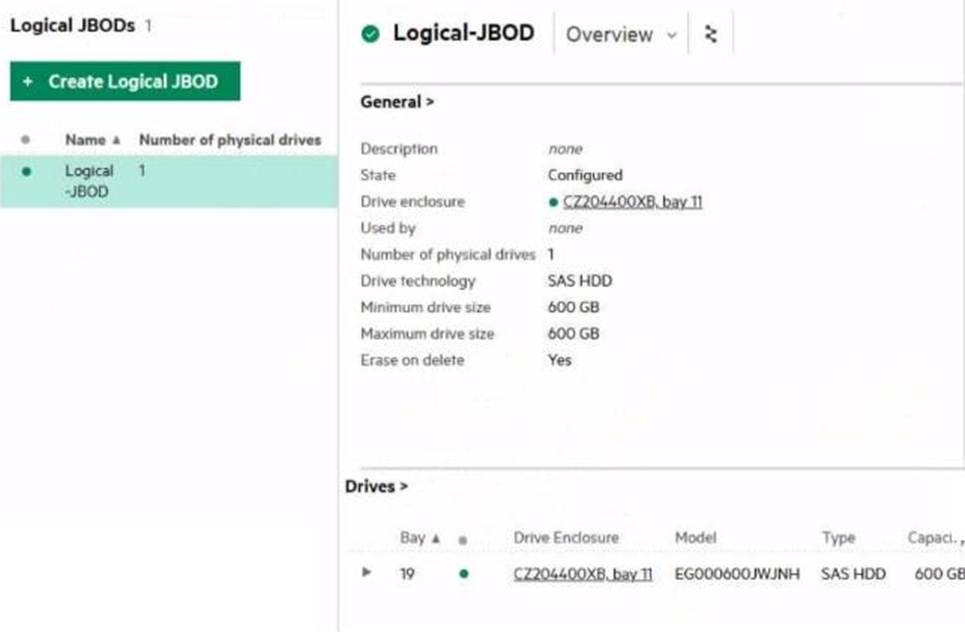
Which statement about this logical JBOD is true?
- A . This logical JBOD can be connected to multiple systems to formulate a snared datastore.
- B . After deleting this logical JBOD drives will he blocked for 12h m case this JBOD must be re-created
- C . After deleting this logical JBOD, its drives w not be available until a clean-up procedure 6 done
- D . This logical JBOD can be presented to the compute nodes in a different frame.
D
Explanation:
In HPE Synergy, logical JBODs (Just a Bunch of Disks) can be configured to be accessible by compute nodes across different frames. This flexibility allows for the logical JBOD to be presented to compute nodes that are not in the same frame as the storage module, facilitating better resource utilization and workload management.
Reference: HPE Synergy Storage Module User Guide
Which HPE Virtual Connect feature allows an administrator to suppress excessive inbound multicast broadcast and destination lookup failure (OLF) packets?
- A . Pause flood protection
- B . Loop protection
- C . LLDP tagging
- D . Storm control
D
Explanation:
Storm control is a feature in HPE Virtual Connect that allows administrators to suppress excessive inbound multicast, broadcast, and destination lookup failure (DLF) packets. This feature helps to mitigate the negative impact of network storms, which can degrade network performance and availability. By configuring storm control, administrators can set thresholds to limit the rate of such packets entering the network, ensuring a stable and reliable network environment.
Reference: HPE Virtual Connect Networking Features