
HP HPE0-S59 Practice Exams
Last updated on Oct 21,2026- Exam Code: HPE0-S59
- Exam Name: HPE Compute Solutions
- Certification Provider: HP
- Latest update: Oct 21,2026
DRAG DROP
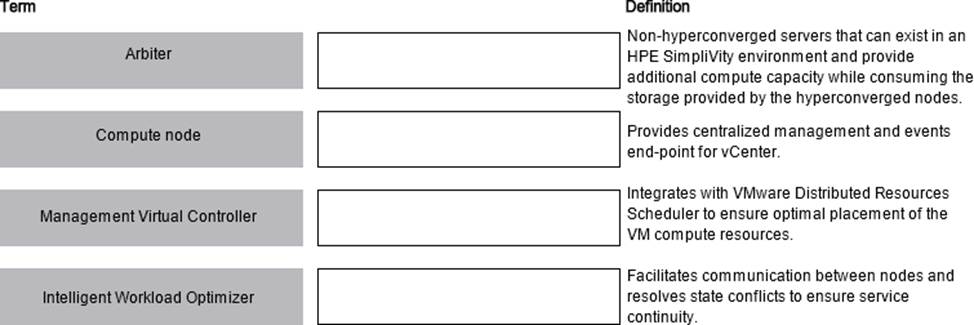
Match HPE SimpliVity term with the definition.
Explanation:
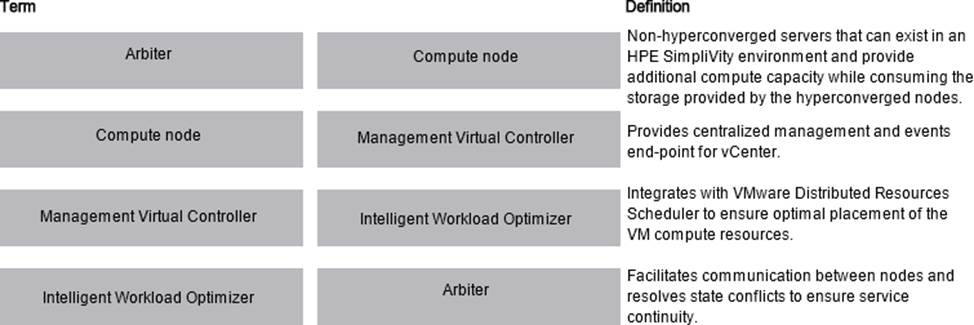
Here are the correct matches for each HPE SimpliVity term with their respective definitions:
Arbiter Definition: Facilitates communication between nodes and resolves state conflicts to ensure service continuity.
Compute node Definition: Non-hyperconverged servers that can exist in an HPE SimpliVity environment and provide additional compute capacity while consuming the storage provided by the hyperconverged nodes.
Management Virtual Controller Definition: Provides centralized management and events end-point
for vCenter.
Intelligent Workload Optimizer Definition: Integrates with VMware Distributed Resources Scheduler to ensure optimal placement of the VM compute resources.
Arbiter: This component is essential for ensuring that the HPE SimpliVity nodes communicate properly and that any state conflicts are resolved, which is critical for maintaining service continuity.
Compute node: These are non-hyperconverged servers that add additional compute capacity to the HPE SimpliVity environment. They utilize the storage resources provided by the hyperconverged nodes.
Management Virtual Controller: This controller is responsible for centralized management and acts as the events end-point for vCenter, allowing for streamlined management of the SimpliVity environment.
Intelligent Workload Optimizer: This tool integrates with VMware’s Distributed Resources Scheduler (DRS) to ensure that virtual machine (VM) compute resources are placed optimally across the infrastructure.
Reference: HPE SimpliVity 380 Data Sheet
Which statement about HPE Superdome Flex firmware updates is true?
- A . RMC CLI can simultaneously update complex firmware for multiple HPE Superdome systems.
- B . RMC CLI is the only tool that can be used to update HPE Persistent Memory firmware.
- C . HPE OneView is the only tool that can be used to perform I/O updates.
- D . HPE SUM is the only tool that can be used to update HPE Persistent Memory firmware.
Your customer wants to add a second HPE Synergy frame to an existing logical enclosure Based on a single HPE Synergy frame. The customer wants to use a highly available master setup.
Which procedures should De performed during the expansion process? (Select two.)
- A . Create a new logical interconnect group and enclosure group for two frames setup
- B . Create a new logical enclosure based on both HPE Synergy frames.
- C . Re-parent an existing enclosure group to the new logical interconnect group.
- D . Modify an existing logical interconnect to include second HPE Synergy frame.
- E . Move one of the master modules to the appropriate interconnect bay in the second frame.
DE
Explanation:
To expand an existing logical enclosure based on a single HPE Synergy frame to include a second frame and ensure a highly available master setup, the following steps should be performed:
Modify an existing logical interconnect to include the second HPE Synergy frame: This step involves updating the logical interconnect configuration to encompass the new frame, ensuring network connectivity and consistency across both frames.
Move one of the master modules to the appropriate interconnect bay in the second frame: To achieve a highly available master setup, one of the master modules should be relocated to the second frame, providing redundancy and high availability for the management components.
Reference: HPE Synergy Frame Expansion Guide
Refer to the exhibit.
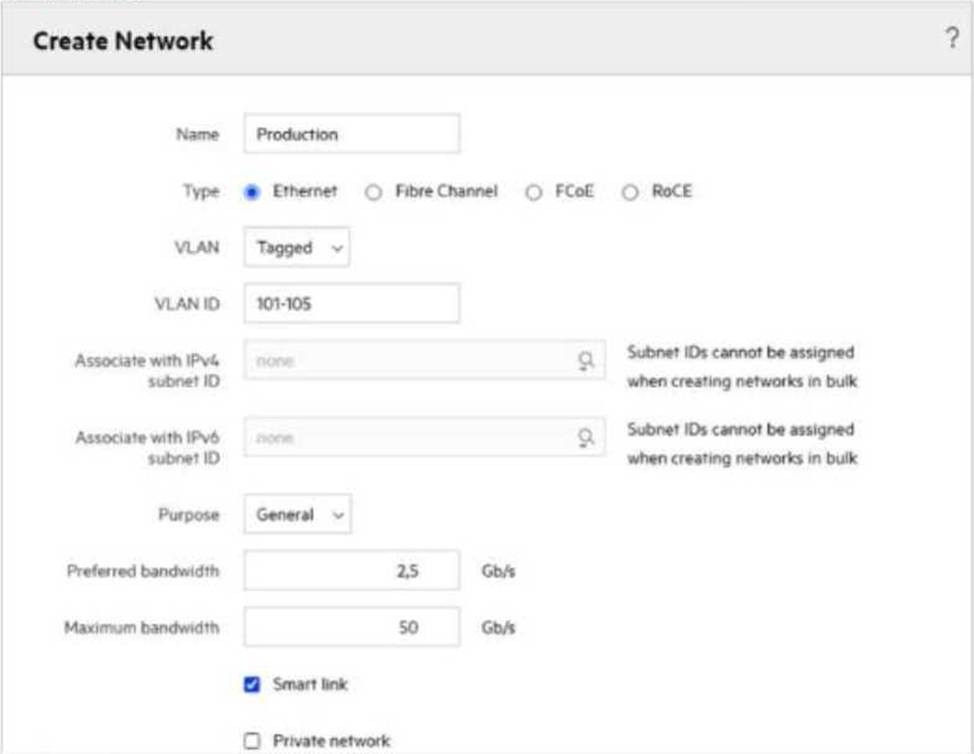
How will traffic for a given network be affected if the purpose is changed from General to VM Migration?
- A . Changing this parameter to VM Migration will give higher priority for vMotion traffic.
- B . Changing this parameter does not affect the behavior of the network or traffic.
- C . If VM Migration is selected, all types of traffic other than vMotion will be blocked.
- D . This parameter will allow an administrator to define a VMkernel port.
Your customer plans to add four HPE Synergy frames to an existing management ring Ail installed frames are equipped with two 2-port FLM modules, while new frames will be equipped with 4-port FLM modules.
Which statement about mixing different FLM modules is true?
- A . Existing 2-port FLM modules must be replaced with 4-port FLM modules
- B . A management ring can contain mixed frame link module configurations
- C . A management ring with mixed FLM modules cannot have more than 12 frames
- D . Mixing different FLM modules is allowed if all of them have the same firmware version
B
Explanation:
In HPE Synergy, a management ring can indeed contain mixed frame link module (FLM) configurations. This means you can have a mix of 2-port and 4-port FLM modules within the same management ring without needing to replace the existing 2-port modules. This flexibility allows for gradual upgrades and scalability within the management ring.
Reference: HPE Synergy Management Guide
Which tool can be used to evaluate me health of an HPE Oneview appliance before proceeding with an appliance updated.
- A . HPE Composer Maintenance Console
- B . HPE OneView Update Readiness Checker
- C . HPE OneView Global Dashboard
- D . HPE OneView Firmware Compliance Report
B
Explanation:
The HPE OneView Update Readiness Checker is a tool specifically designed to evaluate the health and readiness of an HPE OneView appliance before proceeding with an update. It checks for any potential issues that could affect the update process and provides recommendations for resolution.
Reference: HPE OneView Update Guide
Your customer is trying to grow a VMware duster using HPE OneView for VMware vCenter Server. They get an error and cannot proceed
Which tool should you use to troubleshoot the problem?
- A . HPE One View for VMware vCenter Server to verify if server profile template s property imported and registered
- B . vCenter Server to verify if an OS Bund Plans property defined and has ESXi image uploaded
- C . HPE OneView interface to import an existing cluster using the hypervisor cluster profile functionality.
- D . ILO interlace of a given HPE Synergy compute node to verify whether this node is registered within HPE Oneview.
A
Explanation:
When encountering an error while growing a VMware cluster using HPE OneView for VMware vCenter Server, it is crucial to verify that the server profile template is properly imported and registered in HPE OneView. This ensures that the necessary configurations and settings are correctly applied to the new compute nodes being added to the cluster.
Reference: HPE OneView for VMware vCenter Server User Guide
Which statement about the HPE D3940 storage module is true?
- A . Only one type of drives (SATA, SAS, SSD) can be installed in each module.
- B . It is configured through CLI available from HPE Synergy console.
- C . SATA drives require redundant IO adapters to be installed in this module.
- D . Up to five modules can be installed in a single frame with Gen10 servers.
DRAG DROP
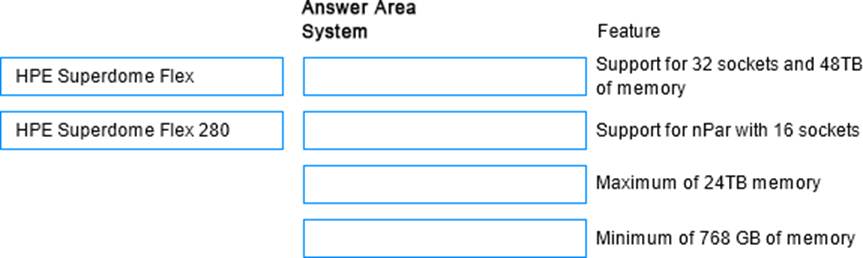
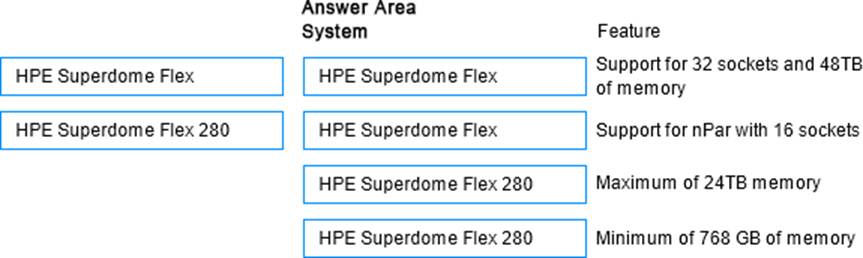
Match HPE Superdome Flex system with its specific feature.
Explanation:
Here are the correct matches for each HPE Superdome Flex system with its respective feature:
HPE Superdome Flex
Support for 32 sockets and 48TB of memory
Support for nPar with 16 sockets
HPE Superdome Flex 280
Maximum of 24TB memory
Minimum of 768 GB of memory
HPE Superdome Flex:
Support for 32 sockets and 48TB of memory: The HPE Superdome Flex system is designed for extremely large-scale workloads and can support configurations with up to 32 CPU sockets and 48TB of memory.
Support for nPar with 16 sockets: This system supports nPartitions (nPars) with configurations that can include up to 16 CPU sockets, providing flexible partitioning and resource allocation.
HPE Superdome Flex 280:
Maximum of 24TB memory: The HPE Superdome Flex 280 supports a maximum memory capacity of 24TB, suitable for large but not as massive workloads compared to the full Superdome Flex.
Minimum of 768 GB of memory: The minimum memory configuration for the HPE Superdome Flex 280 is 768 GB, ensuring a base level of performance and capacity for smaller deployments.
Reference: HPE Superdome Flex QuickSpecs
Refer to the exhibit.
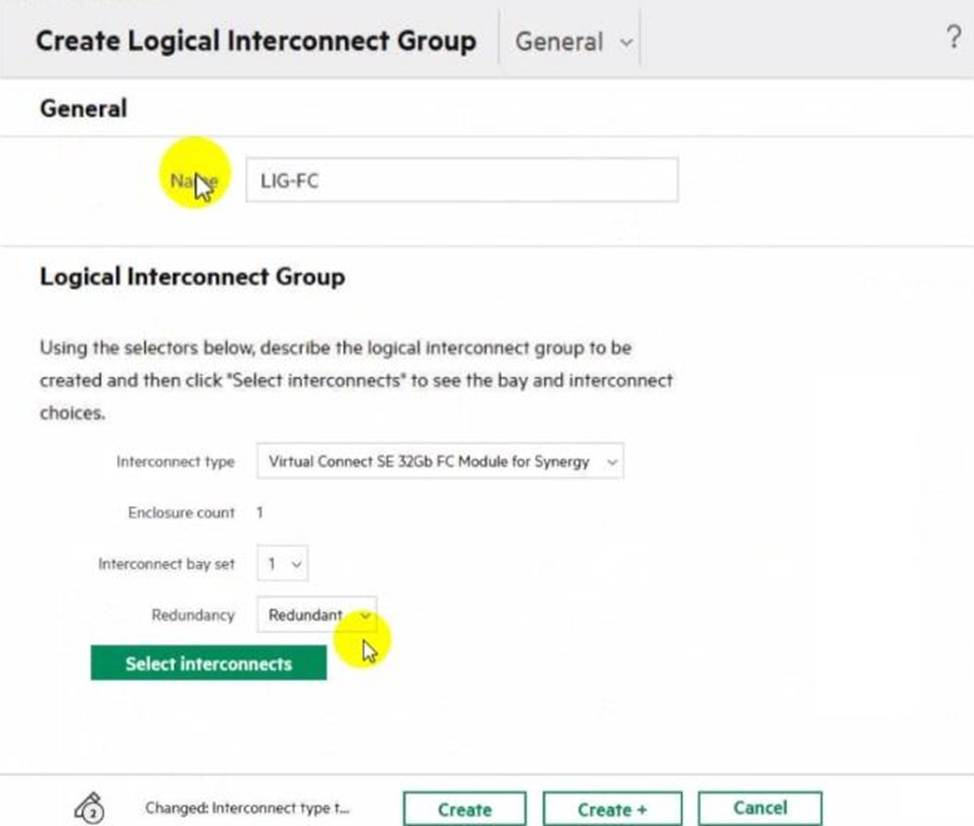
Which statement about this logical interconnect group is true?
- A . Both modules are located in different frames for redundancy
- B . For an uplink set, ports from different modules can be selected
- C . interconnect modules are installed in interconnect bays 1 and 4
- D . An additional license is required to change the enclosure count
18/84
C
Explanation:
In the HPE Synergy setup shown in the exhibit, the interconnect type is Virtual Connect SE 32Gb FC Module for Synergy with an enclosure count of 1 and interconnect bay set 1. Typically, in such configurations, the interconnect modules are installed in bays 1 and 4 for redundancy. This placement ensures high availability and failover capabilities.
Reference: HPE Synergy Interconnects Configuration Guide