
HP HPE0-S59 Practice Exams
Last updated on Oct 21,2026- Exam Code: HPE0-S59
- Exam Name: HPE Compute Solutions
- Certification Provider: HP
- Latest update: Oct 21,2026
Your customer used to manage their HPE 3PAR arrays using HPE OneView Now they have replaced these arrays HPE Primera.
How does managing the new arrays compare to managing their old arrays?
- A . HPE OneView offers additional functionalities for HPE Primera like CPG management
- B . HPE OneView offers limited support tor HPE Primera because of the firmware differences
- C . To manage HPE Primera using HPE OneView. a dedicated license is required
- D . Management procedures and features are the same tor both types of the array
D
Explanation:
When managing HPE Primera arrays using HPE OneView, the management procedures and features are largely the same as those for HPE 3PAR arrays. HPE OneView provides a consistent management experience across both storage platforms, allowing customers to easily transition from HPE 3PAR to HPE Primera without significant changes to their management workflows.
Reference: HPE OneView Storage Management Guide
You discovered that somebody deleted the SSO certificate that affects accessing iLO from HPE OneView from an iLO processor in an HPE Synergy compute node.
How will you recover from this problem?
- A . Login to the HPE Composer CLI and use the efuse procedure for the affected server.
- B . Remove the affected server from HPE OneView and add it again to reconfigure the iLO processor.
- C . Navigate to HPE OneView, locate the affected server hardware and use Refresh option.
- D . Navigate to HPE OneView, locate the affected server hardware and use the Reset iLO option.
Your customer wants to add multiple compute nodes to an existing HPE SimpliVity environment.
Which statement about this expansion is true?
- A . Each compute node will need a capacity-based license that covers a specific amount of memory, CPUs, and storage.
- B . A maximum of five compute nodes per HPE SimpliVity cluster can be added, with no more than 32 sockets in total.
- C . The number of compute nodes that can be added depends on the number and type of HPE SimpliVity nodes.
- D . If a stretched cluster is implemented, an extension must be applied before compute nodes can be added.
Your customer plans to deploy a VMware ESXi with HPE Synergy platform. They plan to use Distributed Switches and DRS cluster
You are preparing a proposal with the following components:
– HPE Synergy frame with ten HPE Synergy 480 Gen10 Plus compute modules
– two HPE Virtual Connect SE 100Gb F32 Modules for Synergy
– an appropriate number of the vSphere Standard licenses for each compute node
– one HPE D3940 Storage Modules with 40 SSDs
– all required cables and options
Which statement about this proposal is true?
- A . One HPE Virtual Connect SE 100Gb F32 Module for Synergy should be replaced with 50GD/S ILM
- B . vSphere Standard licenses should be replaced with Enterprise Pius licenses to enable requested features
- C . 2 additional HPE Synergy 480 Gen10 Plus compute modules can be added to this setup
- D . 20 SSD drives should be removed from this setup, as D3940 supports only 20 SSD or SAS drive.
B
Explanation:
The VMware vSphere Standard license does not include support for advanced features like Distributed Resource Scheduler (DRS) and Distributed Switches. These features are available only with the vSphere Enterprise Plus license. Therefore, to meet the customer’s requirement of using Distributed Switches and a DRS cluster, the proposal should include vSphere Enterprise Plus licenses instead of Standard licenses.
Reference: VMware vSphere Licensing Guide
In the past a customer experienced a networking issue where network ports went down and came back up in quick succession.
Which HPE Virtual Connect SE 100 GD F32 Module for HPE Synergy feature can be configured to disable such ports?
- A . Pause flood protection
- B . sFlow
- C . Storm control
- D . Port flap protection
D
Explanation:
Port flap protection is a feature of the HPE Virtual Connect SE 100Gb F32 Module for HPE Synergy that can be configured to disable ports experiencing frequent up and down transitions. This feature helps to stabilize the network by preventing the disruptive effects of port flapping.
Reference: HPE Virtual Connect SE 100Gb F32 Module for HPE Synergy User Guide
Your customer has the following HPE Synergy setup
– 3 HPE Synergy 12000 Frames
– 4 HPE Virtual Connect SE 100 Gb F32 Modules
– 2 HPE Synergy 50 GO Interconnect Link Modules
– 36 HPE Synergy 480 Gen10 Plus compute modules
– 2 HPE Composer 2 modules
Which statement about this setup is true?
- A . To use all compute nodes, the customer must create at least two logical enclosures
- B . To manage all frames, the customer must buy two additional HPE Composer 2 modules
- C . The customer must buy 36 HPE OneView Advanced licenses to manage compute modules
- D . The customer can add one D3940 storage Module to each of the frames
A
Explanation:
In an HPE Synergy environment, a logical enclosure represents a management domain that groups multiple Synergy frames and their associated compute, storage, and fabric resources. Given the setup with 3 HPE Synergy 12000 Frames and the specified components, the customer must create at least two logical enclosures to effectively manage all compute nodes and resources across multiple frames. This ensures proper resource allocation, management, and redundancy.
Reference: HPE Synergy Logical Enclosure Guide
Your customer wants to compare HPE Superdome Flex with HPE Superdome Flex 280.
Which statement about these two systems is true?
- A . HPE Superdome Flex must be in memory mode to support HPE Persistent Memory.
- B . HPE Superdome Flex 280 can be managed using iLO5 management processor.
- C . HPE Superdome Flex requires Rack Management Controller to support multiple nPars.
- D . HPE Superdome Flex 280 can scale up to 16 sockets and 24TB of memory.
DRAG DROP
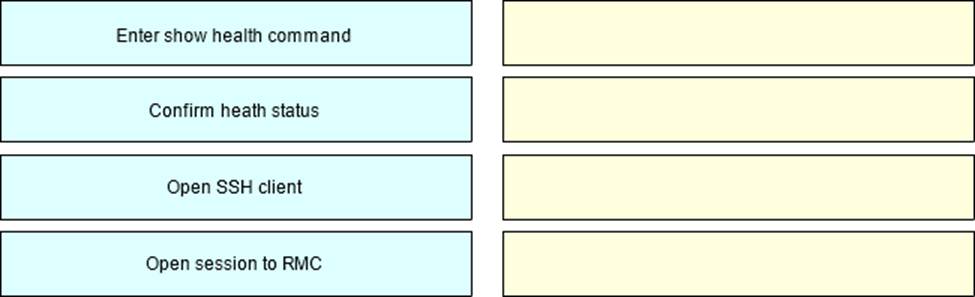
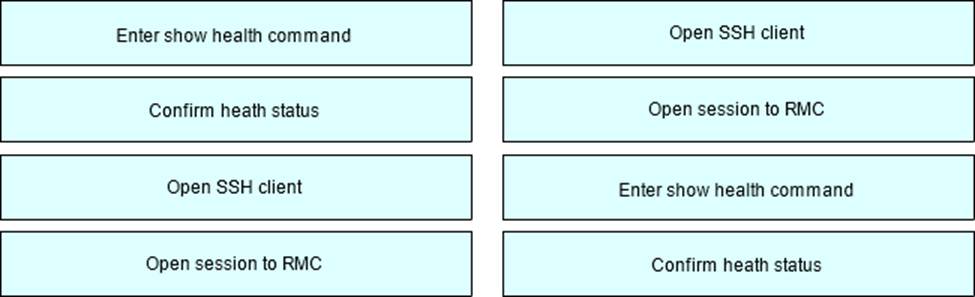
After HPE Superdome Flex deployment and nPar setup, you need to verify health status of HPE Superdome Flex components.
Put the steps on the left into the coned order on the right to perform this task.
Explanation:
Open SSH client: Begin by opening an SSH client on your computer. This client will be used to establish a secure connection to the Rack Management Controller (RMC).
Open session to RMC: Use the SSH client to open a session to the RMC. The RMC is the central management component for the HPE Superdome Flex system.
Enter show health command: Once connected to the RMC, enter the show health command. This command will provide detailed information about the health status of various components within the Superdome Flex system.
Confirm health status: Review the output of the show health command to confirm the health status of the Superdome Flex components. This step ensures that all components are functioning correctly and identifies any potential issues.
Reference: HPE Superdome Flex Management Guide
DRAG DROP
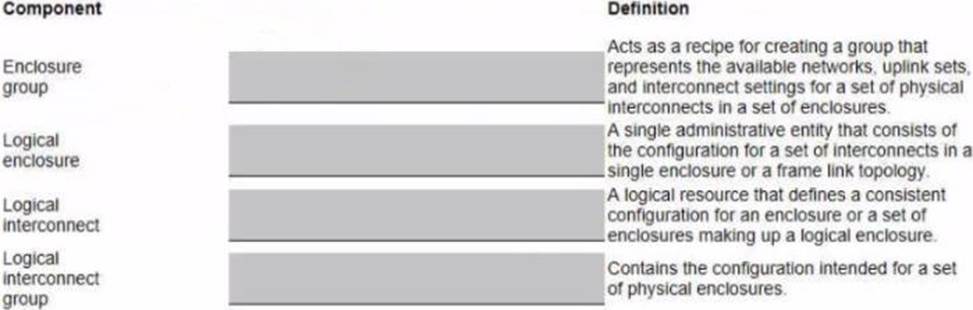
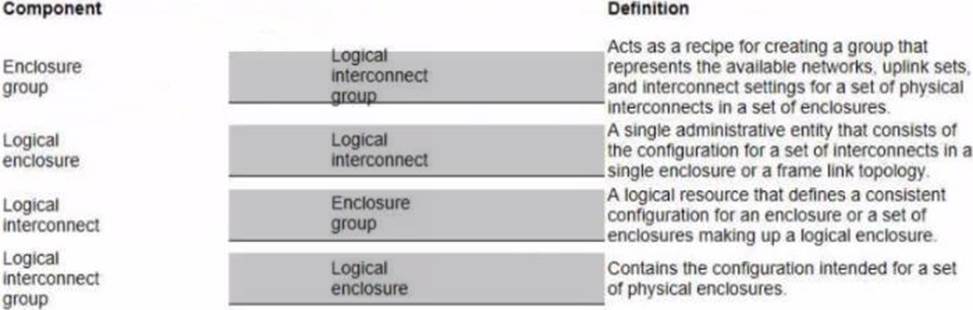
Match each HPE Synergy logical component with the definition.
Explanation:
Here are the correct matches for each HPE Synergy logical component with their respective definitions:
Enclosure group
Definition: Contains the configuration intended for a set of physical enclosures.
Logical enclosure
Definition: A logical resource that defines a consistent configuration for an enclosure or a set of enclosures making up a logical enclosure.
Logical interconnect
Definition: A single administrative entity that consists of the configuration for a set of interconnects in a single enclosure or a frame link topology.
Logical interconnect group
Definition: Acts as a recipe for creating a group that represents the available networks, uplink sets, and interconnect settings for a set of physical interconnects in a set of enclosures.
Enclosure group: An enclosure group in HPE Synergy defines the configuration settings, including logical interconnect groups and firmware baselines, for a set of physical enclosures.
Logical enclosure: A logical enclosure in HPE Synergy is a resource that includes one or more physical enclosures and their associated logical interconnects, providing a consistent configuration for those enclosures.
Logical interconnect: A logical interconnect represents a set of interconnects within an enclosure, managed as a single entity. It includes the configuration of the interconnects and their connections.
Logical interconnect group: A logical interconnect group (LIG) defines the network configuration, including available networks, uplink sets, and interconnect settings, that can be applied to multiple enclosures.
Reference: HPE Synergy Configuration and Management Guide
Your customer manages HPE Synergy using HPE OneView. For one of its projects, the company purchased 50 HPE.
ProLiant DK385 Gen10 Plus v2. They plan to manage the new systems using HPE OneView as well.
What should the customer do to manage rack system using HPE OneView?
- A . add the rack system to the HPE OneView instance used to manage HPE Synergy to centralize management of all systems.
- B . connect the rack system to an IPDU and add the IPDU to the HPE. OneView instance that is used for HPE synergy management.
- C . Deploy HPE OneView Global Dashboard and add the rack systems there, as AMD systems are not directly in HPE OneView.
- D . Deploy an HPE OneView virtual appliance, and, after configuration, use it to manage only the rack systems.
A
Explanation:
HPE OneView can manage both Synergy and ProLiant systems, allowing for centralized management of all infrastructure components. By adding the HPE ProLiant DL385 Gen10 Plus v2 systems to the existing HPE OneView instance used for Synergy, the customer can streamline management processes and maintain a unified management interface for all systems.
Reference: HPE OneView User Guide