
HashiCorp HCVA0-003 Practice Exams
Last updated on Oct 22,2026- Exam Code: HCVA0-003
- Exam Name: HashiCorp Certified: Vault Associate (003)Exam
- Certification Provider: HashiCorp
- Latest update: Oct 22,2026
You have a CI/CD pipeline using Terraform to provision AWS resources with static privileged credentials. Your security team requests that you use Vault to limit AWS access when needed.
How can you enhance this process and increase pipeline security?
- A . Enable the SSH secrets engine and have Terraform generate dynamic credentials when deploying resources in AWS
- B . Enable the Transit secrets engine to encrypt the AWS credentials and have Terraform retrieve these credentials when needed
- C . Store the AWS credentials in the Vault KV store and use the Vault provider to obtain these credentials on each terraform apply
- D . Enable the aws secrets engine and configure Terraform to dynamically generate a short-lived AWS credential on each terraform apply
D
Explanation:
Comprehensive and Detailed In-Depth
The AWS secrets engine generates dynamic credentials, enhancing security. The Vault documentation states:
"The best bet here is to use the AWS secrets engine to generate dynamic credentials for your AWS account(s) when Terraform is executed. You can use the Vault provider to grab these credentials for Vault and then use the credentials as inputs for your AWS provider. In this scenario, Terraform would generate credentials only when executed, and the credentials would automatically expire when the lease expires."
― Vault Secrets: AWS
D: Correct. Dynamic, short-lived credentials limit exposure:
"Enabling the aws secrets engine in Vault allows you to dynamically generate short-lived AWS credentials for each terraform apply."
― Vault Secrets: AWS
A: SSH engine is unrelated to AWS.
B: Transit encrypts data, not credentials.
C: KV stores static credentials, less secure.
Reference: Vault Secrets: AWS
Vault Provider for Terraform
An Active Directory admin created a service account for an internal application. You want to store these credentials in Vault, allowing a CI/CD pipeline to read and configure the application with them during provisioning. Vault should maintain the last 3 versions of this secret.
Which Vault secrets engine should you use?
- A . The KV secrets engine
- B . The LDAP secrets engine
- C . The Identity secrets engine
- D . The KV v2 secrets engine
D
Explanation:
Comprehensive and Detailed In-Depth
The requirement is to store static credentials (from Active Directory) in Vault with versioning (last 3 versions) for a CI/CD pipeline. The KV v2 secrets engine is designed for this: it stores arbitrary key-value pairs and supports versioning, allowing configuration of a maximum version count (e.g., vault kv metadata put -max-versions=3 kv/path). KV v1 (option A) lacks versioning. The LDAP engine (B) is for dynamic LDAP credentials, not static storage. The Identity engine (C) manages identities, not secrets. KV v2’s versioning capability meets all needs, per its documentation.
Reference: KV v2 Docs
KV Versions Comparison
What is a benefit of response wrapping?
- A . Log every use of a secret
- B . Load balanc secret generation across a Vault cluster
- C . Provide error recovery to a secret so it is not corrupted in transit
- D . Ensure that only a single party can ever unwrap the token and see what’s inside
D
Explanation:
Response wrapping is a feature that allows Vault to take the response it would have sent to a client and instead insert it into the cubbyhole of a single-use token, returning that token instead. The client can then unwrap the token and retrieve the original response. Response wrapping has several benefits, such as providing cover, malfeasance detection, and lifetime limitation for the secret data. One of the benefits is to ensure that only a single party can ever unwrap the token and see what’s inside, as the token can be used only once and cannot be unwrapped by anyone else, even the root user or the creator of the token. This provides a way to securely distribute secrets to the intended recipients and detect any tampering or interception along the way5.
The other options are not benefits of response wrapping:
Log every use of a secret: Response wrapping does not log every use of a secret, as the secret is not directly exposed to the client or the network. However, Vault does log the creation and deletion of the response-wrapping token, and the client can use the audit device to log the unwrapping operation6.
Load balance secret generation across a Vault cluster: Response wrapping does not load balance secret generation across a Vault cluster, as the secret is generated by the Vault server that receives the request and the response-wrapping token is bound to that server. However, Vault does support high availability and replication modes that can distribute the load and improve the performance of the cluster7.
Provide error recovery to a secret so it is not corrupted in transit: Response wrapping does not provide error recovery to a secret so it is not corrupted in transit, as the secret is encrypted and stored in the cubbyhole of the token and cannot be modified or corrupted by anyone. However, if the token is lost or expired, the secret cannot be recovered either, so the client should have a backup or retry mechanism to handle such cases.
Reference:
5(https://developer.hashicorp.com/vault/docs/concepts/response-wrapping), 6(https://developer.hashicorp.com/vault/docs/secrets), 7(https://developer.hashicorp.com/vault/docs/secrets), (https://developer.hashicorp.com/vault/tutorials/secrets-management/cubbyhole-response-wrapping)
An authentication method should be selected for a use case based on:
- A . The auth method that best establishes the identity of the client
- B . The cloud provider for which the client is located on
- C . The strongest available cryptographic hash for the use case
- D . Compatibility with the secret engine which is to be used
A
Explanation:
An authentication method should be selected for a use case based on the auth method that best establishes the identity of the client. The identity of the client is the basis for assigning a set of policies and permissions to the client in Vault. Different auth methods have different ways of verifying the identity of the client, such as using passwords, tokens, certificates, cloud credentials, etc. Depending on the use case, some auth methods may be more suitable or convenient than others. For example, for human users, the userpass or ldap auth methods may be easy to use, while for machines or applications, the approle or aws auth methods may be more secure and scalable. The choice of the auth method should also consider the trade-offs between security, performance, and usability.
Reference: Auth Methods | Vault | HashiCorp Developer, Authentication – Concepts | Vault | HashiCorp Developer
Frapps, Inc. is a coffee startup specializing in frozen caffeinated beverages. Their new customer loyalty web app uses Vault to store sensitive information, choosing Integrated Storage for its benefits. Select the benefits the organization would see by using Integrated Storage over other storage backends (Select four)
- A . Eliminates network communication between hosts, requiring no open ports between hosts
- B . Uses the SERF gossip protocol to enable communication between cluster nodes
- C . Eliminates the requirement to deploy and manage a separate platform for storing encrypted data
- D . Simplified troubleshooting since Integrated Storage is a built-in solution
- E . Reduces operational overhead since all configuration is within Vault itself
- F . Immediate access to storage since the data is stored locally on disk
C, D, E, F
Explanation:
Comprehensive and Detailed In-Depth
Integrated Storage (Raft) offers several benefits over external storage backends. The Vault documentation states:
"Introduced in Vault 1.4, Integrated Storage is a built-in solution that provides a highly available, durable storage backend without relying on any external systems. All Vault data is stored locally on each node, and replicated to all other nodes in the cluster for high availability. It also reduces complexity since all configuration is done within Vault."
― Vault Configuration: Raft Storage
C: Correct.
"Eliminates the requirement to deploy and manage a separate platform for storing encrypted data."
― Vault Configuration: Raft Storage
D: Correct.
"Troubleshooting is simplified when using Integrated Storage because it is a built-in solution within Vault."
― Vault Configuration: Raft Storage
E: Correct.
"Reduces operational overhead by keeping all configuration and data storage within Vault itself."
― Vault Configuration: Raft Storage
F: Correct.
"Integrated Storage provides immediate access to stored data since it is stored locally on disk within Vault."
― Vault Configuration: Raft Storage
A: Incorrect; Raft requires port 8201 for replication:
"The Vault cluster nodes still need to communicate over port 8201 for replication and RPC forwarding."
― Vault Configuration: Raft Storage
B: Incorrect; Raft uses the RAFT protocol, not SERF:
"Integrated Storage uses the same underlying consensus protocol (RAFT) as Consul to handle cluster leadership and log management."
― Vault Configuration: Raft Storage
Reference: Vault Configuration: Raft Storage
Your application cannot manage authentication with Vault, but it can communicate with a local service to retrieve secrets.
What solution can enable your app to generate dynamic credentials from Vault?
- A . Vault Proxy with caching feature enabled
- B . Vault Agent with environment variable secret injection
- C . Vault Proxy with Auto-Auth feature enabled
- D . Vault Agent with the templating feature configured
C
Explanation:
Comprehensive and Detailed in Depth
For an application that cannot manage authentication with Vault but can communicate with a local service, the Vault Proxy with Auto-Auth feature enabled is the optimal solution. The HashiCorp Vault documentation states that Vault Proxy can "act as a proxy between Vault and the application, optionally simplifying the authentication process." The Auto-Auth feature allows the proxy to handle authentication on behalf of the application, enabling it to generate dynamic credentials without the application needing to manage the authentication process directly. This aligns perfectly with the requirement of delegating authentication to a local service.
Vault Proxy with caching improves performance by caching responses but does not inherently handle authentication, missing the core need. Vault Agent with environment variable secret injection injects secrets into the application’s environment but assumes the agent manages authentication, which the application cannot do. Vault Agent with templating generates credentials based on templates but still requires authentication management, which the application cannot handle. Vault Proxy with Auto-Auth uniquely addresses this by offloading authentication responsibilities.
Reference: HashiCorp Vault Documentation – Vault Agent and Proxy
Which of the following is true about the token authentication method in Vault? (Select three)
- A . The token auth method is automatically enabled in Vault and cannot be disabled
- B . External authentication mechanisms, such as GitHub, are used to dynamically create tokens
- C . The token auth method is used as the first method of authentication for Vault for a newly initialized Vault node/cluster
- D . Tokens cannot be used directly; they must be used in conjunction with one of Vault’s many auth methods
A, B, C
Explanation:
Comprehensive and Detailed In-Depth
The token auth method is foundational to Vault.
The Vault documentation states:
"Tokens are the core method for authentication within Vault. It is also the only auth method that cannot be disabled. If you’ve gone through the getting started guide, you probably noticed that vault server -dev (or vault operator init for a non-dev server) outputs an initial ‘root token.’ This is the first method of authentication for Vault. All external authentication mechanisms, such as GitHub, map down to dynamically created tokens."
― Vault Concepts: Tokens
A, B, C: Correct per the above.
D: Incorrect; tokens can be used directly:
"Tokens can be used directly or auth methods can be used to dynamically generate tokens based on external identities."
― Vault Concepts: Tokens
Reference: Vault Concepts: Tokens
Your organization recently suffered a security breach on a specific application, and the security response team believes that MySQL database credentials were likely obtained during the event. The application generated the credentials using the database secrets engine in Vault mounted at the path database/.
How can you quickly revoke all of the secrets generated by this secrets engine?
- A . vault token revoke database/*
- B . vault secrets disable mysql
- C . vault lease renew database/creds/mysql
- D . vault lease revoke -prefix database/
D
Explanation:
Comprehensive and Detailed In-Depth
To revoke all secrets from the database/ engine, use vault lease revoke -prefix. The Vault documentation states:
"If you need to revoke many leases, you can use vault lease revoke -prefix <prefix> and Vault will revoke all leases associated with the specified path. For example, you can revoke all leases associated with an entire database secrets engine by using vault lease revoke -prefix database/."
― Vault Commands: lease revoke
D: Correct. Revokes all leases under database/:
"Using the command vault lease revoke -prefix database/ will revoke all the leases that have a prefix matching the specified path database/."
― Vault Commands: lease revoke
A: Revokes tokens, not leases.
B: Disables the engine, not existing secrets.
C: Renews a specific lease, not revokes all.
Reference: Vault Commands: lease revoke
Vault Secrets: Databases
When you are unsealing Vault using unseal keys, what are you actually doing?
- A . Creating the recovery keys
- B . Exporting the encryption key
- C . Reconstructing the root key
- D . Decrypting the Vault data
C
Explanation:
Comprehensive and Detailed In-Depth
Unsealing involves:
C. Reconstructing the root key: "Unsealing is the process of obtaining the plaintext root key necessary to read the decryption key to decrypt the data, allowing access to the Vault." The unseal keys reconstruct this root key via Shamir’s Secret Sharing.
Incorrect Options:
A: Recovery keys are separate.
B: Keys aren’t exported during unseal.
D: Data decryption is a result, not the action.
Reference: https://developer.hashicorp.com/vault/docs/concepts/seal#seal-unseal
You are working on a new project and need to retrieve a secret from Vault. You log into the Vault UI and browse to the path where the secret is stored.
Based on the screenshot below, what is true about the secrets stored in this path? (Select four)
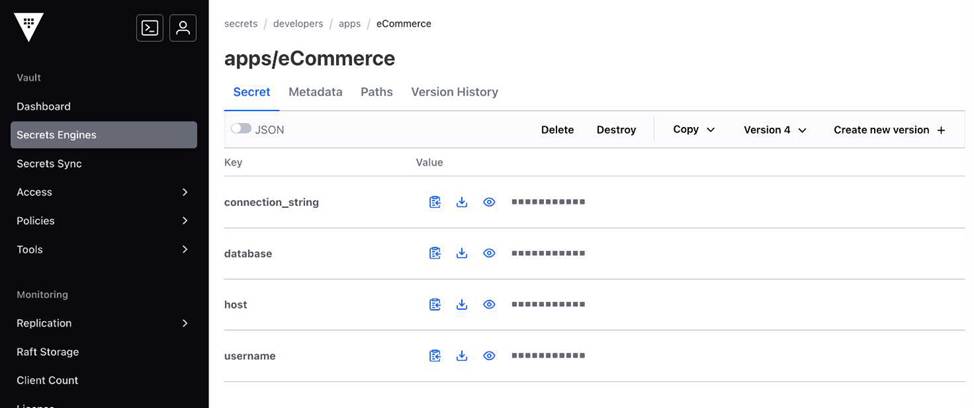
- A . The secrets are stored in a KV v1 secrets engine
- B . The user does not have permission to delete the secret
- C . The secrets are stored in a KV v2 secrets engine
- D . The secrets engine is mounted at the path developers/
- E . There are four previous versions of the secret
- F . The user has additional permissions on the path beyond just list and read
C, D, E, F
Explanation:
Comprehensive and Detailed In-Depth
Assuming the screenshot shows a KV secrets engine at developers/ with version 5 of a secret and options for delete/create:
C: KV v2 is indicated by versioning (version 5 and four previous versions). KV v1 doesn’t support versioning, per the KV v2 documentation.
D: The path developers/ is the mount point, as secrets are accessed under this path, consistent with Vault’s mount structure.
E: Four previous versions (v1Cv4) exist if v5 is current, a feature of KV v2’s versioning.
F: Delete and create options in the UI imply permissions beyond list and read, such as delete and create or update, per Vault’s UI behavior reflecting policy capabilities.
A: KV v1 lacks versioning, so this is incorrect.
B: The delete option’s presence suggests permission exists, though UI visibility isn’t a definitive policy check―still, it’s typically indicative.
Reference: KV Secrets Engine v2 Docs Vault UI Tutorial