
HashiCorp HCVA0-003 Practice Exams
Last updated on Oct 22,2026- Exam Code: HCVA0-003
- Exam Name: HashiCorp Certified: Vault Associate (003)Exam
- Certification Provider: HashiCorp
- Latest update: Oct 22,2026
Short-lived, dynamically generated secrets provide organizations with many benefits. Select the benefits from the options below. (Select four)
- A . Each application instance can generate its own credentials, rather than using a shared credential across all application instances
- B . Credentials only exist when needed
- C . Applications only have access to privileged accounts when needed
- D . Credentials accidentally checked into a code repo or discovered in a text file are likely to be invalid
- E . Dynamic credentials do not change, so legacy applications can easily take advantage of them
A, B, C, D
Explanation:
Comprehensive and Detailed In-Depth
Dynamic secrets in Vault are generated on-demand and have short lifespans, offering significant security and operational benefits:
Your organization operates active/active applications across multiple data centers for high availability.
Which Vault feature should be used in the secondary data centers to provide local access to secrets?
- A . Performance standby nodes
- B . Customized plugins for the Vault cluster
- C . Disaster recovery cluster
- D . Performance replication cluster
D
Explanation:
Comprehensive and Detailed In-Depth
For active/active setups:
D. Performance replication cluster: "Should be used in an active/active scenario to ensure applications in both data centers can easily access Vault secrets."
Incorrect Options:
A: Scales single cluster, not multi-DC. B, C: Not suited for local access.
Reference: https://developer.hashicorp.com/vault/docs/enterprise/replication#performance-replication-and-disaster-recovery-dr-replication
Security requirements demand that no secrets appear in the shell history.
Which command does not meet this requirement?
- A . generate-password | vault kv put secret/password value
- B . vault kv put secret/password value-itsasecret
- C . vault kv put secret/password [email protected]
- D . vault kv put secret/password value-SSECRET_VALUE
B
Explanation:
The command that does not meet the security requirement of not having secrets appear in the shell history is B. vault kv put secret/password value-itsasecret. This command would store the secret value “itsasecret” in the key/value secrets engine at the path secret/password, but it would also expose the secret value in the shell history, which could be accessed by other users or malicious actors. This is not a secure way of storing secrets in Vault.
The other commands are more secure ways of storing secrets in Vault without revealing them in the shell history.
You are considering using HCP Vault Dedicated but are concerned about differences between a hosted version and a self-hosted deployment.
Which of the following statements is true about HCP
Vault Dedicated?
- A . HCP Vault Dedicated provides a similar experience to self-hosted Vault Enterprise because it uses the same Vault binary
- B . HCP Vault Dedicated can be deployed on any cloud provider, including AWS, Azure, and Google Cloud, with full multi-cloud support
- C . HCP Vault Dedicated requires different CLI commands and APIs compared to self-hosted Vault Enterprise
- D . HCP Vault Dedicated is currently limited to a single region and cannot be deployed across multiple regions
A
Explanation:
Comprehensive and Detailed In-Depth
HCP Vault Dedicated is a managed Vault service provided by HashiCorp, designed to mirror the self-hosted Vault Enterprise experience while simplifying deployment:
A Fintech company is using Vault to store its static long-lived credentials so automated processes can quickly retrieve secrets. A user needs to add a new static secret for a new automated job.
What CLI commands can be used to store a new static credential? (Select two)
- A . vault kv put kv/training/certification/vault @secrets.txt
- B . vault kv write kv/training/certification/vault key=username value=bryan
- C . vault kv create kv/training/certification/vault @secrets.txt
- D . vault kv put -mount=secret creds passcode=my-long-passcode
A, D
Explanation:
Comprehensive and Detailed In-Depth
To store static credentials in Vault’s KV secrets engine via CLI, the vault kv put command is used.
A: vault kv put kv/training/certification/vault @secrets.txt writes data from a file (secrets.txt) to the path kv/training/certification/vault. The @ syntax reads key-value pairs from the file, a valid method per the KV docs.
D: vault kv put -mount=secret creds passcode=my-long-passcode specifies the mount (secret/) and stores passcode=my-long-passcode at secret/creds, a correct inline syntax.
B: vault kv write isn’t a valid command; put is the correct verb. The key=value syntax is right but needs put.
C: vault kv create isn’t a command; put is used to create or update secrets.
The KV CLI docs confirm vault kv put as the standard method, supporting both file input and inline key-value pairs.
Reference: KV Put Command
KV Secrets Engine Docs
True or False? The root and default policies can be deleted if they are not needed or being used.
- A . True
- B . False
B
Explanation:
Comprehensive and Detailed In-Depth
In HashiCorp Vault, the root and default policies are built-in and cannot be deleted:
B. False: "The default and root policy cannot be deleted. You don’t have to use them, but you can’t delete them." The root policy grants superuser privileges, while the default policy provides common permissions assigned to new tokens unless explicitly excluded (e.g., via vault token create -no-default-policy). Their permanence ensures baseline functionality and security. Incorrect Option:
By default, what TCP port does Vault replication use?
- A . tcp/8200
- B . tcp/8300
- C . tcp/8201
- D . tcp/8301
C
Explanation:
Comprehensive and Detailed in Depth
Vault replication ensures data consistency across clusters, using a specific port:
A: 8200 – Default HTTP API port, not replication.
B: 8300 – Raft protocol port, not replication.
C: 8201 – Default replication port. Correct.
D: 8301 – Serf protocol port, not replication. Overall Explanation from Vault Docs:
“Replication occurs on TCP port 8201 by default… distinct from the API (8200) and Raft (8300) ports.”
Reference: https://developer.hashicorp.com/vault/tutorials/day-one-raft/raft-reference-architecture#network-connectivity
Your organization runs workloads on both AWS and Azure for production applications. The security team has requested that a single Vault authentication mechanism be enabled to support applications on both public cloud platforms.
Which of the following would be a valid auth method you can use?
- A . AWS
- B . GitHub
- C . AppRole
- D . Azure
C
Explanation:
Comprehensive and Detailed In-Depth
AppRole is platform-agnostic. The Vault documentation states:
"Auth methods are commonly grouped into machine-based and human-based auth methods. In this case, AWS and Azure cannot be used since you can’t authenticate with a single auth method across both platforms. AppRole is a Vault authentication method that allows machines or applications to authenticate with Vault using a role-specific secret ID and role ID."
― Vault Auth Methods
C: Correct. Works across AWS and Azure:
"It is a flexible and secure method that can be used across different cloud platforms like AWS and
Azure."
― Vault Auth: AppRole
A, D: Platform-specific.
B: User-based, not cross-platform.
Reference: Vault Auth Methods Vault Auth: AppRole
True or False? The userpass auth method has the ability to access external services in order to provide authentication to Vault.
- A . True
- B . False
B
Explanation:
Comprehensive and Detailed in Depth
The statement is False. The HashiCorp Vault documentation clarifies: "The userpass auth method uses a local database that cannot interact with any services outside of the Vault instance." It relies solely on credentials stored within Vault, lacking the ability to integrate with external services for authentication, unlike methods like OIDC or LDAP. Thus, B (False) is the correct answer.
Reference: HashiCorp Vault Documentation – Userpass Auth Method
What does the following policy do?
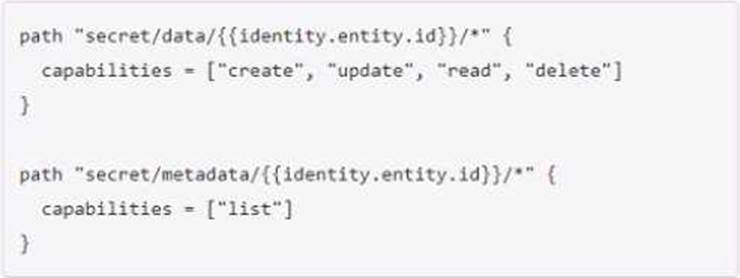
- A . Grants access for each user to a KV folder which shares their id
- B . Grants access to a special system entity folder
- C . Allows a user to read data about the secret endpoint identity
- D . Nothing, this is not a valid policy
C
Explanation:
This policy allows a user to read data about the secret endpoint identity. The policy grants the user the ability to create, update, read, and delete data in the “secret/data/{identity.entity.id}” path. Additionally, the user is allowed to list data in the “secret/metadata/{identity.entity.id}” path. This policy is useful for users who need to access information about the secret endpoint identity.
The secret endpoint identity is a feature of the Identity Secrets Engine, which allows Vault to generate identity tokens that can be used to access other Vault secrets engines or namespaces. The identity tokens are based on the entity and group information of the user or machine that authenticates with Vault. The entity is a unique identifier for the user or machine, and the group is a collection of entities that share some common attributes. The identity tokens can carry metadata and policies that are associated with the entity and group.
The “secret/data/{identity.entity.id}” path is where the user can store and retrieve data that is related to the secret endpoint identity. For example, the user can store some configuration or preferences for the secret endpoint identity in this path. The “secret/metadata/{identity.entity.id}” path is where the user can list the metadata of the data stored in the “secret/data/{identity.entity.id}” path. For example, the user can list the version, creation time, deletion time, and destroy time of the data in this path.
Reference: [Identity – Secrets Engines | Vault | HashiCorp Developer] [KV – Secrets Engines | Vault | HashiCorp Developer]