
HashiCorp HCVA0-003 Practice Exams
Last updated on Oct 22,2026- Exam Code: HCVA0-003
- Exam Name: HashiCorp Certified: Vault Associate (003)Exam
- Certification Provider: HashiCorp
- Latest update: Oct 22,2026
What is the proper command to enable the AWS secrets engine at the default path?
- A . vault enable aws secrets engine
- B . vault secrets enable aws
- C . vault secrets aws enable
- D . vault enable secrets aws
B
Explanation:
Comprehensive and Detailed in Depth
Enabling a secrets engine in Vault follows a specific syntax:
A: Incorrect syntax; jumbled order.
B: Correct: vault secrets enable <type> enables the AWS engine at aws/. Correct.
C: Incorrect word order.
D: Incorrect syntax.
Overall Explanation from Vault Docs:
“The command vault secrets enable <type> enables a secrets engine at its default path (e.g., aws/ for AWS).”
Reference: https://developer.hashicorp.com/vault/docs/commands/secrets
You have TBs of data encrypted by Vault stored in a database and are worried about Vault becoming unavailable and not being able to decrypt the data.
Is it possible to export the encryption key to store it somewhere else in the event Vault becomes unavailable?
- A . Yes, as long as the key was configured to be exportable when it was created
- B . No, you cannot export the encryption key from Vault
A
Explanation:
Comprehensive and Detailed In-Depth
Vault allows key export under specific conditions:
When creating a policy, an error was thrown:
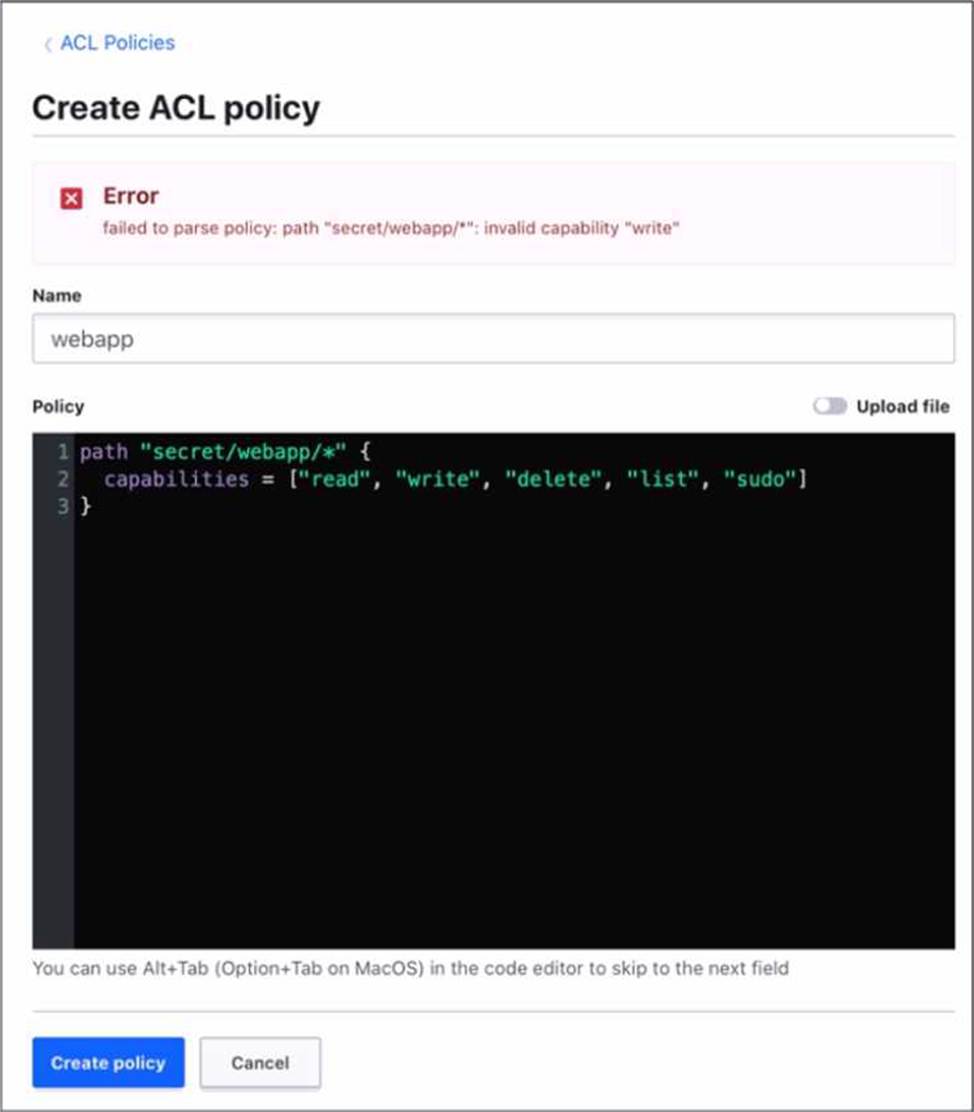
Which statement describes the fix for this issue?
- A . Replace write with create in the capabilities list
- B . You cannot have a wildcard (" • ") in the path
- C . sudo is not a capability
A
Explanation:
The error was thrown because the policy code contains an invalid capability, “write”. The valid capabilities for a policy are “create”, “read”, “update”, “delete”, “list”, and “sudo”. The “write” capability is not recognized by Vault and should be replaced with “create”, which allows creating new secrets or overwriting existing ones. The other statements are not correct, because the wildcard (*) and the sudo capability are both valid in a policy. The wildcard matches any number of characters within a path segment, and the sudo capability allows performing certain operations that require root privileges.
Reference: [Policy Syntax | Vault | HashiCorp Developer]
[Policy Syntax | Vault | HashiCorp Developer]
Examine the command below. Output has been trimmed.
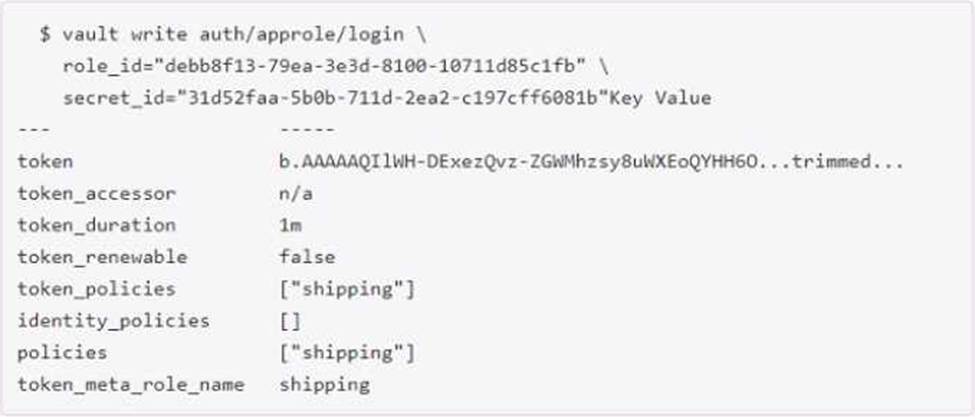
Which of the following statements describe the command and its output?
- A . Missing a default token policy
- B . Generated token’s TTL is 60 hours
- C . Generated token is an orphan token which can be renewed indefinitely
- D . Configures the AppRole auth method with user specified role ID and secret ID
BC
Explanation:
The command shown in the image is:
vault token create -policy=approle -orphan -period=60h
This command creates a new token with the following characteristics:
It has the policy “approle” attached to it, which grants or denies access to certain paths and operations in Vault according to the policy rules. The policy can be defined by using the vault policy write command or the sys/policy API endpoint12.
It is an orphan token, which means it has no parent token and it will not be revoked when its parent token is revoked. Orphan tokens can be useful for creating long-lived tokens that are not affected by the token hierarchy3.
It has a period of 60 hours, which means it has a renewable TTL of 60 hours. This means that the token can be renewed indefinitely as long as it does not go past the 60-hour mark from the last renewal time. The token’s TTL will be reset to 60 hours upon each renewal. Periodic tokens are useful for creating tokens that have a fixed lifetime and can be easily revoked4.
Reference: [1]1,
[2]2, 3(https://developer.hashicorp.com/vault/docs/secrets/kv), 4(https://developer.hashicorp.com/vault/docs/secrets/kv)
Which of the following statements describe the secrets engine in Vault? Choose three correct answers.
- A . Some secrets engines simply store and read data
- B . Once enabled, you cannot disable the secrets engine
- C . You can build your own custom secrets engine
- D . Each secrets engine is isolated to its path
- E . A secrets engine cannot be enabled at multiple paths
ACD
Explanation:
Secrets engines are components that store, generate, or encrypt data in Vault. They are enabled at a specific path in Vault and have their own API and configuration. Some of the statements that describe the secrets engines in Vault are:
Some secrets engines simply store and read data, such as the key/value secrets engine, which acts like an encrypted Redis or Memcached. Other secrets engines perform more complex operations, such as generating dynamic credentials, encrypting data, issuing certificates, etc1.
You can build your own custom secrets engine by using the plugin system, which allows you to write and run your own secrets engine as a separate process that communicates with Vault over gRPC. You can also use the SDK to create your own secrets engine in Go and compile it into Vault2.
Each secrets engine is isolated to its path, which means that the secrets engine cannot access or interact with other secrets engines or data outside its path. The path where the secrets engine is enabled can be customized and can have multiple segments. For example, you can enable the AWS secrets engine at aws/ or aws/prod/ or aws/dev/3.
The statements that are not true about the secrets engines in Vault are:
You can disable an existing secrets engine by using the vault secrets disable command or the sys/mounts API endpoint. When a secrets engine is disabled, all of its secrets are revoked and all of its data is deleted from the storage backend4.
A secrets engine can be enabled at multiple paths, with a few exceptions, such as the system and identity secrets engines. Each secrets engine enabled at a different path is independent and isolated from others. For example, you can enable the KV secrets engine at kv/ and secret/ and they will not share any data3.
Reference: 1(https://developer.hashicorp.com/vault/docs/secrets), 2(https://developer.hashicorp.co m/vault/docs/secrets), 3(https://developer.hashicorp.com/vault/docs/secrets), 4(https://developer. hashicorp.com/vault/docs/secrets)
Tanner manages a data processing application and needs to be sure the data being processed is encrypted so it is securely stored post-processing.
Which secrets engines can encrypt data? (Select three)
- A . transit
- B . KMIP
- C . SSH
- D . transform
A, B, D
Explanation:
Comprehensive and Detailed In-Depth
Vault offers secrets engines for encryption:
Which statement best explains how Vault handles data encryption?
- A . Vault uses encryption to secure data at rest and in transit, using an encryption key protected by the root key.
- B . Vault encrypts data using a root key stored in plain text on the server’s filesystem.
- C . Vault stores data in plaintext on disk but encrypts it only when transmitting it over the network.
- D . Vault offloads all encryption to third-party services, so no secret data is ever processed by Vault.
A
Explanation:
Comprehensive and Detailed in Depth
Vault’s encryption mechanism is a core security feature. The HashiCorp Vault documentation states: "When a Vault server is started, it starts in a sealed state. In this state, Vault is configured to know where and how to access the physical storage, but doesn’t know how to decrypt any of it. Unsealing is the process of obtaining the plaintext root key necessary to read the decryption key to decrypt the data, allowing access to the Vault." It further explains: "Vault uses encryption to secure data at rest and in transit, using an encryption key protected by the root key."
The documentation details: "The data stored by Vault is encrypted using an encryption key in the keyring. This keyring is itself encrypted by the root key, which is protected by the unseal process (e.g., Shamir’s Secret Sharing or auto-unseal). Vault ensures data is encrypted both at rest in the storage backend and in transit over the network using TLS."
Option B is false―the root key is never stored in plaintext.
Option C is incorrect―data is encrypted at rest, not just in transit.
Option D is wrong―Vault performs encryption internally, not via third-party services. Thus, A is correct.
Reference: HashiCorp Vault Documentation – Seal Concepts
An application is trying to use a dynamic secret in which the lease has expired.
What can be done in order for the application to successfully request data from Vault?
- A . Try the expired secret in hopes it hasn’t been deleted yet
- B . Perform a lease renewal
- C . Request a new secret and associated lease
- D . Request the TTL be extended for the secret lease
C
Explanation:
Comprehensive and Detailed in Depth
Once a dynamic secret’s lease expires, it cannot be renewed or reused; a new secret must be requested. The HashiCorp Vault documentation states: "A lease must be renewed before it has expired. Once it has expired, it is permanently revoked and a new secret must be requested." This means that after expiration, the secret is invalidated, and the application must obtain a new secret with a new lease to regain access.
Trying an expired secret (A) is futile as it’s revoked. Performing a lease renewal (B) is impossible post-expiration, as the docs note: "Renewal must occur before the lease expires." Extending the TTL (D) isn’t an option for an expired lease. Thus, C is the correct action.
Reference: HashiCorp Vault Documentation – Leases: Lease Renew and Revoke
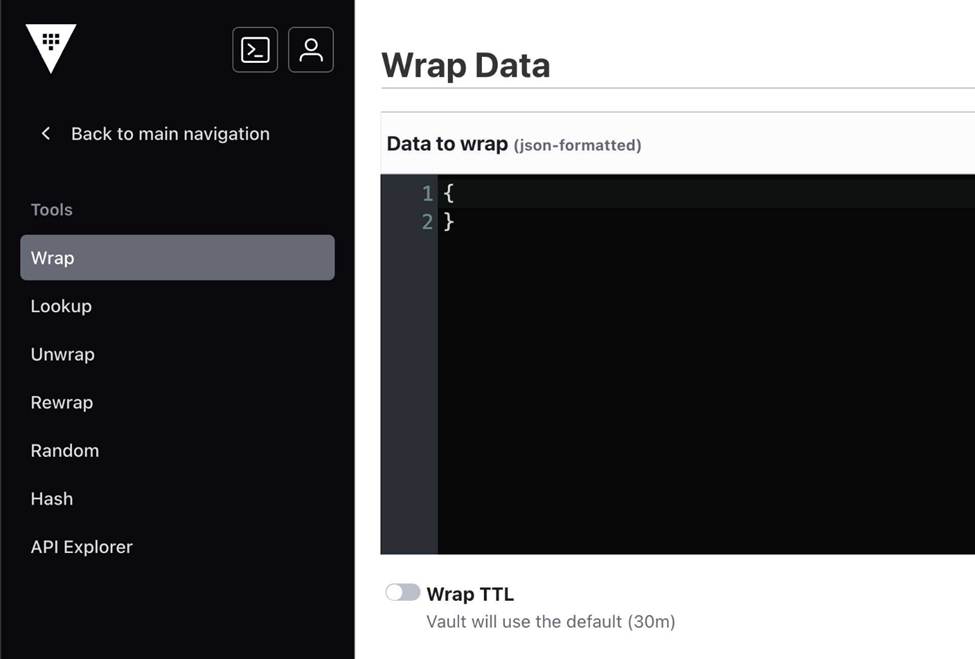
What could you do with the feature found in the screenshot below (select two)?
- A . Using a short TTL, you could encrypt data in order to place only the encrypted data in Vault
- B . Encrypt the Vault master key that is stored in memory
- C . Encrypt sensitive data to send to a colleague over email
- D . Use response-wrapping to protect data
C, D
Explanation:
Comprehensive and Detailed in Depth
The screenshot highlights Vault’s response wrapping feature, accessible via the UI’s “Wrap” option. This feature wraps a Vault response (e.g., a secret or token) in a single-use token with a configurable TTL, ensuring secure delivery to an intended recipient. Let’s evaluate each option against this capability:
Option A: Using a short TTL, you could encrypt data in order to place only the encrypted data in Vault This misinterprets response wrapping. Wrapping doesn’t encrypt data for storage in Vault; it secures a response for transmission outside Vault. Encryption for storage would involve the Transit secrets engine, not wrapping. The TTL in wrapping limits the wrapped token’s validity, not the data’s encryption lifecycle. This option conflates two unrelated features and is incorrect.
Vault Docs Insight: “Response wrapping does not store data in Vault; it delivers it securely to a recipient.” (No direct storage implication.)
Option B: Encrypt the Vault master key that is stored in memory
The master key in Vault is already encrypted at rest (in storage) and decrypted in memory during operation using the unseal process (e.g., Shamir shares or auto-unseal). Response wrapping doesn’t interact with the master key―it’s a client-facing feature for secret delivery, not an internal encryption mechanism. This is a fundamental misunderstanding of Vault’s architecture and wrapping’s purpose. Incorrect.
Vault Docs Insight: “The master key is managed by the seal mechanism, not client-facing features like wrapping.” (See seal/unseal docs.)
Option C: Encrypt sensitive data to send to a colleague over email
This aligns perfectly with response wrapping. You can retrieve a secret (e.g., vault read secret/data/my-secret), wrap it with a short TTL (e.g., 5 minutes), and receive a token (e.g., hvs.<token>). You email this token to a colleague, who unwraps it with vault unwrap <token> to access the secret. The data is encrypted within the token, secure during transit, and expires after the TTL. This is a textbook use case for wrapping. Correct.
Vault Docs Insight: “Response wrapping… can be used to securely send sensitive data to another party, such as over email, with a limited lifetime.” (Directly supported use case.) Option D: Use response-wrapping to protect data
This is the essence of the feature. Wrapping protects data by encapsulating it in a single-use token, accessible only via an unwrap operation. For example, vault write -wrap-ttl=60s secret/data/my-secret returns a wrapped token, protecting the secret until unwrapped. This ensures confidentiality and controlled access, making it a core benefit of the feature. Correct.
Vault Docs Insight: “Vault can wrap a response in a single-use token… protecting the data until unwrapped by the recipient.” (Core definition.) Detailed Mechanics:
Response wrapping works by taking a Vault API response (e.g., a secret’s JSON payload) and storing it in the cubbyhole secrets engine under a newly generated single-use token. The token’s TTL (e.g., 60s) limits its validity. The API call POST /v1/sys/wrapping/wrap with a payload (e.g., {"ttl": "60s",
"data": {"key": "value"}}) returns {"wrap_info": {"token": "hvs.<token>"}}. The recipient uses vault
unwrap hvs.<token> (or POST /v1/sys/wrapping/unwrap) to retrieve the original data. Once
unwrapped, the token is revoked, ensuring one-time use. This leverages Vault’s encryption and token
system for secure data exchange.
Real-World Example:
You generate an API key in Vault: vault write secret/data/api key=abc123. In the UI, you click “Wrap” with a 5-minute TTL, getting hvs.XYZ. You email hvs.XYZ to a colleague, who runs vault unwrap hvs.XYZ within 5 minutes to get key=abc123. After unwrapping, the token is invalid, and the secret is safe from interception.
Overall Explanation from Vault Docs:
“Vault includes a feature called response wrapping. When requested, Vault can take the response it would have sent to an HTTP client and instead insert it into the cubbyhole of a single-use token, returning that token instead… This is useful for securely delivering sensitive data.” The feature excels at protecting data in transit (e.g., email) and enforcing one-time access, not internal key management or storage encryption.
Reference: https://developer.hashicorp.com/vault/docs/concepts/response-wrapping
Additional
Reference: https://developer.hashicorp.com/vault/docs/secrets/cubbyhole
You have a new team member on the Vault operations team. Their first task is to rotate the encryption key in Vault as part of the organization’s security policy. However, when they log in, they get an access denied error when attempting to rotate the key. The policy being used is below.
Why can’t the user rotate the encryption key?
path "auth/*" {
capabilities = ["create", "read", "update", "delete", "list"]
}
path "sys/rotate" {
capabilities = ["read", "update"]
}
- A . The policy requires sudo privileges since it is a root-protected path
- B . The policy doesn’t include create privileges so a new encryption key can’t be created
- C . The policy should include sys/rotate/<name of key> as part of the path
- D . The encryption key has a minimum TTL, therefore the key cannot be rotated until that time expires
A
Explanation:
Comprehensive and Detailed In-Depth
Rotating the encryption key in Vault is done via the sys/rotate endpoint, a root-protected path requiring sudo capability in addition to update. The provided policy grants read and update on sys/rotate, but lacks sudo, resulting in an access denied error.
Option B (create) isn’t required for
rotation, per the API docs.
Option C is incorrect; sys/rotate is the fixed endpoint, not key-specific.
Option D (TTL) isn’t a Vault restriction for key rotation. The policies tutorial confirms sudo is needed for root-protected paths like this.
Reference: Root-Protected Endpoints
Sys/Rotate API