
HashiCorp HCVA0-003 Practice Exams
Last updated on Oct 22,2026- Exam Code: HCVA0-003
- Exam Name: HashiCorp Certified: Vault Associate (003)Exam
- Certification Provider: HashiCorp
- Latest update: Oct 22,2026
Which of the following statements are true regarding Vault seal and unseal (select three)?
- A . By default, Vault uses the Shamir Sharing algorithm to create unseal keys during the initialization process
- B . When using Vault Auto Unseal feature, Vault returns unseal keys to the user when it is initialized
- C . Vault can use a third-party KMS solution to automatically unseal during a service restart
- D . Vault supports high availability for the Auto Unseal feature, allowing you to point to multiple keys
A, C, D
Explanation:
Comprehensive and Detailed in Depth
A: Vault uses Shamir’s Secret Sharing by default for unseal keys. Correct.
B: Auto Unseal uses KMS or similar; it returns recovery keys, not unseal keys. Incorrect.
C: Third-party KMS (e.g., AWS KMS) can auto-unseal Vault. Correct.
D: Auto Unseal supports HA with multiple keys for redundancy. Correct.
Overall Explanation from Vault Docs:
“Vault uses Shamir’s algorithm by default… Auto Unseal with KMS supports HA and does not return unseal keys but recovery keys.”
Reference: https://developer.hashicorp.com/vault/docs/concepts/seal#seal-unseal
Which of the following are supported auth methods for Vault? (Select six)
- A . AWS
- B . Kubernetes
- C . Token
- D . OIDC/JWT
- E . Userpass
- F . Cubbyhole
- G . AppRole
A, B, C, D, E, G
Explanation:
Comprehensive and Detailed In-Depth
Supported auth methods:
A, B, C, D, E, G: "All of the options are valid auth methods except for Cubbyhole." Detailed in Vault docs.
Incorrect Option:
F: "Cubbyhole is a secrets engine."
Reference: https://developer.hashicorp.com/vault/docs/auth
You have a long-running app that cannot handle a regeneration of a token or secret.
What type of token should be created for this application in order to authenticate and interact with Vault?
- A . Service Token with Use Limit
- B . Periodic Service Token
- C . Batch Token
- D . Orphan Token
B
Explanation:
Comprehensive and Detailed in Depth
For a long-running application that cannot handle token or secret regeneration, the Periodic Service Token is the most suitable choice. According to HashiCorp Vault documentation, periodic service tokens are renewable tokens that do not have a maximum Time-to-Live (TTL), meaning they can be renewed indefinitely by the client without requiring manual intervention or regeneration. This is ideal for applications needing continuous access to Vault over an extended period. The documentation states: "Periodic tokens have a TTL, but no max TTL. Periodic tokens may live for an infinite amount of time, so long as they are renewed within their TTL." This feature ensures uninterrupted operation for long-running processes, aligning perfectly with the scenario described. In contrast, a Service Token with Use Limit has a finite number of uses before expiration, making it unsuitable for continuous access without regeneration. A Batch Token is designed for short-lived, one-time operations or batch processes, not persistent access, as it lacks renewability and has a fixed TTL. An Orphan Token, while not tied to a parent token, does not inherently address the regeneration issue and is less secure for long-term use due to its lack of association with policies or identity. Thus, the periodic service token stands out as the best fit.
Reference: HashiCorp Vault Documentation – Tokens: Periodic Tokens
What is the correct order that Vault uses to protect data?
- A . root key –> encryption key –> data
- B . unseal keys –> root key –> data
- C . root key –> data
- D . encryption key –> root key –> data
A
Explanation:
Comprehensive and Detailed in Depth
Vault protects data using a layered encryption process: root key –> encryption key –> data. The HashiCorp Vault documentation explains: "The data stored by Vault is encrypted. Vault needs the encryption key to decrypt it. The key is also stored with the data (in the keyring), but it is encrypted with another key known as the root key. Therefore, to decrypt the data, Vault must decrypt the encryption key, which requires the root key." This sequence ensures data security through multiple encryption layers.
The docs further clarify: "Unsealing is the process of accessing this root key. The root key is stored alongside all Vault data but is encrypted by yet another mechanism: the unseal key. To recap: most Vault data is encrypted using the encryption key in the keyring; the keyring is encrypted by the root key; and the root key is encrypted by the unseal key." Option B includes unseal keys but omits the encryption key’s role. C and D misrepresent the order. Thus, A is correct.
Reference: HashiCorp Vault Documentation – Seal Concepts
Given the following screenshot, how many secrets engines have been enabled by a Vault user?
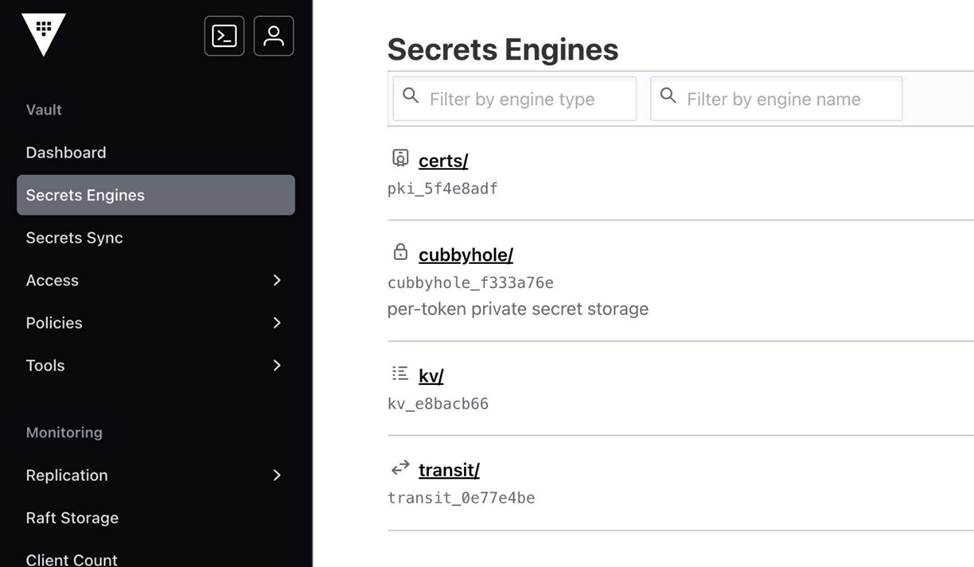
- A . 2
- B . 3
- C . 4
- D . 5
B
Explanation:
Comprehensive and Detailed in Depth
cubbyhole is default; kv and transit are user-enabled. Total: 3.
Overall Explanation from Vault Docs:
“cubbyhole is enabled by default… User-enabled engines add to this.”
Reference: https://developer.hashicorp.com/vault/docs/secrets/cubbyhole
Your team uses the Transit secrets engine to encrypt all data before writing it to a MySQL database server. During testing, you manually retrieve ciphertext from the database and decrypt it to ensure the data can be read. After decrypting the data, you are worried something is wrong because the plaintext data isn’t legible.
Why can you not read the original plaintext data after decrypting the ciphertext?
$ vault write transit/decrypt/krausen-key ciphertext=vault:v1:8SDd3WHDOjf7mq69C…..
Key Value
— —–
plaintext Zml2ZSBzdGFyIHByYWN0aWNlIGV4YW1zIGJ5IGJyeWFuIGtyYXVzZW4=
- A . The incorrect key was selected when decrypting the ciphertext. Use the correct key to successfully read the data
- B . The incorrect key version was used to decrypt the data. Update the ciphertext and change the v1 to v3 to use the latest key version
- C . The plaintext is Base64 encoded. Decode the plaintext to see the original data
- D . The data was also encrypted on the database. Therefore Vault cannot decrypt the original data
C
Explanation:
Comprehensive and Detailed In-Depth
When using the Transit secrets engine, Vault encrypts data and returns ciphertext (e.g., vault:v1:<ciphertext>). Upon decryption (e.g., vault write transit/decrypt/<key_name> ciphertext=<value>), Vault returns the plaintext as a Base64-encoded string. This is because the Transit engine supports arbitrary data, including binary files (e.g., PDFs, images), and Base64 encoding ensures safe transport within JSON payloads. If the decrypted output (e.g., Zml2ZSBzdGFyIHByYWN0aWNlIGV4YW1zIGJ5IGJyeWFuIGtyYXVzZW4=) isn’t legible, it’s not an error―it’s Base64 encoded. Decoding it (e.g., using a Base64 decoder) reveals the original plaintext (e.g., "five star practice exams by bryan krausen").
Option A (incorrect key) would cause a decryption failure, not illegible plaintext.
Option B (incorrect
key version) is irrelevant, as Vault automatically uses the correct version based on the ciphertext’s vault:v# prefix, and changing it manually wouldn’t produce Base64 output.
Option D (database
encryption) isn’t indicated in the scenario and would also cause a failure, not Base64 output. The Transit documentation explicitly states that plaintext is returned Base64-encoded, requiring the user to decode it.
Reference: Transit Secrets Engine Docs
Transit Usage Section
Mike’s Cereal Shack uses Vault to encrypt customer data to ensure it is always stored securely.
They are developing a new application integration to send new customer data to be encrypted using the following API request:
text
CollapseWrapCopy
$ curl
–header "X-Vault-Token: hvs.sf4vj1rFV5PvQSV3M9dcv832brxQFsfbXA" –request POST
–data @data.json
https://vault.mcshack.com:8200/v1/transit/encrypt/customer-data
What would be contained within the data.json file?
- A . Transit secrets engine configuration file
- B . Ciphertext to be decrypted
- C . The encryption key to be used for encrypting the data
- D . Cleartext customer data to be encrypted
D
Explanation:
Comprehensive and Detailed in Depth
The data.json file in this API request contains the data to be encrypted by the Transit secrets engine. The HashiCorp Vault documentation states: "When executing any call to the Vault API, data can be sent using an external file as shown above. In this case, the contents of the file would be cleartext customer data that needs to be encrypted by the transit secrets engine." Specifically, for the /transit/encrypt/ endpoint, it explains: "The API expects a JSON payload with a plaintext field containing the base64-encoded data to encrypt."
The documentation elaborates under "Encrypt Data": "The request body must include the plaintext parameter, which is the base64-encoded version of the data you want to encrypt. For example: {"plaintext": "base64-encoded-data"}." Here, D (Cleartext customer data to be encrypted) fits this requirement―customer data in cleartext, base64-encoded, sent for encryption. A (Transit config) is managed in Vault, not sent. B (Ciphertext) is the output, not input. C (Encryption key) is stored in Vault, not provided by the client. Thus, D is correct.
Reference: HashiCorp Vault Documentation – Transit API: Encrypt Data
True or False? Although AppRole is designed for machines, humans can use it to authenticate to Vault if you wish.
- A . True
- B . False
A
Explanation:
Comprehensive and Detailed In-Depth
AppRole’s flexibility allows human use:
To secure your applications, your organization uses certificates generated by a public CA. However, this strategy has proven expensive and you have to revoke certificates even though they have additional time left.
What Vault plugin can be used to quickly generate X.509 certificates to secure your internal applications?
- A . Identity secrets engine
- B . PKI secrets engine
- C . SSH secrets engine
- D . Transit secrets engine
B
Explanation:
Comprehensive and Detailed In-Depth
The PKI secrets engine in Vault generates dynamic X.509 certificates, acting as a certificate authority (CA) or intermediate CA. It allows quick, cost-effective certificate creation for internal applications, with configurable TTLs and revocation capabilities, avoiding reliance on expensive public CAs. For example, vault write pki/issue/<role> generates a certificate instantly. The Identity engine (A) manages identities, not certificates. The SSH engine (C) handles SSH credentials, not X.509. The Transit engine (D) is for encryption, not certificate generation. The PKI docs highlight its suitability for this use case.
Reference: PKI Secrets Engine Docs
PKI Tutorial
You are using the Vault API to test authentication before modifying your CI/CD pipeline to properly authenticate to Vault. You manually authenticate to Vault and receive the response below.
Based on the provided options, which of the following are true? (Select four)
$ curl
–request POST
–data @payload.json
https://vault.krausen.com:8200/v1/auth/userpass/login/bryan.krausen | jq
*******************************************************************************
******* RESPONSE BELOW ********************************************************
*******************************************************************************
{
"request_id": "f758e8da-11b6-8341-d404-56f0c370a7fa",
"lease_id": "",
"renewable": false,
"lease_duration": 0,
"data": null,
"wrap_info": null,
"warnings": null,
"auth": {
"client_token": "hvs.CbzCNJCVWt63jyzyaJakgDwz",
"accessor": "rffwXzKFcxvaQi6Vgo8tY4Lt",
"policies": [
"training",
"default"
],
"token_policies": [
"training",
"default"
],
"metadata": {
"username": "bryan.krausen"
},
"lease_duration": 84600,
"renewable": true,
"entity_id": "f1795f6a-c576-d619-b2d5-74c0aee08edb",
"token_type": "service",
"orphan": true
}
}
- A . The token required to retrieve a secret is hvs.CbzCNJCVWt63jyzyaJakgDwz
- B . The returned token is a batch token
- C . The user needs to retrieve .auth.client_token in order to perform other actions
- D . The accessor will be used to authenticate to Vault to retrieve secrets
- E . The user is using the userpass auth method
- F . The user’s password is stored in a file named payload.json
A, C, E, F
Explanation:
Comprehensive and Detailed In-Depth
The API response provides authentication details. The Vault documentation states:
"When executing an authentication request to Vault, you will need to provide the credentials that will be used for authentication. Once successfully authenticated, Vault will return a bunch of information. The primary value that you need to retrieve from this response is the client_token, which can be queried from a JSON parsing tool (such as jq) by grabbing the value of .auth.client_token."
― Vault API Docs
A, C, E, F: Correct per the response and endpoint (/auth/userpass).
B: Incorrect; token_type is service, not batch:
"The returned token is a service token used for interacting with Vault’s API on behalf of the authenticated user."
― Vault Concepts: Tokens
D: Incorrect; accessors don’t authenticate:
"The accessor value provided in the response is not typically used for direct authentication to Vault to retrieve secrets."
― Vault Concepts: Tokens
Reference: Vault API Docs Vault Auth: Userpass