
HashiCorp HCVA0-003 Practice Exams
Last updated on Oct 22,2026- Exam Code: HCVA0-003
- Exam Name: HashiCorp Certified: Vault Associate (003)Exam
- Certification Provider: HashiCorp
- Latest update: Oct 22,2026
True or False? The command vault lease revoke -prefix aws/ will revoke all leases associated with the secret engine mounted at /aws.
- A . True
- B . False
A
Explanation:
Comprehensive and Detailed in Depth
The statement is True. The vault lease revoke -prefix aws/ command revokes all leases under the specified prefix. The HashiCorp Vault documentation states: "The vault lease revoke command is used to revoke leases. Using the -prefix flag allows you to revoke entire trees of secrets." When applied to aws/, it targets all leases associated with the secrets engine mounted at that path.
The docs further explain under "Prefix-Based Revocation": "The -prefix option allows revocation of all
leases that share a common prefix, effectively cleaning up all secrets under a mount point or path."
Thus, A (True) is correct.
Reference: HashiCorp Vault Documentation – Leases: Prefix-Based Revocation
Which of the following secrets engines does NOT issue a lease upon a read request?
- A . KV
- B . Consul
- C . Database
- D . AWS
A
Explanation:
Comprehensive and Detailed in Depth
Leases tie to dynamic secrets with TTLs. Let’s check:
A: KV – Static secrets, no lease on read. Correct.
B: Consul – Dynamic creds with leases. Incorrect.
C: Database – Dynamic creds with leases. Incorrect.
D: AWS – Dynamic creds with leases. Incorrect. Overall Explanation from Vault Docs:
“The Key/Value Backend… does not issue leases although it may return a lease duration.”
Reference: https://developer.hashicorp.com/vault/docs/concepts/lease#lease-renew-and-revoke
You have multiple Kubernetes pods that need frequent access to Vault to retrieve credentials for establishing connectivity to a backend database. You enable the Kubernetes auth method in Vault.
What resource do you need to create within Kubernetes to complete this configuration?
- A . Username and password for kubectl
- B . k8s service account token
- C . A Vault token for authentication
- D . An AppRole role_id and secret_id
B
Explanation:
Comprehensive and Detailed In-Depth
Kubernetes auth requires:
B. k8s service account token: "The kubernetes auth method can be used to authenticate with Vault
using a Kubernetes Service Account Token."
Incorrect Options:
A, C, D: Not specific to Kubernetes auth.
Reference: https://developer.hashicorp.com/vault/docs/auth/kubernetes
A Jenkins server is using the following token to access Vault.
Based on the lookup shown below, what type of token is this?
$ vault token lookup hvs.FGP1A77Hxa1Sp6Pkp1yURcZB
Key Value
— —–
- A . Periodic token
- B . Batch token
- C . Orphaned token
- D . Secondary token
A
Explanation:
Comprehensive and Detailed in Depth
A: period indicates a renewable periodic token. Correct. Overall Explanation from Vault Docs:
“A periodic token has a period… renewable without a max TTL.”
Reference: https://developer.hashicorp.com/vault/docs/concepts/tokens#token-time-to-live-periodic-tokens-and-explicit-max-ttls
Your supervisor has requested that you log into Vault and update a policy for one of the development teams. You successfully authenticated to Vault via OIDC but do not see a way to manage the Vault policies.
Why are you unable to manage policies in the Vault UI?
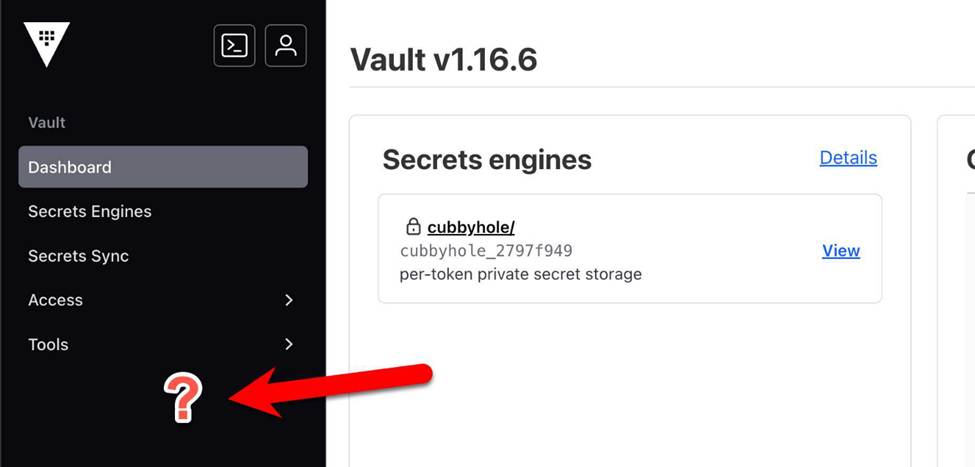
- A . Policies are only available on Vault Enterprise
- B . The Vault node is sealed, and therefore you cannot manage policies
- C . Policies cannot be managed in the UI, only the CLI and API
- D . The policy associated with your login does not permit access to manage policies
D
Explanation:
Comprehensive and Detailed In-Depth
In the Vault UI, the “Policies” tab is visible only if your token’s policy grants access to policy management endpoints (e.g., sys/policy in Vault OSS or sys/policies/acl in Enterprise). If the tab is missing after OIDC authentication, it’s because your policy lacks permissions like read and list on these paths, preventing UI navigation to policy management. For example, a minimal policy to view policies in OSS is path "sys/policy/*" { capabilities = ["read", "list"] }. Without this, the UI hides the tab, aligning with Vault’s least-privilege model.
Option A is false; policies exist in both OSS and Enterprise, with UI support in both.
Option B is
incorrect; a sealed Vault prevents login entirely, not just policy access.
Option C is wrong; the UI does
support policy management when permitted. Vault’s policy docs confirm that UI visibility depends
on policy permissions.
Reference: Policy Management OSS
Policy Management Enterprise
How does the Vault Secrets Operator (VSO) assist in integrating Kubernetes-based workloads with Vault?
- A . By enabling a local API endpoint to allow the workload to make requests directly from the VSO
- B . By using client-side caching for KVv1 and KVv2 secrets engines
- C . By injecting a Vault Agent directly into the pod requesting secrets from Vault
- D . By watching for changes to its supported set of Custom Resource Definitions (CRD)
D
Explanation:
Comprehensive and Detailed in Depth
The Vault Secrets Operator (VSO) integrates Kubernetes workloads with Vault by syncing secrets.
Let’s evaluate:
A: VSO doesn’t create a local API endpoint for direct requests; it syncs secrets to Kubernetes Secrets. Incorrect.
B: Client-side caching is a Vault Agent feature, not VSO’s primary function. VSO can use caching, but it’s not the main integration method. Incorrect.
C: VSO doesn’t inject Vault Agents; that’s a separate Vault Agent Sidecar approach. Incorrect.
D: VSO watches Custom Resource Definitions (CRDs) to sync Vault secrets to Kubernetes Secrets dynamically. This is its core mechanism. Correct.
Overall Explanation from Vault Docs:
“VSO operates by watching for changes to its supported set of CRDs… It synchronizes secrets from Vault to Kubernetes Secrets, ensuring applications access them natively.”
Reference: https://developer.hashicorp.com/vault/docs/platform/k8s/vso
After a client has authenticated to Vault, what security feature is used to make all subsequent calls?
- A . ldap
- B . pgp
- C . path
- D . key shard
- E . listener
- F . token
F
Explanation:
Comprehensive and Detailed in Depth
After authentication, Vault uses tokens for all subsequent calls. The HashiCorp Vault documentation states: "After authenticating, a client is issued a service token which is associated with a policy. That token is used to make all subsequent requests to Vault." Tokens serve as the primary security feature for authorizing and authenticating requests.
The docs elaborate: "Tokens are the core method for authentication within Vault. Once authenticated, the client uses this token to access secrets and perform operations according to the attached policies." Other options like ldap, pgp, path, key shard, and listener are unrelated to this role. Thus, F is correct.
Reference: HashiCorp Vault Documentation – Authentication Concepts
You are deploying Vault in a local data center, but want to be sure you have a secondary Vault cluster in the event the primary cluster goes offline. In the secondary data center, you have applications that are running, as they are architected to run active/active.
Which type of replication would be best in this scenario?
- A . Disaster Recovery replication
- B . Performance replication
B
Explanation:
Comprehensive and Detailed in Depth
Vault supports two replication types: Performance Replication and Disaster Recovery (DR) Replication, each serving distinct purposes. The scenario involves an on-premises primary cluster and a secondary cluster in another data center, with active/active applications needing Vault access. Let’s analyze:
Option A: Disaster Recovery replication
DR replication mirrors the primary cluster’s state (secrets, tokens, leases) to a secondary cluster, which remains in standby mode until activated (promoted) during a failover. It’s designed for disaster scenarios where the primary is lost, not for active/active use. The secondary doesn’t serve reads or writes until promoted, which doesn’t suit applications actively running in the secondary data center. Incorrect.
Option B: Performance replication
Performance replication creates an active secondary cluster that replicates data from the primary in near real-time. It supports read operations locally, reducing latency for applications in the secondary data center, and can handle writes (forwarded to the primary). This fits an active/active architecture, providing redundancy and performance. If the primary fails, the secondary can continue serving reads (though writes need reconfiguring). Correct.
Detailed Mechanics:
Performance replication uses a primary-secondary model with log shipping via Write-Ahead Logs (WALs). The secondary maintains its own storage, synced from the primary, and can serve reads independently. Writes are forwarded to the primary, ensuring consistency. In an active/active setup, applications in both data centers can query their local Vault cluster, leveraging the secondary’s read capability. DR replication, conversely, keeps the secondary dormant, requiring manual promotion, which introduces downtime unsuitable for active apps. Real-World Example:
Primary cluster at dc1.vault.local:8200, secondary at dc2.vault.local:8200. Apps in DC2 query the secondary for secrets (e.g., GET /v1/secret/data/my-secret), avoiding cross-DC latency. If DC1 fails, DC2 continues serving cached reads until a new primary is established. Overall Explanation from Vault Docs:
“Performance replication… allows secondary clusters to serve reads locally, ideal for active/active setups… DR replication is for failover, keeping secondaries in standby.”
Reference: https://developer.hashicorp.com/vault/docs/enterprise/replication
What environment variable overrides the CLI’s default Vault server address?
- A . VAULT_ADDR
- B . VAULT_HTTP_ADORESS
- C . VAULT_ADDRESS
- D . VAULT _HTTPS_ ADDRESS
B
Explanation:
The environment variable VAULT_ADDR overrides the CLI’s default Vault server address. The VAULT_ADDR environment variable specifies the address of the Vault server that is used to communicate with Vault from other applications or processes. By setting this variable, you can avoid hard-coding the Vault server address in your code or configuration files, and you can also use different addresses for different environments or scenarios. For example, you can use a local development server for testing purposes, and a production server for deploying your application.
Reference: Commands (CLI) | Vault | HashiCorp Developer, Vault Agent – secrets as environment variables | Vault | HashiCorp Developer
What is the default TTL for tokens in Vault if one is not specified?
- A . 24 hours (1 day)
- B . 15 minutes
- C . 768 hours (32 days)
- D . 60 minutes (1 hour)
C
Explanation:
Comprehensive and Detailed In-Depth
In HashiCorp Vault, the default TTL (Time To Live) for tokens, when not explicitly specified, is 768 hours, equivalent to 32 days. This applies to both the initial TTL and the maximum TTL unless overridden.
Default Configuration: The documentation states: "When no specific TTL is provided, a generated token will inherit the default TTL which is 768 hours (32 days)." This long default ensures usability in many scenarios while allowing customization.
Customization Option: Operators can adjust this using commands like vault write
sys/mounts/auth/token/tune default_lease_ttl=1h max_lease_ttl=24h, but without such tuning, 768 hours applies.
Incorrect Options: