
HashiCorp HCVA0-003 Practice Exams
Last updated on Oct 22,2026- Exam Code: HCVA0-003
- Exam Name: HashiCorp Certified: Vault Associate (003)Exam
- Certification Provider: HashiCorp
- Latest update: Oct 22,2026
Without logging into another interface, what feature can Chad use to execute a simple CLI command to enable a new secrets engine?
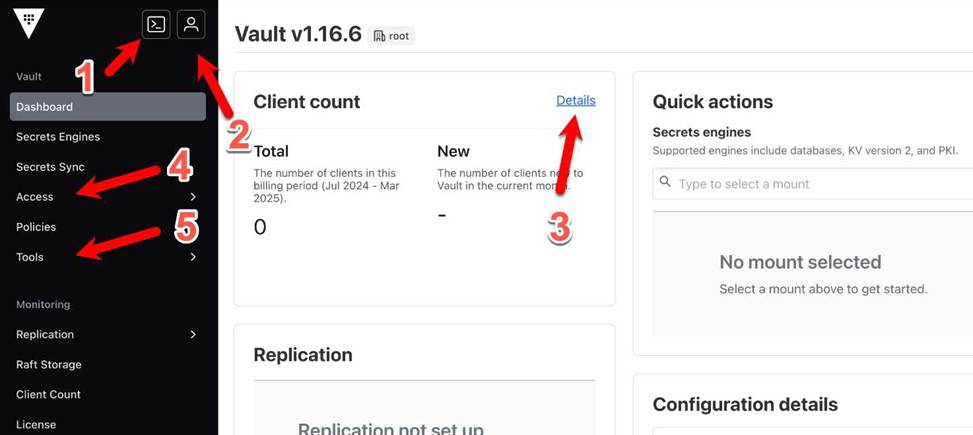
- A . CLI emulation in the Vault UI (Feature 1)
- B . User information button (Feature 2)
- C . Client count details (Feature 3)
- D . Access management link (Feature 4)
A
Explanation:
Comprehensive and Detailed in Depth
The Vault UI includes a feature allowing CLI commands to be executed directly within the interface, known as the CLI emulation or REPL (Read-Eval-Print Loop) terminal. The HashiCorp Vault documentation states: "The Vault GUI includes an advanced mode that uses a readCevalCprint loop (REPL) terminal to mimic basic create/read/update/delete/list (CRUDL) commands for users who are more familiar with the Vault CLI than the GUI." This feature enables Chad to run a command like vault secrets enable <engine> without switching to a separate CLI, fulfilling the requirement.
The documentation under "Explore the Vault UI" adds: "This terminal allows users to execute Vault CLI commands directly from the web interface, enhancing usability for those accustomed to CLI workflows." Options like user information (B), client count details (C), and access management (D) do not provide CLI execution capabilities. Thus, A is correct.
Reference: HashiCorp Vault Documentation – Getting Started UI: Explore the Vault UI
HOTSPOT
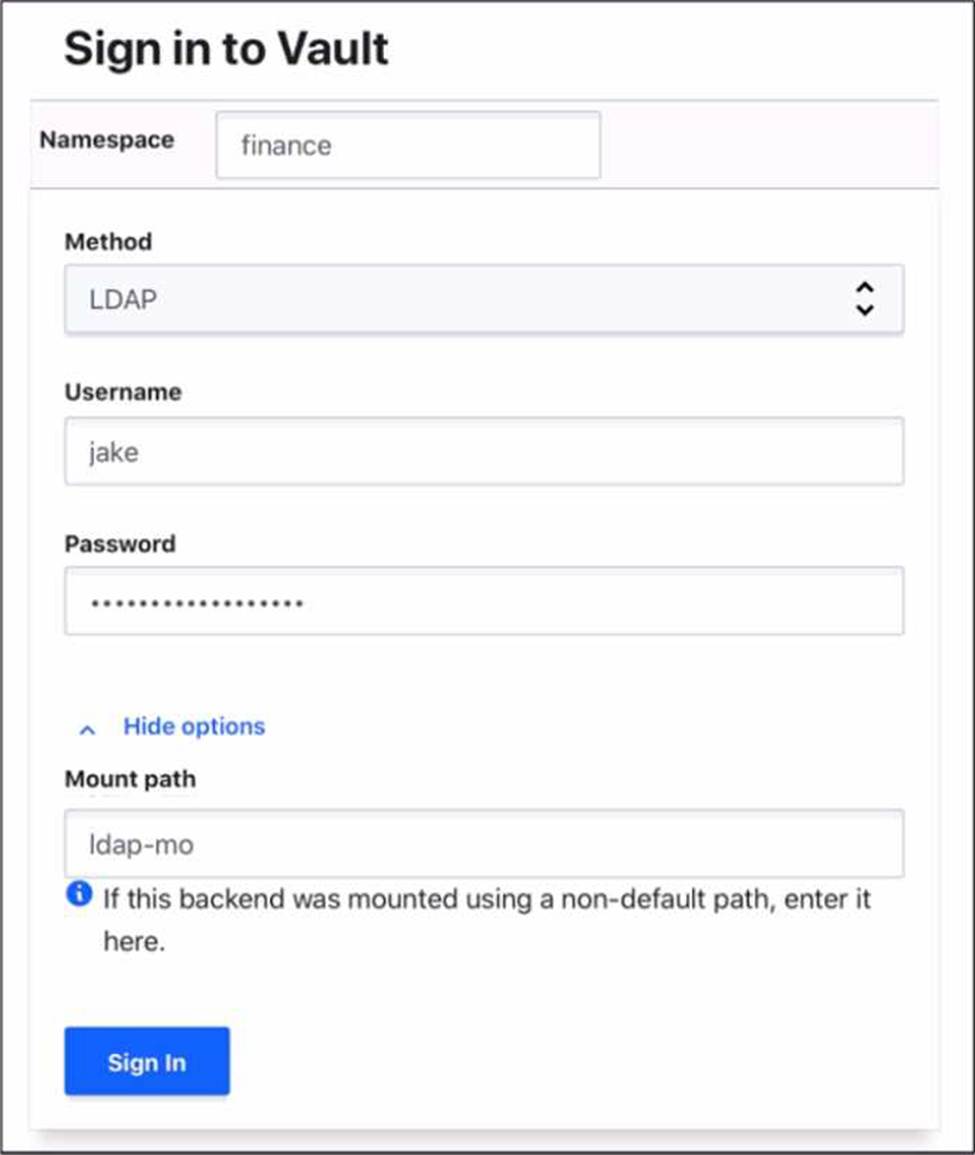
Where do you define the Namespace to log into using the Vault Ul?
To answer this question
Use your mouse to click on the screenshot in the location described above. An arrow indicator will mark where you have clicked. Click the "Answer" button once you have positioned the arrow to answer the question. You may need to scroll down to see the entire screenshot.
Reference: Transit – Secrets Engines | Vault | HashiCorp Developer, Encryption as a service: transit secrets engine | Vault | HashiCorp Developer
Which statement best describes the process of sealing a Vault instance?
- A . Disable the TLS certificates on the Vault server by running vault secrets disable pki, blocking all requests.
- B . Run vault operator rotate to rotate the Vault tokens for all clients, causing them to reauthenticate with the Vault.
- C . Run the vault operator seal command, which securely discards the master key from memory and prevents further operations until unsealed.
- D . Revoke all leases so no secrets can be accessed using vault lease revoke, but keep the master key in memory for quick recovery.
C
Explanation:
Comprehensive and Detailed in Depth
Sealing a Vault instance is a critical security operation that involves locking down the system to prevent access until it is explicitly unsealed. The HashiCorp Vault documentation states: "Sealing a Vault will throw away the root key in memory and require another unseal process to restore it." This is achieved by running the vault operator seal command, which "securely discards the master key from memory and prevents further operations until unsealed." This action ensures that no data can be accessed without the unseal process, making it the correct description of sealing.
Disabling TLS certificates via vault secrets disable pki affects the PKI secrets engine, not the sealing process. Running vault operator rotate rotates encryption keys, not seals the Vault. Revoking leases with vault lease revoke terminates secret access but keeps the master key in memory, unlike sealing, which discards it. Thus, only option C accurately reflects the sealing process.
Reference: HashiCorp Vault Documentation – Seal and Unseal
HashiCorp Vault Documentation – Vault Operator Seal Command
Vault enables the generation of dynamic credentials against many different platforms.
When generating these credentials, what Vault feature is used to track the credentials?
- A . namespace
- B . role
- C . token
- D . lease_id
D
Explanation:
Comprehensive and Detailed In-Depth
Dynamic credentials are tracked via leases. The Vault documentation states:
"With every dynamic secret and service type authentication token, Vault creates a lease. A lease is metadata containing information such as time duration, renewability, and more. Vault promises that the data will be valid for the given period, or Time To Live (TTL). The lease_id is a unique identifier assigned to each dynamically generated credential by Vault."
― Vault Concepts: Leases
D: Correct. lease_id tracks credential lifecycle:
"It is used to track the lifecycle of the credential, including its creation, renewal, and revocation."
― Vault Concepts: Leases
A: Namespaces organize, not track.
B: Roles define generation, not tracking.
C: Tokens authenticate, not track credentials.
Reference: Vault Concepts: Leases
According to the screenshot below, what auth method did this client use to log in to Vault? (Screenshot shows a lease path: auth/userpass/login/student01)
- A . Userpass
- B . Auth
- C . Root token
- D . Child token
A
Explanation:
Comprehensive and Detailed in Depth
The screenshot provides a lease path: auth/userpass/login/student01, which reveals the authentication method used to generate the token tied to this lease. Vault’s auth methods create tokens at specific paths, and the path structure indicates the method.
Option A: Userpass
The path auth/userpass/login/student01 explicitly includes userpass, matching the userpass auth method. This method authenticates users with a username (e.g., student01) and password, typically via vault login -method=userpass username=student01. The /login endpoint confirms a login operation, and the lease ties to the resulting token. This is the clear, correct answer based on the path. Correct.
Vault Docs Insight: “The userpass auth method allows users to authenticate with a username and password… mounted at auth/userpass by default.” (Matches the path.) Option B: Auth
“Auth” isn’t an auth method―it’s the namespace prefix (auth/) for all auth methods in Vault (e.g., auth/token, auth/userpass). The screenshot specifies userpass within auth/, not a generic “auth” method. This option is a misnomer and incorrect.
Vault Docs Insight: “All auth methods are mounted under auth/… ‘auth’ itself is not a method.”
(Clarifies structure.)
Option C: Root token
A root token is a privileged token type, not an auth method. It’s created during Vault initialization or via auth/token/create with root privileges, not through a login path like auth/userpass/login. The screenshot’s path indicates a userpass login, not a root token usage. Incorrect.
Vault Docs Insight: “Root tokens are created at initialization… not tied to a specific auth method login
path.” (Distinct from userpass.)
Option D: Child token
A child token is a token created by a parent token (e.g., via vault token create), not an auth method.
The path auth/userpass/login/student01 shows a login event, not a token creation event (which
would be auth/token/create). This option confuses token hierarchy with authentication. Incorrect.
Vault Docs Insight: “Child tokens are created by parent tokens… not directly via login endpoints.”
(Different mechanism.)
Detailed Mechanics:
When a user logs in with vault login -method=userpass -path=userpass username=student01, Vault hits the endpoint POST /v1/auth/userpass/login/student01 with a password payload. Success generates a token, and a lease is created at auth/userpass/login/student01 with a TTL. The screenshot’s lease path directly reflects this process, pinpointing userpass as the method. Real-World Example:
Enable userpass: vault auth enable userpass. Add user: vault write auth/userpass/users/student01
password=secret. Login: vault login -method=userpass username=student01. The token’s lease
appears as auth/userpass/login/student01.
Overall Explanation from Vault Docs:
“The lease shown lives at auth/userpass/login/<username> and indicates the userpass auth method was used to obtain a token… The userpass method authenticates via username/password at its mount path.” The path structure is a definitive indicator.
Reference: https://developer.hashicorp.com/vault/docs/auth/userpass
After decrypting data using the Transit secrets engine, the plaintext output does not match the plaintext credit card number that you encrypted.
Which of the following answers provides a solution?
$ vault write transit/decrypt/creditcard ciphertext="vault:v1:cZNHVx+sxdMEr……."
Key: plaintext Value: Y3JlZGl0LWNhcmQtbnVtYmVyCg==
- A . Vault is sealed, therefore the data cannot be decrypted. Unseal Vault to properly decrypt the data
- B . The user doesn’t have permission to decrypt the data, therefore Vault returns false data
- C . The resulting plaintext data is base64-encoded. To reveal the original plaintext, use the base64 — decode command
- D . The data is corrupted. Execute the encryption command again using a different data key
C
Explanation:
Comprehensive and Detailed in Depth
A: Sealing would prevent decryption, not return encoded data. Incorrect.
B: Permission issues don’t return encoded data. Incorrect.
C: Transit returns base64-encoded plaintext; decoding Y3JlZGl0LWNhcmQtbnVtYmVyCg== yields “credit-card-number”. Correct.
D: No evidence of corruption; it’s a format issue. Incorrect.
Overall Explanation from Vault Docs:
“All plaintext data must be base64-encoded… Decode it to reveal the original value.”
Reference: https://developer.hashicorp.com/vault/docs/secrets/transit
A new Vault administrator is writing a CURL command (shown below) to retrieve a secret stored in a KV v2 secrets engine at secret/audio/soundbooth but is receiving an error.
What could be the cause of the error?
$ curl
–header "X-Vault-Token: hvs.rffHw0iXqkRo19b2cjf93DM39WjpbN3J" https://vault.unlimited.com:8200/v1/secret/audio/soundbooth
- A . The VAULT_ADDR environment variable wasn’t set, so it should be configured: export VAULT_ADDR="https://vault.unlimited.com:8200"
- B . The request is being made on the incorrect endpoint and should be:
$ curl
–header "X-Vault-Token: hvs.rffHw0iXqkRo19b2cjf93DM39WjpbN3J" https://vault.unlimited.com:8200/v1/secret/data/audio/soundbooth - C . The user’s token doesn’t permit access to the Vault API, only the UI
- D . The endpoint should point to v2 since this is a KV v2 secrets engine:
$ curl
–header "X-Vault-Token: hvs.rffHw0iXqkRo19b2cjf93DM39WjpbN3J" https://vault.unlimited.com:8200/v2/secret/audio/soundbooth
B
Explanation:
Comprehensive and Detailed in Depth
The error occurs because the CURL command uses the wrong endpoint for a KV v2 secrets engine. The HashiCorp Vault documentation states: "The KVv2 store uses a prefixed API, which is different from the version 1 API. Writing and reading versions are prefixed with the data/ path." For KV v2, the correct endpoint to retrieve a secret is /v1/secret/data/audio/soundbooth, not /v1/secret/audio/soundbooth, which applies to KV v1.
The docs explain: "In KV v2, the data/ prefix is required when accessing secrets via the API to distinguish data operations from metadata or versioning tasks." Option A (VAULT_ADDR) is irrelevant for API calls, as it’s CLI-specific.
Option C (token UI restriction) is incorrect―tokens apply universally.
Option D misinterprets v1 as the API version, not the engine version. Thus, B is correct.
Reference: HashiCorp Vault Documentation – KV v2: ACL Rules
Which of the following are considered benefits of using policies in Vault? (Select three)
- A . Policies are assigned to a token on a 1:1 basis to eliminate conflicting policies
- B . Provides granular access control to paths within Vault
- C . Policies have an implicit deny, meaning that policies are deny by default
- D . Policies provide Vault operators with role-based access control
B, C, D
Explanation:
Comprehensive and Detailed In-Depth
Vault policies offer several benefits for access control. The Vault documentation states:
"There are many benefits to using Vault policies, including:
Provides granular access control to paths within Vault to control who can access certain paths inside Vault
Policies have an implicit deny, meaning that policies are deny by default – no policy means no authorization
Policies provide Vault operators with role-based access control so you can ensure users only have access to the paths required"
― Vault Tutorials: Policies
B: Correct. Granular control is a core feature.
C: Correct. Implicit deny enhances security:
"Policies in Vault follow the principle of least privilege by having an implicit deny."
― Vault Policies
D: Correct. Role-based access simplifies management.
A: Incorrect; tokens can have multiple policies:
"Policies are indeed attached to tokens, but tokens can be assigned more than one policy if needed. Policies are cumulative and capabilities are additive."
― Vault Tutorials: Policies
Reference: Vault Tutorials: Policies Vault Policies
Below is a list of parent and child tokens and their associated TTL.
Which token(s) will be revoked first?
- A . ├───hvs.y4fUERqCtUV0xsQjWLJar5qX – TTL: 4 hours
- B . ├───hvs.FNiIFU14RUxxUYAl4ErLfPVR – TTL: 6 hours
- C . ├───hvs.Jw9LMpu7oCQgxiKbjfyzyg75 – TTL: 4 hours (child of B)
- D . ├───hvs.3IrlhEvcerEGbae11YQf9FvI – TTL: 3 hours
- E . ├───hvs.hOpweMVFvqfvoVnNgvZq8jLS – TTL: 5 hours (child of D)
D
Explanation:
Comprehensive and Detailed in Depth
Vault tokens have a Time-To-Live (TTL) that determines their expiration time, after which they are revoked. Parent-child relationships mean that revoking a parent token also revokes its children, regardless of their TTLs. Let’s analyze:
A: TTL 4 hours – Expires after 4 hours, no children listed.
B: TTL 6 hours – Expires after 6 hours, parent to C.
C: TTL 4 hours (child of B) – Expires after 4 hours or if B is revoked earlier.
D: TTL 3 hours – Expires after 3 hours, parent to E.
E: TTL 5 hours (child of D) – Expires after 5 hours or if D is revoked earlier. Analysis:
Shortest TTL is D (3 hours), so it expires first unless a parent above it (none listed) is revoked sooner. E (5 hours) is a child of D. If D is revoked at 3 hours, E is also revoked, despite its longer TTL.
A and C (4 hours) expire after D.
B (6 hours) expires last among parents.
The question asks which token(s) are revoked first based on TTL alone, not manual revocation. D has the shortest TTL (3 hours) and will be revoked first. E’s revocation depends on D, but the question
focuses on initial expiration. Thus, only D is revoked first based on its TTL.
Overall Explanation from Vault Docs:
Tokens form a hierarchy where child tokens inherit revocation from their parents. “When a parent token is revoked, all of its child tokens―and all of their leases―are revoked as well.” TTL dictates automatic expiration unless overridden by manual revocation or parent revocation. Here, D’s 3-hour TTL is the shortest, making it the first to expire naturally.
Reference: https://developer.hashicorp.com/vault/docs/concepts/tokens#token-hierarchies-and-orphan-tokens
Which is not a capability that can be used when writing a Vault policy?
- A . delete
- B . modify
- C . create
- D . list
- E . read
- F . update
B
Explanation:
Comprehensive and Detailed in Depth
When writing a Vault policy, the valid capabilities are predefined, and modify is not among them. The HashiCorp Vault documentation states: "When writing a policy in Vault, permissions which can be applied to paths include create, read, update, delete, list, deny, and sudo." These capabilities dictate what actions a token can perform on a path.
The docs elaborate: "Capabilities are specific permissions assigned to paths in a policy. For example, create allows creating new resources, update modifies existing ones, delete removes them, list retrieves listings, and read accesses data." Modify is not a recognized capability; it’s likely a misnomer for update. Thus, B is the correct answer.
Reference: HashiCorp Vault Documentation – Policies: Capabilities