
Genesys GCX-SCR Practice Exams
Last updated on Oct 21,2026- Exam Code: GCX-SCR
- Exam Name: Genesys Cloud CX: Scripting Certification
- Certification Provider: Genesys
- Latest update: Oct 21,2026
Which of the following entities is used to ensure that people within your organization have the rights and permissions that they need within Genesys Cloud CX?
- A . Workgroups
- B . Rooms
- C . Groups
- D . Roles
D
Explanation:
In Genesys Cloud CX, Roles are used to ensure that people within your organization have the rights and permissions they need to perform their tasks. Roles are collections of permissions that can be assigned to users, determining what actions they can perform within the system. For example, a role might allow a user to manage queues, configure scripts, or view analytics. By assigning the appropriate roles to users, administrators can control access and maintain security within the organization.
Reference: Genesys Cloud CX Roles and Permissions Documentation.
Which of the following entities is used to ensure that people within your organization have the rights and permissions that they need within Genesys Cloud CX?
- A . Workgroups
- B . Rooms
- C . Groups
- D . Roles
D
Explanation:
In Genesys Cloud CX, Roles are used to ensure that people within your organization have the rights and permissions they need to perform their tasks. Roles are collections of permissions that can be assigned to users, determining what actions they can perform within the system. For example, a role might allow a user to manage queues, configure scripts, or view analytics. By assigning the appropriate roles to users, administrators can control access and maintain security within the organization.
Reference: Genesys Cloud CX Roles and Permissions Documentation.
Select the built-in variables available in Scripts. (Choose three.)
- A . Agent Name
- B . Queue Name
- C . Customer Preferred
- D . Language
- E . Agent Call Duration
A, B, D
Explanation:
In Genesys Cloud CX scripts, several built-in variables are available by default, providing essential data that can be used within the script. The built-in variables include:
Agent Name: This variable holds the name of the agent who is currently using the script. It is often used to personalize the interaction or for logging purposes.
Queue Name: This variable contains the name of the queue from which the interaction was routed. It helps in identifying the source of the interaction and can be used to tailor the script based on the queue’s context.
Language: This variable stores the language preference of the customer or the interaction, allowing the script to present content in the appropriate language.
These variables are readily accessible within scripts and are integral to creating dynamic and context-aware interactions.
Reference: Genesys Cloud CX Scripting Documentation.
You are working on a script and need to add new variables to it. Select the correct tab to add variables.
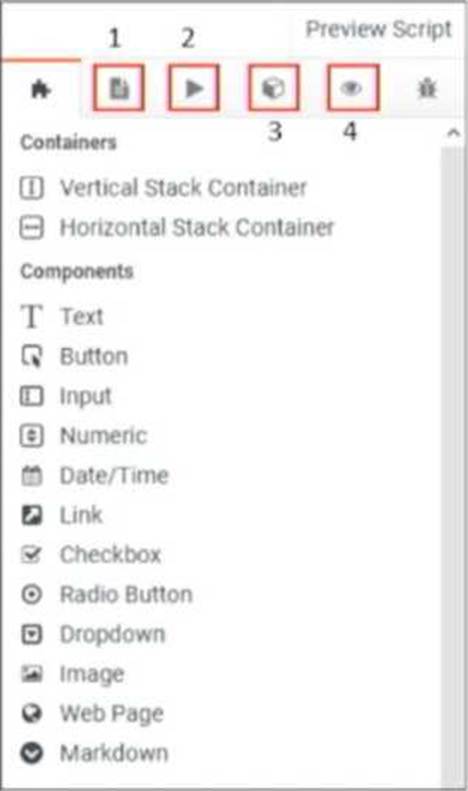
- A . 1
- B . 2
- C . 3
- D . 4
C
Explanation:
In the image provided, the correct tab to add variables to the script is labeled as number 3. This tab represents the "Variables" section where you can define new variables that will be used in your script. Variables are crucial in scripts as they allow for dynamic content, enabling personalized interactions based on data such as customer names, account details, and other context-specific information.
You are a contact center administrator responsible for managing scripts. When you attempt to delete a script from the Scripts page, you encounter an issue preventing the deletion.
What might be the potential reason preventing the script’s deletion?
- A . The script contains critical information.
- B . The script is shared with other administrators.
- C . The script is assigned to an outbound dialing campaign.
- D . The script is locked for editing.
C
Explanation:
In Genesys Cloud CX, a script cannot be deleted if it is currently assigned to an active outbound dialing campaign. The system prevents deletion to ensure that ongoing operations are not disrupted. This measure protects the integrity of the campaign, ensuring that agents continue to have access to the necessary scripts during interactions.
Before attempting to delete the script, you must first unassign it from the campaign or ensure that the campaign is no longer active.
Which action in a contact center allows agents to transfer interactions seamlessly without requiring them to remember the destination?
- A . Consult Transfer
- B . Invoke Secureflow
- C . Blind Transfer
- D . Schedule Callback
A
Explanation:
The Consult Transfer action in a contact center allows agents to transfer interactions seamlessly without needing to remember the destination. This type of transfer allows the agent to consult with the destination party before completing the transfer, ensuring that the interaction is handled smoothly and that the receiving party is fully informed.
This feature is particularly useful in complex customer service scenarios where context needs to be
preserved during the transfer.
Reference: Genesys Cloud CX Interaction Management Documentation.
Select the correct tab to add multiple pages to your script.
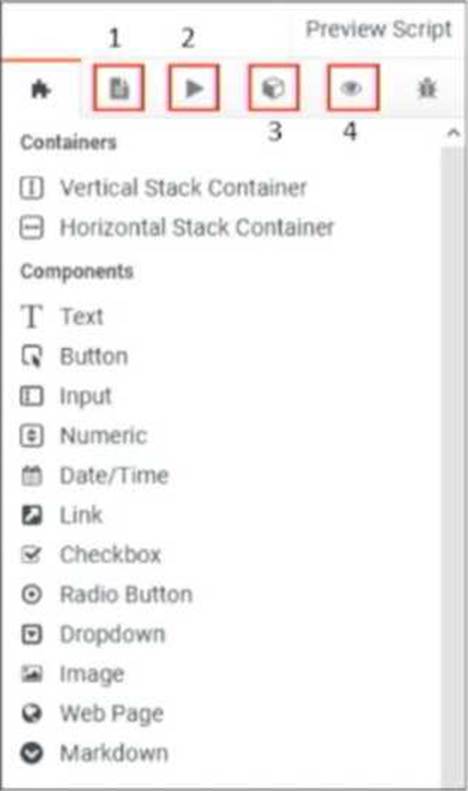
- A . 1
- B . 2
- C . 3
- D . 4
C
Explanation:
To add multiple pages to your script in Genesys Cloud CX, you would use the tab indicated as number
3 in the provided image. This tab provides access to the components and functionalities needed to manage and navigate between different pages within a script.
This is essential for creating scripts with complex flows that require the user or agent to navigate through multiple stages or sections within a single interaction.
Reference: Genesys Cloud CX Scripting Documentation.
Select the correct tab to add multiple pages to your script.
- A . 1
- B . 2
- C . 3
- D . 4
C
Explanation:
To add multiple pages to your script in Genesys Cloud CX, you would use the tab indicated as number
3 in the provided image. This tab provides access to the components and functionalities needed to manage and navigate between different pages within a script.
This is essential for creating scripts with complex flows that require the user or agent to navigate through multiple stages or sections within a single interaction.
Reference: Genesys Cloud CX Scripting Documentation.
Every script page has a horizontal stack container placed in it by default.
- A . True
- B . False
B
Explanation:
In Genesys Cloud CX, every script page does not have a horizontal stack container placed in it by default. While horizontal stack containers are available and can be added to organize content horizontally, they are not automatically included on every script page. The default setup for a new page is typically empty, allowing the script designer to add components and containers as needed.
Where are Genesys Cloud CX call recordings stored by default?
- A . On-premises servers
- B . Microsoft Azure Cloud
- C . Google Cloud Platform
- D . AWS Cloud
D
Explanation:
Genesys Cloud CX stores call recordings by default on AWS Cloud. AWS (Amazon Web Services) is the cloud service provider used by Genesys Cloud CX for its infrastructure, which includes the storage of call recordings. This cloud-based storage ensures scalability, reliability, and accessibility of call recordings, supporting various compliance and data retention needs.
This setup provides the benefits of cloud storage, including high availability, security, and easy access to recordings from anywhere.