
Fortinet NSE8_812 Practice Exams
Last updated on Nov 16,2026- Exam Code: NSE8_812
- Exam Name: Fortinet NSE 8 - Written Exam (NSE8_812)
- Certification Provider: Fortinet
- Latest update: Nov 16,2026
A customer wants to use the FortiAuthenticator REST API to retrieve an SSO group called SalesGroup.
The following API call is being made with the ‘curl’ utility:

Which two statements correctly describe the expected behavior of the FortiAuthenticator REST API? (Choose two.)
- A . Only users with the "Full permission" role can access the REST API
- B . This API call will fail because it requires that API version 2
- C . If the REST API web service access key is lost, it cannot be retrieved and must be changed.
- D . The syntax is incorrect because the API calls needs the get method.
BD
Explanation:
To retrieve an SSO group called SalesGroup using the FortiAuthenticator REST API, the following issues need to be fixed in the API call:
The API version should be v2, not v1, as SSO groups are only supported in version 2 of the REST API. The HTTP method should be GET, not POST, as GET is used to retrieve information from the server, while POST is used to create or update information on the server. Therefore, a correct API call would look like this: curl -X GET -H “Authorization: Bearer <token>”
https://fac.example.com/api/v2/sso/groups/SalesGroup
References:
https://docs.fortinet.com/document/fortiauthenticator/6.4.1/rest-api-solution-guide/927310/introduction https://docs.fortinet.com/document/fortiauthenticator/6.4.1/rest-api-solution-guide/927311/sso-groups
What is the benefit of using FortiGate NAC LAN Segments?
- A . It provides support for multiple DHCP servers within the same VLAN.
- B . It provides physical isolation without changing the IP address of hosts.
- C . It provides support for IGMP snooping between hosts within the same VLAN
- D . It allows for assignment of dynamic address objects matching NAC policy.
D
Explanation:
FortiGate NAC LAN Segments are a feature that allows users to assign different VLANs to different LAN segments without changing the IP address of hosts or bouncing the switch port. This provides physical isolation while maintaining firewall sessions and avoiding DHCP issues. One benefit of using FortiGate NAC LAN Segments is that it allows for assignment of dynamic address objects matching NAC policy. This means that users can create firewall policies based on dynamic address objects that match the NAC policy criteria, such as device type, OS type, MAC address, etc. This simplifies firewall policy management and enhances security by applying different security profiles to different types of devices. References: https://docs.fortinet.com/document/fortigate/7.0.0/new-features/856212/nac-lan-segments-7-0-1
Refer to the exhibit.
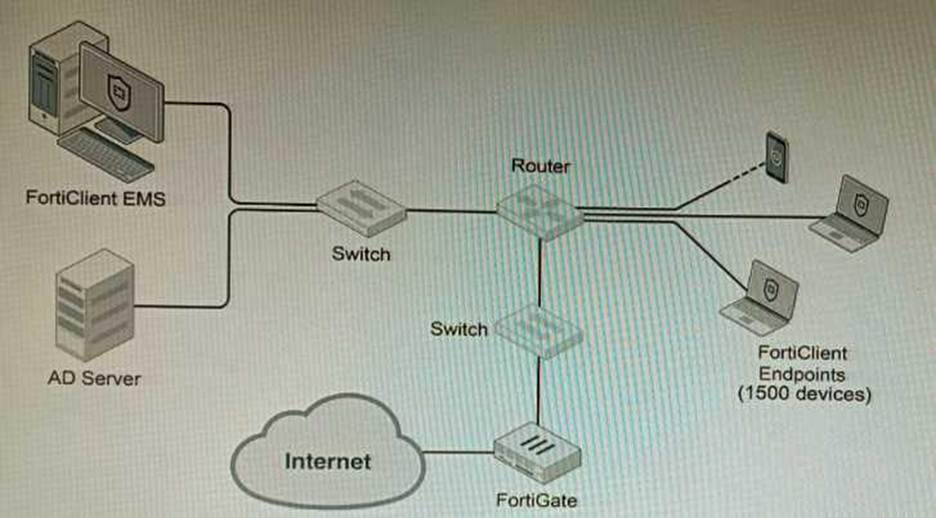
A customer wants FortiClient EMS configured to deploy to 1500 endpoints. The deployment will be integrated with FortiOS and there is an Active Directory server.
Given the configuration shown in the exhibit, which two statements about the installation are correct? (Choose two.)
- A . If no client update time is specified on EMS, the user will be able to choose the time of installation if they wish to delay.
- B . A client can be eligible for multiple enabled configurations on the EMS server, and one will be chosen based on first priority
- C . You can only deploy initial installations to Windows clients.
- D . You must use Standard or Enterprise SQL Server rather than the included SQL Server Express
- E . The Windows clients only require "File and Printer Sharing0 allowed and the rest is handled by Active Directory group policy
AE
Explanation:
A is correct because if no client update time is specified on EMS, the user will be able to choose the time of installation if they wish to delay. This is because the FortiClient EMS server will not force the installation on the client.
E is correct because the Windows clients only require "File and Printer Sharing" allowed and the rest is handled by Active Directory group policy. This is because the Active Directory group policy will configure the Windows clients to automatically install FortiClient and the FortiClient EMS server will only need to push the initial configuration to the clients.
The other options are incorrect. Option B is incorrect because a client can only be eligible for one enabled configuration on the EMS server. Option C is incorrect because you can deploy initial installations to both Windows and macOS clients. Option D is incorrect because you can use the included SQL Server Express to deploy FortiClient EMS.
References:
Deploying FortiClient EMS | FortiClient / FortiOS 7.4.0 – Fortinet Document Library
Configuring FortiClient EMS | FortiClient / FortiOS 7.4.0 – Fortinet Document Library
FortiClient EMS installation requirements | FortiClient / FortiOS 7.4.0 – Fortinet Document Library
Refer to the exhibit.
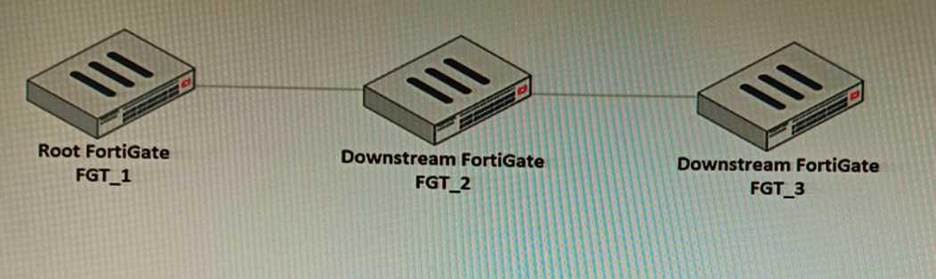
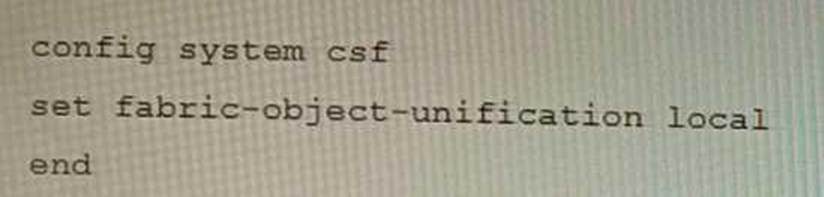
You have deployed a security fabric with three FortiGate devices as shown in the exhibit. FGT_2 has the following configuration:
FGT_1 and FGT_3 are configured with the default setting.
Which statement is true for the synchronization of fabric-objects?
- A . Objects from the FortiGate FGT_2 will be synchronized to the upstream FortiGate.
- B . Objects from the root FortiGate will only be synchronized to FGT__2.
- C . Objects from the root FortiGate will not be synchronized to any downstream FortiGate.
- D . Objects from the root FortiGate will only be synchronized to FGT_3.
C
Explanation:
The fabric-object-unification setting on FGT_2 is set to local, which means that objects will not be synchronized to any other FortiGate devices in the security fabric. The default setting for fabric-object-unification is default, which means that objects will be synchronized from the root FortiGate to all downstream FortiGate devices.
Since FGT_2 is not the root FortiGate and the fabric-object-unification setting is set to local, objects from the root FortiGate will not be synchronized to FGT_2.
Reference: Synchronizing objects across the Security Fabric: https://docs.fortinet.com/document/fortigate/6.4.0/administration-guide/880913/synchronizing-objects-across-the-security-fabric
A remote IT Team is in the process of deploying a FortiGate in their lab. The closed environment has been configured to support zero-touch provisioning from the FortiManager, on the same network, via DHCP options. After waiting 15 minutes, they are reporting that the FortiGate received an IP address, but the zero-touch process failed.
The exhibit below shows what the IT Team provided while troubleshooting this issue:

Which statement explains why the FortiGate did not install its configuration from the FortiManager?
- A . The FortiGate was not configured with the correct pre-shared key to connect to the FortiManager
- B . The DHCP server was not configured with the FQDN of the FortiManager
- C . The DHCP server used the incorrect option type for the FortiManager IP address.
- D . The configuration was modified on the FortiGate prior to connecting to the FortiManager
C
Explanation:
C is correct because the DHCP server used the incorrect option type for the FortiManager IP address. The option type should be 43 instead of 15, as shown in the FortiManager Administration Guide under Zero-Touch Provisioning > Configuring DHCP options for ZTP.
References:
https://docs.fortinet.com/document/fortimanager/7.4.0/administration-guide/568591/high-availability https://docs.fortinet.com/document/fortimanager/7.4.0/administration-guide/568591/high-availability/568592/configuring-ha-options
Refer to the exhibits.
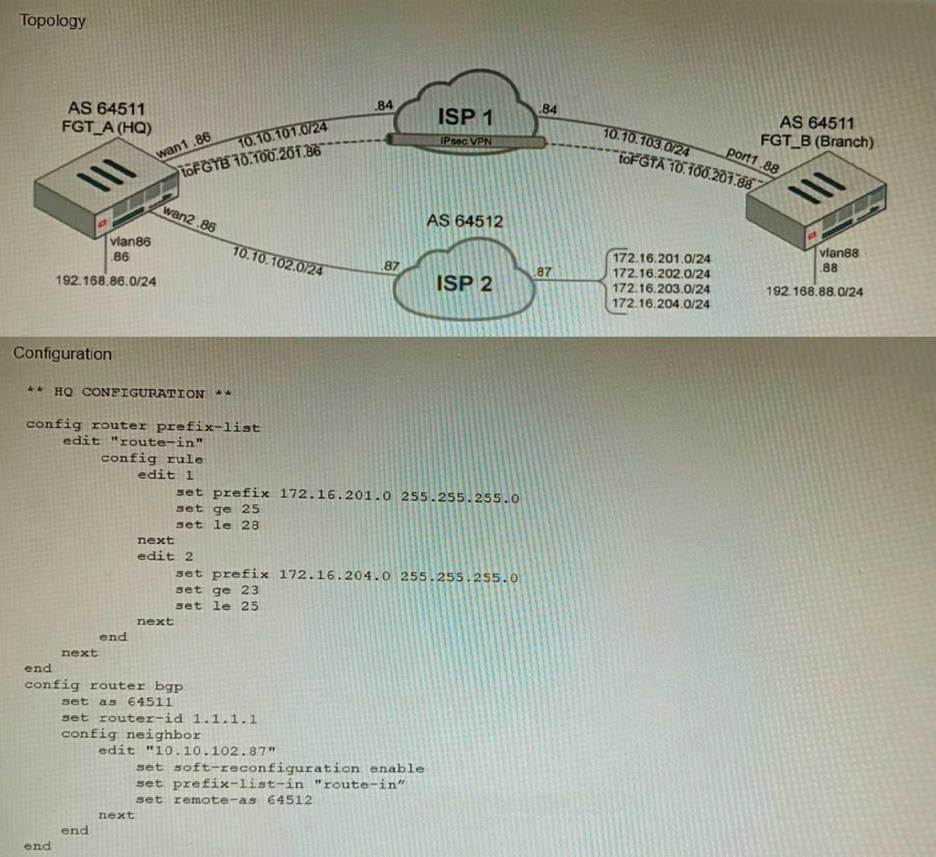
A customer has deployed a FortiGate with iBGP and eBGP routing enabled. HQ is receiving routes over eBGP from ISP 2; however, only certain routes are showing up in the routing table-Assume that BGP is working perfectly and that the only possible modifications to the routing table are solely due to the prefix list that is applied on HQ.
Given the exhibits, which two routes will be active in the routing table on the HQ firewall? (Choose two.)
- A . 172.16.204.128/25
- B . 172.16.201.96/29
- C . 172,620,64,27
- D . 172.16.204.64/27
AD
Explanation:
The prefix list in the exhibit is configured to match prefixes that are either in the 172.16.204.0/24 subnet or in the 172.62.0.0/16 subnet. The routes that match these prefixes will be active in the
routing table on the HQ firewall.
The routes that match the following prefixes will not be active in the routing table:
You are creating the CLI script to be used on a new SD-WAN deployment You will have branches with a different number of internet connections and want to be sure there is no need to change the Performance SLA configuration in case more connections are added to the branch.
The current configuration is:
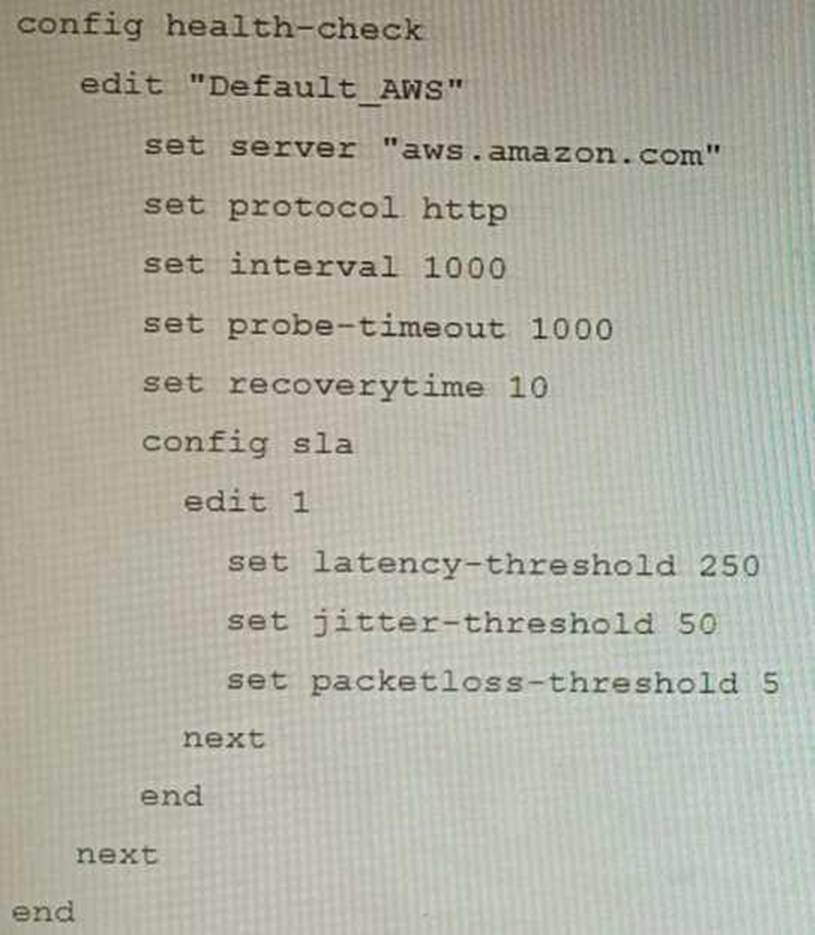
Which configuration do you use for the Performance SLA members?
- A . set members any
- B . set members 0
- C . current configuration already fulfills the requirement
- D . set members all
A
Explanation:
The set members any option will ensure that all of the SD-WAN interfaces are included in the Performance SLA. This is the best option if you want to be sure that the Performance SLA will be triggered even if more connections are added to the branch in the future.
The set members 0 option will exclude all of the SD-WAN interfaces from the Performance SLA. This is not a good option because it will prevent the Performance SLA from being triggered even if there is a problem with the network.
The current configuration already fulfills the requirement option is incorrect because it does not ensure that all of the SD-WAN interfaces will be included in the Performance SLA.
The set members all option will include all of the SD-WAN interfaces in the Performance SLA, but it is not the best option because it is not scalable. If you have a large number of SD-WAN interfaces, this option will cause the Performance SLA to be triggered too often.
References:
Performance SLA | FortiGate / FortiOS 7.4.0
Configuring Performance SLA | FortiGate / FortiOS 7.4.0
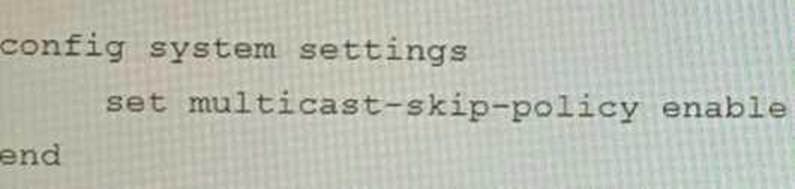
On a FortiGate Configured in Transparent mode, which configuration option allows you to control Multicast traffic passing through the?
A)
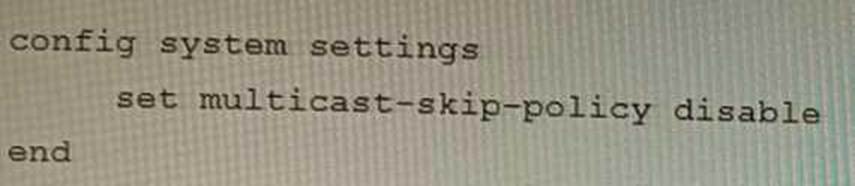
B)
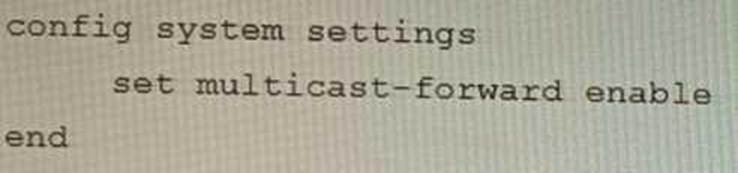
C)
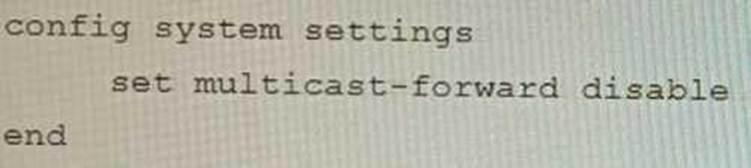
D)
- A . Option A
- B . Option B
- C . Option C
- D . Option D
C
Explanation:
To control multicast traffic passing through a FortiGate configured in transparent mode, you can use multicast policies. Multicast policies allow you to filter multicast traffic based on source and destination addresses, protocols, and interfaces. You can also apply security profiles to scan multicast traffic for threats and violations.
References: https://docs.fortinet.com/document/fortigate/6.2.14/cookbook/968606/configuring-multicast-forwarding
Refer to the exhibits.
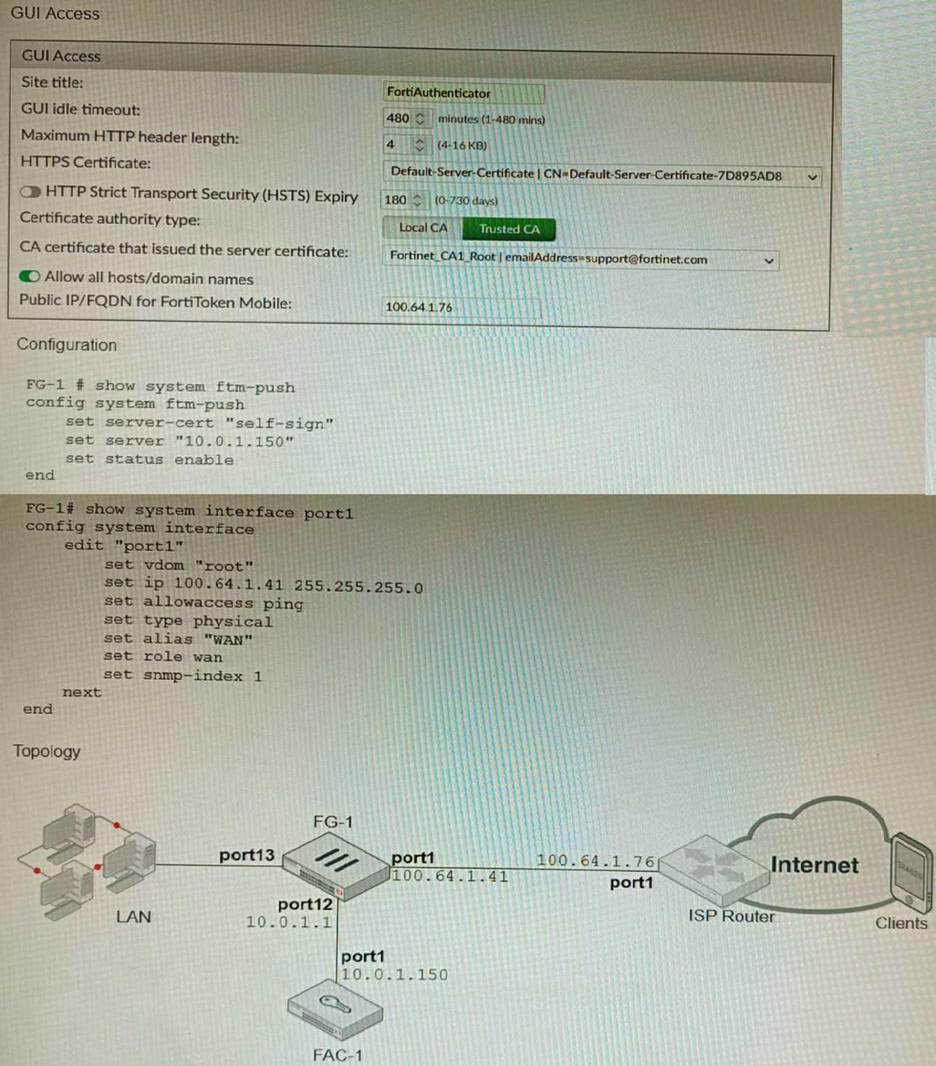
An administrator has configured a FortiGate and Forti Authenticator for two-factor authentication with FortiToken push notifications for their SSL VPN login. Upon initial review of the setup, the administrator has discovered that the customers can manually type in their two-factor code and authenticate but push notifications do not work
Based on the information given in the exhibits, what must be done to fix this?
- A . On FG-1 port1, the ftm access protocol must be enabled.
- B . FAC-1 must have an internet routable IP address for push notifications.
- C . On FG-1 CLI, the ftm-push server setting must point to 100.64.141.
- D . On FAC-1, the FortiToken public IP setting must point to 100.64.1 41
B
Explanation:
FortiToken push notifications require that the FortiAuthenticator has an internet routable IP address. This is because the FortiAuthenticator uses this IP address to send push notifications to the FortiGate.
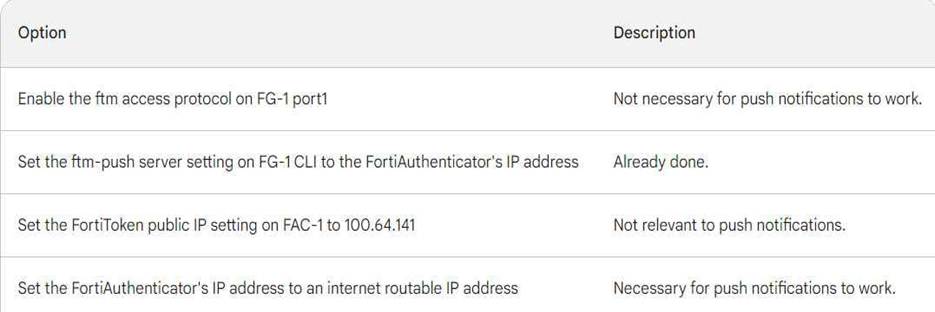
The other options are not correct. Enabling the ftm access protocol on FG-1 port1 is not necessary for push notifications to work. The ftm-push server setting on FG-1 CLI should already point to the FortiAuthenticator’s IP address. The FortiToken public IP setting on FAC-1 is not relevant to push notifications.
Here is a table that summarizes the different options:
Refer to the exhibits.
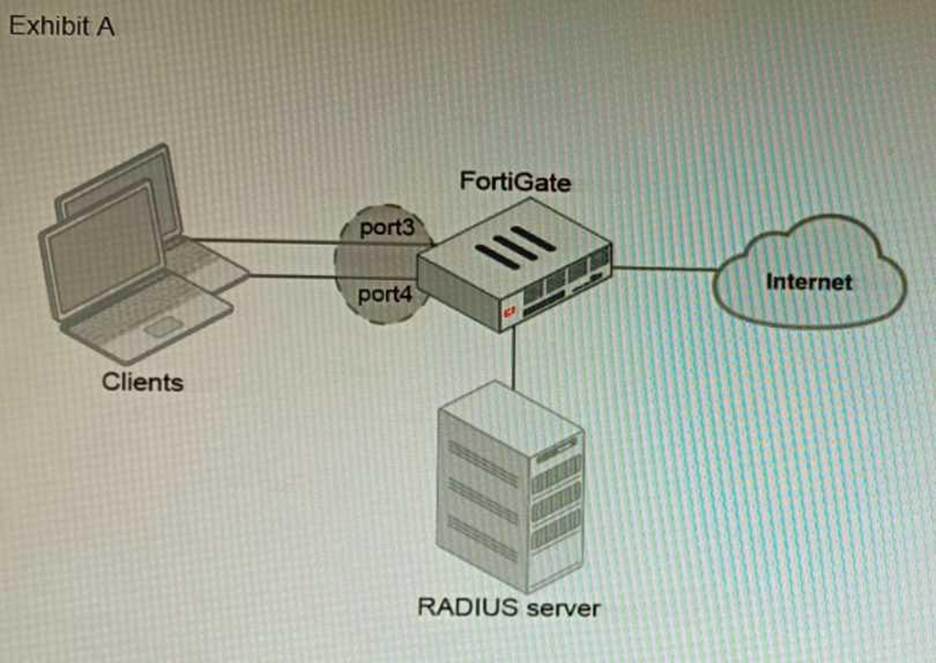
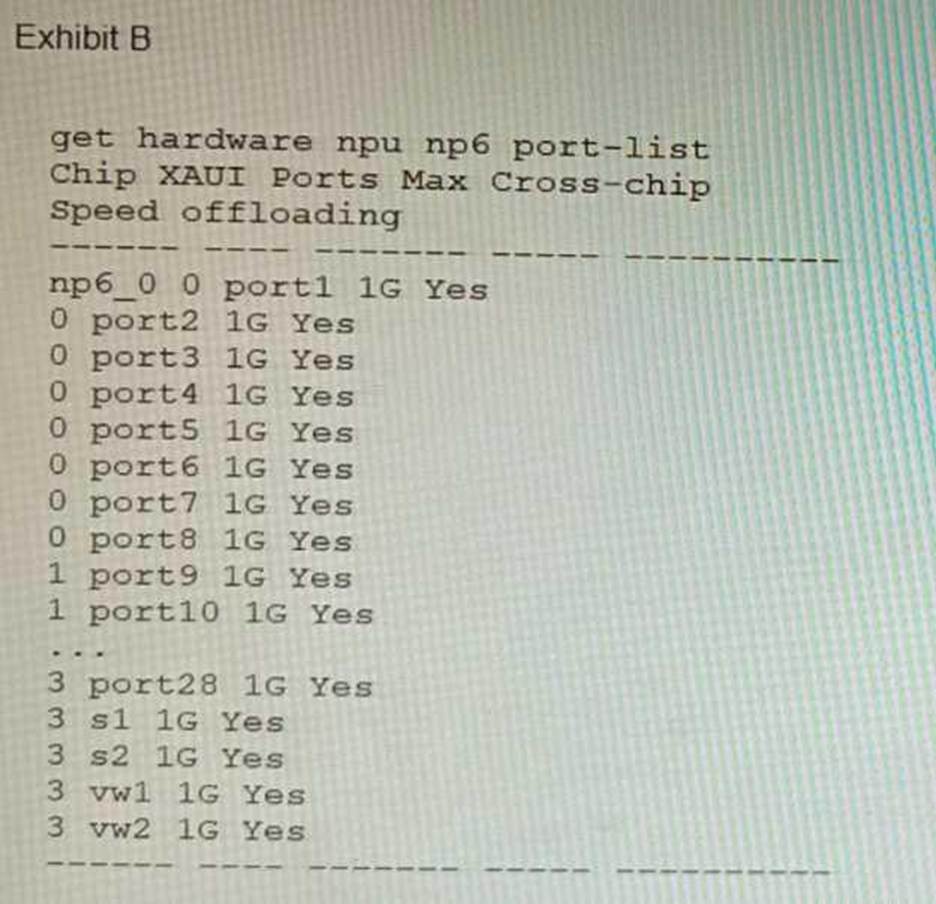
A customer is looking for a solution to authenticate the clients connected to a hardware switch interface of a FortiGate 400E.
Referring to the exhibits, which two conditions allow authentication to the client devices before assigning an IP address? (Choose two.)
- A . FortiGate devices with NP6 and hardware switch interfaces cannot support 802.1X authentication.
- B . Devices connected directly to ports 3 and 4 can perform 802 1X authentication.
- C . Ports 3 and 4 can be part of different switch interfaces.
- D . Client devices must have 802 1X authentication enabled
BD
Explanation:
The customer wants to deploy a solution to authenticate the clients connected to a hardware switch interface of a FortiGate 400E device. A hardware switch interface is an interface that combines multiple physical interfaces into one logical interface, allowing them to act as a single switch with one IP address and one set of security policies. The customer wants to use 802.1X authentication for this solution, which is a standard protocol for port-based network access control (PNAC) that authenticates clients based on their credentials before granting them access to network resources. One condition that allows authentication to the client devices before assigning an IP address is that devices connected directly to ports 3 and 4 can perform 802.1X authentication. This is because ports 3 and 4 are part of the hardware switch interface named “lan”, which has an IP address of 10.10.10.254/24 and an inbound SSL inspection profile named “ssl-inspection”. The inbound SSL inspection profile enables the FortiGate device to intercept and inspect SSL/TLS traffic from clients before forwarding it to servers, which allows it to apply security policies and features such as antivirus, web filtering, application control, etc. However, before performing SSL inspection, the FortiGate device needs to authenticate the clients using 802.1X authentication, which requires the clients to send their credentials (such as username and password) to the FortiGate device over a secure EAP (Extensible Authentication Protocol) channel. The FortiGate device then verifies the credentials with an authentication server (such as RADIUS or LDAP) and grants or denies access to the clients based on the authentication result. Therefore, devices connected directly to ports 3 and 4 can perform 802.1X authentication before assigning an IP address. Another condition that allows authentication to the client devices before assigning an IP address is that client devices must have 802.1X authentication enabled. This is because 802.1X authentication is a mutual process that requires both the client devices and the FortiGate device to support and enable it. The client devices must have 802.1X authentication enabled in their network settings, which allows them to initiate the authentication process when they connect to the hardware switch interface of the FortiGate device. The client devices must also have an 802.1X supplicant software installed, which is a program that runs on the client devices and handles the communication with the FortiGate device using EAP messages. The client devices must also have a trusted certificate installed, which is used to verify the identity of the FortiGate device and establish a secure EAP channel. Therefore, client devices must have 802.1X authentication enabled before assigning an IP address.
References:
https://docs.fortinet.com/document/fortigate/7.0.0/administration-guide/19662/hardware-switch-interfaces https://docs.fortinet.com/document/fortigate/7.0.0/administration-guide/19662/802-1x-authentication