
Fortinet NSE8_812 Practice Exams
Last updated on Nov 16,2026- Exam Code: NSE8_812
- Exam Name: Fortinet NSE 8 - Written Exam (NSE8_812)
- Certification Provider: Fortinet
- Latest update: Nov 16,2026
Refer to the exhibit.
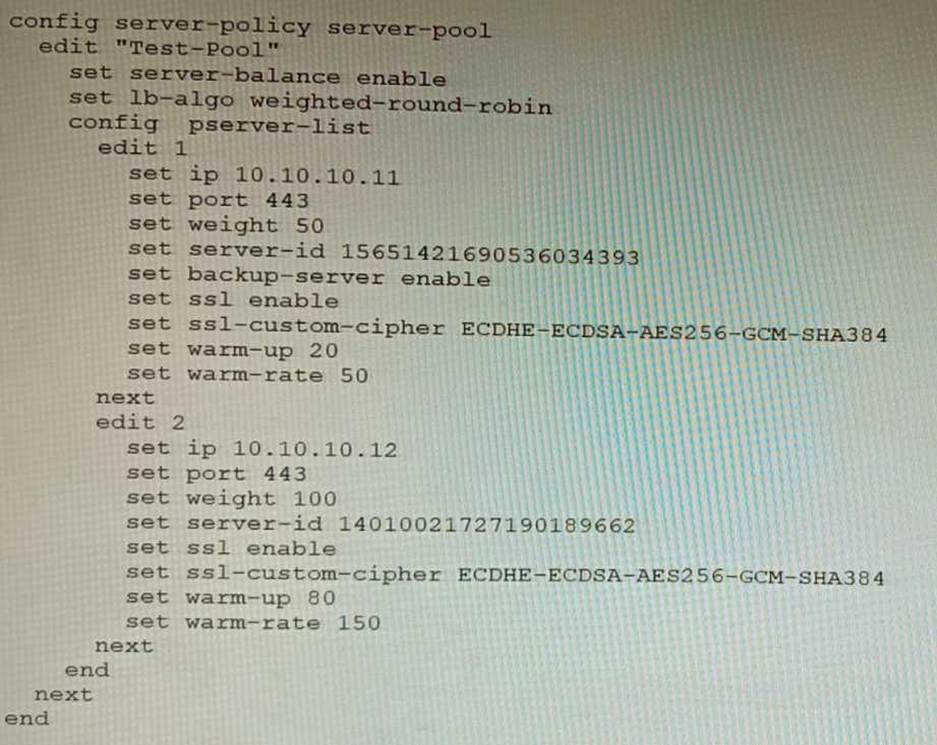
A FortiWeb appliance is configured for load balancing web sessions to internal web servers. The Server Pool is configured as shown in the exhibit.
How will the sessions be load balanced between server 1 and server 2 during normal operation?
- A . Server 1 will receive 25% of the sessions, Server 2 will receive 75% of the sessions
- B . Server 1 will receive 20% of the sessions, Server 2 will receive 66.6% of the sessions
- C . Server 1 will receive 33.3% of the sessions, Server 2 will receive 66 6% of the sessions
- D . Server 1 will receive 0% of the sessions Server 2 will receive 100% of the sessions
A
Explanation:
The Server Pool in the exhibit is configured with a weight of 20 for server 1 and a weight of 60 for server 2. This means that server 1 will receive 20% of the sessions and server 2 will receive 75% of the sessions.
The following formula is used to calculate the load balancing between servers in a Server Pool:
weight_of_server_1 / (weight_of_server_1 + weight_of_server_2)
In this case, the formula is:
20/(20+60)=20/80=0.25=25%
Therefore, server 1 will receive 25% of the sessions and server 2 will receive 75% of the sessions.
You are responsible for recommending an adapter type for NICs on a FortiGate VM that will run on an ESXi Hypervisor. Your recommendation must consider performance as the main concern, cost is not a factor.
Which adapter type for the NICs will you recommend?
- A . Native ESXi Networking with E1000
- B . Virtual Function (VF) PCI Passthrough
- C . Native ESXi Networking with VMXNET3
- D . Physical Function (PF) PCI Passthrough
C
Explanation:
The FortiGate VM is a virtual firewall appliance that can run on various hypervisors, such as ESXi, Hyper-V, KVM, etc. The adapter type for NICs on a FortiGate VM determines the performance and compatibility of the network interface cards with the hypervisor and the physical network. There are different adapter types available for NICs on a FortiGate VM, such as E1000, VMXNET3, SR-IOV, etc. If performance is the main concern and cost is not a factor, one option is to use native ESXi networking with VMXNET3 adapter type for NICs on a FortiGate VM that will run on an ESXi hypervisor. VMXNET3 is a paravirtualized network interface card that is optimized for performance in virtual machines and supports features such as multiqueue support, Receive Side Scaling (RSS), Large Receive Offload (LRO), IPv6 offloads, and MSI/MSI-X interrupt delivery. Native ESXi networking means that the FortiGate VM uses the standard virtual switch (vSwitch) or distributed virtual switch (dvSwitch) provided by the ESXi hypervisor to connect to the physical network. This option can provide high performance and compatibility for NICs on a FortiGate VM without requiring additional hardware or software components.
References:
https://docs.fortinet.com/document/fortigate/7.0.0/vm-installation-for-vmware-esxi/19662/installing-fortigate-vm-on-vmware-esxi
https://docs.fortinet.com/document/fortigate/7.0.0/vm-installation-for-vmware-esxi/19662/networking
Refer to the exhibit.
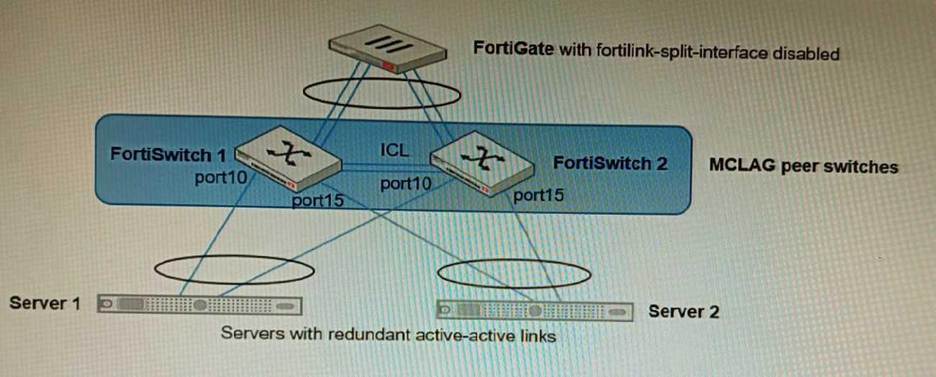
You have been tasked with replacing the managed switch Forti Switch 2 shown in the topology.
Which two actions are correct regarding the replacement process? (Choose two.)
- A . After replacing the FortiSwitch unit, the automatically created trunk name does not change
- B . CLAG-ICL needs to be manually reconfigured once the new switch is connected to the FortiGate
- C . After replacing the FortiSwitch unit, the automatically created trunk name changes.
- D . MCLAG-ICL will be automatically reconfigured once the new switch is connected to the FortiGate.
AB
Explanation:
A is correct because the automatically created trunk name is based on the MAC address of the FortiSwitch unit. When the FortiSwitch unit is replaced, the MAC address will change, but the trunk name will not change.
B is correct because CLAG-ICL is a manually configured link aggregation group. When the FortiSwitch unit is replaced, the CLAG-ICL configuration will need to be manually reconfigured on the new FortiSwitch unit.
The other options are incorrect. Option C is incorrect because the automatically created trunk name
does not change when the FortiSwitch unit is replaced. Option D is incorrect because MCLAG-ICL is a
manually configured link aggregation group and will not be automatically reconfigured when the
FortiSwitch unit is replaced.
References:
Configuring link aggregation on FortiSwitches | FortiSwitch / FortiOS 7.0.4 – Fortinet Document Library
Managing FortiLink | FortiGate / FortiOS 7.0.4 – Fortinet Document Library
A customer is planning on moving their secondary data center to a cloud-based laaS. They want to place all the Oracle-based systems Oracle Cloud, while the other systems will be on Microsoft Azure with ExpressRoute service to their main data center.
They have about 200 branches with two internet services as their only WAN connections. As a security consultant you are asked to design an architecture using Fortinet products with security, redundancy and performance as a priority.
Which two design options are true based on these requirements? (Choose two.)
- A . Systems running on Azure will need to go through the main data center to access the services on Oracle Cloud.
- B . Use FortiGate VM for IPSEC over ExpressRoute, as traffic is not encrypted by Azure.
- C . Branch FortiGate devices must be configured as VPN clients for the branches’ internal network to be able to access Oracle services without using public IPs.
- D . Two ExpressRoute services to the main data center are required to implement SD-WAN between a FortiGate VM in Azure and a FortiGate device at the data center edge
AC
Explanation:
Refer to the exhibits.
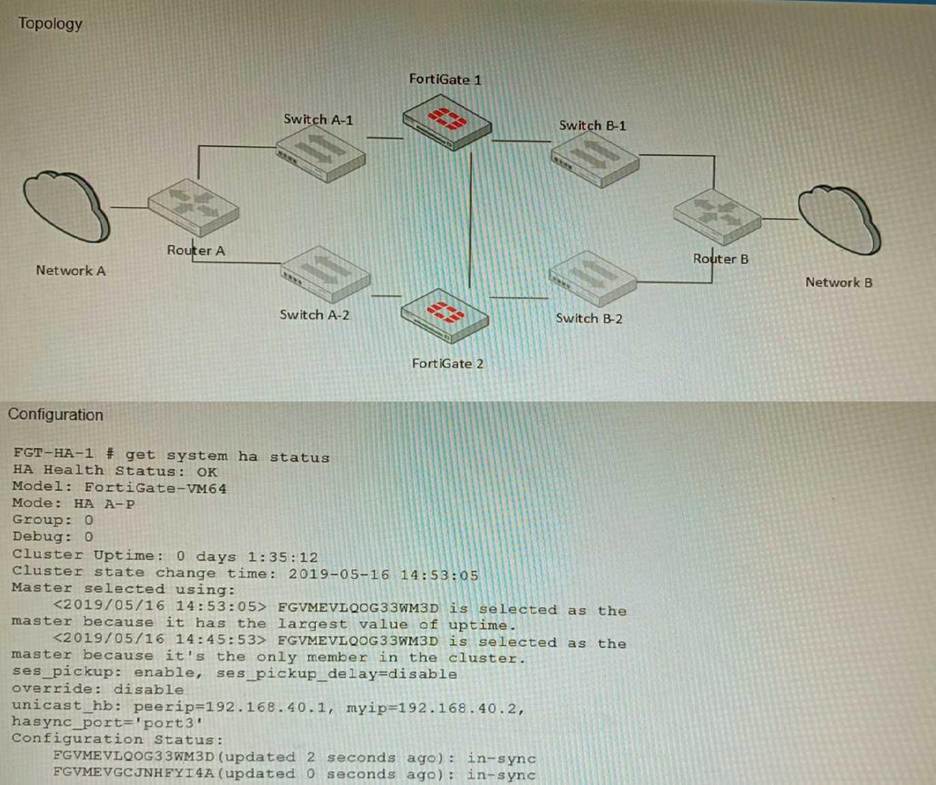
The exhibits show a FortiGate network topology and the output of the status of high availability on the FortiGate.
Given this information, which statement is correct?
- A . The ethertype values of the HA packets are 0x8890, 0x8891, and 0x8892
- B . The cluster mode can support a maximum of four (4) FortiGate VMs
- C . The cluster members are on the same network and the IP addresses were statically assigned.
- D . FGVMEVLQOG33WM3D and FGVMEVGCJNHFYI4A share a virtual MAC address.
D
Explanation:
The output of the status of high availability on the FortiGate shows that the cluster mode is active-passive, which means that only one FortiGate unit is active at a time, while the other unit is in standby mode. The active unit handles all traffic and also sends HA heartbeat packets to monitor the standby unit. The standby unit becomes active if it stops receiving heartbeat packets from the active unit, or if it receives a higher priority from another cluster unit. In active-passive mode, all cluster
units share a virtual MAC address for each interface, which is used as the source MAC address for all
packets forwarded by the cluster.
References: https://docs.fortinet.com/document/fortigate/6.4.0/cookbook/103439/high-availability-with-two-fortigates
An HA topology is using the following configuration:
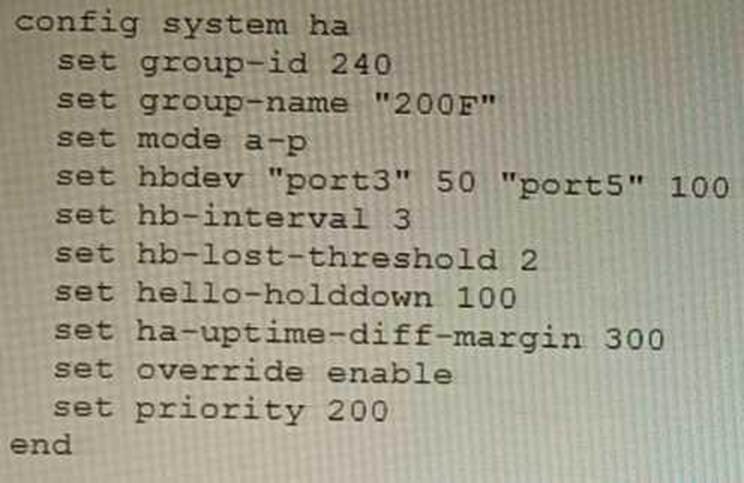
Based on this configuration, how long will it take for a failover to be detected by the secondary cluster member?
- A . 600ms
- B . 200ms
- C . 300ms
- D . 100ms
B
Explanation:
The HA heartbeat interval is 100ms, and the number of lost heartbeats before a failover is detected is 2. So, it will take 2 * 100ms = 200ms for a failover to be detected by the secondary cluster member.
Reference: FortiGate High Availability: https://docs.fortinet.com/document/fortigate/7.0.0/administration-guide/647723/link-monitoring-and-ha-failover-time
You want to use the MTA adapter feature on FortiSandbox in an HA-Cluster.
Which statement about this solution is true?
- A . The configuration of the MTA Adapter Local Interface is different than on port1.
- B . The MTA adapter is only available in the primary node.
- C . The MTA adapter mode is only detection mode.
- D . The configuration is different than on a standalone device.
B
Explanation:
The MTA adapter feature on FortiSandbox is a feature that allows FortiSandbox to act as a mail transfer agent (MTA) that can receive, inspect, and forward email messages from external sources. The MTA adapter feature can be used to integrate FortiSandbox with third-party email security solutions that do not support direct integration with FortiSandbox, such as Microsoft Exchange Server or Cisco Email Security Appliance (ESA). The MTA adapter feature can also be used to enhance email security by adding an additional layer of inspection and filtering before delivering email messages to the final destination. The MTA adapter feature can be enabled on FortiSandbox in an HA-Cluster, which is a configuration that allows two FortiSandbox units to synchronize their settings and data and provide high availability and load balancing for sandboxing services. However, one statement about this solution that is true is that the MTA adapter is only available in the primary node. This means that only one FortiSandbox unit in the HA-Cluster can act as an MTA and receive email messages from external sources, while the other unit acts as a backup node that can take over the MTA role if the primary node fails or loses connectivity. This also means that only one IP address or FQDN can be used to configure the external sources to send email messages to the FortiSandbox MTA, which is the IP address or FQDN of the primary node. References:
https://docs.fortinet.com/document/fortisandbox/3.2.0/administration-guide/19662/mail-transfer-agent-mta https://docs.fortinet.com/document/fortisandbox/3.2.0/administration-guide/19662/high-availability-ha
A remote worker requests access to an SSH server inside the network. You deployed a ZTNA Rule to their FortiClient. You need to follow the security requirements to inspect this traffic.
Which two statements are true regarding the requirements? (Choose two.)
- A . FortiGate can perform SSH access proxy host-key validation.
- B . You need to configure a FortiClient SSL-VPN tunnel to inspect the SSH traffic.
- C . SSH traffic is tunneled between the client and the access proxy over HTTPS
- D . Traffic is discarded as ZTNA does not support SSH connection rules
AC
Explanation:
ZTNA supports SSH connection rules that allow remote workers to access SSH servers inside the network through an HTTPS tunnel between the client and the access proxy (FortiGate). The access proxy acts as an SSH client to connect to the real SSH server on behalf of the user, and performs host-key validation to verify the identity of the server. The user can use any SSH client that supports HTTPS proxy settings, such as PuTTY or OpenSSH.
References: https://docs.fortinet.com/document/fortigate/7.0.0/ztna-deployment/899992/configuring-ztna-rules-to-control-access
Refer to the CLI configuration of an SSL inspection profile from a FortiGate device configured to protect a web server:
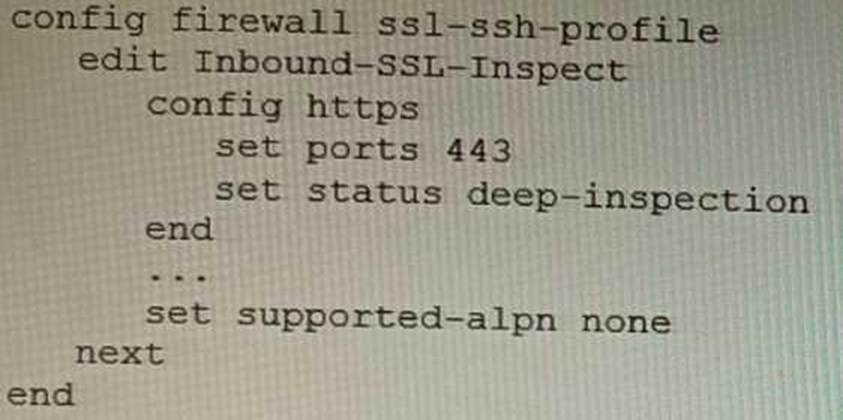
Based on the information shown, what is the expected behavior when an HTTP/2 request comes in?
- A . FortiGate will reject all HTTP/2 ALPN headers.
- B . FortiGate will strip the ALPN header and forward the traffic.
- C . FortiGate will rewrite the ALPN header to request HTTP/1.
- D . FortiGate will forward the traffic without modifying the ALPN header.
A
Explanation:
The supported-alpn parameter is set to http1.1 in the SSL inspection profile. This means that the FortiGate will only accept HTTP/1.1 traffic. Any HTTP/2 traffic will be rejected.
The following is the relevant documentation from Fortinet:
The supported-alpn parameter specifies the list of ALPN protocols that the FortiGate will accept. If the client requests a protocol that is not in this list, the FortiGate will reject the connection.
The default value for the supported-alpn parameter is all. This means that the FortiGate will accept any ALPN protocol that the client requests.
To reject all HTTP/2 traffic, set the supported-alpn parameter to http1.1.
Source: https://docs.fortinet.com/document/fortigate/7.0.0/new-features/710924/http-2-support-in-proxy-mode-ssl-inspection
Which two methods are supported for importing user defined Lookup Table Data into the FortiSIEM? (Choose two.)
- A . Report
- B . FTP
- C . API
- D . SCP
AC
Explanation:
FortiSIEM supports two methods for importing user defined Lookup Table Data:
Report: You can import lookup table data from a report. This is the most common method for importing lookup table data.
API: You can also import lookup table data using the FortiSIEM API. This is a more advanced method that allows you to import lookup table data programmatically.
FTP, SCP, and other file transfer protocols are not supported for importing lookup table data into FortiSIEM.
Reference: https://help.fortinet.com/fsiem/6-7-4/Online-Help/HTML5_Help/importing_lookup_table_data.htm