
Fortinet NSE8_812 Practice Exams
Last updated on Nov 16,2026- Exam Code: NSE8_812
- Exam Name: Fortinet NSE 8 - Written Exam (NSE8_812)
- Certification Provider: Fortinet
- Latest update: Nov 16,2026
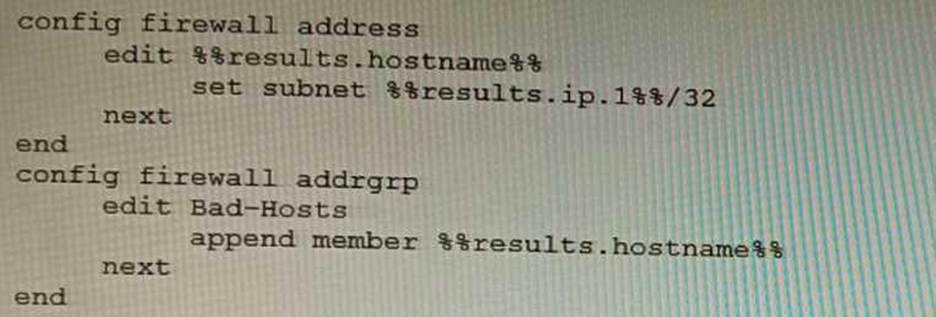
An automation stitch was configured using an incoming webhook as the trigger named ‘my_incoming_webhook’.
The action is configured to execute the CLI Script shown:
A)

B)

C)

D)

- A . Option A
- B . Option B
- C . Option C
- D . Option D
A
Explanation:
The CLI script in option A will send the log message to the webhook server. The webhook server can then be configured to take any desired action, such as storing the log message in a database or sending an email notification.
The other options are incorrect. Option B will not send the log message to the webhook server because it does not contain the curl command. Option C will send the log message to the webhook server, but it will also include the FortiGate’s IP address and MAC address. This information is not necessary, and it could be used by an attacker to identify the FortiGate. Option D will not send the log message to the webhook server because it does not contain the webhook action.
References:
Automation webhook stitches: https://docs.fortinet.com/document/fortigate/7.4.0/administration-guide/989735/webhook-actionWebhooks: https://en.wikipedia.org/wiki/Webhook
Refer to the CLI output:
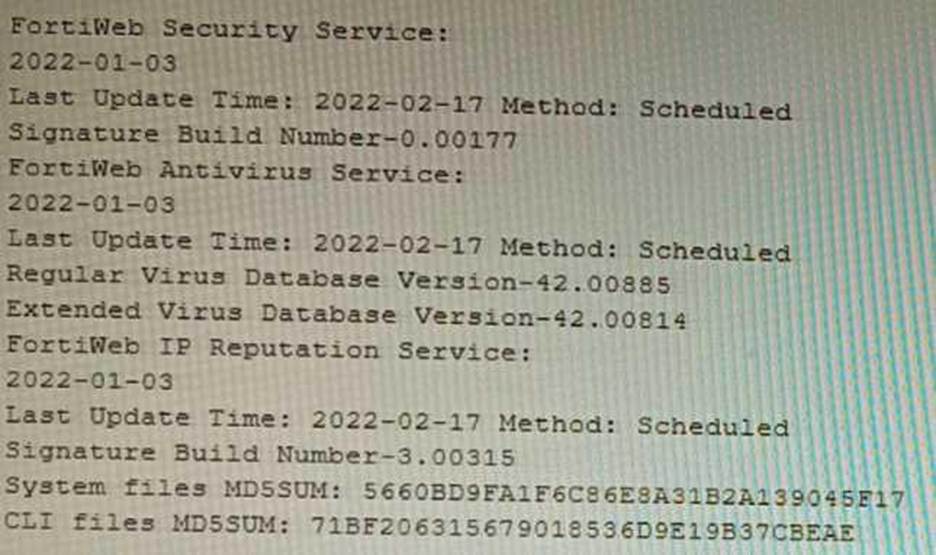
Given the information shown in the output, which two statements are correct? (Choose two.)
- A . Geographical IP policies are enabled and evaluated after local techniques.
- B . Attackers can be blocked before they target the servers behind the FortiWeb.
- C . The IP Reputation feature has been manually updated
- D . An IP address that was previously used by an attacker will always be blocked
- E . Reputation from blacklisted IP addresses from DHCP or PPPoE pools can be restored
BE
Explanation:
The CLI output shown in the exhibit indicates that FortiWeb has enabled IP Reputation feature with local techniques enabled and geographical IP policies enabled after local techniques (set geoip-policy-order after-local). IP Reputation feature is a feature that allows FortiWeb to block or allow traffic based on the reputation score of IP addresses, which reflects their past malicious activities or behaviors. Local techniques are methods that FortiWeb uses to dynamically update its own blacklist based on its own detection of attacks or violations from IP addresses (such as signature matches, rate limiting, etc.). Geographical IP policies are rules that FortiWeb uses to block or allow traffic based on the geographical location of IP addresses (such as country, region, city, etc.). Therefore, based on the output, one correct statement is that attackers can be blocked before they target the servers behind the FortiWeb. This is because FortiWeb can use IP Reputation feature to block traffic from IP addresses that have a low reputation score or belong to a blacklisted location, which prevents them from reaching the servers and launching attacks. Another correct statement is that reputation from blacklisted IP addresses from DHCP or PPPoE pools can be restored. This is because FortiWeb can use local techniques to remove IP addresses from its own blacklist if they stop sending malicious traffic for a certain period of time (set local-techniques-expire-time), which allows them to regain their reputation and access the servers. This is useful for IP addresses that are dynamically assigned by DHCP or PPPoE and may change frequently. References:
https://docs.fortinet.com/document/fortiweb/6.4.0/administration-guide/19662/ip-reputation
https://docs.fortinet.com/document/fortiweb/6.4.0/administration-guide/19662/geographical-ip-policies
A retail customer with a FortiADC HA cluster load balancing five webservers in L7 Full NAT mode is receiving reports of users not able to access their website during a sale event. But for clients that were able to connect, the website works fine.
CPU usage on the FortiADC and the web servers is low, application and database servers are still able to handle more traffic, and the bandwidth utilization is under 30%.
Which two options can resolve this situation? (Choose two.)
- A . Change the persistence rule to LB_PERSIS_SSL_SESSJD.
- B . Add more web servers to the real server poof
- C . Disable SSL between the FortiADC and the web servers
- D . Add a connection-pool to the FortiADC virtual server
BD
Explanation:
Option B: Adding more web servers to the real server pool will increase the overall capacity of the load balancer, which should help to resolve the issue of users not being able to access the website. Option D: Adding a connection-pool to the FortiADC virtual server will allow the load balancer to cache connections to the web servers, which can help to improve performance and reduce the number of dropped connections.
Option A: Changing the persistence rule to LB_PERSIS_SSL_SESSJD would only be necessary if the current persistence rule is not working properly. In this case, the CPU usage on the FortiADC and the web servers is low, so the persistence rule is likely not the issue.
Option C: Disabling SSL between the FortiADC and the web servers would reduce the load on the FortiADC, but it would also make the website less secure. Since the bandwidth utilization is under 30%, it is unlikely that disabling SSL would resolve the issue.
Reference: https://docs.fortinet.com/document/fortiadc/7.2.1/handbook/970956/configuring-virtual-servers
Refer to the exhibit showing a firewall policy configuration.
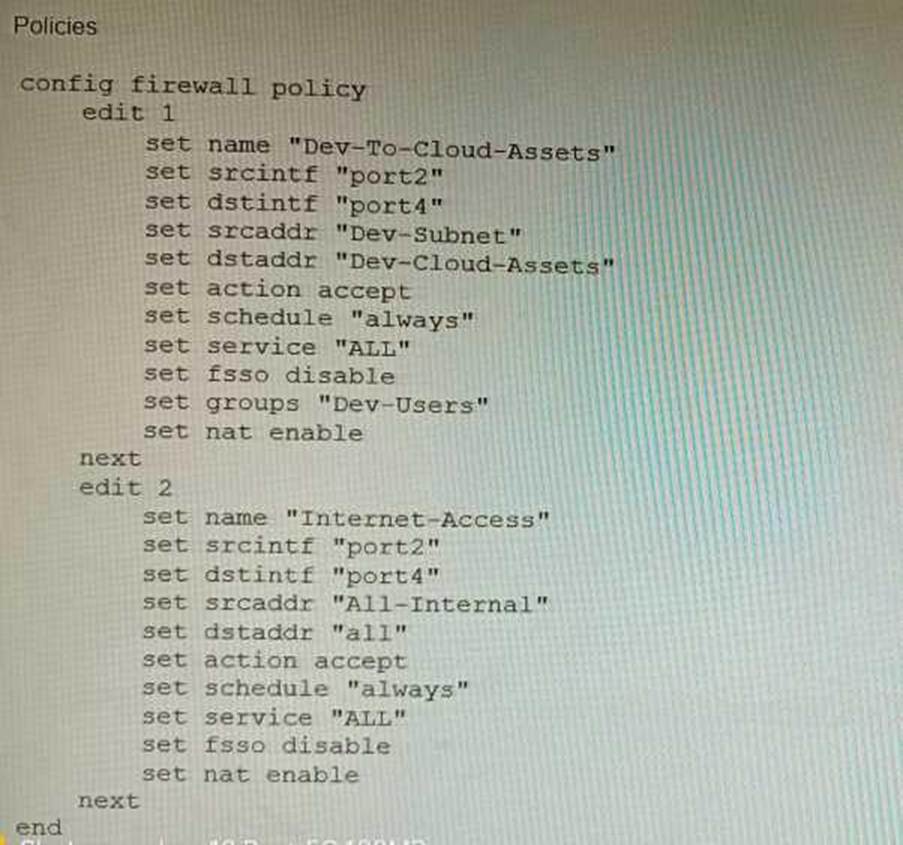
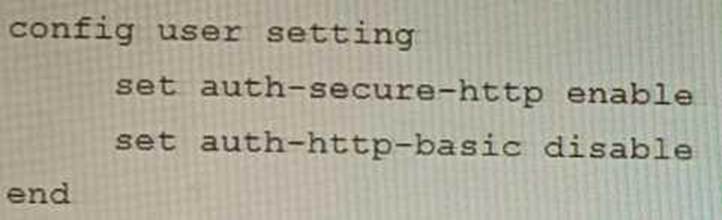
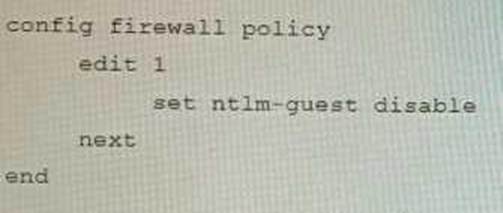
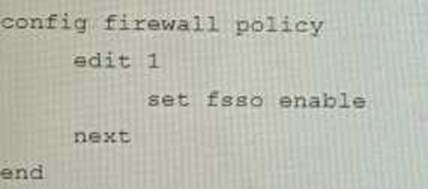
To prevent unauthorized access of their cloud assets, an administrator wants to enforce authentication on firewall policy ID 1.
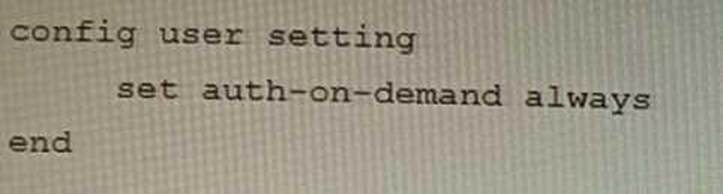
What change does the administrator need to make?
A)
B)
C)
D)
- A . Option A
- B . Option B
- C . Option C
- D . Option D
C
Explanation:
The firewall policy in the exhibit allows all traffic from the internal network to the cloud. To enforce authentication on this traffic, the administrator needs to add the auth-on-demand option to the policy. This option will force all users to authenticate before they are allowed to access the cloud.
The following is the correct configuration:
config firewall policy
edit 1
set srcintf "internal"
set dstintf "wan1"
set srcaddr "all"
set dstaddr "all"
set service "all"
set action accept
set auth-on-demand enable
References:
Configuring firewall authentication | FortiGate / FortiOS 7.4.0 – Fortinet Document Library Firewall policy configuration | FortiGate / FortiOS 7.4.0 – Fortinet Document Library
SD-WAN is configured on a FortiGate. You notice that when one of the internet links has high latency the time to resolve names using DNS from FortiGate is very high.
You must ensure that the FortiGate DNS resolution times are as low as possible with the least amount of work.
What should you configure?
- A . Configure local out traffic to use the outgoing interface based on SD-WAN rules with a manual defined IP associated to a loopback interface and configure an SD-WAN rule from the loopback to the DNS server.
- B . Configure an SD-WAN rule to the DNS server and use the FortiGate interface IPs in the source address.
- C . Configure two DNS servers and use DNS servers recommended by the two internet providers.
- D . Configure local out traffic to use the outgoing interface based on SD-WAN rules with the interface IP and configure an SD-WAN rule to the DNS server.
D
Explanation:
SD-WAN is a feature that allows users to optimize network performance and reliability by using multiple WAN links and applying rules based on various criteria, such as latency, jitter, packet loss, etc. One way to ensure that the FortiGate DNS resolution times are as low as possible with the least amount of work is to configure local out traffic to use the outgoing interface based on SD-WAN rules with the interface IP and configure an SD-WAN rule to the DNS server. This means that the FortiGate will use the best WAN link available to send DNS queries to the DNS server according to the SD-WAN rule, and use its own interface IP as the source address. This avoids NAT issues and ensures optimal DNS performance. References: https://docs.fortinet.com/document/fortigate/7.0.0/sd-wan/19662/sd-wan
Refer to the exhibits.
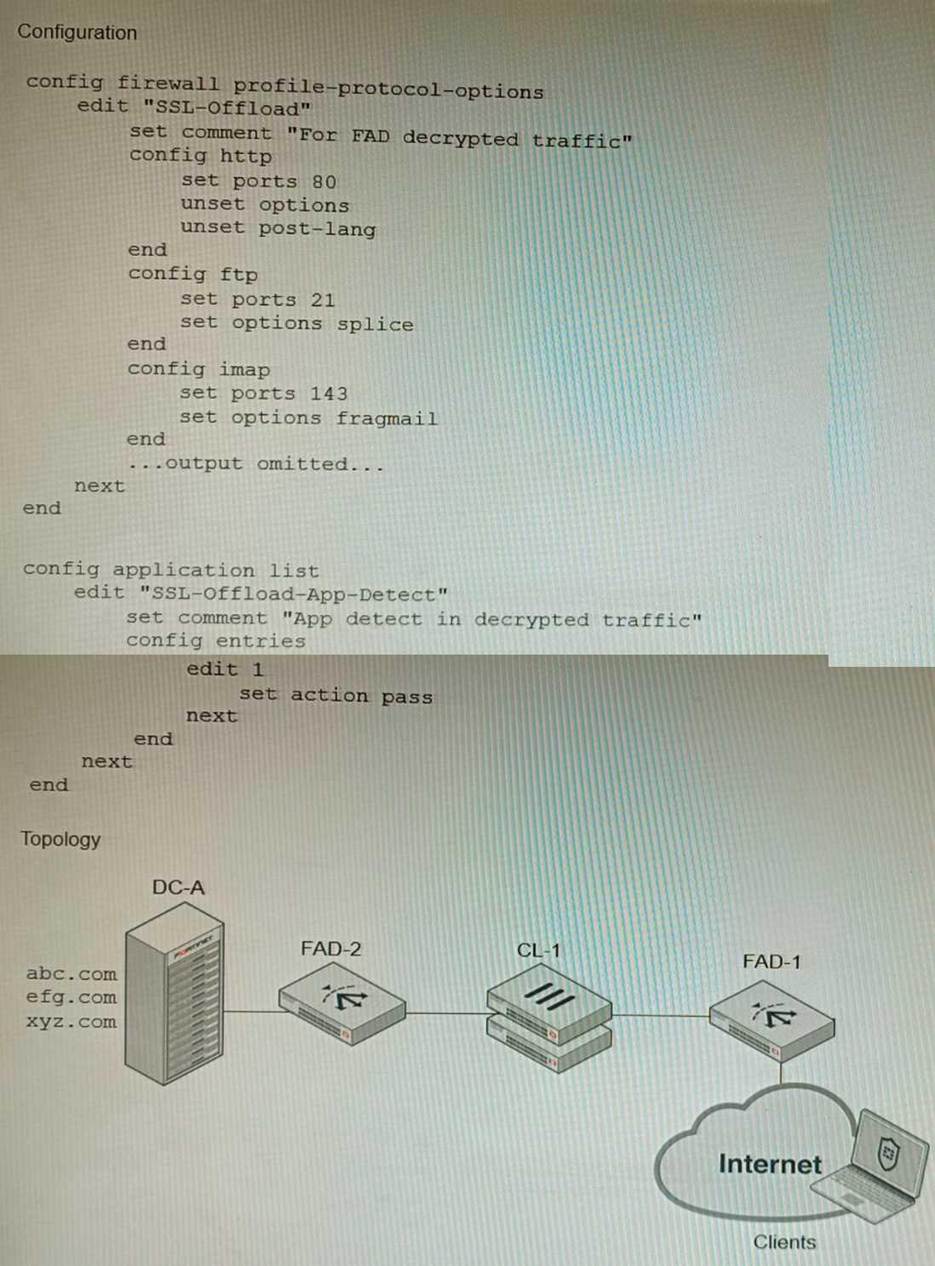
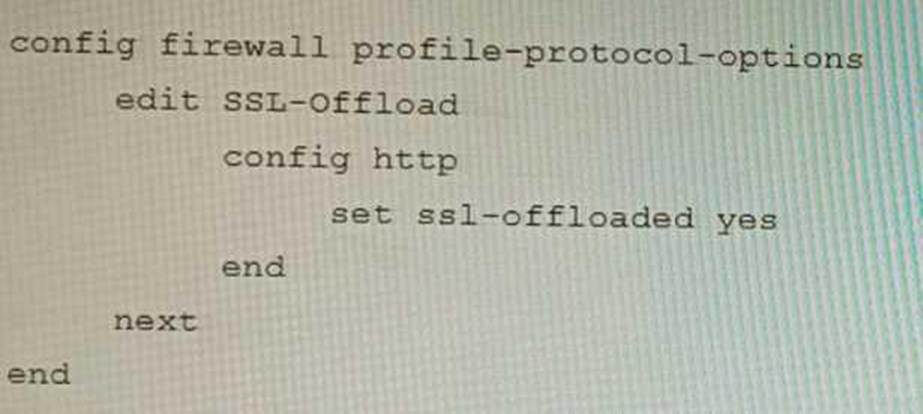
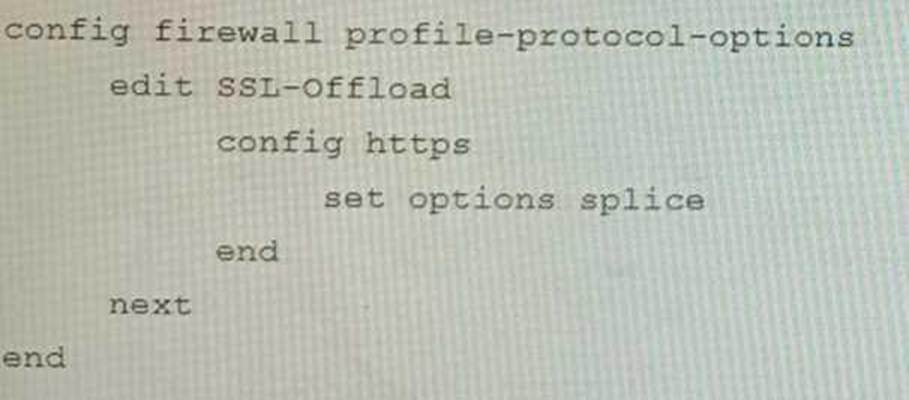
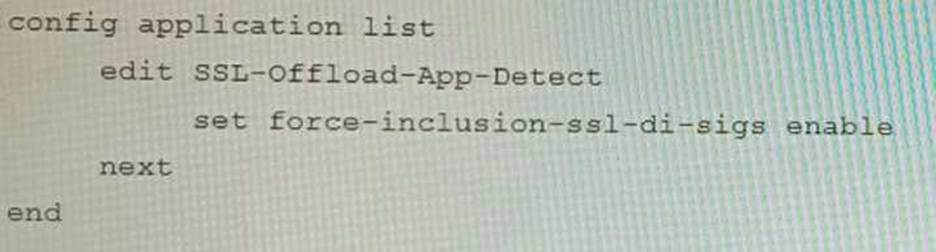
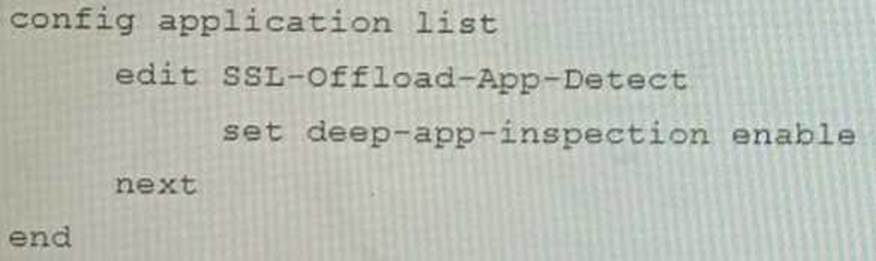
A FortiGate cluster (CL-1) protects a data center hosting multiple web applications. A pair of FortiADC devices are already configured for SSL decryption (FAD-1), and re-encryption (FAD-2). CL-1 must accept unencrypted traffic from FAD-1, perform application detection on the plain-text traffic, and forward the inspected traffic to FAD-2.
The SSL-Offload-App-Detect application list and SSL-Offload protocol options profile are applied to the firewall policy handling the web application traffic on CL-1.
Given this scenario, which two configuration tasks must the administrator perform on CL-1? (Choose two.)
A)
B)
C)
D)
- A . Option A
- B . Option B
- C . Option C
- D . Option D
BC
Explanation:
To enable application detection on plain-text traffic that has been decrypted by FortiADC, the administrator must perform two configuration tasks on CL-1:
Enable SSL offloading in the firewall policy and select the SSL-Offload protocol options profile. Enable application control in the firewall policy and select the SSL-Offload-App-Detect application list. References: https://docs.fortinet.com/document/fortigate/6.4.0/cookbook/103438/application-detection-on-ssl-offloaded-traffic
Review the following FortiGate-6000 configuration excerpt:

Based on the configuration, which statement is correct regarding SNAT source port partitioning behavior?
- A . It dynamically distributes SNAT source ports to operating FPCs or FPMs.
- B . It is the default SNAT configuration and preserves active sessions when an FPC or FPM goes down.
- C . It statically distributes SNAT source ports to operating FPCs or FPMs
- D . It equally distributes SNAT source ports across chassis slots.
A
Explanation:
The configuration excerpt shows that the SNAT source port partitioning behavior is set to dynamic. This means that the FortiGate will dynamically distribute SNAT source ports to operating FPCs or FPMs. This ensures that active sessions are not interrupted if an FPC or FPM goes down.
The other options are incorrect. Option B is incorrect because the default SNAT configuration is static. Option C is incorrect because the configuration excerpt does not specify that SNAT source ports are statically distributed. Option D is incorrect because the SNAT source ports are not evenly distributed across chassis slots.
Here are some additional details about SNAT source port partitioning behavior:
SNAT source port partitioning behavior can be set to dynamic or static.
The default SNAT configuration is static.
Dynamic SNAT source port partitioning ensures that active sessions are not interrupted if an FPC or FPM goes down.
Static SNAT source port partitioning can improve performance by reducing the number of SNAT lookups.
Refer to the exhibits.
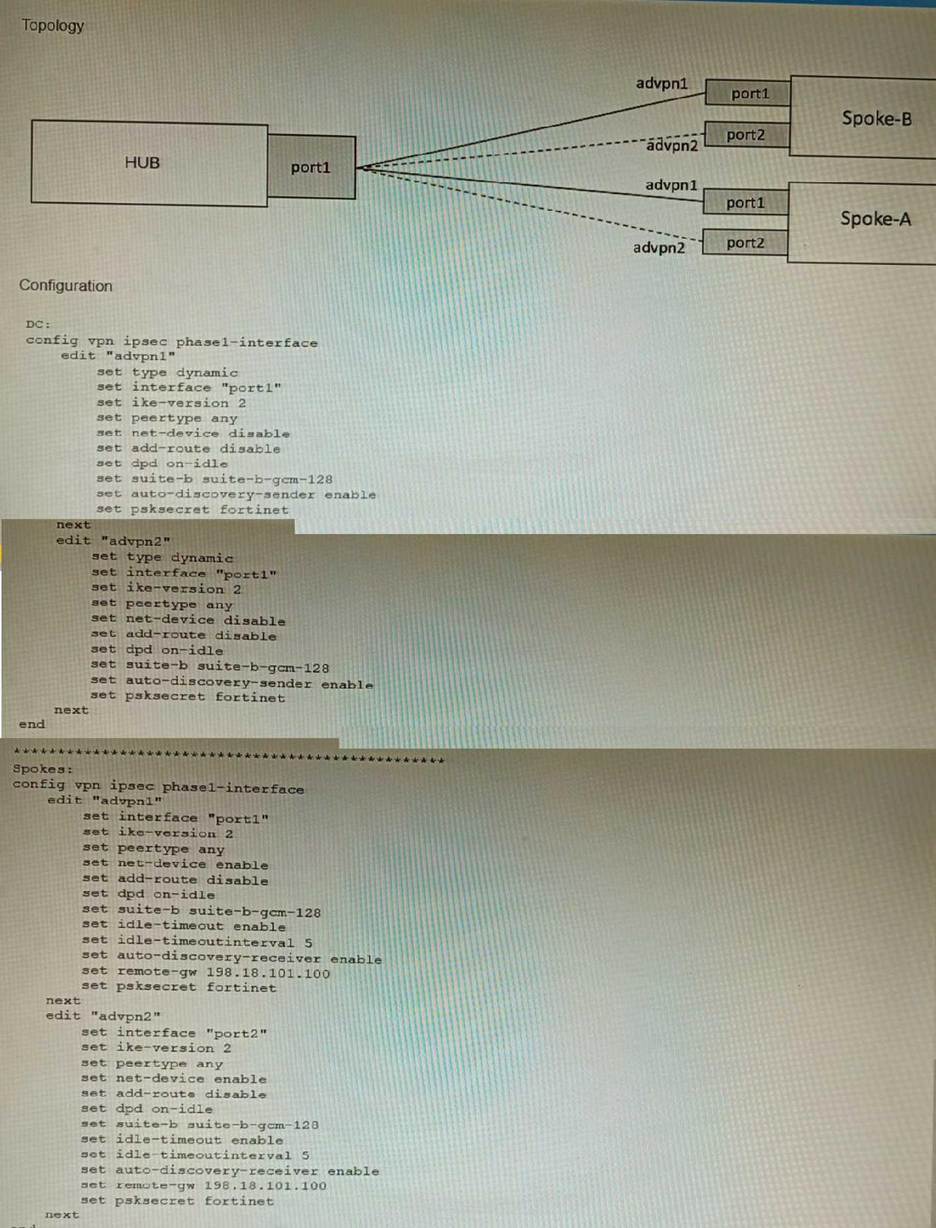
The exhibits show a diagram of a requested topology and the base IPsec configuration.
A customer asks you to configure ADVPN via two internet underlays. The requirement is that you use one interface with a single IP address on DC FortiGate.
In this scenario, which feature should be implemented to achieve this requirement?
- A . Use network-overlay id
- B . Change advpn2 to IKEv1
- C . Use local-id
- D . Use peer-id
A
Explanation:
A is correct because using network-overlay id allows you to configure multiple ADVPN tunnels on a single interface with a single IP address on the DC FortiGate. This is explained in the FortiGate Administration Guide under ADVPN > Configuring ADVPN > Configuring ADVPN on the hub.
References:
https://docs.fortinet.com/document/fortigate/7.4.0/administration-guide/978793/advpn
https://docs.fortinet.com/document/fortigate/7.4.0/administration-guide/978793/advpn/978794/configuring-advpn
Refer to the exhibit containing the configuration snippets from the FortiGate.
Customer requirements:
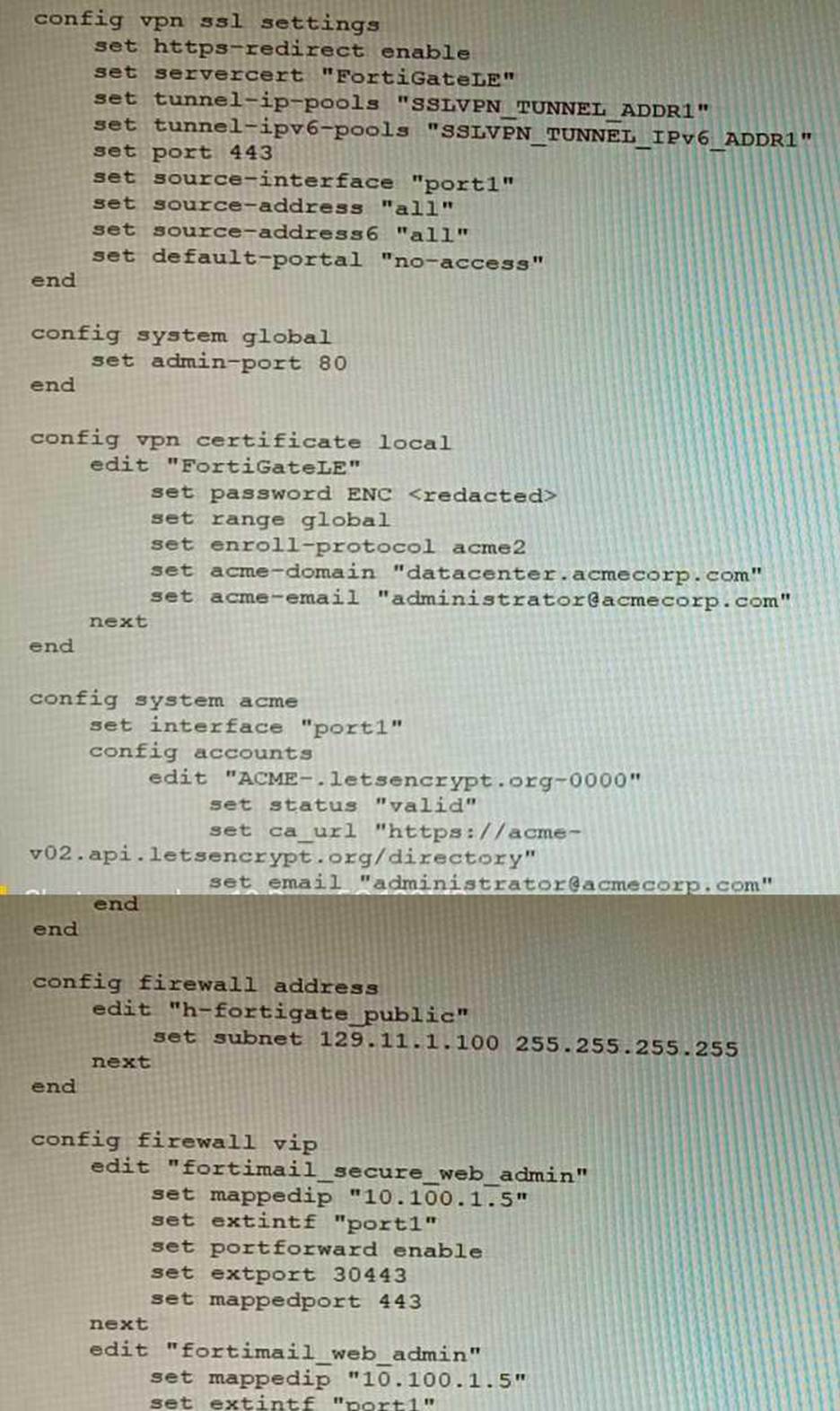
• SSLVPN Portal must be accessible on standard HTTPS port (TCP/443)
• Public IP address (129.11.1.100) is assigned to portl
• Datacenter.acmecorp.com resolves to the public IP address assigned to portl
The customer has a Let’s Encrypt certificate that is going to expire soon and it reports that subsequent attempts to renew that certificate are failing.
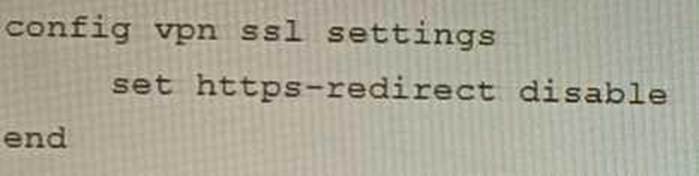
Reviewing the requirement and the exhibit, which configuration change below will resolve this issue?
A)
B)
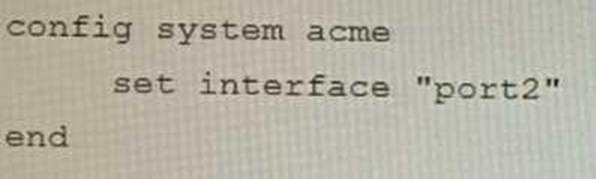
C)
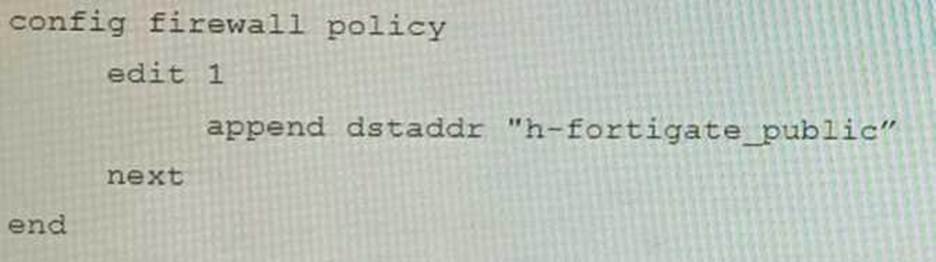
D)
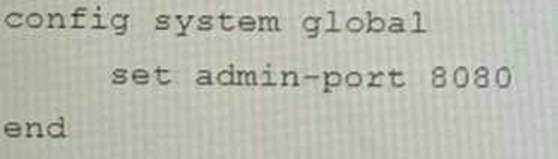
- A . Option A
- B . Option B
- C . Option C
- D . Option D
B
Explanation:
The customer’s SSLVPN Portal is currently configured to use a self-signed certificate. This means that
the certificate is not trusted by any browsers, and users will have to accept a security warning before they can connect to the portal.
To resolve this issue, the customer needs to configure the FortiGate to use a Let’s Encrypt certificate. Let’s Encrypt is a free certificate authority that provides trusted certificates for websites and other applications.
The configuration change in option B will configure the FortiGate to use a Let’s Encrypt certificate for the SSLVPN Portal. This will allow users to connect to the portal without having to accept a security warning.
The other configuration changes are not necessary to resolve the issue. Option A will configure the FortiGate to use a different port for the SSLVPN Portal, but this will not resolve the issue with the self-signed certificate. Option C will configure the FortiGate to use a different DNS name for the SSLVPN Portal, but this will also not resolve the issue with the self-signed certificate. Option D will configure the FortiGate to use a different certificate authority for the SSLVPN Portal, but this will also not resolve the issue because the customer still needs to use a trusted certificate.
References:
Configuring SSLVPN with Let’s Encrypt: https://docs.fortinet.com/document/fortigate/7.0.0/administration-guide/822087/acme-certificate-support
Let’s Encrypt: https://letsencrypt.org/
Refer to the exhibits.
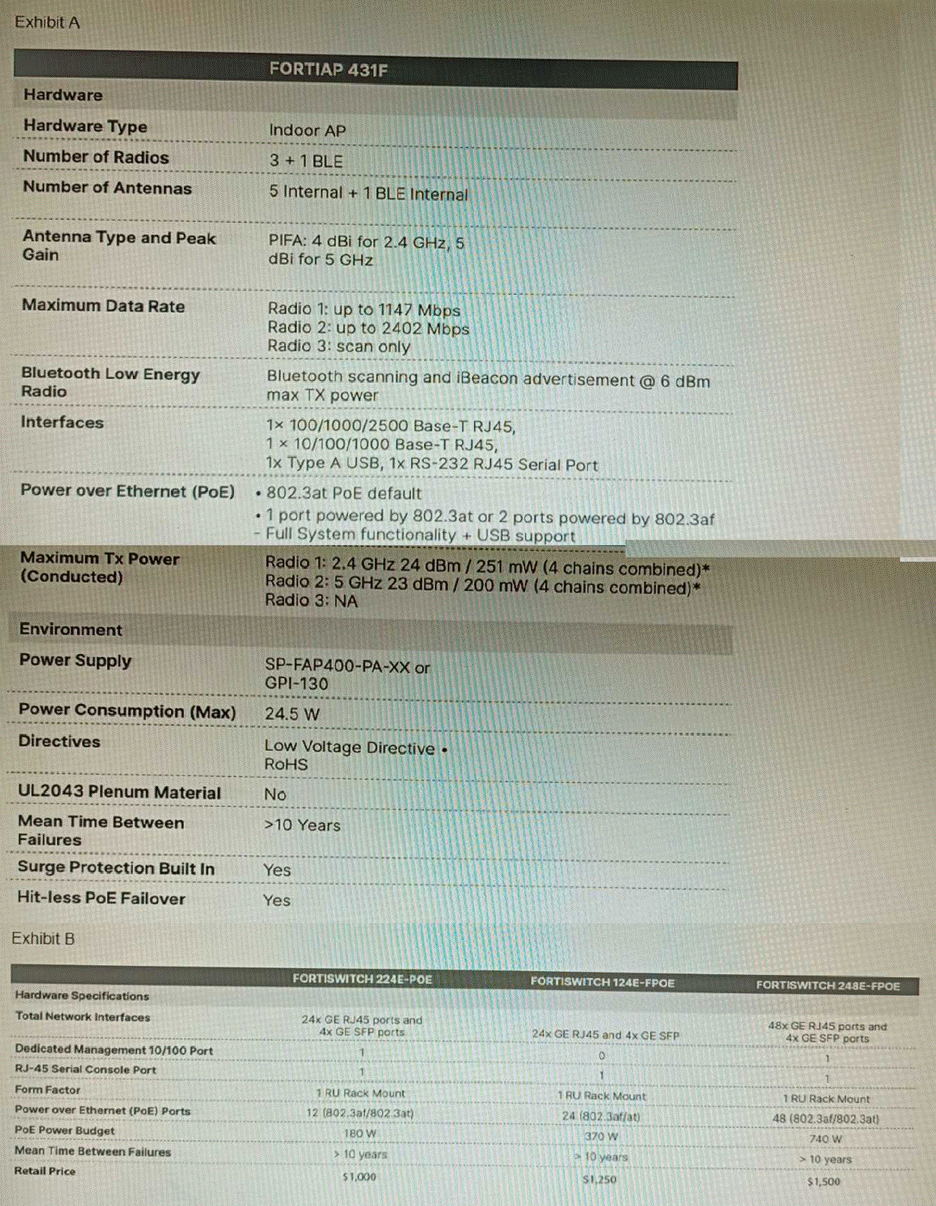
A customer wants to deploy 12 FortiAP 431F devices on high density conference center, but they do not currently have any PoE switches to connect them to. They want to be able to run them at full power while having network redundancy
From the FortiSwitch models and sample retail prices shown in the exhibit, which build of materials would have the lowest cost, while fulfilling the customer’s requirements?
- A . 1x FortiSwitch 248EFPOE
- B . 2x FortiSwitch 224E-POE
- C . 2x FortiSwitch 248E-FPOE
- D . 2x FortiSwitch 124E-FPOE
C
Explanation:
The customer wants to deploy 12 FortiAP 431F devices on a high density conference center, but they do not have any PoE switches to connect them to. They want to be able to run them at full power while having network redundancy. PoE switches are switches that can provide both data and power to connected devices over Ethernet cables, eliminating the need for separate power adapters or outlets. PoE switches are useful for deploying devices such as wireless access points, IP cameras, and VoIP phones in locations where power outlets are scarce or inconvenient. The FortiAP 431F is a wireless access point that supports PoE+ (IEEE 802.3at) standard, which can deliver up to 30W of power per port. The FortiAP 431F has a maximum power consumption of 25W when running at full power. Therefore, to run 12 FortiAP 431F devices at full power, the customer needs PoE switches that can provide at least 300W of total PoE power budget (25W x 12). The customer also needs network redundancy, which means that they need at least two PoE switches to connect the FortiAP devices in case one switch fails or loses power. From the FortiSwitch models and sample retail prices shown in the exhibit, the build of materials that has the lowest cost while fulfilling the customer’s requirements is 2x FortiSwitch 248E-FPOE. The FortiSwitch 248E-FPOE is a PoE switch that has 48 GE ports with PoE+ capability and a total PoE power budget of 370W. It also has 4x 10 GE SFP+ uplink ports for high-speed connectivity. The sample retail price of the FortiSwitch 248E-FPOE is $1,995, which means that two units will cost $3,990. This is the lowest cost among the other options that can meet the customer’s requirements. Option A is incorrect because the FortiSwitch 248EFPOE is a non-PoE switch that has no PoE capability or power budget. It cannot provide power to the FortiAP devices over Ethernet cables. Option B is incorrect because the FortiSwitch 224E-POE is a PoE switch that has only 24 GE ports with PoE+ capability and a total PoE power budget of 185W. It cannot provide enough ports or power to run 12 FortiAP devices at full power. Option D is incorrect because the FortiSwitch 124E-FPOE is a PoE switch that has only 24 GE ports with PoE+ capability and a total PoE power budget of 185W. It cannot provide enough ports or power to run 12 FortiAP devices at full power.
References:
https://www.fortinet.com/content/dam/fortinet/assets/data-sheets/FortiSwitch_Secure_Access_Series.pdf
https://www.fortinet.com/content/dam/fortinet/assets/data-sheets/FortiAP_400_Series.pdf