
Fortinet NSE8_812 Practice Exams
Last updated on Nov 16,2026- Exam Code: NSE8_812
- Exam Name: Fortinet NSE 8 - Written Exam (NSE8_812)
- Certification Provider: Fortinet
- Latest update: Nov 16,2026
Refer to the exhibit, which shows a Branch1 configuration and routing table.
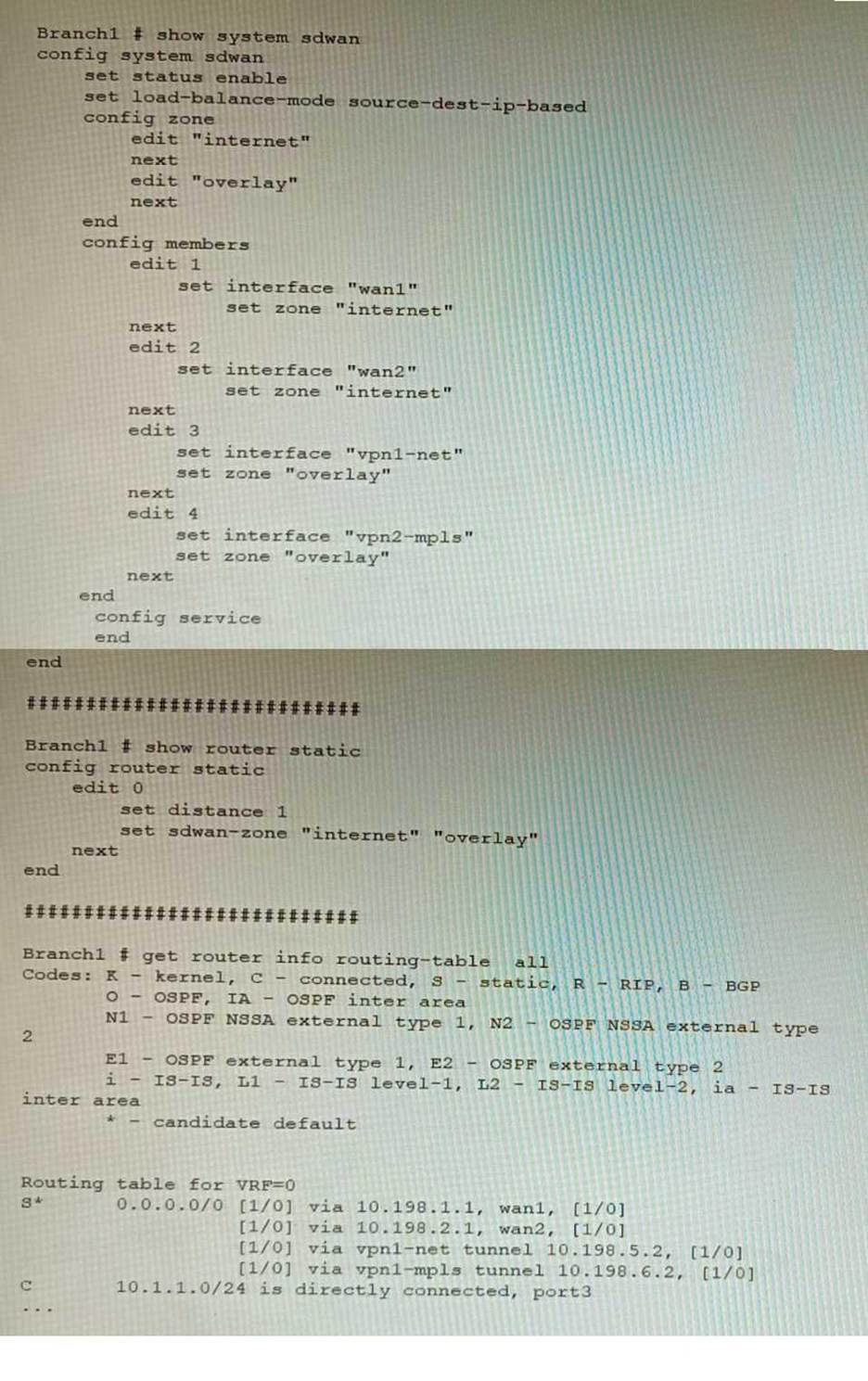
In the SD-WAN implicit rule, you do not want the traffic load balance for the overlay interface when all members are available.
In this scenario, which configuration change will meet this requirement?
- A . Change the load-balance-mode to source-ip-based.
- B . Create a new static route with the internet sdwan-zone only
- C . Configure the cost in each overlay member to 10.
- D . Configure the priority in each overlay member to 10.
D
Explanation:
The default load balancing mode for the SD-WAN implicit rule is source IP based. This means that traffic will be load balanced evenly between the overlay members, regardless of the member’s priority.
To prevent traffic from being load balanced, you can configure the priority of each overlay member to 10. This will make the member ineligible for load balancing.
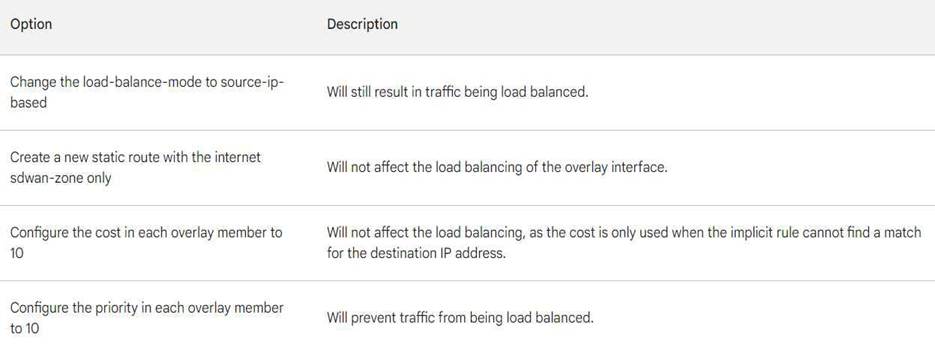
The other options are not correct. Changing the load balancing mode to source-IP based will still result in traffic being load balanced. Creating a new static route with the internet sdwan-zone only will not affect the load balancing of the overlay interface. Configuring the cost in each overlay member to 10 will also not affect the load balancing, as the cost is only used when the implicit rule cannot find a match for the destination IP address.
Refer to the exhibit.
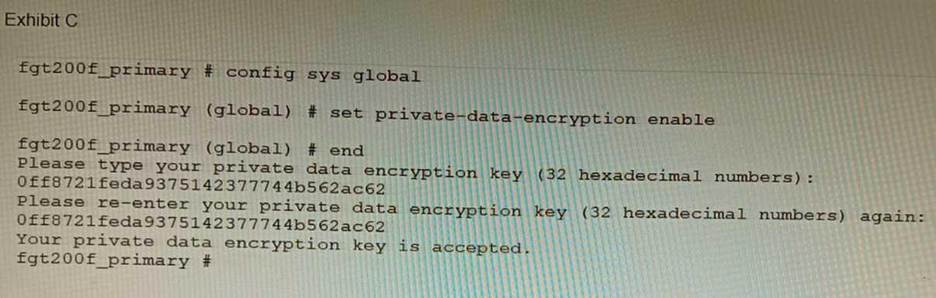
A customer has deployed a FortiGate 200F high-availability (HA) cluster that contains & TPM chip. The exhibit shows output from the FortiGate CLI session where the administrator enabled TPM. Following these actions, the administrator immediately notices that both FortiGate high availability (HA) status and FortiManager status for the FortiGate are negatively impacted.
What are the two reasons for this behavior? (Choose two.)
- A . The private-data-encryption key entered on the primary did not match the value that the TPM expected.
- B . Configuration for TPM is not synchronized between FortiGate HA cluster members.
- C . The FortiGate has not finished the auto-update process to synchronize the new configuration to FortiManager yet.
- D . TPM functionality is not yet compatible with FortiGate HA D The administrator needs to manually enter the hex private data encryption key in FortiManager
AB
Explanation:
The two reasons for the negative impact on the FortiGate HA status and FortiManager status after enabling TPM are:
The private-data-encryption key entered on the primary unit did not match the value that the TPM expected. This could happen if the TPM was previously enabled and then disabled, and the key was changed in between. The TPM will reject the new key and cause an error in the configuration synchronization.
Configuration for TPM is not synchronized between FortiGate HA cluster members. Each cluster member must have the same private-data-encryption key to form a valid HA cluster and synchronize their configurations. However, enabling TPM on one unit does not automatically enable it on the other units, and the key must be manually entered on each unit. To resolve these issues, the administrator should disable TPM on all units, clear the TPM data, and then enable TPM again with the same private-data-encryption key on each unit.
References:
https://docs.fortinet.com/document/fortigate/6.4.0/cookbook/103437/inbound-ssl-inspection
https://docs.fortinet.com/document/fortigate/6.4.0/cookbook/103438/application-detection-on-ssl-offloaded-traffic
Refer to the exhibit showing FortiGate configurations
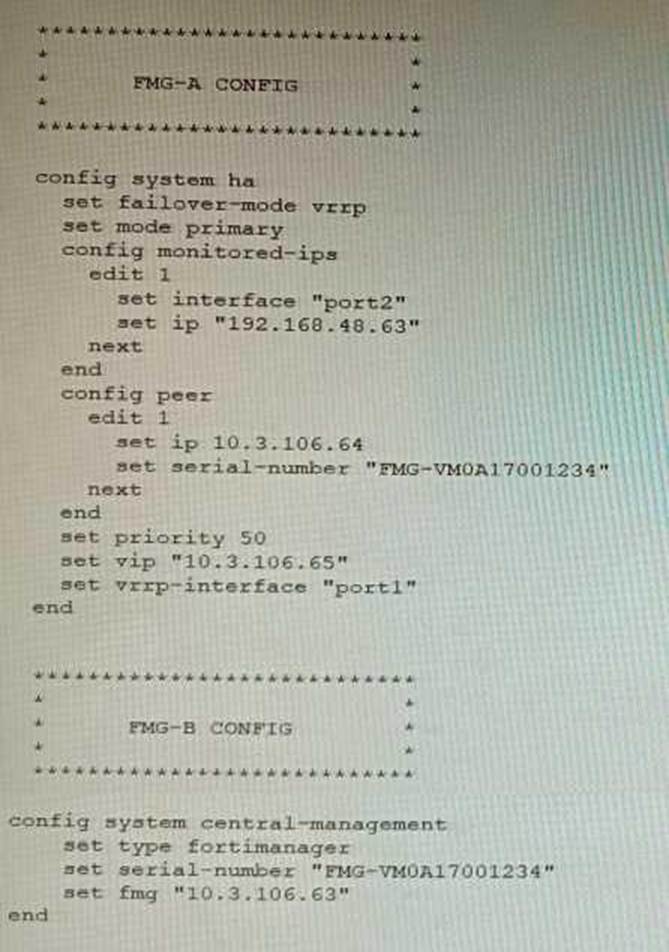
FortiManager VM high availability (HA) is not functioning as expected after being added to an existing deployment.
The administrator finds that VRRP HA mode is selected, but primary and secondary roles are greyed out in the GUI The managed devices never show online when FMG-B becomes primary, but they will show online whenever the FMG-A becomes primary.
What change will correct HA functionality in this scenario?
- A . Change the FortiManager IP address on the managed FortiGate to 10.3.106.65.
- B . Make the monitored IP to match on both FortiManager devices.
- C . Unset the primary and secondary roles in the FortiManager CLI configuration so VRRP will decide
who is primary. - D . Change the priority of FMG-A to be numerically lower for higher preference
B
Explanation:
B is correct because the monitored IP must match on both FortiManager devices for HA to function properly. This is explained in the FortiManager Administration Guide under High Availability > Configuring HA options > Configuring HA options using the GUI.
References:
https://docs.fortinet.com/document/fortimanager/7.4.0/administration-guide/568591/high-availability https://docs.fortinet.com/document/fortimanager/7.4.0/administration-guide/568591/high-availability/568592/configuring-ha-options
You are migrating the branches of a customer to FortiGate devices. They require independent routing tables on the LAN side of the network.
After reviewing the design, you notice the firewall will have many BGP sessions as you have two data centers (DC) and two ISPs per DC while each branch is using at least 10 internal segments.
Based on this scenario, what would you suggest as the more efficient solution, considering that in the future the number of internal segments, DCs or internet links per DC will increase?
- A . No change in design is needed as even small FortiGate devices have a large memory capacity.
- B . Acquire a FortiGate model with more capacity, considering the next 5 years growth.
- C . Implement network-id, neighbor-group and increase the advertisement-interval
- D . Redesign the SD-WAN deployment to only use a single VPN tunnel and segment traffic using VRFs on BGP
D
Explanation:
Using multiple VPN tunnels and BGP sessions for each internal segment is not scalable and efficient, especially when the number of segments, DCs or internet links per DC increases. A better solution is to use a single VPN tunnel per branch and segment traffic using virtual routing and forwarding (VRF)
instances on BGP. This way, each VRF can have its own routing table and BGP session, while sharing
the same VPN tunnel.
References:
https://docs.fortinet.com/document/fortigate/6.4.0/cookbook/103439/sd-wan-with-vrf-and-bgp
Refer to the exhibit.
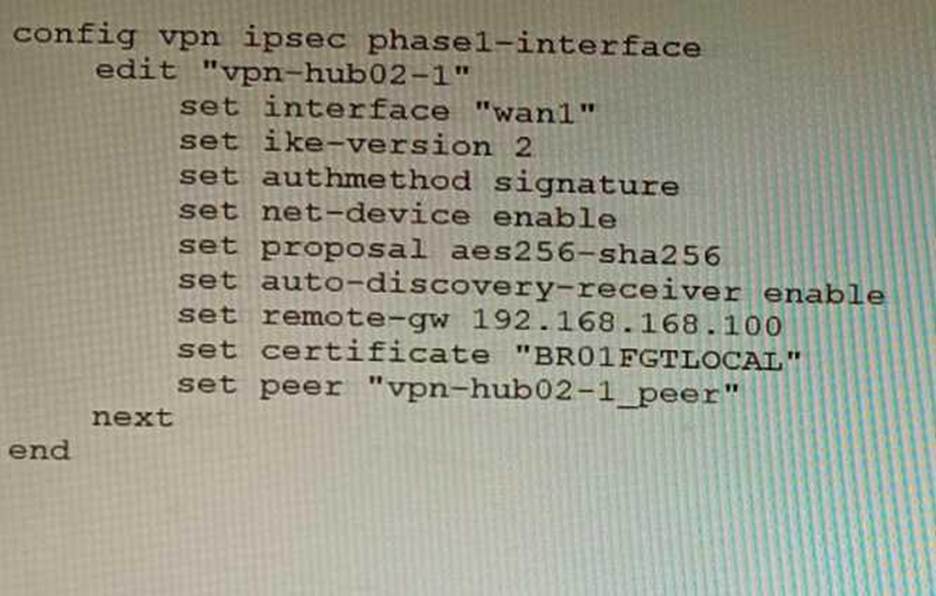
To facilitate a large-scale deployment of SD-WAN/ADVPN with FortiGate devices, you are tasked with configuring the FortiGate devices to support injecting of IKE routes on the ADVPN shortcut tunnels.
Which three commands must be added or changed to the FortiGate spoke config vpn ipsec phasei-interface options referenced in the exhibit for the VPN interface to enable this capability? (Choose three.)
- A . set net-device disable
- B . set mode-cfg enable
- C . set ike-version 1
- D . set add-route enable
- E . set mode-cfg-allow-client-selector enable
BDE
Explanation:
B must be set to enable mode-cfg, which is required for injecting IKE routes on the ADVPN shortcut tunnels.
D must be set to enable add-route, which is the command that actually injects the IKE routes.
E must be set to enable mode-cfg-allow-client-selector, which allows custom phase 2 selectors to be configured.
The other options are incorrect. Option A is incorrect because net-device disable is not required for injecting IKE routes on the ADVPN shortcut tunnels. Option C is incorrect because IKE version 1 is not supported for ADVPN.
References:
Phase 2 selectors and ADVPN shortcut tunnels | FortiGate / FortiOS 7.2.0 Configuring SD-WAN/ADVPN with FortiGate | FortiGate / FortiOS 7.2.0
You are running a diagnose command continuously as traffic flows through a platform with NP6 and you obtain the following output:
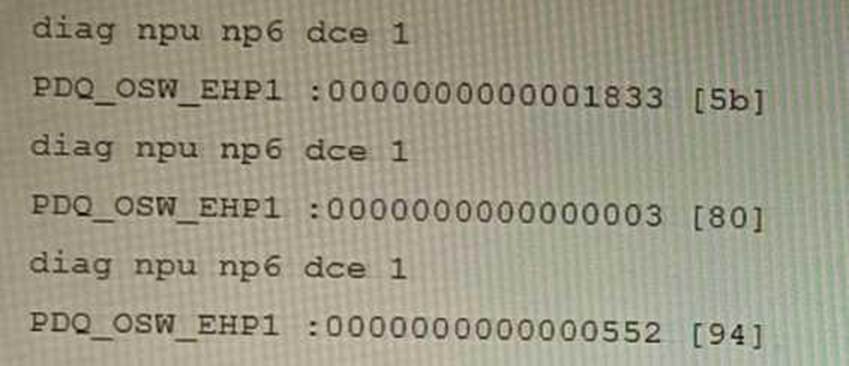
Given the information shown in the output, which two statements are true? (Choose two.)
- A . Enabling bandwidth control between the ISF and the NP will change the output
- B . The output is showing a packet descriptor queue accumulated counter
- C . Enable HPE shaper for the NP6 will change the output
- D . Host-shortcut mode is enabled.
- E . There are packet drops at the XAUI.
BE
Explanation:
The diagnose command shown in the output is used to display information about NP6 packet descriptor queues. The output shows that there are 16 NP6 units in total, and each unit has four XAUI ports (XA0-XA3). The output also shows that there are some non-zero values in the columns PDQ ACCU (packet descriptor queue accumulated counter) and PDQ DROP (packet descriptor queue drop counter). These values indicate that there are some packet descriptor queues that have reached their maximum capacity and have dropped some packets at the XAUI ports. This could be caused by congestion or misconfiguration of the XAUI ports or the ISF (Internal Switch Fabric).
References: https://docs.fortinet.com/document/fortigate/7.0.0/cli-reference/19662/diagnose-np6-pdq
The output is showing a packet descriptor queue accumulated counter, which is a measure of the number of packets that have been dropped by the NP6 due to congestion. The counter will increase if there are more packets than the NP6 can handle, which can happen if the bandwidth between the ISF and the NP is not sufficient or if the HPE shaper is enabled.
The output also shows that there are packet drops at the XAUI, which is the interface between the NP6 and the FortiGate’s backplane. This means that the NP6 is not able to keep up with the traffic and is dropping packets.
The other statements are not true. Host-shortcut mode is not enabled, and enabling bandwidth control between the ISF and the NP will not change the output. HPE shaper is a feature that can be enabled to improve performance, but it will not change the output of the diagnose command.
Reference: https://docs.fortinet.com/document/fortigate/7.4.0/hardware-acceleration/48875/diagnose-npu-np6-dce-np6-id-number-of-dropped-np6-packets
Refer to the exhibit, which shows the high availability configuration for the FortiAuthenticator (FAC1).
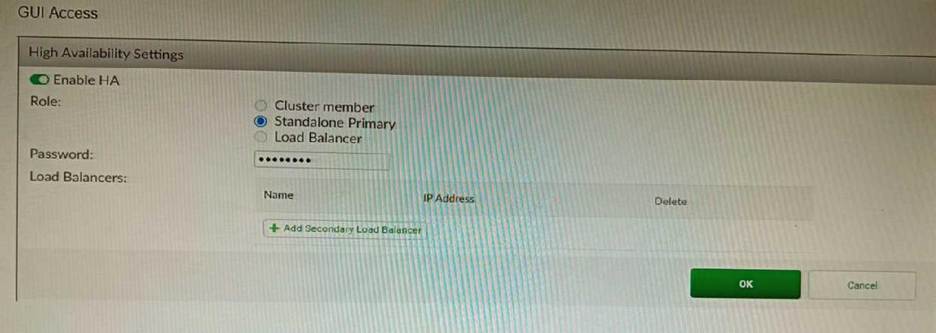
Based on this information, which statement is true about the next FortiAuthenticator (FAC2) member that will join an HA cluster with this FortiAuthenticator (FAC1)?
- A . FAC2 can only process requests when FAC1 fails.
- B . FAC2 can have its HA interface on a different network than FAC1.
- C . The FortiToken license will need to be installed on the FAC2.
- D . FSSO sessions from FAC1 will be synchronized to FAC2.
D
Explanation:
When FortiAuthenticator operates in cluster mode, it provides active-passive failover and synchronization of all configuration and data, including FSSO sessions, between the cluster members. Therefore, if FAC1 is the active unit and FAC2 is the standby unit, any FSSO sessions from FAC1 will be synchronized to FAC2. If FAC1 fails, FAC2 will take over the active role and continue to process the FSSO sessions.
References: https://docs.fortinet.com/document/fortiauthenticator/6.1.2/administration-guide/122076/high-availability
A customer with a FortiDDoS 200F protecting their fibre optic internet connection from incoming traffic sees that all the traffic was dropped by the device even though they were not under a DoS attack. The traffic flow was restored after it was rebooted using the GUI.
Which two options will prevent this situation in the future? (Choose two)
- A . Change the Adaptive Mode.
- B . Create an HA setup with a second FortiDDoS 200F
- C . Move the internet connection from the SFP interfaces to the LC interfaces
- D . Replace with a FortiDDoS 1500F
BD
Explanation:
B is correct because creating an HA setup with a second FortiDDoS 200F will provide redundancy in case one of the devices fails. This will prevent all traffic from being dropped in the event of a failure. D is correct because the FortiDDoS 1500F has a larger throughput capacity than the FortiDDoS 200F. This means that it will be less likely to drop traffic even under heavy load.
The other options are incorrect. Option A is incorrect because changing the Adaptive Mode will not prevent the device from dropping traffic. Option C is incorrect because moving the internet connection from the SFP interfaces to the LC interfaces will not change the throughput capacity of the device.
References:
FortiDDoS 200F Datasheet | Fortinet Document Library
FortiDDoS 1500F Datasheet | Fortinet Document Library
High Availability (HA) on FortiDDoS | FortiDDoS / FortiOS 7.0.0 – Fortinet Document Library
Which two statements are correct on a FortiGate using the FortiGuard Outbreak Protection Service (VOS)? (Choose two.)
- A . The FortiGuard VOS can be used only with proxy-base policy inspections.
- B . If third-party AV database returns a match the scanned file is deemed to be malicious.
- C . The antivirus database queries FortiGuard with the hash of a scanned file
- D . The AV engine scan must be enabled to use the FortiGuard VOS feature
- E . The hash signatures are obtained from the FortiGuard Global Threat Intelligence database.
CE
Explanation:
C. The antivirus database queries FortiGuard with the hash of a scanned file. This is how the FortiGuard VOS service works. The FortiGate queries FortiGuard with the hash of a scanned file, and FortiGuard returns a list of known malware signatures that match the hash.
E. The hash signatures are obtained from the FortiGuard Global Threat Intelligence database. This is where the FortiGuard VOS service gets its hash signatures from. The FortiGuard Global Threat Intelligence database is updated regularly with new malware signatures.
Refer to the exhibit, which shows a VPN topology.
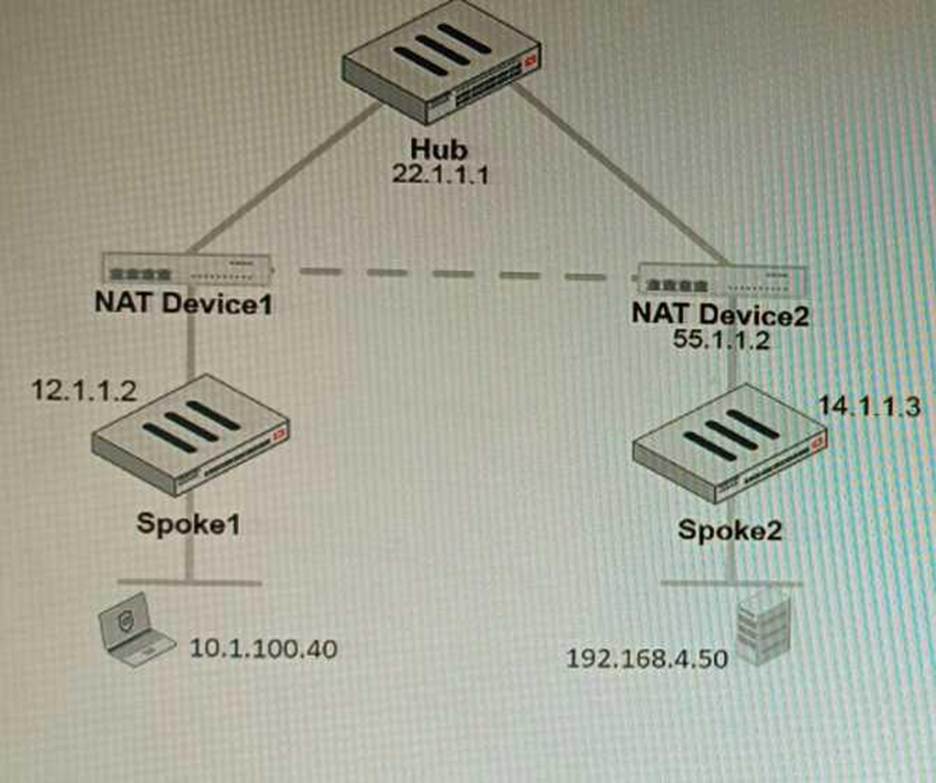
The device IP 10.1.100.40 downloads a file from the FTP server IP 192.168.4.50
Referring to the exhibit, what will be the traffic flow behavior if ADVPN is configured in this environment?
- A . All the session traffic will pass through the Hub
- B . The TCP port 21 must be allowed on the NAT Device2
- C . ADVPN is not supported when spokes are behind NAT
- D . Spoke1 will establish an ADVPN shortcut to Spoke2
D
Explanation:
D is correct because Spoke1 will establish an ADVPN shortcut to Spoke2 when it detects that there is a demand for traffic between them. This is explained in the Fortinet Community article on Technical Tip: Fortinet Auto Discovery VPN (ADVPN) under Summary – ADVPN sequence of events.
References: https://community.fortinet.com/t5/FortiGate/Technical-Tip-Fortinet-Auto-Discovery-VPN-ADVPN/ta-p/195698