
Fortinet NSE8_812 Practice Exams
Last updated on Oct 01,2026- Exam Code: NSE8_812
- Exam Name: Fortinet NSE 8 - Written Exam (NSE8_812)
- Certification Provider: Fortinet
- Latest update: Oct 01,2026
Which feature must you enable on the BGP neighbors to accomplish this goal?
- A . Graceful-restart
- B . Deterministic-med
- C . Synchronization
- D . Soft-reconfiguration
A
Explanation:
Graceful-restart is a feature that allows BGP neighbors to maintain their routing information during a BGP restart or failover event, without disrupting traffic forwarding or causing route flaps. Graceful-restart works by allowing a BGP speaker (the restarting router) to notify its neighbors (the helper routers) that it is about to restart or failover, and request them to preserve their routing information and forwarding state for a certain period of time (the restart time). The helper routers then mark the routes learned from the restarting router as stale, but keep them in their routing table and continue forwarding traffic based on them until they receive an end-of-RIB marker from the restarting router or until the restart time expires. This way, graceful-restart can minimize traffic disruption and routing instability during a BGP restart or failover event.
References: https://docs.fortinet.com/document/fortigate/7.0.0/cookbook/19662/bgp-graceful-restart
Refer to the exhibit showing the history logs from a FortiMail device.
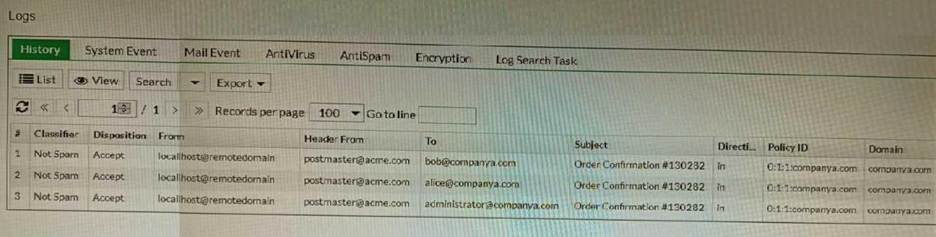
Which FortiMail email security feature can an administrator enable to treat these emails as spam?
- A . DKIM validation in a session profile
- B . Sender domain validation in a session profile
- C . Impersonation analysis in an antispam profile
- D . Soft fail SPF validation in an antispam profile
C
Explanation:
Impersonation analysis is a feature that detects emails that attempt to impersonate a trusted sender, such as a company executive or a well-known brand, by using spoofed or look-alike email addresses. This feature can help prevent phishing and business email compromise (BEC) attacks. Impersonation analysis can be enabled in an antispam profile and applied to a firewall policy.
References: https://docs.fortinet.com/document/fortimail/6.4.0/administration-guide/103663/impersonation-analysis
Refer to the exhibit.
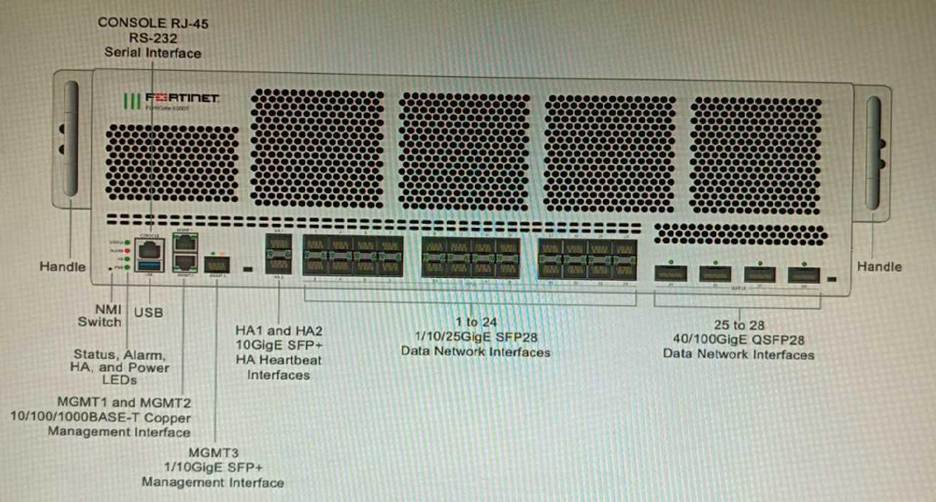
You are deploying a FortiGate 6000F. The device should be directly connected to a switch. In the future, a new hardware module providing higher speed will be installed in the switch, and the connection to the FortiGate must be moved to this higher-speed port.
You must ensure that the initial FortiGate interface connected to the switch does not affect any other port when the new module is installed and the new port speed is defined.
How should the initial connection be made?
- A . Connect the switch on any interface between ports 21 to 24
- B . Connect the switch on any interface between ports 25 to 28
- C . Connect the switch on any interface between ports 1 to 4
- D . Connect the switch on any interface between ports 5 to 8.
C
Explanation:
The FortiGate 6000F has 24 1/10/25-Gbps SFP28 data network interfaces (1 to 24). These interfaces are divided into the following interface groups: 1 to 4, 5 to 8, 9 to 12, 13 to 16, 17 to 20, and 21 to 24. The ports 25 to 28 are 40/100-Gbps QSFP28 data network interfaces.
The initial connection should be made to any interface between ports 1 to 4. This is because the ports 21 to 24 are part of the same interface group, and changing the speed of one of these ports will affect the speeds of all of the ports in the group. The ports 5 to 8 are also part of the same interface group, so they should not be used for the initial connection.
The new hardware module that will be installed in the switch will provide higher speed ports. When this module is installed, the speed of the ports 21 to 24 will be increased. However, this will not affect the ports 1 to 4, because they are not part of the same interface group.
Therefore, the initial connection should be made to any interface between ports 1 to 4, in order to ensure that the FortiGate interface connected to the switch does not affect any other port when the new module is installed and the new port speed is defined.
Reference: FortiGate 6000F Front Panel Interfaces: https://docs.fortinet.com/document/fortigate-6000/hardware/fortigate-6000f-system-guide/827055/front-panel-interfaces
Refer to the exhibit.
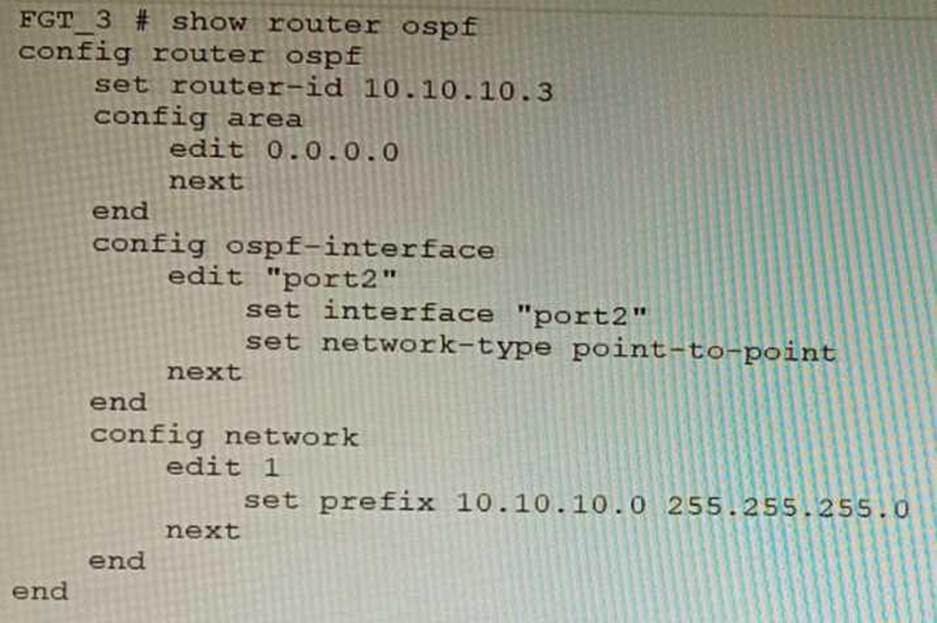
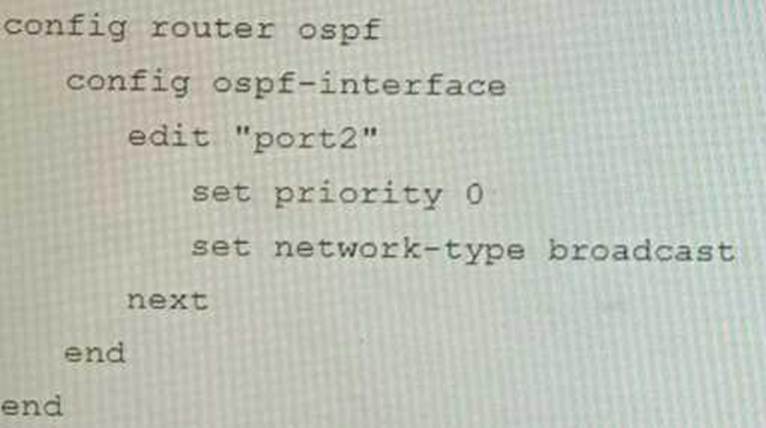
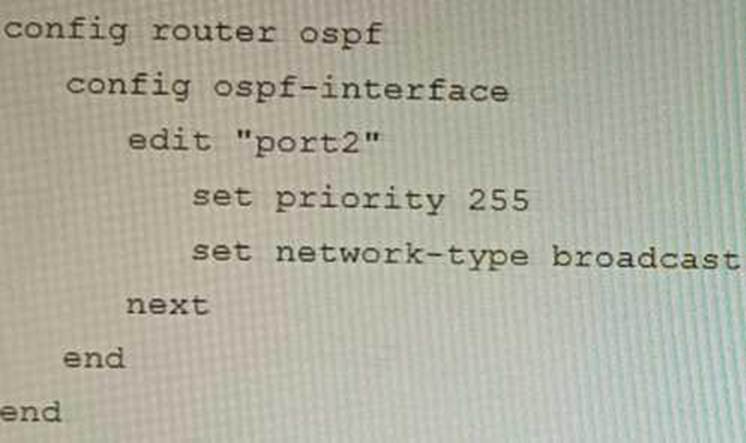
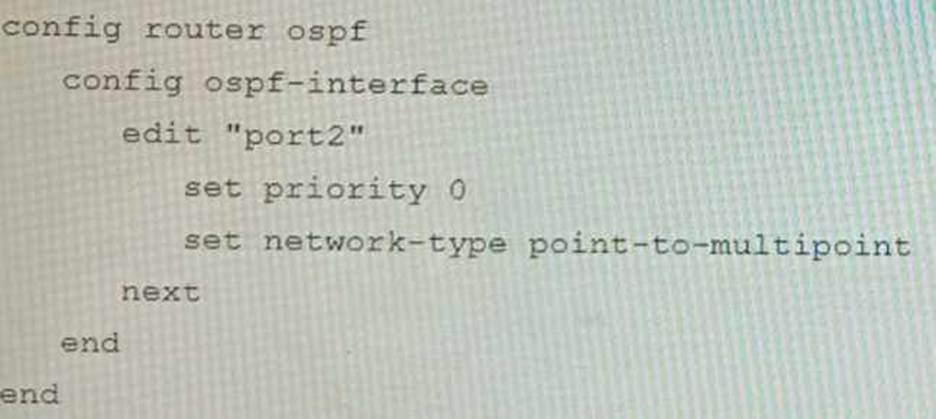
You are operating an internal network with multiple OSPF routers on the same LAN segment. FGT_3 needs to be added to the OSPF network and has the configuration shown in the exhibit. FGT_3 is not establishing any OSPF connection.
What needs to be changed to the configuration to make sure FGT_3 will establish OSPF neighbors
without affecting the DR/BDR election?
A)
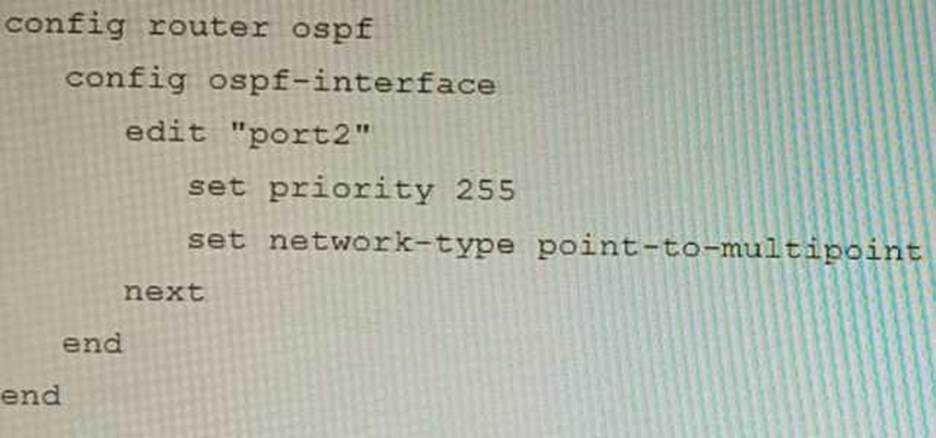
B)
C)
D)
- A . Option A
- B . Option B
- C . Option C
- D . Option D
B
Explanation:
The OSPF configuration shown in the exhibit is using the default priority value of 1 for the interface port1. This means that FGT_3 will participate in the DR/BDR election process with the other OSPF routers on the same LAN segment. However, this is not desirable because FGT_3 is a new device that needs to be added to the OSPF network without affecting the existing DR/BDR election. Therefore, to make sure FGT_3 will establish OSPF neighbors without affecting the DR/BDR election, the priority value of the interface port1 should be changed to 0. This will prevent FGT_3 from becoming a DR or BDR and allow it to form OSPF adjacencies with the current DR and BDR. Option B shows the correct configuration that changes the priority value to 0. Option A is incorrect because it does not change the priority value. Option C is incorrect because it changes the network type to point-to-point, which is not suitable for a LAN segment with multiple OSPF routers. Option D is incorrect because it changes the area ID to 0.0.0.1, which does not match the area ID of the other OSPF routers on the same LAN segment. References: https://docs.fortinet.com/document/fortigate/7.0.0/administration-guide/358640/basic-ospf-example
You must configure an environment with dual-homed servers connected to a pair of FortiSwitch units using an MCLAG.
Multicast traffic is expected in this environment, and you should ensure unnecessary traffic is pruned from links that do not have a multicast listener.
In which two ways must you configure the igmps-f lood-traffic and igmps-flood-report settings? (Choose two.)
- A . disable on ICL trunks
- B . enable on ICL trunks
- C . disable on the ISL and FortiLink trunks
- D . enable on the ISL and FortiLink trunks
AD
Explanation:
To ensure that unnecessary multicast traffic is pruned from links that do not have a multicast listener, you must disable IGMP flood traffic on the ICL trunks and enable IGMP flood reports on the ISL and FortiLink trunks.
Disabling IGMP flood traffic will prevent the FortiSwitch units from flooding multicast traffic to all ports on the ICL trunks. This will help to reduce unnecessary multicast traffic on the network. Enabling IGMP flood reports will allow the FortiSwitch units to learn which ports are interested in receiving multicast traffic. This will help the FortiSwitch units to prune multicast traffic from links that do not have a multicast listener.
Refer to the exhibit.
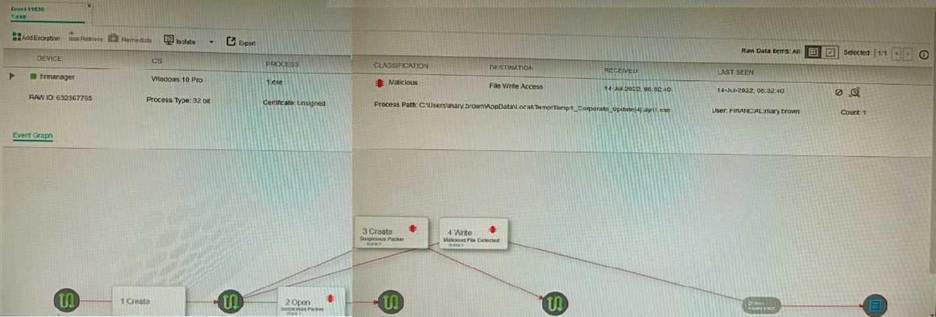
The exhibit shows the forensics analysis of an event detected by the FortiEDR core.
In this scenario, which statement is correct regarding the threat?
- A . This is an exfiltration attack and has been stopped by FortiEDR.
- B . This is an exfiltration attack and has not been stopped by FortiEDR
- C . This is a ransomware attack and has not been stopped by FortiEDR.
- D . This is a ransomware attack and has been stopped by FortiEDR
B
Explanation:
The exhibit shows that the FortiEDR core has detected an exfiltration attack. The attack is attempting to copy files from the device to an external location. The FortiEDR core has blocked the attack, and the files have not been exfiltrated.
The exhibit also shows that the attack is using the Cobalt Strike beacon. Cobalt Strike is a penetration testing tool that can be used for both legitimate and malicious purposes. In this case, the Cobalt Strike beacon is being used to exfiltrate files from the device.
The other options are incorrect. Option A is incorrect because the attack has not been stopped.
Option C is incorrect because the attack is not a ransomware attack. Option D is incorrect because
the FortiEDR core has not stopped the attack.
References:
FortiEDR Forensics: https://docs.fortinet.com/document/fortiedr/6.0.0/administration-guide/733983/forensics
Cobalt Strike: https://www.cobaltstrike.com/
Refer to the exhibit.
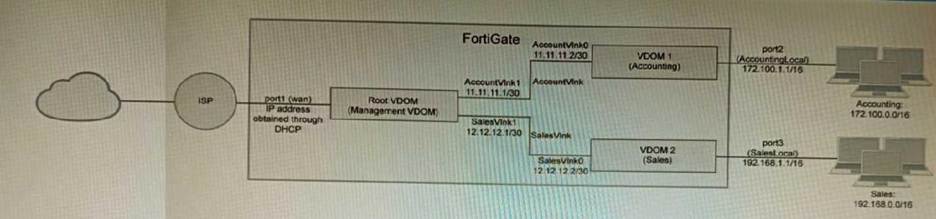
A customer has deployed a FortiGate 300E with virtual domains (VDOMs) enabled in the multi-VDOM mode. There are three VDOMs: Root is for management and internet access, while VDOM 1 and VDOM 2 are used for segregating internal traffic. AccountVInk and SalesVInk are standard VDOM links in Ethernet mode.
Given the exhibit, which two statements below about VDOM behavior are correct? (Choose two.)
- A . You can apply OSPF routing on the VDOM link in either PPP or Ethernet mode
- B . Traffic on AccountVInk and SalesVInk will not be accelerated.
- C . The VDOM links are in Ethernet mode because they have IP addressed assigned on both sides.
- D . Root VDOM is an Admin type VDOM, while VDOM 1 and VDOM 2 are Traffic type VDOMs.
- E . OSPF routing can be configured between VDOM 1 and Root VDOM without any configuration changes to AccountVInk
AD
Explanation:
You are deploying a FortiExtender (FEX) on a FortiGate-60F. The FEX will be managed by the FortiGate. You anticipate high utilization. The requirement is to minimize the overhead on the device for WAN traffic.
Which action achieves the requirement in this scenario?
- A . Add a switch between the FortiGate and FEX.
- B . Enable CAPWAP connectivity between the FortiGate and the FortiExtender.
- C . Change connectivity between the FortiGate and the FortiExtender to use VLAN Mode
- D . Add a VLAN under the FEX-WAN interface on the FortiGate.
C
Explanation:
VLAN Mode is a more efficient way to connect a FortiExtender to a FortiGate than CAPWAP Mode. This is because VLAN Mode does not require the FortiExtender to send additional control traffic to the FortiGate.
The other options are not correct.
A customer’s cybersecurity department needs to implement security for the traffic between two VPCs in AWS, but these belong to different departments within the company. The company uses a single region for all their VPCs.
Which two actions will achieve this requirement while keeping separate management of each department’s VPC? (Choose two.)
- A . Create a transit VPC with a FortiGate HA cluster, connect to the other two using VPC peering, and use routing tables to force traffic through the FortiGate cluster.
- B . Create an 1AM account for the cybersecurity department to manage both existing VPC, create a FortiGate HA Cluster on each VPC and IPSEC VPN to force traffic between the VPCs through the FortiGate clusters
- C . Migrate all the instances to the same VPC and create 1AM accounts for each department, then implement a new subnet for a FortiGate auto-scaling group and use routing tables to force the traffic through the FortiGate cluster.
- D . Create a VPC with a FortiGate auto-scaling group with a Transit Gateway attached to the three VPC to force routing through the FortiGate cluster
AD
Explanation:
To implement security for the traffic between two VPCs in AWS, while keeping separate management of each department’s VPC, two possible actions are:
Create a transit VPC with a FortiGate HA cluster, connect to the other two using VPC peering, and use routing tables to force traffic through the FortiGate cluster. This option allows the cybersecurity
department to manage the transit VPC and apply security policies on the FortiGate cluster, while the other departments can manage their own VPCs and instances. The VPC peering connections enable direct communication between the VPCs without using public IPs or gateways. The routing tables can be configured to direct all inter-VPC traffic to the transit VPC.
Create a VPC with a FortiGate auto-scaling group with a Transit Gateway attached to the three VPCs to force routing through the FortiGate cluster. This option also allows the cybersecurity department to manage the security VPC and apply security policies on the FortiGate cluster, while the other departments can manage their own VPCs and instances. The Transit Gateway acts as a network hub that connects multiple VPCs and on-premises networks. The routing tables can be configured to
direct all inter-VPC traffic to the security VPC.
References: https://docs.fortinet.com/document/fortigate-public-cloud/7.2.0/aws-administration-guide/506140/connecting-a-local-fortigate-to-an-aws-vpc-vpn https://docs.fortinet.com/document/fortigate-public-cloud/7.0.0/sd-wan-architecture-for-enterprise/166334/sd-wan-configuration
A customer’s cybersecurity department needs to implement security for the traffic between two VPCs in AWS, but these belong to different departments within the company. The company uses a single region for all their VPCs.
Which two actions will achieve this requirement while keeping separate management of each department’s VPC? (Choose two.)
- A . Create a transit VPC with a FortiGate HA cluster, connect to the other two using VPC peering, and use routing tables to force traffic through the FortiGate cluster.
- B . Create an 1AM account for the cybersecurity department to manage both existing VPC, create a FortiGate HA Cluster on each VPC and IPSEC VPN to force traffic between the VPCs through the FortiGate clusters
- C . Migrate all the instances to the same VPC and create 1AM accounts for each department, then implement a new subnet for a FortiGate auto-scaling group and use routing tables to force the traffic through the FortiGate cluster.
- D . Create a VPC with a FortiGate auto-scaling group with a Transit Gateway attached to the three VPC to force routing through the FortiGate cluster
AD
Explanation:
To implement security for the traffic between two VPCs in AWS, while keeping separate management of each department’s VPC, two possible actions are:
Create a transit VPC with a FortiGate HA cluster, connect to the other two using VPC peering, and use routing tables to force traffic through the FortiGate cluster. This option allows the cybersecurity
department to manage the transit VPC and apply security policies on the FortiGate cluster, while the other departments can manage their own VPCs and instances. The VPC peering connections enable direct communication between the VPCs without using public IPs or gateways. The routing tables can be configured to direct all inter-VPC traffic to the transit VPC.
Create a VPC with a FortiGate auto-scaling group with a Transit Gateway attached to the three VPCs to force routing through the FortiGate cluster. This option also allows the cybersecurity department to manage the security VPC and apply security policies on the FortiGate cluster, while the other departments can manage their own VPCs and instances. The Transit Gateway acts as a network hub that connects multiple VPCs and on-premises networks. The routing tables can be configured to
direct all inter-VPC traffic to the security VPC.
References: https://docs.fortinet.com/document/fortigate-public-cloud/7.2.0/aws-administration-guide/506140/connecting-a-local-fortigate-to-an-aws-vpc-vpn https://docs.fortinet.com/document/fortigate-public-cloud/7.0.0/sd-wan-architecture-for-enterprise/166334/sd-wan-configuration