
Fortinet NSE8_812 Practice Exams
Last updated on Nov 16,2026- Exam Code: NSE8_812
- Exam Name: Fortinet NSE 8 - Written Exam (NSE8_812)
- Certification Provider: Fortinet
- Latest update: Nov 16,2026
An administrator has configured a FortiGate device to authenticate SSL VPN users using digital certificates. A FortiAuthenticator is the certificate authority (CA) and the Online Certificate Status Protocol (OCSP) server.
Part of the FortiGate configuration is shown below:
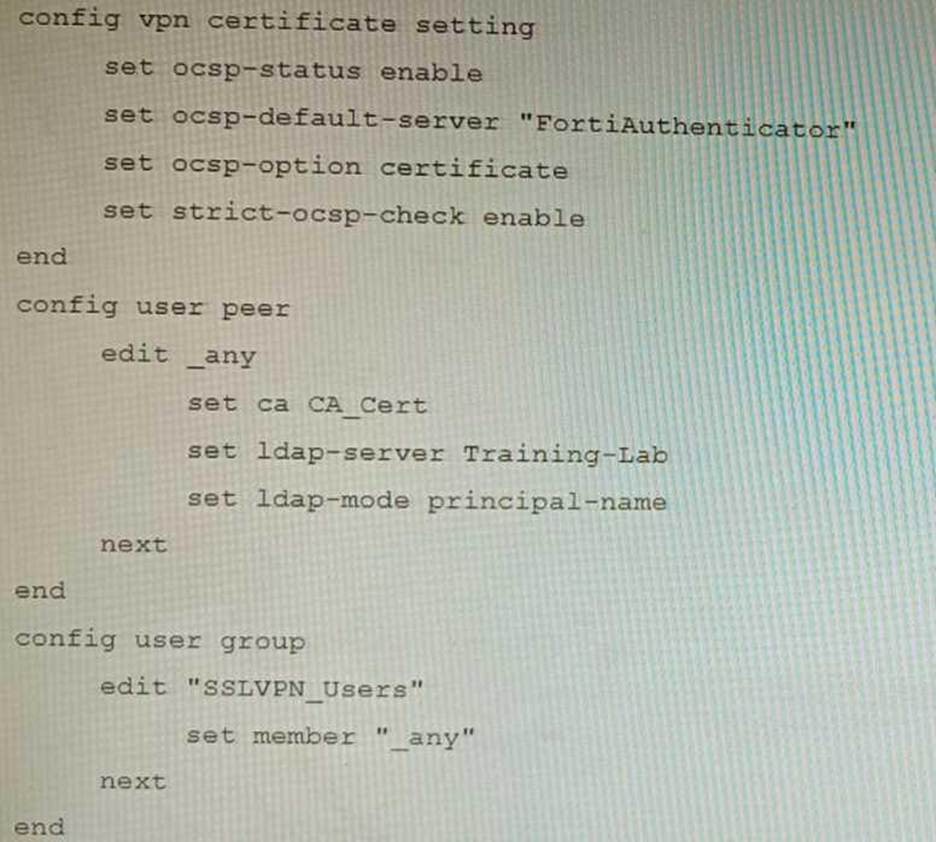
Based on this configuration, which two statements are true? (Choose two.)
- A . OCSP checks will always go to the configured FortiAuthenticator
- B . The OCSP check of the certificate can be combined with a certificate revocation list.
- C . OCSP certificate responses are never cached by the FortiGate.
- D . If the OCSP server is unreachable, authentication will succeed if the certificate matches the CA.
BD
Explanation:
B is correct because the OCSP check of the certificate can be combined with a certificate revocation list (CRL). This means that the FortiGate will check the OCSP server to see if the certificate has been revoked, and it will also check the CRL to see if the certificate has been revoked.
D is correct because if the OCSP server is unreachable, authentication will succeed if the certificate matches the CA. This is because the FortiGate will fall back to using the CRL if the OCSP server is unreachable.
The other options are incorrect. Option A is incorrect because OCSP checks can go to other OCSP servers, not just the FortiAuthenticator. Option C is incorrect because OCSP certificate responses can be cached by the FortiGate.
References:
Configuring SSL VPN authentication using digital certificates | FortiGate / FortiOS 7.2.0 – Fortinet Document Library
Online Certificate Status Protocol (OCSP) | FortiGate / FortiOS 7.2.0 – Fortinet Document Library Certificate Revocation Lists (CRLs) | FortiGate / FortiOS 7.2.0 – Fortinet Document Library
Refer to the exhibit showing a FortiSOAR playbook.
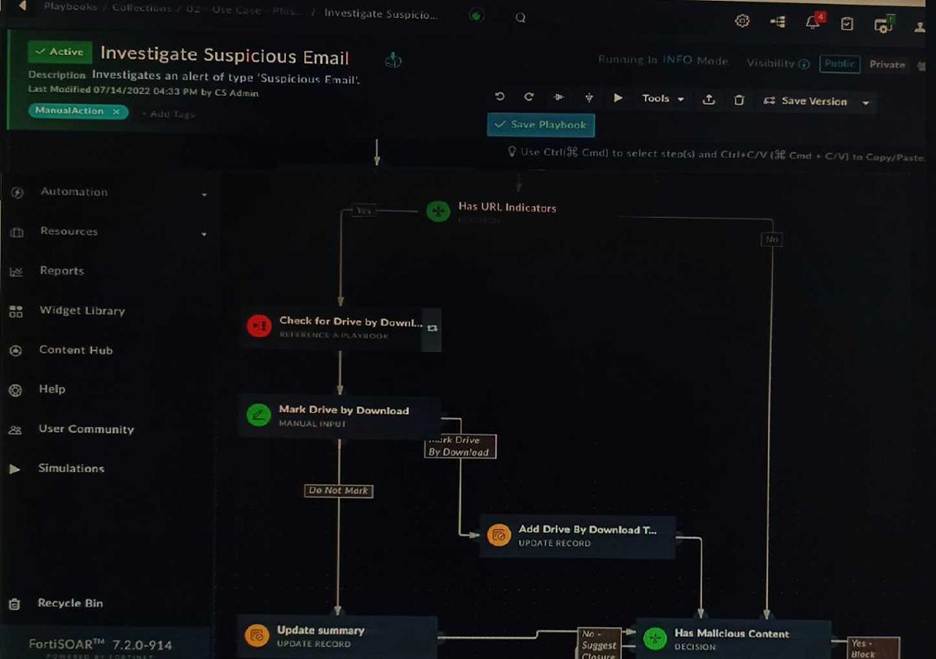
You are investigating a suspicious e-mail alert on FortiSOAR, and after reviewing the executed playbook, you can see that it requires intervention.
What should be your next step?
- A . Go to the Incident Response tasks dashboard and run the pending actions
- B . Click on the notification icon on FortiSOAR GUI and run the pending input action
- C . Run the Mark Drive by Download playbook action
- D . Reply to the e-mail with the requested Playbook action
A
Explanation:
The exhibited playbook requires intervention, which means that the playbook has reached a point where it needs a human operator to take action. The next step should be to go to the Incident Response tasks dashboard and run the pending actions. This will allow you to see the pending actions that need to be taken and to take those actions.
The other options are not correct.
Option B will only show you the notification icon, but it will not allow you to run the pending input action.
Option C will run the Mark Drive by Download playbook action, but this is not the correct action to take in this case.
Option D is not a valid option.
Here are some additional details about pending actions in FortiSOAR: Pending actions are actions that need to be taken by a human operator. Pending actions are displayed in the Incident Response tasks dashboard. Pending actions can be run by clicking on the action in the dashboard.
Refer to the exhibits, which show a firewall policy configuration and a network topology.
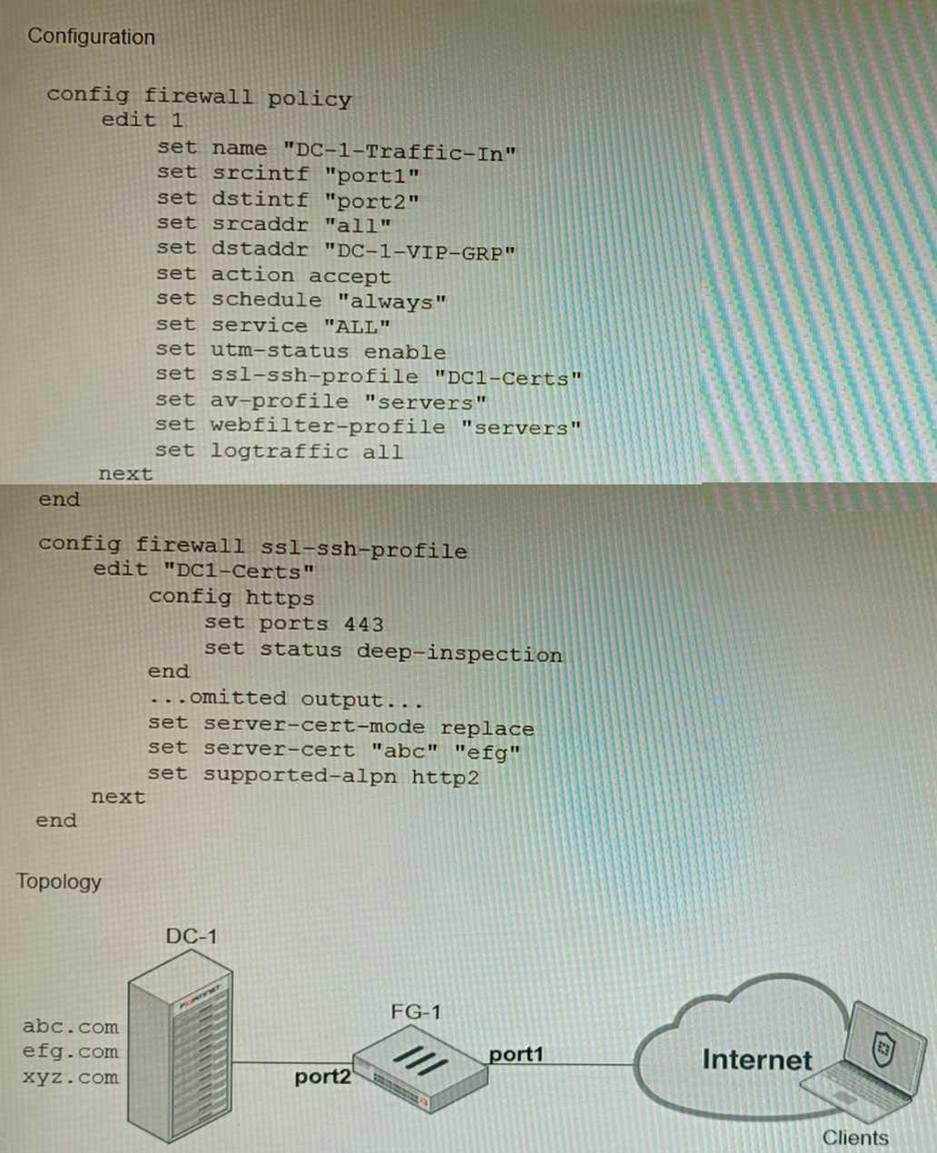
An administrator has configured an inbound SSL inspection profile on a FortiGate device (FG-1) that is protecting a data center hosting multiple web pages.
Given the scenario shown in the exhibits, which certificate will FortiGate use to handle requests to xyz.com?
- A . FortiGate will fall-back to the default Fortinet_CA_SSL certificate.
- B . FortiGate will reject the connection since no certificate is defined.
- C . FortiGate will use the Fortinet_CA_Untrusted certificate for the untrusted connection,
- D . FortiGate will use the first certificate in the server-cert list―the abc.com certificate
A
Explanation:
When using inbound SSL inspection, FortiGate needs to present a certificate to the client that matches the requested domain name. If no matching certificate is found in the server-cert list, FortiGate will fall-back to the default Fortinet_CA_SSL certificate, which is self-signed and may trigger a warning on the client browser.
References:
https://docs.fortinet.com/document/fortigate/6.4.0/cookbook/103437/inbound-ssl-inspection
Refer to the exhibit showing an SD-WAN configuration.
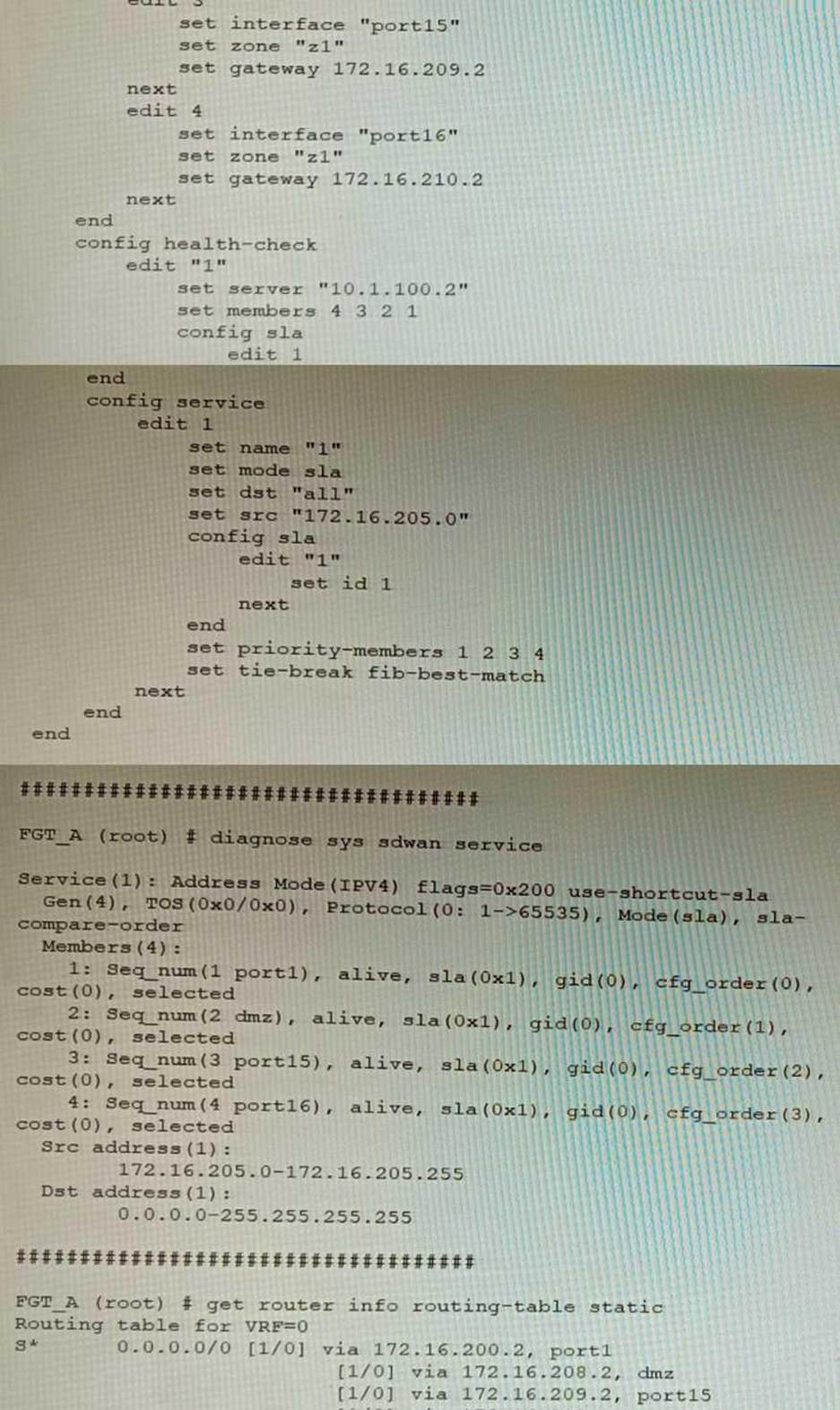
According to the exhibit, if an internal user pings 10.1.100.2 and 10.1.100.22 from subnet 172.16.205.0/24, which outgoing interfaces will be used?
- A . port16 and port1
- B . port1 and port1
- C . port16 and port15
- D . port1 and port15
A
Explanation:
According to the exhibit, the SD-WAN configuration has two rules: one for traffic to 10.1.100.0/24 subnet, and one for traffic to 10.1.100.16/28 subnet. The first rule uses the best quality strategy, which selects the SD-WAN member with the best measured quality based on performance SLA metrics. The second rule uses the manual strategy, which specifies port1 as the SD-WAN member to select. Therefore, if an internal user pings 10.1.100.2 and 10.1.100.22 from subnet 172.16.205.0/24, the outgoing interfaces will be port16 and port1 respectively, assuming that port16 has the best quality among the SD-WAN members.
References: https://docs.fortinet.com/document/fortigate/6.2.14/cookbook/218559/configuring-the-sd-wan-interface
Review the VPN configuration shown in the exhibit.
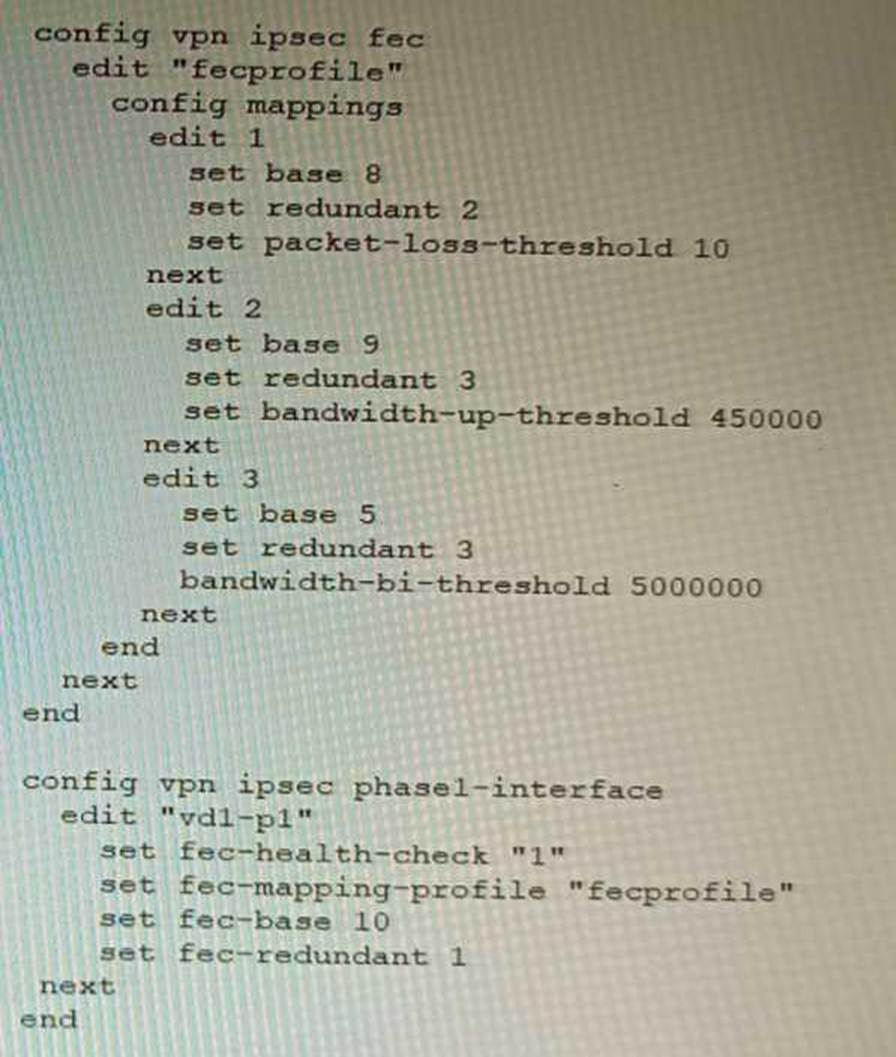
What is the Forward Error Correction behavior if the SD-WAN network traffic download is 500 Mbps and has 8% of packet loss in the environment?
- A . 1 redundant packet for every 10 base packets
- B . 3 redundant packet for every 5 base packets
- C . 2 redundant packet for every 8 base packets
- D . 3 redundant packet for every 9 base packets
C
Explanation:
The FEC configuration in the exhibit specifies that if the packet loss is greater than 10%, then the FEC mapping will be 8 base packets and 2 redundant packets. The download bandwidth of 500 Mbps is not greater than 950 Mbps, so the FEC mapping is not overridden by the bandwidth setting. Therefore, the FEC behavior will be 2 redundant packets for every 8 base packets.
Here is the explanation of the FEC mappings in the exhibit:
Packet loss greater than 10%: 8 base packets and 2 redundant packets.
Upload bandwidth greater than 950 Mbps: 9 base packets and 3 redundant packets.
The mappings are matched from top to bottom, so the first mapping that matches the conditions will be used. In this case, the first mapping matches because the packet loss is greater than 10%. Therefore, the FEC behavior will be 2 redundant packets for every 8 base packets.
Reference: https://docs.fortinet.com/document/fortigate/7.0.0/new-features/169010/adaptive-forward-error-correction-7-0-2
Refer to the exhibits.
Exhibit A
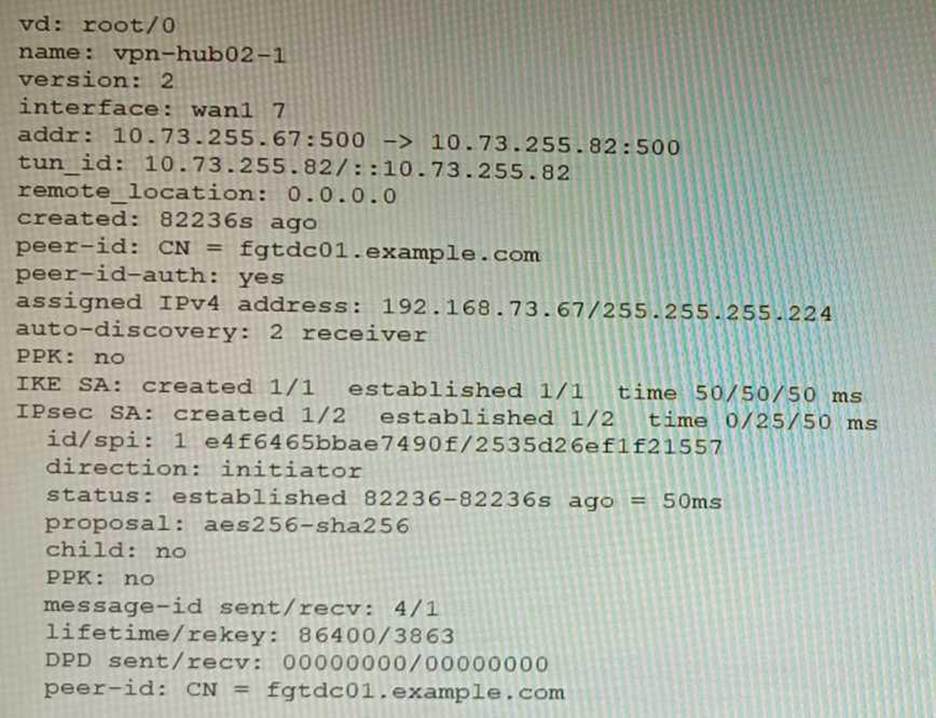
Exhibit B
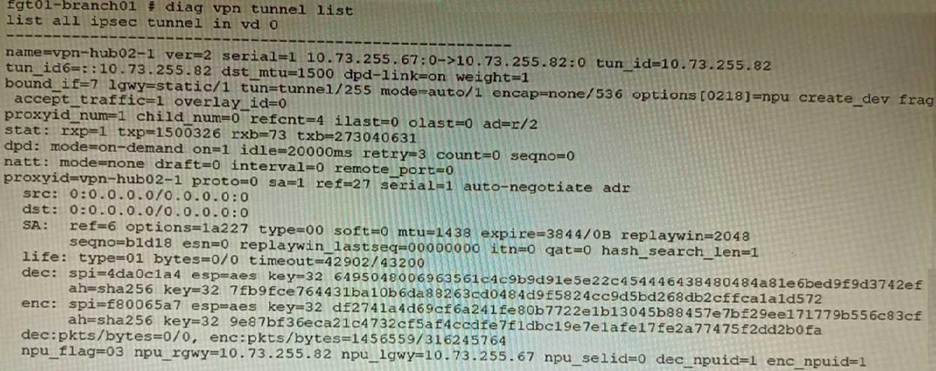
Exhibit C
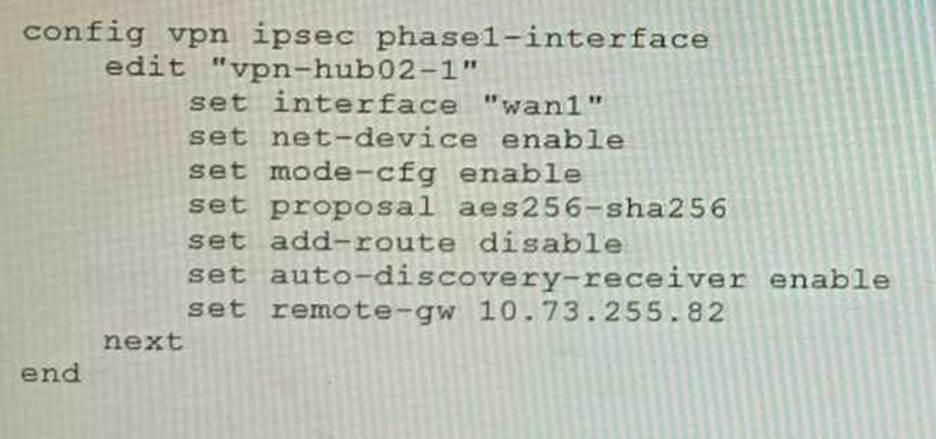
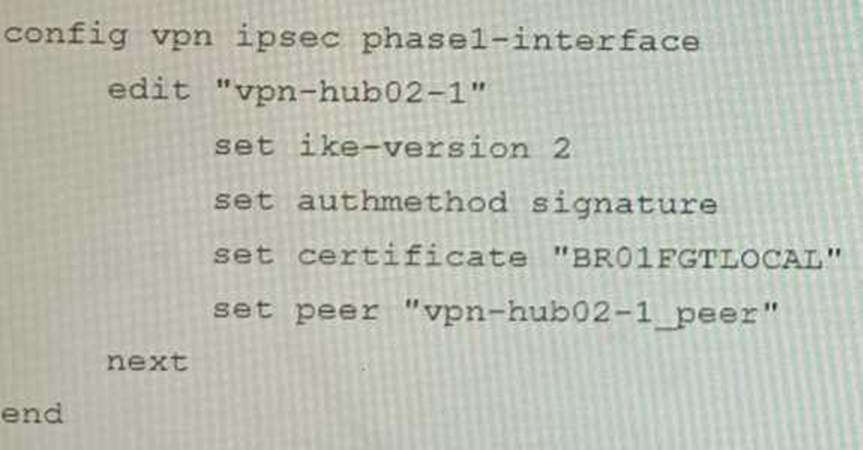
A customer is trying to set up a VPN with a FortiGate, but they do not have a backup of the configuration. Output during a troubleshooting session is shown in the exhibits A and B and a baseline VPN configuration is shown in Exhibit C Referring to the exhibits, which configuration will restore VPN connectivity?
A)
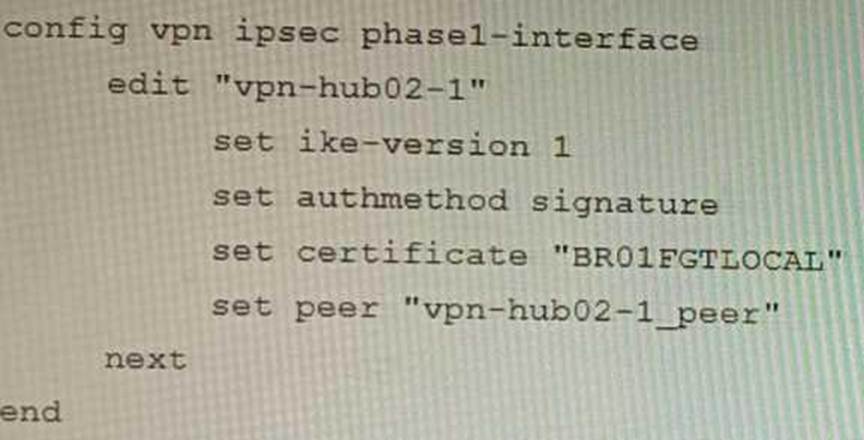
B)
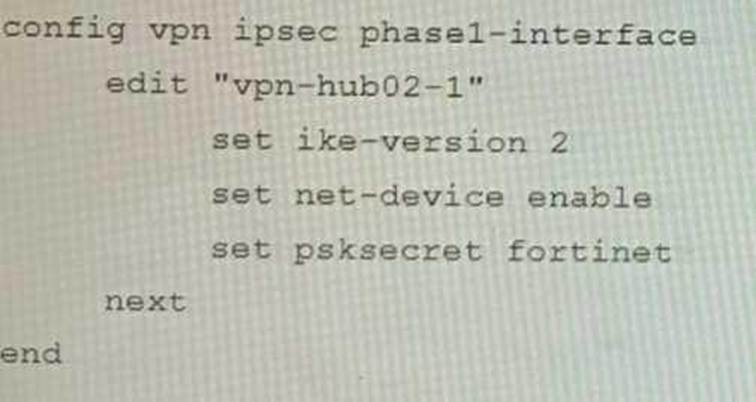
C)
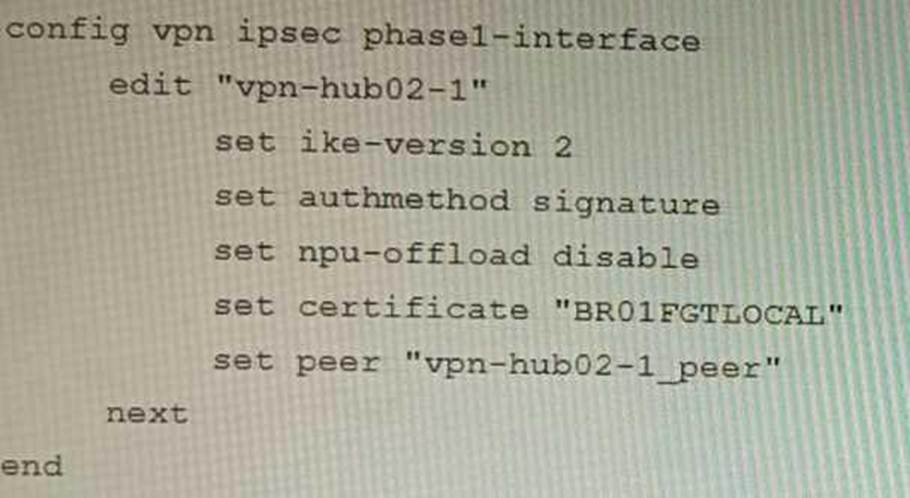
D)
- A . Option A
- B . Option B
- C . Option C
- D . Option D
C
Explanation:
The output in Exhibit A shows that the VPN tunnel is not established because the peer IP address is incorrect. The output in Exhibit B shows that the peer IP address is 192.168.1.100, but the baseline VPN configuration in Exhibit C shows that the peer IP address should be 192.168.1.101.
To restore VPN connectivity, you need to change the peer IP address in the VPN tunnel configuration to 192.168.1.101.
The correct configuration is shown below: config vpn ipsec phase1-interface edit "wan"
set peer-ip 192.168.1.101
set peer-id 192.168.1.101
set dhgrp 1
set auth-mode psk
set psk SECRET_PSK
next
end
Option A is incorrect because it does not change the peer IP address. Option B is incorrect because it changes the peer IP address to 192.168.1.100, which is the incorrect IP address. Option D is incorrect because it does not include the necessary configuration for the VPN tunnel.
You must analyze an event that happened at 20:37 UTC.
One log relevant to the event is extracted from FortiGate logs:

The devices and the administrator are all located in different time zones Daylight savings time (DST) is disabled
• The FortiGate is at GMT-1000.
• The FortiAnalyzer is at GMT-0800
• Your browser local time zone is at GMT-03.00
You want to review this log on FortiAnalyzer GUI, what time should you use as a filter?
- A . 20:37:08
- B . 10:37:08
- C . 17:37:08
- D . 12.37:08
C
Explanation:
To review this log on FortiAnalyzer GUI, the administrator should use the time filter that matches the local time zone of FortiAnalyzer, which is GMT-0800. Since the log was generated at 20:37 UTC (GMT+0000), the corresponding time in GMT-0800 is 20:37 – 8 hours = 12:37. However, since DST is disabled on FortiAnalyzer, the administrator should add one hour to account for daylight saving time difference, resulting in 12:37 + 1 hour = 13:37. Therefore, the time filter to use is 13:37:08.
References: https://docs.fortinet.com/document/fortianalyzer/6.4.0/administration-guide/103664/time-zone-and-daylight-saving-time
Refer to the exhibit.
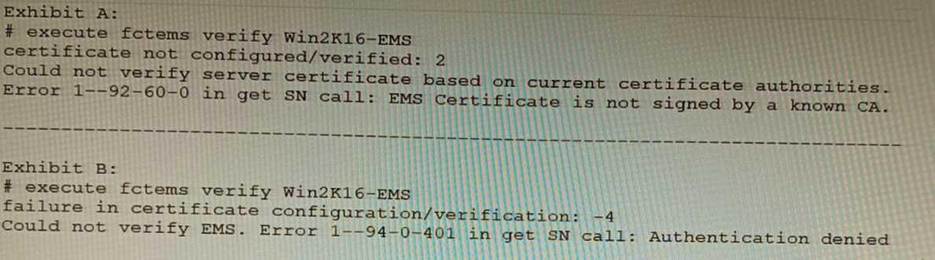
The exhibit shows two error messages from a FortiGate root Security Fabric device when you try to configure a new connection to a FortiClient EMS Server.
Referring to the exhibit, which two actions will fix these errors? (Choose two.)
- A . Verify that the CRL is accessible from the root FortiGate
- B . Export and import the FortiClient EMS server certificate to the root FortiGate.
- C . Install a new known CA on the Win2K16-EMS server.
- D . Authorize the root FortiGate on the FortiClient EMS
AD
Explanation:
A is correct because the error message "The CRL is not accessible" indicates that the root FortiGate cannot access the CRL for the FortiClient EMS server. Verifying that the CRL is accessible will fix this error.
D is correct because the error message "The FortiClient EMS server is not authorized" indicates that
the root FortiGate is not authorized to connect to the FortiClient EMS server. Authorizing the root FortiGate on the FortiClient EMS server will fix this error.
The other options are incorrect. Option B is incorrect because exporting and importing the FortiClient EMS server certificate to the root FortiGate will not fix the CRL error. Option C is incorrect because installing a new known CA on the Win2K16-EMS server will not fix the authorization error. References:
Troubleshooting FortiClient EMS connectivity | FortiClient / FortiOS 7.0.0 – Fortinet Document Library Authorizing FortiGates with FortiClient EMS | FortiClient / FortiOS 6.4.8 – Fortinet Document Library
Refer to the exhibits.
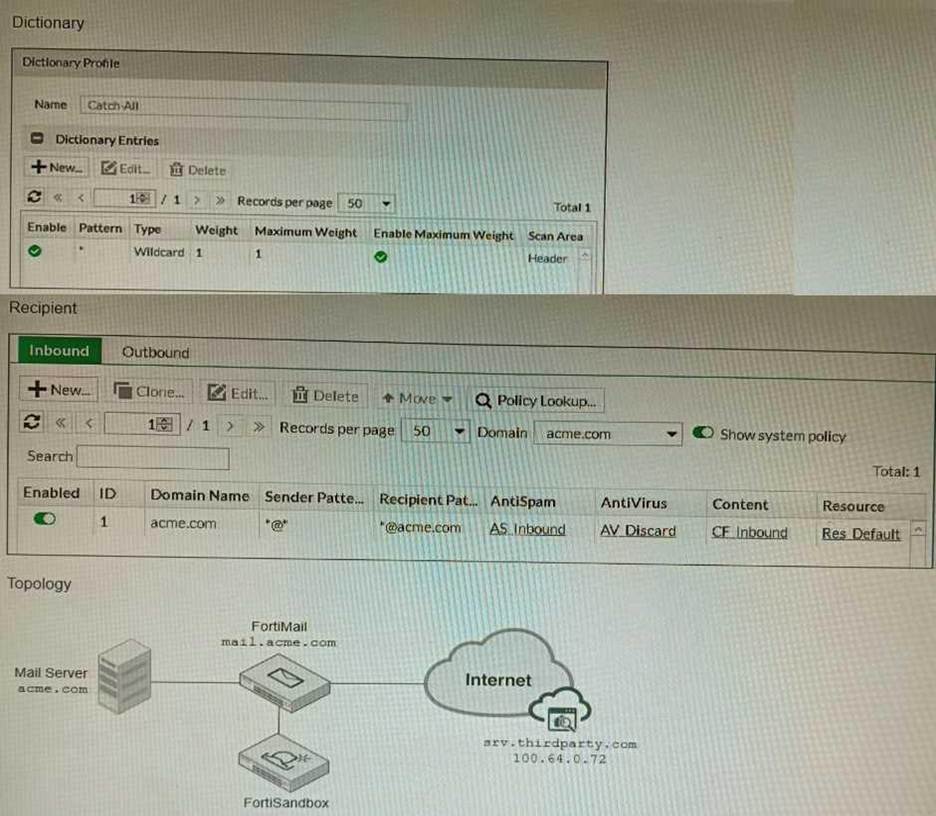
The exhibits show a FortiMail network topology, Inbound configuration settings, and a Dictionary Profile.
You are required to integrate a third-party’s host service (srv.thirdparty.com) into the e-mail processing path.
All inbound e-mails must be processed by FortiMail antispam and antivirus with FortiSandbox integration. If the email is clean, FortiMail must forward it to the third-party service, which will send the email back to FortiMail for final delivery, FortiMail must not scan the e-mail again.
Which three configuration tasks must be performed to meet these requirements? (Choose three.)
- A . Change the scan order in FML-GW to antispam-sandbox-content.
- B . Apply the Catch-Ail profile to the CFInbound profile and configure a content action profile to deliver to the srv. thirdparty. com FQDN
- C . Create an access receive rule with a Sender value of srv. thirdparcy.com, Recipient value of *@acme.com, and action value of Safe
- D . Apply the Catch-AII profile to the ASinbound profile and configure an access delivery rule to deliver to the 100.64.0.72 host.
- E . Create an IP policy with a Source value of 100. 64 .0.72/32, enable precedence, and place the policy at the top of the list.
ABE
Explanation:
A is correct because the scan order must be changed to antispam-sandbox-content in order for FortiMail to scan the email for spam and viruses before forwarding it to the third-party service.
B is correct because the Catch-All profile must be applied to the CFInbound profile in order for FortiMail to forward clean emails to the third-party service.
E is correct because an IP policy must be created with a Source value of 100.64.0.72/32 in order to allow emails from the third-party service to be delivered to FortiMail.
The other options are not necessary to meet the requirements. Option C is not necessary because the access receive rule will already allow emails from the third-party service to be received by FortiMail. Option D is not necessary because the Catch-All profile already allows emails to be delivered to any destination.
Here are some additional details about integrating a third-party service into the FortiMail email processing path:
The third-party service must be able to receive emails from FortiMail and send them back to FortiMail.
The third-party service must be able to communicate with FortiMail using the SMTP protocol.
The third-party service must be able to authenticate with FortiMail using the SMTP AUTH protocol. Once the third-party service is integrated into the FortiMail email processing path, all inbound emails will be processed by FortiMail as usual. If the email is clean, FortiMail will forward it to the third-party service. The third-party service will then send the email back to FortiMail for final delivery. FortiMail will not scan the email again.
You are troubleshooting a FortiMail Cloud service integrated with Office 365 where outgoing emails are not reaching the recipients’ mail.
What are two possible reasons for this problem? (Choose two.)
- A . The FortiMail access control rule to relay from Office 365 servers FQDN is missing.
- B . The FortiMail DKIM key was not set using the Auto Generation option.
- C . The FortiMail access control rules to relay from Office 365 servers public IPs are missing.
- D . A Mail Flow connector from the Exchange Admin Center has not been set properly to the FortiMail Cloud FQDN.
AD
Explanation: