
Fortinet NSE5_FSM-6.3 Practice Exams
Last updated on Oct 21,2026- Exam Code: NSE5_FSM-6.3
- Exam Name: Fortinet NSE 5 - FortiSIEM 6.3
- Certification Provider: Fortinet
- Latest update: Oct 21,2026
An administrator defines SMTP as a critical process on a Linux server.
It the SMTP process is stopped. FortiSIEM will generate a critical event with which event type?
- A . Postfix-Mail-Stop
- B . PH_DEV_MON_PROC_STOP
- C . PH_DEV_MON_SMTP_STOP
- D . Generic_SMTP_Procoss_Exit
B
Explanation:
Process Monitoring in FortiSIEM: FortiSIEM can monitor critical processes on managed devices, such as an SMTP process on a Linux server.
Event Generation: When a critical process stops, FortiSIEM generates an event to alert administrators.
Event Types: Specific event types correspond to different monitored conditions. For a stopped process, the event type PH_DEV_MON_PROC_STOP is used.
Reasoning: The name PH_DEV_MON_PROC_STOP (Device Monitoring Process Stop) is a generic event type used by FortiSIEM to indicate that any monitored process, including SMTP, has stopped.
Reference: FortiSIEM 6.3 User Guide, Event Types section, explains the predefined event types and their usage in different monitoring scenarios.
An administrator defines SMTP as a critical process on a Linux server.
It the SMTP process is stopped. FortiSIEM will generate a critical event with which event type?
- A . Postfix-Mail-Stop
- B . PH_DEV_MON_PROC_STOP
- C . PH_DEV_MON_SMTP_STOP
- D . Generic_SMTP_Procoss_Exit
B
Explanation:
Process Monitoring in FortiSIEM: FortiSIEM can monitor critical processes on managed devices, such as an SMTP process on a Linux server.
Event Generation: When a critical process stops, FortiSIEM generates an event to alert administrators.
Event Types: Specific event types correspond to different monitored conditions. For a stopped process, the event type PH_DEV_MON_PROC_STOP is used.
Reasoning: The name PH_DEV_MON_PROC_STOP (Device Monitoring Process Stop) is a generic event type used by FortiSIEM to indicate that any monitored process, including SMTP, has stopped.
Reference: FortiSIEM 6.3 User Guide, Event Types section, explains the predefined event types and their usage in different monitoring scenarios.
Refer to the exhibit.
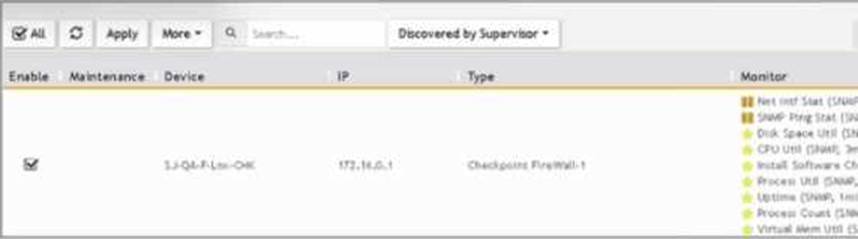
What does the pauso icon indicate?
- A . Data collection is paused after the intervals shown for metrics.
- B . Data collection has not started.
- C . Data collection execution failed because the device is not reachable.
- D . Data collection is paused duo to an issue, such as a change of password.
D
Explanation:
Data Collection Status: FortiSIEM displays various icons to indicate the status of data collection for different devices.
Pause Icon: The pause icon specifically indicates that data collection is paused, but this can happen due to several reasons.
Common Cause for Pausing: One common cause for pausing data collection is an issue such as a change of password, which prevents the system from authenticating and collecting data.
Exhibit Analysis: In the provided exhibit, the presence of the pause icon next to the device suggests that data collection has encountered an issue that has caused it to pause.
Reference: FortiSIEM 6.3 User Guide, Device Management and Data Collection Status Icons section, which explains the different icons and their meanings.
Refer to the exhibit.
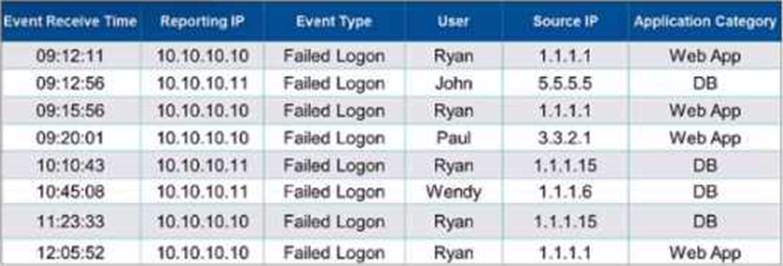
It events are grouped by Event Type and User attributes in FortiSIEM.
How many results will be displayed?
- A . Four results will be displayed.
- B . Eight results will be displayed.
- C . Two results will be displayed.
- D . No results will be displayed.
B
Explanation:
Grouping Events in FortiSIEM: Grouping events by specific attributes allows administrators to aggregate and analyze data more efficiently.
Grouping Criteria: In this case, the events are grouped by "Event Type" and "User" attributes.
Unique Combinations: To determine the number of results displayed, identify the unique combinations of the "Event Type" and "User" attributes in the provided data.
Failed Logon by Ryan (appears multiple times but is one unique combination) Failed Logon by John
Failed Logon by Paul Failed Logon by Wendy
Unique Groupings: There are four unique groupings based on the given data: "Failed Logon" by "Ryan", "John", "Paul", and "Wendy".
Reference: FortiSIEM 6.3 User Guide, Event Management and Reporting sections, which explain how events are grouped and reported based on selected attributes.
Which is a requirement for implementing FortiSIEM disaster recovery?
- A . All worker nodes must access both supervisor nodes using IP.
- B . SNMP, and WMI ports must be open between the two supervisor nodes.
- C . The two supervisor nodes must have layer 2 connectivity.
- D . DNS names must be used for the worker upload addresses.
D
Explanation:
Disaster Recovery (DR) Implementation: For FortiSIEM to effectively support disaster recovery, specific requirements must be met to ensure seamless failover and data integrity.
Layer 2 Connectivity: One of the critical requirements for implementing FortiSIEM DR is that the two supervisor nodes must have layer 2 connectivity.
Layer 2 Connectivity: This ensures that the supervisors can communicate directly at the data link layer, which is necessary for synchronous data replication and other DR processes.
Importance of Connectivity: Layer 2 connectivity between the supervisor nodes ensures that they can maintain consistent and up-to-date state information, which is essential for a smooth failover in the event of a disaster.
Reference: FortiSIEM 6.3 Administration Guide, Disaster Recovery section, which details the requirements and configurations needed for setting up disaster recovery, including the necessity for layer 2 connectivity between supervisor nodes.
In the advanced analytical rules engine in FortiSIEM, multiple subpatterms can be referenced using which three operation? (Choose three.)
- A . ELSE
- B . NOT
- C . FOLLOWED_BY
- D . OR
- E . AND
CDE
Explanation:
Advanced Analytical Rules Engine: FortiSIEM’s rules engine allows for complex event correlation using multiple subpatterns.
Operations for Referencing Subpatterns:
FOLLOWED_BY: This operation is used to indicate that one event follows another within a specified time window.
OR: This logical operation allows for the inclusion of multiple subpatterns, where the rule triggers if
any of the subpatterns match.
AND: This logical operation requires all referenced subpatterns to match for the rule to trigger.
Usage: These operations allow for detailed and precise event correlation, helping to detect complex patterns and incidents.
Reference: FortiSIEM 6.3 User Guide, Advanced Analytics Rules Engine section, which explains the use of different operations to reference subpatterns in rules.
Which statement about global thresholds and per device thresholds is true?
- A . FortiSIEM uses global and per device thresholds tor all performance metrics.
- B . FortiSIEM uses global thresholds for all performance metrics.
- C . FortiSIEM uses fixed hardcoded thresholds for all performance metrics.
- D . FortiSIEM uses global thresholds for all security metrics.
A
Explanation:
Threshold Management: FortiSIEM uses thresholds to generate alerts and incidents based on performance and security metrics.
Global Thresholds: These are default thresholds applied to all devices and metrics across the system, providing a baseline for alerts.
Per Device Thresholds: These thresholds can be customized for individual devices, allowing for more granular control and tailored monitoring based on specific device characteristics and requirements.
Usage in Performance Metrics: Both global and per device thresholds are used for performance metrics to ensure comprehensive and precise monitoring.
Reference: FortiSIEM 6.3 User Guide, Thresholds and Alerts section, details the application of global and per device thresholds for performance and security metrics.
In the rules engine, which condition instructs FortiSIEM to summarize and count the matching evaluated data?
- A . Time Window
- B . Aggregation
- C . Group By
- D . Filters
B
Explanation:
Rules Engine in FortiSIEM: The rules engine evaluates incoming events based on defined conditions to detect incidents and anomalies.
Aggregation Condition: The aggregation condition instructs FortiSIEM to summarize and count the matching evaluated data.
Function: Aggregation is used to group events based on specified criteria and then perform operations such as counting the number of occurrences within a defined time window.
Purpose: This allows for the detection of patterns and anomalies, such as a high number of failed login attempts within a short period.
Reference: FortiSIEM 6.3 User Guide, Rules Engine section, which explains how aggregation is used to summarize and count matching data.
Refer to the exhibit.
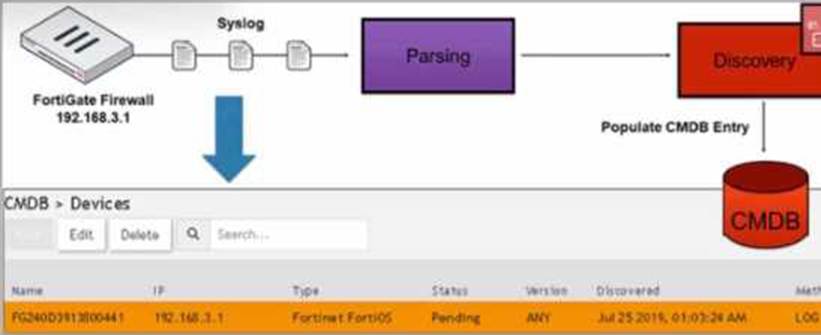
How was the FortiGate device discovered by FortiSIEM?
- A . GUI log discovery
- B . Syslog discovery
- C . Pull events discovery
- D . Auto log discovery
D
Explanation:
Discovery Methods in FortiSIEM: FortiSIEM can discover devices using various methods, including syslog, SNMP, and others.
Syslog Discovery: The exhibit shows that the FortiGate device is discovered by FortiSIEM using syslog.
Syslog Parsing: The syslog messages sent by the FortiGate device are parsed by FortiSIEM to extract relevant information.
CMDB Entry: Based on the parsed information, an entry is populated in the Configuration Management Database (CMDB) for the device.
Evidence in Exhibit: The exhibit shows the syslog flow from the FortiGate Firewall to the parsing and discovery process, resulting in the device being listed in the CMDB with the status "Pending."
Reference: FortiSIEM 6.3 User Guide, Device Discovery section, which explains how syslog discovery works and how devices are added to the CMDB based on syslog data.
Refer to the exhibit.
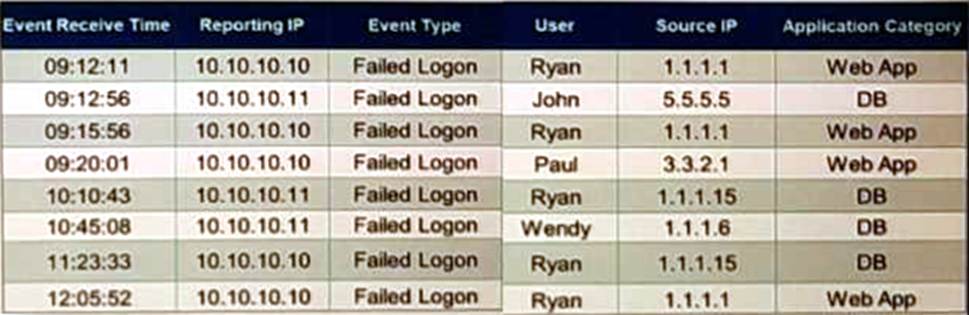
If events are grouped by Reporting IP, Event Type, and user attributes in FortiSIEM, how, many results will be displayed?
- A . Seven results will be displayed.
- B . There results will be displayed.
- C . Unique attribute cannot be grouped.
- D . Five results will be displayed.
A
Explanation:
Grouping Events: Grouping events by specific attributes allows for the aggregation of similar events.
Grouping Criteria: For this question, events are grouped by "Reporting IP," "Event Type," and "User."
Unique Combinations Analysis: