
Fortinet NSE5_FSM-6.3 Practice Exams
Last updated on Oct 22,2026- Exam Code: NSE5_FSM-6.3
- Exam Name: Fortinet NSE 5 - FortiSIEM 6.3
- Certification Provider: Fortinet
- Latest update: Oct 22,2026
An administrator wants to search for events received from Linux and Windows agents.
Which attribute should the administrator use in search filters, to view events received from agents only.
- A . External Event Receive Protocol
- B . Event Received Proto Agents
- C . External Event Receive Raw Logs
- D . External Event Receive Agents
D
Explanation:
Search Filters in FortiSIEM: When searching for specific events, administrators can use various attributes to filter the results.
Attribute for Agent Events: To view events received specifically from Linux and Windows agents, the attribute External Event Receive Agents should be used.
Function: This attribute filters events that are received from agents, distinguishing them from events received through other protocols or sources.
Search Efficiency: Using this attribute helps the administrator focus on events collected by FortiSIEM agents, making the search results more relevant and targeted.
Reference: FortiSIEM 6.3 User Guide, Event Search and Filters section, which describes the available attributes and their usage for filtering search results.
Which FortiSIEM feature must you use to produce a report on which FortiGate devices in your environment are running which firmware version?
- A . Run an analytic search.
- B . Run a query using the Inventory tab.
- C . Run a baseline report.
- D . Run a CMDB report
B
Explanation:
Feature Overview: FortiSIEM provides several tools for querying and reporting on device information within an environment.
Inventory Tab: The Inventory tab is specifically designed to display detailed information about devices, including their firmware versions.
Query Functionality: Within the Inventory tab, you can run queries to filter and display devices based on specific attributes, such as the firmware version for FortiGate devices.
Report Generation: By running a query in the Inventory tab, you can produce a report that lists the FortiGate devices and their corresponding firmware versions.
Reference: FortiSIEM 6.3 User Guide, Inventory Management section, explains how to use the Inventory tab to query and report on device attributes.
Refer to the exhibit.

An administrator is investigating a FortiSIEM license issue.
The procedure is for which offline licensing condition?
- A . The procedure is for offline license debug.
- B . The procedure is for offline license registration.
- C . The procedure is for offline license validation.
- D . The procedure is for offline license verification.
B
Explanation:
Offline Licensing in FortiSIEM: FortiSIEM provides mechanisms for offline licensing to accommodate environments without direct internet access.
License Tool Command: The command ./phLicenseTool –collect license_req.dat is used to collect license information necessary for offline registration.
Procedure Analysis: The exhibit shows the output of this command, which indicates the collection of license information to a file named license_req.dat.
Offline License Registration: This collected data file is then typically uploaded to the FortiSIEM support portal or provided to the FortiSIEM support team for processing and generating a license file.
Reference: FortiSIEM 6.3 Administration Guide, Licensing section, details the procedures for both online and offline license registration, including the use of the phLicenseTool for offline scenarios.
Refer to the exhibit.
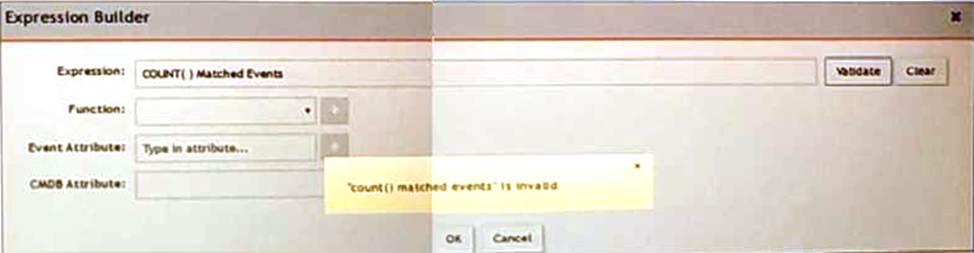
An administrator is trying to identify an issue using an expression bated on the Expression Builder settings shown in the exhibit however, the error message shown in the exhibit indicates that the expression is invalid.
Which is the correct expression?
- A . Matched Events COUNT()
- B . Matched Events(COUNT)
- C . COUNT(Matched Events)
- D . (COUNT) Matched Events
C
Explanation:
Expression Builder in FortiSIEM: The Expression Builder is used to create expressions for analyzing event data.
Correct Syntax: The correct syntax for counting matched events is COUNT(Matched Events).
Function: COUNT is a function that takes a parameter, in this case, "Matched Events," to count the number of occurrences.
Common Errors: Incorrect syntax, such as reversing the order or using parentheses improperly, can lead to invalid expressions.
Reference: FortiSIEM 6.3 User Guide, Expression Builder section, which explains the correct syntax and usage for creating valid expressions for event analysis.
Refer to the exhibit.
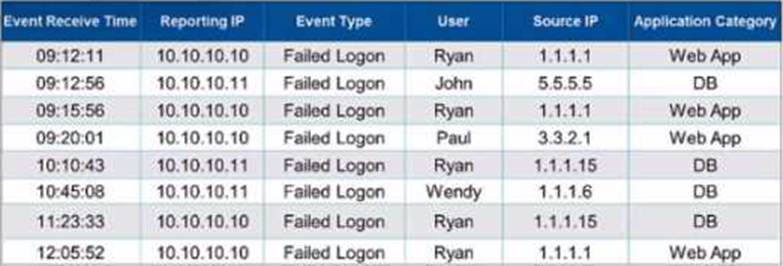
If events are grouped by User. Source IP. and Application Category attributes in FortiSiEM. how many results will be displayed?
- A . Three results will be displayed.
- B . Five results will be displayed.
- C . No results will be displayed.
- D . Seven results will be displayed.
B
Explanation:
Grouping Events in FortiSIEM: Grouping events by specific attributes allows for the aggregation of similar events, providing clearer insights and reducing clutter.
Grouping Criteria: For this question, events are grouped by "User," "Source IP," and "Application Category."
Unique Combinations Analysis:
Ryan, 1.1.1.1, Web App (appears multiple times but is one unique combination)
John, 5.5.5.5, DB
Paul, 3.3.2.1, Web App
Ryan, 1.1.1.15, DB
Wendy, 1.1.1.6, DB
Result Calculation: There are five unique combinations in the provided data based on the specified grouping attributes.
Reference: FortiSIEM 6.3 User Guide, Event Management and Reporting sections, which explain how to group events by various attributes for analysis and reporting purposes.
Which three ports can be used to send Syslogs to FortiSIEM? (Choose three.)
- A . UDP9999
- B . UDP 162
- C . TCP 514
- D . UDP 514
- E . TCP 1470
CDE
Explanation:
Syslog Ports: Syslog messages can be sent over different ports using TCP or UDP protocols.
Common Ports for Syslog:
UDP 514: This is the default port for sending syslog messages over UDP.
TCP 514: This is the default port for sending syslog messages over TCP, providing a more reliable transmission.
TCP 1470: This port is often used for secure or alternative syslog transmission.
Usage in FortiSIEM: FortiSIEM can be configured to receive syslog messages on these ports to ensure the logs are collected from various network devices.
Reference: FortiSIEM 6.3 User Guide, Syslog Integration section, which details the supported ports for syslog transmission.
Which database is used for storing anomaly data, that is calculated for different parameters, such as traffic and device resource usage running averages, and standard deviation values?
- A . Profile DB
- B . Event DB
- C . CMDB
- D . SVN DB
A
Explanation:
Anomaly Data Storage: Anomaly data, including running averages and standard deviation values for different parameters such as traffic and device resource usage, is stored in a specific database.
Profile DB: The Profile DB is used to store this type of anomaly data.
Function: It maintains statistical profiles and baselines for monitored parameters, which are used to detect anomalies and deviations from normal behavior.
Significance: Storing anomaly data in the Profile DB allows FortiSIEM to perform advanced analytics and alerting based on deviations from established baselines.
Reference: FortiSIEM 6.3 User Guide, Database Architecture section, which describes the purpose and contents of the Profile DB in storing anomaly and baseline data.
What are the four possible incident status values?
- A . Active, dosed, cleared, open
- B . Active, cleared, cleared manually, system cleared
- C . Active, closed, manual, resolved
- D . Active, auto cleared, manual, false positive
A
Explanation:
Incident Status Values: Incident statuses in FortiSIEM help administrators track and manage the lifecycle of incidents from detection to resolution.
Four Possible Status Values:
Active: Indicates that the incident is currently ongoing and needs attention.
Closed: Indicates that the incident has been resolved or addressed.
Cleared: Indicates that the incident has been resolved automatically based on predefined conditions.
Open: Indicates that the incident is acknowledged and under investigation but not yet resolved.
Usage: These statuses help in prioritizing and tracking incidents effectively, ensuring that all incidents are appropriately managed.
Reference: FortiSIEM 6.3 User Guide, Incident Management section, which details the different status values and their meanings.
How is a subpattern for a rule defined?
- A . Filters, Aggregation, Group by definitions
- B . Filters, Group By definitions, Threshold
- C . Filters, Threshold, Time Window definitions
- D . Filters, Aggregation, Time Window definitions
How is a subpattern for a rule defined?
- A . Filters, Aggregation, Group by definitions
- B . Filters, Group By definitions, Threshold
- C . Filters, Threshold, Time Window definitions
- D . Filters, Aggregation, Time Window definitions