
Fortinet NSE5_FSM-6.3 Practice Exams
Last updated on Oct 21,2026- Exam Code: NSE5_FSM-6.3
- Exam Name: Fortinet NSE 5 - FortiSIEM 6.3
- Certification Provider: Fortinet
- Latest update: Oct 21,2026
Refer to the exhibit.
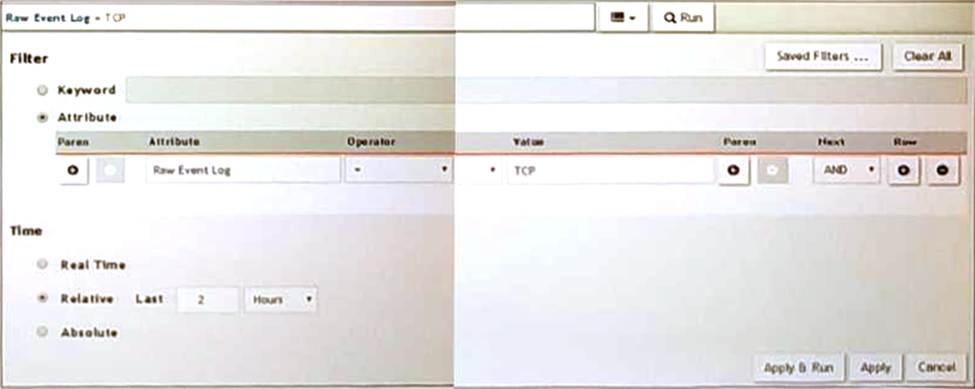
A FortiSIEM is continuously receiving syslog events from a FortiGate firewall The FortiSlfcM administrator is trying to search the raw event logs for the last two hours that contain the keyword tcp . However, the administrator is getting no results from the search.
Based on the selected filters shown in the exhibit, why are there no search results?
- A . The keyword is case sensitive Instead of typing TCP in the Value field. the administrator should type tcp.
- B . In the Time section, the administrator selected the Relative Last option, and in the drop-down lists, selected 2 and Hours as the lime period The time period should be 24 hours.
- C . The administrator selected – in the Operator column That a the wrong operator.
- D . The administrator selected AND in the Next drop-down list. This is the wrong boolean operator.
A
Explanation:
Case Sensitivity in Searches: In FortiSIEM, search queries, including those for raw event logs, are case sensitive. This means that keywords must be entered exactly as they appear in the logs.
Keyword Mismatch: The exhibit shows the keyword "TCP" in the Value field. If the actual events use "tcp" (lowercase), the search will return no results because of the case mismatch.
Correct Keyword: To match the keyword correctly, the administrator should enter "tcp" in the Value field.
Reference: FortiSIEM 6.3 User Guide, Search and Filtering section, which discusses the importance of case sensitivity in search queries.
Refer to the exhibit.
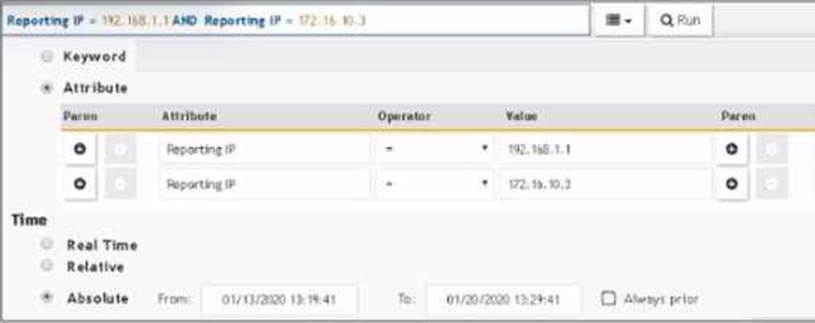
The FortiSIEM administrator is examining events for two devices to investigate an issue. However, the administrator is not getting any results from their search.
Based on the selected filters shown in the exhibit, why is the search returning no results?
- A . Parenthesis are missing.
- B . The wrong boolean operator is selected in the Next column.
- C . The wrong option is selected in the Operator column.
- D . An invalid IP subnet is typed in the Value column.
B
Explanation:
Search Filters in FortiSIEM: When searching for events, the correct use of filters and logical operators is crucial to obtain accurate results.
Issue Analysis:
Selected Filters: The exhibit shows filters for two different Reporting IP addresses.
Logical Operators: The use of "AND" between the two Reporting IP addresses implies that an event must match both IP addresses simultaneously, which is not possible for a single event.
Correct Usage: To search for events from either of the two IP addresses, parentheses should be used to group conditions logically.
Corrected Filter: (Reporting IP = 192.168.1.1 OR Reporting IP = 172.16.10.3) would return events from either IP address.
Reference: FortiSIEM 6.3 User Guide, Search and Filters section, which explains the use of logical operators and the importance of parentheses in constructing effective search queries.
In me FortiSIEM CLI. which command must you use to determine whether or not syslog is being received from a network device?
- A . tcpdump
- B . OphSyslogRecorder
- C . Onetcat
- D . phDeviceTest
A
Explanation:
Syslog Reception Verification: To verify whether syslog messages are being received from a network device, a network packet capture tool can be used.
tcpdump Command: tcpdump is a powerful command-line packet analyzer tool available in Unix-like operating systems. It allows administrators to capture and analyze network traffic.
Usage: By using tcpdump with the appropriate filters (e.g., port 514 for syslog), administrators can monitor the incoming syslog messages in real-time to verify if they are being received.
Example Command: tcpdump -i <interface> port 514 captures the syslog messages on the specified network interface.
Reference: FortiSIEM 6.3 User Guide, CLI Commands section, which details the usage of tcpdump for network traffic analysis and verification of syslog reception.
What does the Frequency field determine on a rule?
- A . How often the rule will evaluate the subpattern.
- B . How often the rule will trigger for the same condition.
- C . How often the rule will trigger.
- D . How often the rule will take a clear action.
B
Explanation:
Rule Evaluation in FortiSIEM: Rules in FortiSIEM are evaluated periodically to check if the defined conditions or subpatterns are met.
Frequency Field: The Frequency field in a rule determines the interval at which the rule’s subpattern will be evaluated.
Evaluation Interval: This defines how often the system will check the incoming events against the rule’s subpattern to determine if an incident should be triggered.
Impact on Performance: Setting an appropriate frequency is crucial to balance between timely detection of incidents and system performance.
Examples:
If the Frequency is set to 5 minutes, the rule will evaluate the subpattern every 5 minutes.
This means that every 5 minutes, the system will check if the conditions defined in the subpattern are met by the incoming events.
Reference: FortiSIEM 6.3 User Guide, Rules and Incidents section, which explains the Frequency field and how it impacts the evaluation of subpatterns in rules.
If an incident’s status is Cleared, what does this mean?
- A . Two hours have passed since the incident occurred and the incident has not reoccurred.
- B . A clear condition set on a rule was satisfied.
- C . A security rule issue has been resolved.
- D . The incident was cleared by an operator.
B
Explanation:
Incident Status in FortiSIEM: The status of an incident indicates its current state and helps administrators track and manage incidents effectively.
Cleared Status: When an incident’s status is "Cleared," it means that a specific condition set to clear the incident has been satisfied.
Clear Condition: This is typically a predefined condition that indicates the issue causing the incident has been resolved or no longer exists.
Automatic vs. Manual Clearance: While some incidents may be cleared automatically based on clear conditions, others might be manually cleared by an operator.
Reference: FortiSIEM 6.3 User Guide, Incident Management section, detailing the various incident statuses and the conditions that lead to an incident being marked as "Cleared."
If an incident’s status is Cleared, what does this mean?
- A . Two hours have passed since the incident occurred and the incident has not reoccurred.
- B . A clear condition set on a rule was satisfied.
- C . A security rule issue has been resolved.
- D . The incident was cleared by an operator.
B
Explanation:
Incident Status in FortiSIEM: The status of an incident indicates its current state and helps administrators track and manage incidents effectively.
Cleared Status: When an incident’s status is "Cleared," it means that a specific condition set to clear the incident has been satisfied.
Clear Condition: This is typically a predefined condition that indicates the issue causing the incident has been resolved or no longer exists.
Automatic vs. Manual Clearance: While some incidents may be cleared automatically based on clear conditions, others might be manually cleared by an operator.
Reference: FortiSIEM 6.3 User Guide, Incident Management section, detailing the various incident statuses and the conditions that lead to an incident being marked as "Cleared."
Refer to the exhibit.
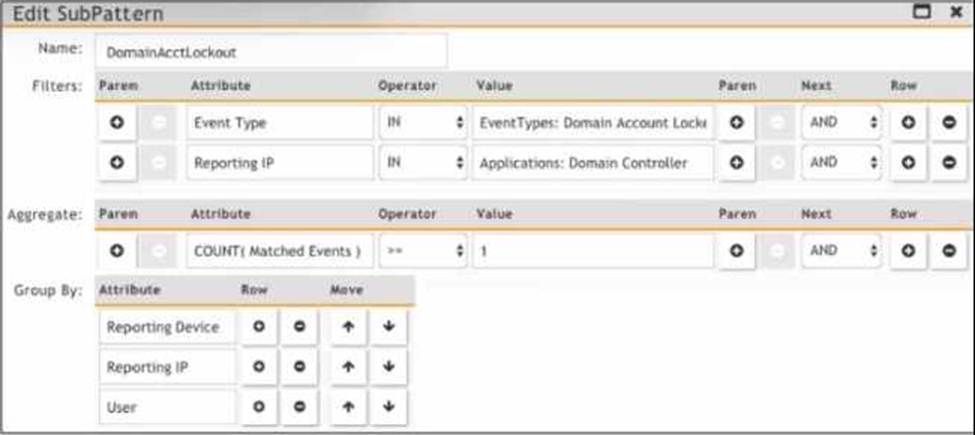
Which section contains the sortings that determine how many incidents are created?
- A . Actions
- B . Group By
- C . Aggregate
- D . Filters
C
Explanation:
Incident Creation in FortiSIEM: Incidents in FortiSIEM are created based on specific patterns and conditions defined within the system.
Group By Function: The "Group By" section in the "Edit SubPattern" window specifies how the data should be grouped for analysis and incident creation.
Impact of Grouping: The way data is grouped affects the number of incidents generated. Each unique combination of the grouped attributes results in a separate incident.
Exhibit Analysis: In the provided exhibit, the "Group By" section lists "Reporting Device," "Reporting IP," and "User." This means incidents will be created for each unique combination of these attributes.
Reference: FortiSIEM 6.3 User Guide, Rule and Pattern Creation section, which details how grouping impacts incident generation.
IF the reported packet loss is between 50% and 98%. which status is assigned to the device in the Availability column of summary dashboard?
- A . Up status is assigned because of received packets.
- B . Critical status is assigned because of reduction in number of packets received.
- C . Degraded status is assigned because of packet loss
- D . Down status is assigned because of packet loss.
B
Explanation:
Device Status in FortiSIEM: FortiSIEM assigns different statuses to devices based on their operational state and performance metrics.
Packet Loss Impact: The reported packet loss percentage directly influences the status assigned to a device. Packet loss between 50% and 98% indicates significant network issues that affect the device’s performance.
Degraded Status: When packet loss is between 50% and 98%, FortiSIEM assigns a "Degraded" status to the device. This status indicates that the device is experiencing substantial packet loss, which impairs its performance but does not render it completely non-functional.
Reasoning: The "Degraded" status helps administrators identify devices with serious performance issues that need attention but are not entirely down.
Reference: FortiSIEM 6.3 User Guide, Device Availability and Status section, explains the criteria for assigning different statuses based on performance metrics such as packet loss.
Which FortiSIEM components can do performance availability and performance monitoring?
- A . Supervisor, worker, and collector
- B . Supervisor and workers only
- C . Supervisor only
- D . Collectors only
A
Explanation:
Performance and Availability Monitoring: Various components in FortiSIEM are responsible for monitoring the performance and availability of devices and services.
Components:
Supervisor: Oversees the entire FortiSIEM infrastructure and coordinates the activities of other components.
Worker: Processes and analyzes the collected data, including performance and availability metrics.
Collector: Gathers performance and availability data from devices in the network.
Collaborative Functioning: These components work together to ensure comprehensive monitoring of the network’s performance and availability.
Reference: FortiSIEM 6.3 User Guide, Performance and Availability Monitoring section, which explains the roles of the supervisor, worker, and collector in monitoring tasks.
Which discovery scan type is prone to miss a device, if the device is quiet and the entry foe that device is not present in the ARP table of adjacent devices?
- A . CMDB scan
- B . L2 scan
- C . Range scan
- D . Smart scan
B
Explanation:
Discovery Scan Types: FortiSIEM uses various scan types to discover devices on a network.
Layer 2 (L2) Scan: An L2 scan discovers devices based on ARP tables and MAC address information from adjacent devices.
Limitation: If a device is quiet (not actively communicating) and its entry is not present in the ARP
table of adjacent devices, the L2 scan may miss it.
Other Scan Types:
CMDB Scan: Based on the existing Configuration Management Database (CMDB) entries.
Range Scan: Scans a specified IP range for devices.
Smart Scan: Uses a combination of methods to discover devices.
Reference: FortiSIEM 6.3 User Guide, Device Discovery section, which explains the different types of discovery scans and their characteristics.