
Fortinet FCSS_EFW_AD-7.4 Practice Exams
Last updated on Nov 16,2026- Exam Code: FCSS_EFW_AD-7.4
- Exam Name: FCSS - Enterprise Firewall 7.4 Administrator
- Certification Provider: Fortinet
- Latest update: Nov 16,2026
An LDAP user cannot authenticate against a FortiGate device.
Examine the real time debug output shown in the exhibit when the user attempted the authentication; then answer the question below.
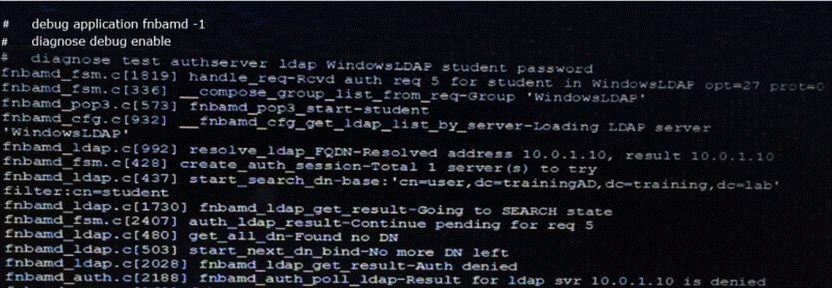

Based on the output in the exhibit, what can cause this authentication problem?
- A . The FortiGate has been configured with the wrong password for the LDAP administrator.
- B . User student is using a wrong password.
- C . User student is not found in the LDAP server.
- D . The FortiGate has been configured with the wrong authentication schema.
What action can be taken on a FortiGate to block traffic using IPS protocol decoders, focusing on network transmission patterns and application signatures?
- A . Use the DNS filter to block application signatures and protocol decoders.
- B . Use application control to limit non-URL-based software handling.
- C . Enable application detection-based SD-WAN rules.
- D . Configure a web filter profile in flow mode.
B
Explanation:
FortiGate’sIPS protocol decodersanalyzenetwork transmission patternsandapplication signaturesto identify and block malicious traffic.Application Controlis the feature that allows FortiGate todetect, classify, and block applicationsbased on their behavior and signatures, even when they do not rely on traditional URLs.
#Application Controlworks alongsideIPS protocol decodersto inspect packet payloads and enforce security policies based on recognized application behaviors.
# It enablesgranular control over non-URL-based applicationssuch asP2P traffic, VoIP, messaging apps, and other non-web-based protocolsthat IPS can identify through protocol decoders.
#IPS and Application Control together can detect evasive or encrypted applications that might bypass traditional firewall rules.
Which of the following statements are true regarding the SIP session helper and the SIP application layer gateway (ALG)? (Choose three)
- A . SIP session helper runs in the kernel; SIP ALG runs as a user space process.
- B . SIP ALG supports SIP HA failover; SIR helper does not
- C . SIP ALG supports SIP over IPv6; SIR helper does not.
- D . SIP ALG can create expected sessions for media traffic; SIP helper does not.
- E . SIP helper supports SIP over TCP and UDP; SIP ALG supports only SIP over UDP.
An administrator must minimize CPU and RAM use on a FortiGate firewall while also enabling essential security features, such as web filtering and application control for HTTPS traffic.
Which SSL inspection setting helps reduce system load while also enabling security features, such as web filtering and application control for encrypted HTTPS traffic?
- A . Use full SSL inspection to thoroughly inspect encrypted payloads.
- B . Disable SSL inspection entirely to conserve resources.
- C . Configure SSL inspection to handle HTTPS traffic efficiently.
- D . Enable SSL certificate inspection mode to perform basic checks without decrypting traffic.
D
Explanation:
To minimizeCPU and RAM usagewhile still enforcingsecurity features like web filtering and application control,SSL certificate inspection modeis the best choice.
#SSL certificate inspectionallows FortiGate to inspectonly the SSL/TLS handshake, including theServer Name Indication (SNI) and certificate details, without decrypting the full encrypted payload.
# This enables features likeweb filtering and application controlbecause FortiGate can determine the destination website or applicationbased onSNI and certificate information.
# Itsignificantly reduces system loadcompared tofull SSL inspection, which requires full decryption and re-encryption of traffic.
Examine the output from the ‘diagnose debug authd fsso list’ command; then answer the question below.
# diagnose debug authd fsso list–FSSO logons-IP: 192.168.3.1 User: STUDENT Groups:TRAININGAD/USERS Workstation: INTERNAL2. TRAINING. LAB The IP address 192.168.3.1 is NOT the one used by the workstation INTERNAL2. TRAINING. LAB.
What should the administrator check?
- A . The IP address recorded in the logon event for the user STUDENT.
- B . The DNS name resolution for the workstation name INTERNAL2. TRAINING. LAB.
- C . The source IP address of the traffic arriving to the FortiGate from the workstation INTERNAL2. TRAINING. LAB.
- D . The reserve DNS lookup forthe IP address 192.168.3.1.
Refer to the exhibit, which shows the ADVPN network topology and partial BGP configuration.
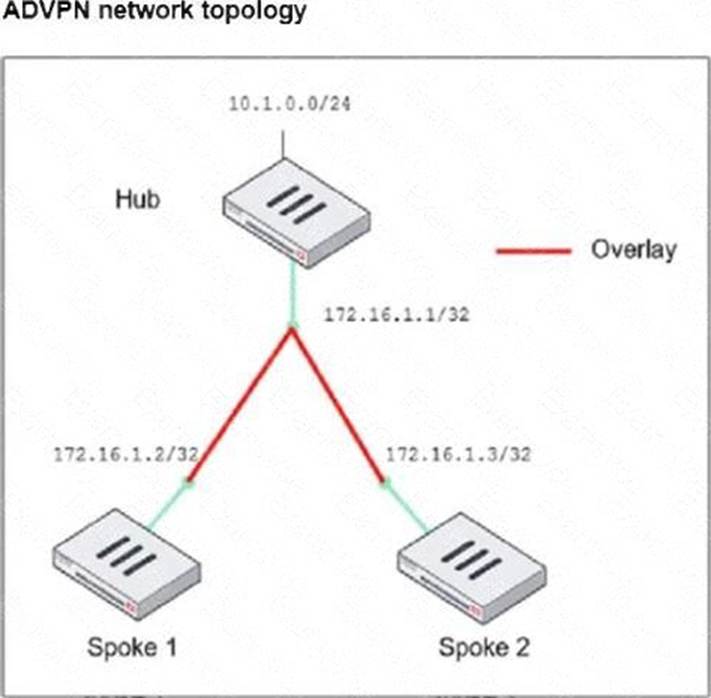
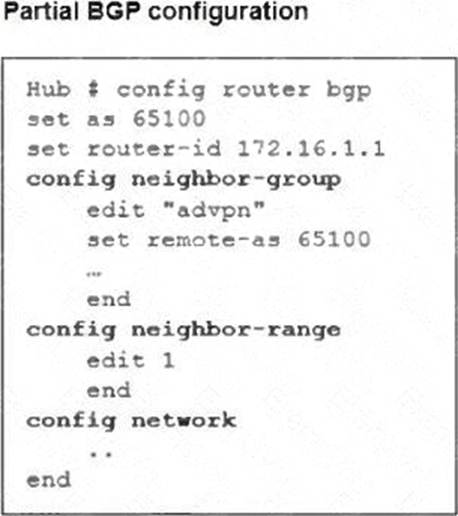
Which two parameters must an administrator configure in the config neighbor range for spokes shown in the exhibit? (Choose two.)
- A . set max-neighbor-num 2
- B . set neighbor-group advpn
- C . set route-reflector-client enable
- D . set prefix 172.16.1.0 255.255.255.0
B D
Explanation:
In the given ADVPN (Auto-Discovery VPN) topology, BGP is being used to dynamically establish routes between spokes. The neighbor-range configuration is crucial for simplifying BGP peer setup by automatically assigning neighbors based on their IP range.
set neighbor-group advpn
# Theneighbor-groupparameter is used to apply pre-defined settings (such as AS number) to dynamically discovered BGP neighbors.
# Theadvpnneighbor-group is already defined in the configuration, and assigning it to the neighbor-range ensures consistent BGP settings for all spoke neighbors.
set prefix 172.16.1.0 255.255.255.0
# This command allowsdynamic BGP peer discoveryby defining a range of potential neighbor IPs (172.16.1.1 – 172.16.1.255).
# Sinceeach spoke has a unique /32 IPwithin this subnet, this ensures that any spoke within the172.16.1.0/24 range can automatically establish a BGP session with the hub.
View the exhibit, which contains a screenshot of some phase-1 settings, and then answer the question below.
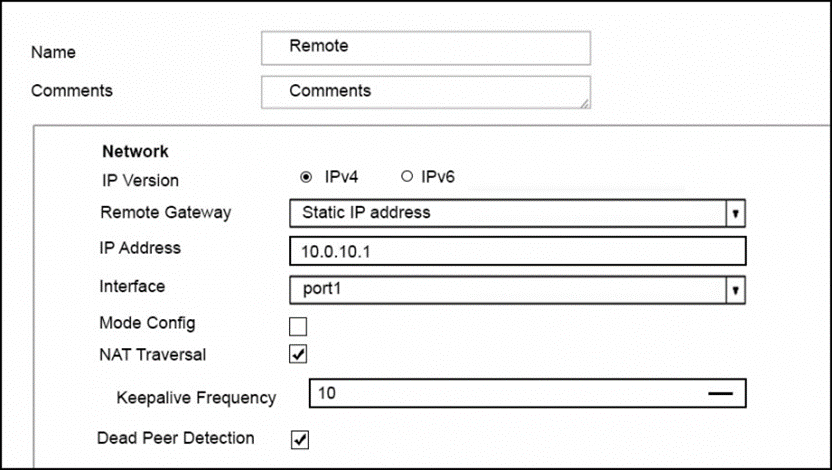
The VPN is up, and DPD packets are being exchanged between both IPsec gateways; however, traffic cannot pass through the tunnel.
To diagnose, the administrator enters these CLI commands:

However, the IKE real time debug does not show any output.
Why?
- A . The debug shows only error messages. If there is no output, then the tunnel is operating normally.
- B . The debug output shows phase 1 negotiation only. After that, the administrator must enable the following real time debug: diagnose debug application ipsec -1.
- C . The log-filter setting was set incorrectly. The VPN’s traffic does not match this filter.
- D . The debug output shows phases 1 and 2 negotiations only. Once the tunnel is up, it does not show any more output.
How will configuring set tcp-mss-sender and set tcp-mss-receiver in a firewall policy affect the size and handling of TCP packets in the network?
- A . The maximum segment size permitted in the firewall policy determines whether TCP packets are allowed or denied.
- B . Applying commands in a firewall policy determines the largest payload a device can handle in a single TCP segment.
- C . The administrator must consider the payload size of the packet and the size of the IP header to configure a correct value in the firewall policy.
- D . The TCP packet modifies the packet size only if the size of the packet is less than the one the administrator configured in the firewall policy.
B
Explanation:
Theset tcp-mss-senderandset tcp-mss-receivercommands in afirewall policyallow an administrator to adjust theMaximum Segment Size (MSS)of TCP packets.
This setting controls thelargest payload sizethat a device can handle in a singleTCP segment, ensuring that packets do not exceed the allowed MTU (Maximum Transmission Unit) along the network path.
#set tcp-mss-senderadjusts the MSS value foroutgoing TCP traffic.
#set tcp-mss-receiveradjusts the MSS value forincoming TCP traffic.
This helps prevent issues withfragmentationandMTU mismatches, improving network performance and avoiding retransmissions.
How will configuring set tcp-mss-sender and set tcp-mss-receiver in a firewall policy affect the size and handling of TCP packets in the network?
- A . The maximum segment size permitted in the firewall policy determines whether TCP packets are allowed or denied.
- B . Applying commands in a firewall policy determines the largest payload a device can handle in a single TCP segment.
- C . The administrator must consider the payload size of the packet and the size of the IP header to configure a correct value in the firewall policy.
- D . The TCP packet modifies the packet size only if the size of the packet is less than the one the administrator configured in the firewall policy.
B
Explanation:
Theset tcp-mss-senderandset tcp-mss-receivercommands in afirewall policyallow an administrator to adjust theMaximum Segment Size (MSS)of TCP packets.
This setting controls thelargest payload sizethat a device can handle in a singleTCP segment, ensuring that packets do not exceed the allowed MTU (Maximum Transmission Unit) along the network path.
#set tcp-mss-senderadjusts the MSS value foroutgoing TCP traffic.
#set tcp-mss-receiveradjusts the MSS value forincoming TCP traffic.
This helps prevent issues withfragmentationandMTU mismatches, improving network performance and avoiding retransmissions.
Refer to the exhibit, which shows the FortiGuard Distribution Network of a FortiGate device.
FortiGuard Distribution Network on FortiGate
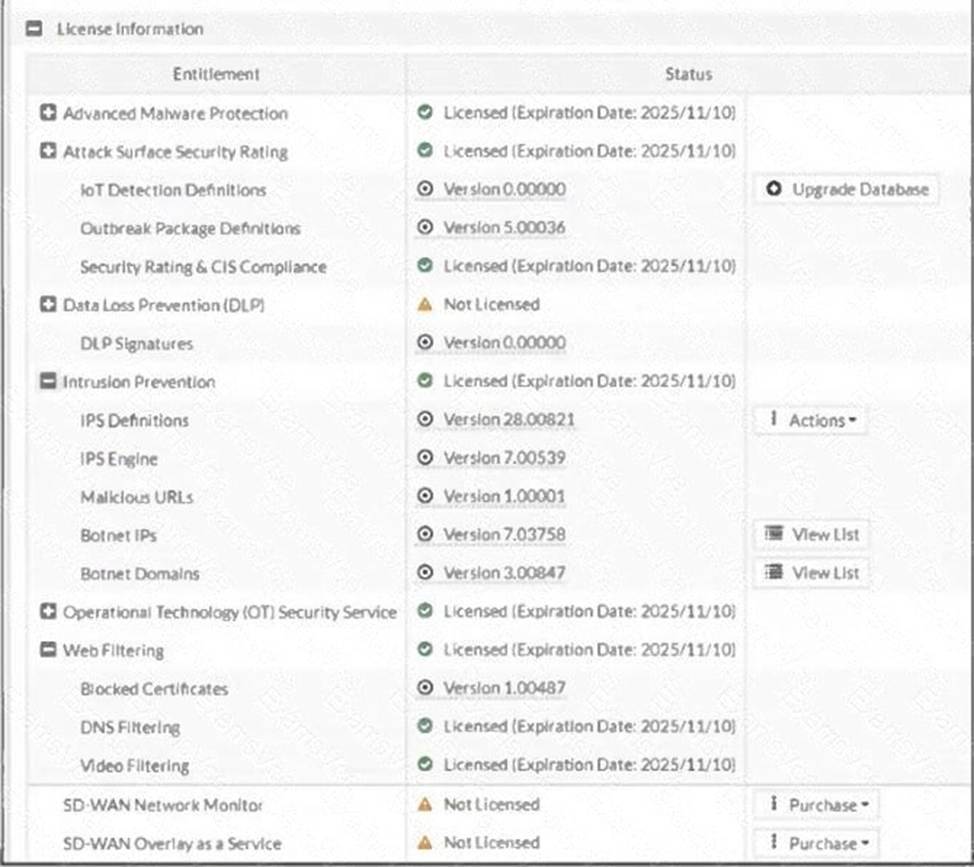
An administrator is trying to find the web filter database signature on FortiGate to resolve issues with websites not being filtered correctly in a flow-mode web filter profile.
Why is the web filter database version not visible on the GUI, such as with IPS definitions?
- A . The web filter database is stored locally, but the administrator must run over CLI diagnose autoupdate versions.
- B . The web filter database is stored locally on FortiGate, but it is hidden behind the GUI. It requires enabling debug mode to make it visible.
- C . The web filter database is not hosted on FortiGate: FortiGate queries FortiGuard or FortiManager for web filter ratings on demand.
- D . The web filter database is only accessible after manual syncing with a valid FDS server using diagnose test update info.
C
Explanation:
Unlike IPS or antivirus databases,FortiGate does not store a full web filter database locally. Instead, FortiGatequeries FortiGuard (or FortiManager, if configured) dynamicallyto classify and filter web content in real time.
Key points:
#Web filtering works on a cloud-based model:
# When a user requests a website,FortiGate queries FortiGuard servers to check its category and reputation.
# The response is then cached locally for faster lookups on repeated requests.
#No local web filter database version:
# UnlikeIPS and antivirus, which download and store signature updates locally,web filtering relies on cloud-based queries.
# This is whyno database version appears in the GUI.
#Flow mode vs Proxy mode:
# Inproxy mode, FortiGate cancachesome web filter data, improving performance.
# Inflow mode, all queries happen dynamically, with no locally stored database.