
DELL EMC D-SNC-DY-00 Practice Exams
Last updated on Oct 21,2026- Exam Code: D-SNC-DY-00
- Exam Name: Dell SONiC Deploy Exam
- Certification Provider: DELL EMC
- Latest update: Oct 21,2026
Question #31
What is the purpose of the write erase boot command option?
- A . Delete the startup and enable zero touch provisioning.
- B . Remove user-installed packages and tile changes.
- C . Delete the startup configuration and the management interface configuration.
- D . Delete the running configuration and all user accounts.
Correct Answer: A
A
Explanation:
The write erase boot command option deletes the startup configuration and enables zero touch provisioning (ZTP). This is used to reset the switch to its default state and prepare it for automated configuration through ZTP.
References:
Dell Technologies SONiC Command Reference Guide
Switch Configuration Guide
A
Explanation:
The write erase boot command option deletes the startup configuration and enables zero touch provisioning (ZTP). This is used to reset the switch to its default state and prepare it for automated configuration through ZTP.
References:
Dell Technologies SONiC Command Reference Guide
Switch Configuration Guide
Question #32
Refer to the exhibit.
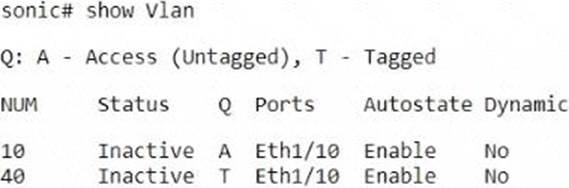
Which three actions can a customer take to change interface Eth1/10 to operate in access mode for VLAN 40?
- A . Configure the access mode for the switch port.
- B . Delete VLAN 40.
- C . Shut down the relevant interface.
- D . Remove the current access VLAN configuration.
- E . Enter it into the relevant interface.
Correct Answer: A D E
A D E
Explanation:
Configure the access mode for the switch port (A):
This involves setting the switch port to operate in access mode.
Remove the current access VLAN configuration (D): Before changing the VLAN, the current configuration must be cleared.
Enter it into the relevant interface (E): Apply the new configuration to the specific interface, Eth1/10.
Steps:
interface Ethernet 1/10
no switchport access vlan <current VLAN> (Remove current VLAN)
switchport mode access
switchport access vlan 40
References:
Dell Technologies SONiC documentation
Dell Networking Configuration Guide
A D E
Explanation:
Configure the access mode for the switch port (A):
This involves setting the switch port to operate in access mode.
Remove the current access VLAN configuration (D): Before changing the VLAN, the current configuration must be cleared.
Enter it into the relevant interface (E): Apply the new configuration to the specific interface, Eth1/10.
Steps:
interface Ethernet 1/10
no switchport access vlan <current VLAN> (Remove current VLAN)
switchport mode access
switchport access vlan 40
References:
Dell Technologies SONiC documentation
Dell Networking Configuration Guide
Question #33
What are two characteristics of route maps in Enterprise SONIC?
- A . Route-map names are not case-sensitive.
- B . The permit or deny clause In route maps permits or rejects the matching routes from being redistributed.
- C . They are a series of commands that contain a matching criterion and action.
- D . Each route map clause has the type values of Match. Set. and Act.
Correct Answer: B C
B C
Explanation:
Route maps in Enterprise SONIC are used for controlling and modifying routing information. They contain a series of commands with matching criteria and actions. The permit or deny clause within route maps determines whether the matching routes are permitted or denied from being redistributed.
References:
Dell Technologies SONiC Route Map Configuration Guide
Dell Networking Configuration Guide
B C
Explanation:
Route maps in Enterprise SONIC are used for controlling and modifying routing information. They contain a series of commands with matching criteria and actions. The permit or deny clause within route maps determines whether the matching routes are permitted or denied from being redistributed.
References:
Dell Technologies SONiC Route Map Configuration Guide
Dell Networking Configuration Guide
Question #34
Which protocol is used to perform an automated installation of Enterprise SONiC?
- A . HTTP
- B . SCP
- C . SFTP
Correct Answer: A
A
Explanation:
The automated installation of Enterprise SONiC is typically performed using the HTTP protocol. During the Zero Touch Provisioning (ZTP) process, the switch retrieves configuration files and software images from an HTTP server, allowing for automated and streamlined deployments.
References:
Dell Technologies SONiC documentation
ONIE User Guide
A
Explanation:
The automated installation of Enterprise SONiC is typically performed using the HTTP protocol. During the Zero Touch Provisioning (ZTP) process, the switch retrieves configuration files and software images from an HTTP server, allowing for automated and streamlined deployments.
References:
Dell Technologies SONiC documentation
ONIE User Guide
Question #35
Which two things does the no vrrp 100 address-family ipv6 command delete?
- A . Identifier
- B . Interface
- C . Version
- D . Address-family
- E . Authentication
Correct Answer: A D
A D
Explanation:
The no vrrp 100 address-family ipv6 command deletes the VRRP (Virtual Router Redundancy Protocol) identifier (A) and the address-family configuration (D) for VRRP group 100. This effectively removes the VRRP configuration for the specified address family.
References:
Dell Technologies SONiC documentation
VRRP Configuration Guide
A D
Explanation:
The no vrrp 100 address-family ipv6 command deletes the VRRP (Virtual Router Redundancy Protocol) identifier (A) and the address-family configuration (D) for VRRP group 100. This effectively removes the VRRP configuration for the specified address family.
References:
Dell Technologies SONiC documentation
VRRP Configuration Guide
Question #36
What does the show vian command display?
- A . All configured VLANs
- B . Only VLANs in an active state
- C . All 4094 VLANs
Correct Answer: A
A
Explanation:
The show vlan command displays all configured VLANs on the device, including their status, ports, and other relevant details. It does not limit the display to only active VLANs or all possible VLANs but shows those that are currently configured.
References:
Dell Technologies SONiC Command Reference Guide
Dell Networking Configuration Guide
A
Explanation:
The show vlan command displays all configured VLANs on the device, including their status, ports, and other relevant details. It does not limit the display to only active VLANs or all possible VLANs but shows those that are currently configured.
References:
Dell Technologies SONiC Command Reference Guide
Dell Networking Configuration Guide
Question #37
Which two additional Q-in-Q VLAN tunnel configuration steps must be followed if the provider network uses a VXLAN overlay?
- A . Configure VLAN Translation.
- B . Map the SVLAN traffic to a VNI.
- C . Remove the CVLAN-to-SVLAN mapping.
- D . Configure the BGP route-target and route-distinguisher.
Correct Answer: A B
A B
Explanation:
Configure VLAN Translation (A): VLAN translation is necessary to translate customer VLANs (CVLANs) to service VLANs (SVLANs) for Q-in-Q tunneling in a VXLAN environment.
Map the SVLAN traffic to a VNI (B): SVLAN traffic must be mapped to a VXLAN Network Identifier (VNI) for encapsulation and transport across the VXLAN overlay network.
References:
Dell Technologies SONiC documentation
VXLAN Configuration Guide
A B
Explanation:
Configure VLAN Translation (A): VLAN translation is necessary to translate customer VLANs (CVLANs) to service VLANs (SVLANs) for Q-in-Q tunneling in a VXLAN environment.
Map the SVLAN traffic to a VNI (B): SVLAN traffic must be mapped to a VXLAN Network Identifier (VNI) for encapsulation and transport across the VXLAN overlay network.
References:
Dell Technologies SONiC documentation
VXLAN Configuration Guide
Question #38
How many port channels can be assigned to a single port?
- A . 8
- B . 2
- C . 4
- D . 1
Correct Answer: D
D
Explanation:
According to the Dell SONiC documentation, a single physical port can be a member of only one port channel at a time. This restriction ensures the consistency and integrity of link aggregation configurations.
References:
Dell Networking SONiC: How to Configure Port Channels
Dell Technologies InfoHub
D
Explanation:
According to the Dell SONiC documentation, a single physical port can be a member of only one port channel at a time. This restriction ensures the consistency and integrity of link aggregation configurations.
References:
Dell Networking SONiC: How to Configure Port Channels
Dell Technologies InfoHub
Question #39
How many times must BGP be configured when running symmetric IRB with two VFRs?
- A . 3
- B . 5
- C . 2
- D . 4
Correct Answer: C
C
Explanation:
When running symmetric Integrated Routing and Bridging (IRB) with two Virtual Forwarding Routers (VFRs), BGP must be configured twice. Each VFR will have its own BGP instance to handle the routing information.
References:
Dell Technologies SONiC Routing Guide
Dell Networking Configuration Guide
C
Explanation:
When running symmetric Integrated Routing and Bridging (IRB) with two Virtual Forwarding Routers (VFRs), BGP must be configured twice. Each VFR will have its own BGP instance to handle the routing information.
References:
Dell Technologies SONiC Routing Guide
Dell Networking Configuration Guide
Question #40
What is an iBGP neighbor relationship?
- A . Two BGP neighbors have the same autonomous system numbers
- B . Two BGP neighbors share L2VPN EVPN advertisements.
- C . Two BGP neighbors share only native BGP networks.
- D . Two BGP neighbors share only private networks.
Correct Answer: A
A
Explanation:
An iBGP (Internal Border Gateway Protocol) neighbor relationship is established between two BGP routers within the same autonomous system (AS). This relationship allows for the exchange of routing information within the AS, ensuring that internal routes are propagated correctly.
References:
Dell Technologies SONiC Routing Guide
BGP Configuration Guide
A
Explanation:
An iBGP (Internal Border Gateway Protocol) neighbor relationship is established between two BGP routers within the same autonomous system (AS). This relationship allows for the exchange of routing information within the AS, ensuring that internal routes are propagated correctly.
References:
Dell Technologies SONiC Routing Guide
BGP Configuration Guide