
DELL EMC D-SNC-DY-00 Practice Exams
Last updated on Oct 21,2026- Exam Code: D-SNC-DY-00
- Exam Name: Dell SONiC Deploy Exam
- Certification Provider: DELL EMC
- Latest update: Oct 21,2026
An administrator issues The ztp enable and show ztp status commands.
What two objectives are they trying to accomplish?
- A . Administratively enable the ZTP process.
- B . Remove the ZTP function from the switch.
- C . Disable the ZTP process.
- D . Check on the progress of the ZTP process.
A D
Explanation:
The ztp enable command is used to administratively enable the Zero Touch Provisioning (ZTP) process on the switch. This process allows the switch to automatically download and apply configuration files upon boot-up without manual intervention. The show ztp status command is used to check on the progress and status of the ZTP process, providing information about whether the process is active, completed, or encountered any issues.
References:
Dell Technologies SONiC documentation
Dell Networking Configuration Guide
An administrator issues The ztp enable and show ztp status commands.
What two objectives are they trying to accomplish?
- A . Administratively enable the ZTP process.
- B . Remove the ZTP function from the switch.
- C . Disable the ZTP process.
- D . Check on the progress of the ZTP process.
A D
Explanation:
The ztp enable command is used to administratively enable the Zero Touch Provisioning (ZTP) process on the switch. This process allows the switch to automatically download and apply configuration files upon boot-up without manual intervention. The show ztp status command is used to check on the progress and status of the ZTP process, providing information about whether the process is active, completed, or encountered any issues.
References:
Dell Technologies SONiC documentation
Dell Networking Configuration Guide
Refer to the exhibit.
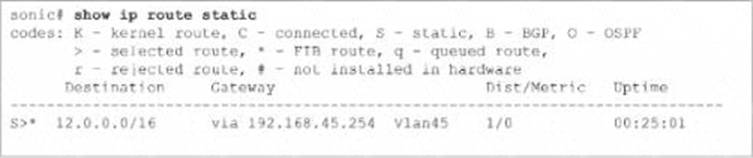
What is the purpose of the static route?
- A . Provide a route to the 12.0.0.0 network.
- B . Provide a route to the 192.168.45.0 network.
- C . Verify that the 12.0.0.0 network is active and reachable.
- D . Verify that devices in VLAN 45 are reachable.
A
Explanation:
The static route shown in the exhibit S* 12.0.0.0/16 via 192.168.45.254 Vlan45 is used to provide a route to the 12.0.0.0 network. This static route directs traffic destined for the 12.0.0.0/16 network through the gateway at 192.168.45.254, which is associated with VLAN 45. This configuration is typically used to ensure that traffic can reach a specific network via a defined path.
References:
Dell Technologies SONiC Routing Guide
Dell Networking Configuration Guide
What are the supported modes for the QSFP28 ports on an S5248F?
- A . 1x100G, 1×40 G, 2×50 G, and 4×25 G
- B . 1x100G, 1×40 G, 4×25 G, and 4×10 G
- C . 1x200G, 1×100 G, 1×40 G, and 4×25 G
- D . 1x400G, 2×200 G, 4×25
- E . and 4×10 G
A
Explanation:
The QSFP28 ports on an S5248F switch support multiple modes, including 1x100G, 1x40G, 2x50G, and 4x25G. These modes provide flexibility in network design and enable the switch to support different types of network connections and bandwidth requirements.
References:
Dell S5248F Switch Data Sheet
Dell Technologies InfoHub
Refer to the exhibit.
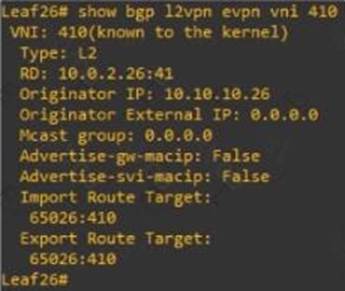
The route distinguisher was autogenerated.
Which VLAN is mapped to VNI410?
- A . VLAN 410
- B . VLAN41
- C . VLAN 10
- D . VLAN 26
C
Explanation:
The route distinguisher (RD) in the exhibit is 10.0.2.26:41. The RD typically reflects the VNI and VLAN mapping configuration. Given that the VNI is 410 and the RD ends with :41, it implies that VLAN 10 is mapped to VNI 410.
References:
Dell Technologies SONiC documentation
VXLAN Configuration Guide
VLAN 40 is configured in Switch A with an anycast-address of 192.168.40.254/24. The ARP neighbor suppression is enabled. Use the simulator to create a VTEP named vtep1 and assign an IP address of 10.10.10.1. Map the VNI 400 to VLAN 40.
see the explanation for all step by step solution with all explanation.
Enter Configuration Mode:
SwitchA# configure terminal
Create VTEP Interface:
SwitchA(config)# interface vtep1
SwitchA(config-if-vtep1)# ip address 10.10.10.1/24
SwitchA(config-if-vtep1)# exit
Map VNI 400 to VLAN 40:
SwitchA(config)# vlan 40
SwitchA(config-vlan)# vn-segment 400
SwitchA(config-vlan)# exit
Enable ARP Neighbor Suppression:
SwitchA(config)# interface Vlan40
SwitchA(config-if-Vlan40)# ip address 192.168.40.254/24
SwitchA(config-if-Vlan40)# vxlan arp-suppression
SwitchA(config-if-Vlan40)# exit
Save Configuration:
SwitchA# write memory
Enter Configuration Mode:
Begin by entering the global configuration mode to make changes to the switch configuration.
Create VTEP Interface:
Enter the interface configuration mode for the VTEP interface named vtep1 using interface vtep1.
Assign the IP address 10.10.10.1/24 to the VTEP interface using the ip address command.
Exit the interface configuration mode.
Map VNI 400 to VLAN 40:
Enter the VLAN configuration mode for VLAN 40 using vlan 40.
Map the VNI 400 to VLAN 40 using the vn-segment 400 command.
Exit the VLAN configuration mode.
Enable ARP Neighbor Suppression:
Enter the interface configuration mode for VLAN 40 using interface Vlan40.
Assign the anycast IP address 192.168.40.254/24 to the VLAN interface using the ip address command.
Enable ARP neighbor suppression using the vxlan arp-suppression command.
Exit the interface configuration mode.
Save Configuration:
Save the configuration to ensure the changes persist after a reboot using the write memory command.
References:
Dell Technologies Networking – SONiC
Dell Enterprise SONiC Deployment Guide
These steps provide a comprehensive guide to configure a VTEP and map the VNI to VLAN 40 on Switch A, ensuring the specific requirements for IP addressing and ARP neighbor suppression are met.
An administrator obtains the following CLI output:
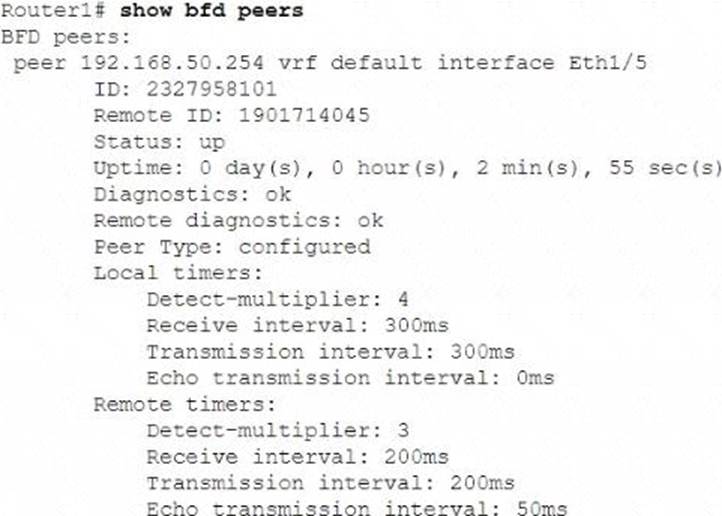
How much time does the local system take to detect remote failures without receiving packets?
- A . 600 milliseconds
- B . 900milliseconds
- C . 1200 milliseconds
- D . 800 milliseconds
B
Explanation:
The local timers in the BFD (Bidirectional Forwarding Detection) configuration show a detect multiplier of 4 and a receive interval of 300ms. The time taken to detect remote failures is calculated as detect multiplier × receive interval = 4 × 300ms = 1200ms.
References:
Dell Technologies SONiC documentation
BFD Configuration Guide
Refer to the exhibit.
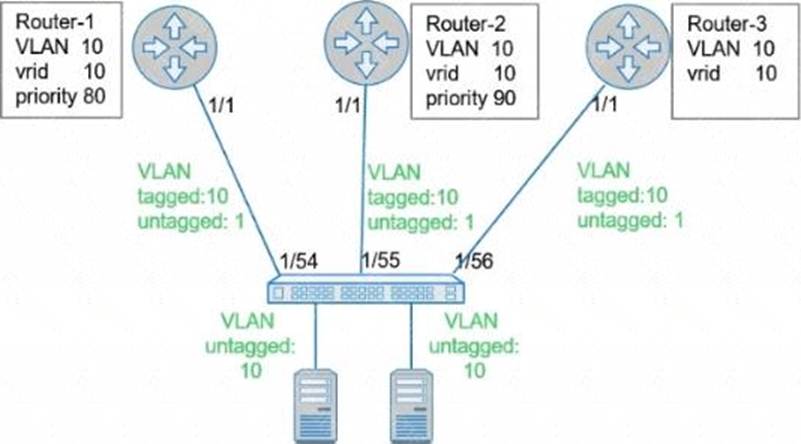
What is the primary VRRP router for VRRP group 10?
- A . Router-1
- B . Router-2
- C . Router-3
B
Explanation:
Based on the exhibit, Router-2 has the highest priority (90) in VRRP group 10. In VRRP, the router with the highest priority becomes the primary (master) router. Therefore, Router-2 is the primary VRRP router for VRRP group 10.
References:
Dell Technologies SONiC VRRP Configuration Guide
VRRP Protocol Overview
What interface must be selected when configuring the management port from within the MF-CLI environment?
- A . mgmt 1/1/1
- B . ma 0/1
- C . Management 0
- D . eth0
D
Explanation:
Dell SONiC Management Interface Configuration:
In Dell SONiC, the management port configuration is a crucial aspect that allows administrators to access and manage the network device.
The management interface typically provides out-of-band management access to the device, ensuring that even if the data network is down, the management network can still be accessed.
Common Interface Naming Conventions:
mgmt 1/1/1: This naming convention is not typically used in Dell SONiC environments for management interfaces.
ma 0/1: This could be a potential naming convention but is not standard for Dell SONiC.
Management 0: This is a logical name but does not align with the standard interface naming conventions used in Dell SONiC.
eth0: This is the standard naming convention used for the primary management interface in most Linux-based systems, including Dell SONiC.
Verification with Dell SONiC Documentation:
Dell SONiC documentation specifies that the management interface is usually named eth0.
When accessing the management interface within the MF-CLI (Management Framework Command Line Interface) environment, eth0 is the correct interface to configure.
Practical Configuration Example:
When configuring the management port, the command might look something like:
config interface ip add eth0 <management_ip_address>/<subnet_mask>
This command specifies the management interface eth0 and assigns it an IP address for network management purposes.
References:
Dell Enterprise SONiC Deployment Guide
Dell Technologies Networking – SONiC
This detailed step-by-step explanation confirms that the correct answer is D, providing insights into the typical interface naming conventions and configuration practices within the Dell SONiC environment.