
DELL EMC D-PE-OE-23 Practice Exams
Last updated on Oct 22,2026- Exam Code: D-PE-OE-23
- Exam Name: Dell Technologies PowerEdge Operate 2023
- Certification Provider: DELL EMC
- Latest update: Oct 22,2026
A technician is sent on-site to troubleshoot a server that reports errors during POST when rebooted. The LCD is amber. The error message is as shown: correctable memory error rate exceeded for DIMM B4 The server has a limited maintenance window. The technician needs to troubleshoot efficiently.
Which step should the technician take to troubleshoot?
- A . Reseat all memory
- B . Swap DIMM B4 with A4
- C . Swap DIMM B4 with B2
- D . Replace DIMM B4
A technician is sent on-site to troubleshoot a server that reports errors during POST when rebooted. The LCD is amber. The error message is as shown: correctable memory error rate exceeded for DIMM B4 The server has a limited maintenance window. The technician needs to troubleshoot efficiently.
Which step should the technician take to troubleshoot?
- A . Reseat all memory
- B . Swap DIMM B4 with A4
- C . Swap DIMM B4 with B2
- D . Replace DIMM B4
A system administrator plans to use iDRAC Direct to use features such as RACADM and WSMan.
What is used to make the connection?
- A . USBC
- B . Micro USB
- C . Mini USB
- D . USBA
B
Explanation:
Understanding iDRAC Direct and Connection Methods
Server Management and Configuration Tools (14%)
Define the function of the iDRAC, login procedures, licensing, and connection methods
iDRAC Direct Overview
iDRAC Direct provides a direct connection to the Integrated Dell Remote Access Controller (iDRAC)
using a USB interface.
Purpose: Allows administrators to perform management tasks locally without needing network access.
Features Accessed via iDRAC Direct:
RACADM: Remote Access Controller Admin CLI tool for managing iDRAC settings.
WS-Man: Web Services Management protocol for remote management.
Connection Interface
Physical Connection: Requires a USB cable connected between the administrator’s laptop and the server’s iDRAC Direct port.
Type of USB Port Used: Dell PowerEdge servers typically use a Micro USB port for iDRAC Direct
connections.
Explanation of Options
Option A: USB-C
USB-C is a newer USB standard with a reversible connector. As of the knowledge cutoff in 2023, Dell servers primarily use Micro USB for iDRAC Direct, not USB-C.
Conclusion: Incorrect.
Option B: Micro USB
Correct Answer. The iDRAC Direct port uses a Micro USB interface.
Option C: Mini USB
Mini USB is an older standard, larger than Micro USB, and not commonly used in modern servers for
management interfaces.
Conclusion: Incorrect.
Option D: USB-A
USB-A refers to the standard rectangular USB port found on most computers. The server’s iDRAC
Direct port does not use USB-A.
Conclusion: Incorrect.
Dell Operate Reference
Server Management and Configuration Tools (14%)
Highlights the importance of understanding connection methods to iDRAC.
Define the function of the iDRAC, login procedures, licensing, and connection methods: Emphasizes knowledge of physical interfaces used for management. Conclusion
To use iDRAC Direct features like RACADM and WS-Man, the system administrator needs to connect via the Micro USB port on the server.
Which Dell PowerEdge server model is best suited to run complex high-performance AI applications?
- A . R760
- B . XE9640
- C . XR12
- D . MX760c
A technician wants to configure the iDRAC on a new server using the iDRAC Quick Sync 2 feature.
What is required to use this feature?
- A . OpenManage Mobile App installed on an Android or iOS device
- B . OpenManage Mobile App installed on a laptop
- C . Quick Sync enabled bezel
- D . iDRAC Enterprise license
A technician receives a repurposed Dell EMC PowerEdge server. The server already has the OS and the Dell Tools software installed. After racking and cabling the server, the technician attempts to log into the iDRAC but cannot do so.
The default login account has been disabled.
What method can be used to enable the default login account?
- A . SSH into the iDRAC and run the racadm racresetcfg command
- B . Run the racadm racreset command from the host OS
- C . Run the racadm racresetcfg command from the host OS
- D . SSH into the iDRAC and run the racadm racreset command
Exhibit.
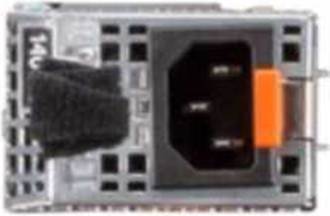
What does the black strap on the power supply handle specify?
- A . PSU
- B . NAF
- C . RAF
- D . Spare PSU
B
Explanation:
Understanding the Black Strap on the Power Supply Handle Server Components (26%)
Identify power options and redundancy features, thermal features, and liquid cooling
Explanation of Power Supply Straps
Dell PowerEdge servers often use black straps on power supply units (PSUs) to indicate certain attributes of the PSU. The color of the strap can help identify specific features or categories of the power supply.
What Does "NAF" Mean?
NAF stands for Non-Redundant, Auto Failover.
This indicates that the PSU is part of a non-redundant configuration, but it is capable of automatic failover in the case of power loss.
This is typical in systems with multiple PSUs, where each PSU can take over if the other fails.
Why Not Other Options?
Option A: PSU
The strap does not indicate that the device is just a PSU; rather, it indicates a specific feature of the PSU.
Option C: RAF
RAF stands for Redundant Auto Failover, which is not the correct feature indicated by the black strap.
Option D: Spare PSU
The strap does not indicate that the PSU is a spare unit.
Conclusion
The black strap on the power supply handle indicates that the PSU is NAF (Non-Redundant, Auto Failover). This means it is part of a non-redundant system but capable of automatic failover.
A technician needs to connect a server to a network but the network switch has only two available network ports so only two network cables can be connected. The user needs as much bandwidth as possible for their workload so the two network cables need to connect to LOM1 and LOM2.
At some point in the future a new network switch will enable additional cables to be used. The technician wants to satisfy the user requirements yet still be able to access the iDRAC without having to reconfigure the iDRAC once new cables are installed in the iDRAC Dedicated NIC.
What is the best way to configure the iDRAC?
- A . Use a splitter cable in one of the network switch ports to connect the same cable to both LOM1 and the iDRAC dedicated NIC
- B . Use a splitter cable in one of the network switch ports to connect the same cable to both LOM1 and LOM2 with the second network cable connecting to the iDRAC dedicated NIC
- C . Set up a dedicated NIC with LOM1 as the NIC selection
- D . Set up a shared NIC with LOM1 as the NIC selection with Auto Dedicated NIC selected
A technician is setting up a previously used server. Upon power up, the PERC alerts them to the presence of a foreign configuration. In the iDRAC storage section, the technician checks Foreign View. The foreign array configuration is the same as the configuration needed for the new project.
What is a recommended way to prepare the disks for the new project?
- A . Edit the foreign configuration and set it to Ready
- B . Import the foreign configuration and perform a full initialization
- C . Format the foreign configuration and clear the controller configuration
- D . Access the Ctrl+R utility, clear the foreign configuration and set up array as needed
What is a characteristic of Dell PowerEdge server out-of-band management?
- A . Cannot manage a powered off device
- B . Gives firmware update access to all users
- C . Network connection separate from data source
- D . Requires an operating system level agent
C
Explanation:
Understanding Dell PowerEdge Server Out-of-Band Management
Server Management and Configuration Tools (14%)
Define in-band and OOB management and at-the-box-management
What is Out-of-Band (OOB) Management?
Out-of-band management refers to the ability to manage and monitor a server independently of the operating system or primary network interfaces. Dell PowerEdge servers utilize the Integrated Dell Remote Access Controller (iDRAC) for OOB management.
Characteristics of Out-of-Band Management:
Independent Operation:
OOB management operates independently of the server’s operating system. It remains functional even if the server is powered off (as long as it is connected to a power source) or the operating system is unresponsive.
Dedicated Network Connection:
OOB management uses a network connection separate from the data network. This is typically achieved via a dedicated management port on the server, ensuring that management traffic does not interfere with data traffic.
Option C reflects this characteristic accurately.
No Need for Operating System Agents:
OOB management does not require any software agents running on the operating system.
Management tasks are performed directly through the iDRAC hardware.
Option D is incorrect because OOB management does not require an OS-level agent.
Remote Management Capabilities:
Allows administrators to perform tasks such as monitoring hardware status, configuring settings, updating firmware, and even powering the server on or off remotely.
Explanation of Options:
Option A: Cannot manage a powered off device
Incorrect: OOB management allows for the management of powered-off devices as long as the iDRAC is receiving power.
Option B: Gives firmware update access to all users
Incorrect: Access to firmware updates and other critical functions is controlled via user permissions within iDRAC. Not all users have equal access.
Option C: Network connection separate from data source
Correct: OOB management uses a dedicated network interface, separate from the server’s primary data network interfaces.
Option D: Requires an operating system level agent
Incorrect: OOB management is independent of the operating system and does not require any OS-level agents.
Dell Operate
Reference: Server Management and Configuration Tools (14%)
Define in-band and OOB management and at-the-box-management: Understanding the differences between in-band (requiring OS-level interaction) and out-of-band management is crucial for effective server administration.
Conclusion:
Dell PowerEdge server out-of-band management is characterized by the use of a network connection separate from the data source, allowing for independent and remote management of the server hardware without relying on the operating system.