
DELL EMC D-PE-OE-23 Practice Exams
Last updated on Oct 22,2026- Exam Code: D-PE-OE-23
- Exam Name: Dell Technologies PowerEdge Operate 2023
- Certification Provider: DELL EMC
- Latest update: Oct 22,2026
A system administrator is trying to connect a 128 GB flash drive to an iDRAC Direct USB port on a Dell PowerEdge R660 server running Red Hat Enterprise Linux 8. They failed to discover the drive from the operating system.
What is the reason for the failure?
- A . The port is set to iDRAC Direct only.
- B . Flash drives are not supported.
- C . The flash drive is formatted as FAT32.
- D . The port only supports devices under 64 GB.
After completing a disk rebuild operation, a technician needs to configure the system so that the rebuild process happens faster the expense of slowing users down.
Which setting should be changed?
- A . Rebuild Rate in the BIOS settings
- B . System Profile to Performance in the BIOS settings
- C . System Profile to Performance in the iDRAC GUI
- D . Rebuild Rate in the iDRAC GUI
A technician needs to configure a server to PXE boot a server setup image with the BIOS in UEFI mode.
What action is required to enable this function?
- A . Boot to Ctrl+S and configure the NIC for PXE Device1
- B . From the iDRAC web interface, select Network Settings, and enable PXE Device1
- C . Navigate to Boot Options Settings and set PXE Device1 as first option
- D . Navigate to Network Settings, PXE Device1 Settings, and configure IP
A technician needs to configure a server to PXE boot a server setup image with the BIOS in UEFI mode.
What action is required to enable this function?
- A . Boot to Ctrl+S and configure the NIC for PXE Device1
- B . From the iDRAC web interface, select Network Settings, and enable PXE Device1
- C . Navigate to Boot Options Settings and set PXE Device1 as first option
- D . Navigate to Network Settings, PXE Device1 Settings, and configure IP
SIMULATION
The system administrator cannot boot their R660 server. To help troubleshooting, use the iDRAC Ul to enable capturing the full POST sequence for the next time it attempts to boot.
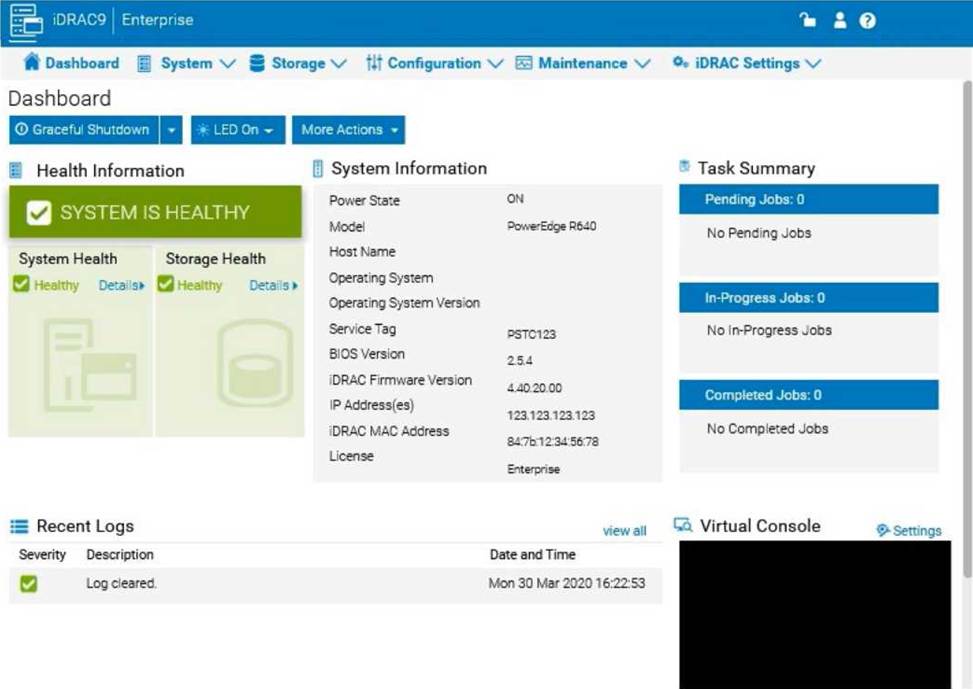
Step-by-Step Guide:
Log into the iDRAC Interface:
Access the iDRAC UI using the server’s IP address from a web browser.
Enter your credentials to log in.
Navigate to System BIOS Settings:
Go to the Configuration tab on the top menu.
Select BIOS Settings from the dropdown menu. This will take you to the settings where you can
manage BIOS-related configurations.
Enable POST Sequence Logging:
In the BIOS Settings, look for an option related to POST Behavior or Boot Sequence Capture. Enable Verbose Mode or Capture Full POST Sequence. This setting ensures that the entire POST process is logged in detail during the next boot attempt.
Alternatively, if there is a specific setting for Capture System Boot Logs, enable it to ensure detailed
logging during POST.
Apply the Changes:
After enabling the POST capture option, click Apply or Save.
iDRAC may prompt for confirmation or inform you that changes will take effect upon the next reboot.
Confirm any prompts as required.
Restart the Server (if necessary):
If the server is currently off, attempt to power it on. If it’s on, you may need to perform a Graceful Shutdown followed by a restart to initiate the POST sequence.
Review POST Logs After Reboot:
Once the server attempts to boot, return to the iDRAC Logs section to review the captured POST logs. Go to Maintenance > System Event Log or Lifecycle Log to view the detailed logs from the POST sequence. This can help diagnose why the server is failing to boot.
By enabling this setting, you will capture detailed information during the POST process, which can then be reviewed to identify any hardware or configuration issues preventing the server from booting successfully.
A system administrator observes network connectivity issues with their iDRACs.
Which three commands can be used in the Diagnostic Console to troubleshoot this issue? (Select 3)
- A . show-netstat
- B . ping
- C . ifconfig
- D . ipconfig
- E . arp
BCE
Explanation:
Troubleshooting iDRAC Network Connectivity Issues Using Diagnostic Console Server Troubleshooting (32%)
Explain Easy Restore, diagnostic utilities, and hardware diagnostic options Analyze the visual indicators on server components – system ID, PSU, and BLINK
Understanding the Diagnostic Console
Diagnostic Console: An interface within iDRAC that provides command-line tools for troubleshooting and diagnosing issues.
Purpose: Allows administrators to execute commands directly on the iDRAC to diagnose network and system problems.
Commands Available for Network Troubleshooting
ping
Usage: Tests connectivity to other network devices by sending ICMP echo requests.
Purpose: Determines if the iDRAC can reach a specified IP address or hostname.
Example: ping 192.168.1.1
ifconfig
Usage: Displays or configures network interface parameters.
Purpose: Checks the status of network interfaces, IP addresses, and subnet masks configured on the iDRAC.
Example: ifconfig eth0
arp
Usage: Displays or modifies the system’s ARP table.
Purpose: Helps identify IP to MAC address mappings, useful for diagnosing duplicate IP issues or
incorrect network configurations.
Example: arp -a
Explanation of Options
Option A: show-netstat
While netstat is a common networking command, show-netstat is not a standard command in the iDRAC Diagnostic Console.
Conclusion: Not a valid command in this context.
Option B: ping
Correct Answer. Used to test network connectivity.
Option C: ifconfig
Correct Answer. Used to display and configure network interface settings.
Option D: ipconfig
ipconfig is a Windows command-line utility, not available in the iDRAC (which is Linux-based).
Conclusion: Incorrect.
Option E: arp
Correct Answer. Used to view and manage the ARP cache.
Dell Operate Reference
Server Troubleshooting (32%)
Emphasizes the use of diagnostic utilities for troubleshooting network issues.
Explain Easy Restore, diagnostic utilities, and hardware diagnostic options
Highlights the importance of understanding and utilizing available tools for diagnostics.
Conclusion
The three commands that can be used in the iDRAC Diagnostic Console to troubleshoot network connectivity issues are:
ping: To test connectivity to other network devices.
ifconfig: To check and configure network interface settings.
arp: To view and manage the Address Resolution Protocol cache.
These commands help identify connectivity problems, misconfigurations, and issues with network interfaces.
A technician plugs in a server that has dual power supply units. After powering on the system, they notice that the power supply status indicators blink green then turn off.
What troubleshooting steps should the technician take to resolve this issue?
- A . Set the power supply redundancy option to ‘No Redundancy’
- B . Check that the PSUs are not connected to a 240VAC source
- C . Update the iDRAC firmware to enable control of new PSU features
- D . Check that the PSUs are the same efficiency, feature set, health status, and supported voltage
A technician wants to install a new version of OMSA onto a server that already has an existing version of OMSA.
What is required for this new installation?
- A . iSM must also be installed on the managed server
- B . iDRAC firmware needs to be at version 5.0 or higher
- C . Existing OMSA version must be disabled in Services
- D . Existing OMSA must be uninstalled before the new version is installed
A technician needs to update the iDRAC license on a PowerEdge R740 server from Express to Enterprise.
The server has the following components:
– 2x CPUs
– 384 GB RAM
– 6x 1 TB drives
– 1x PSU
The server is powered down but connected to active AC. The user wants it to stay powered down and not connect to any networks. No errors are presently displayed.
How can the technician upgrade the license?
- A . The license cannot be upgraded because the user will not allow the server to be powered on
- B . The license cannot be upgraded on a single PSU system
- C . Power on the server then connect to the iDRAC and upgrade iDRAC license before powering the server down
- D . Connect to the iDRAC GUI and upgrade the iDRAC license while the server is powered down.
A systems engineer needs to configure a RAID volume that combines disk striping across multiple disks with parity for data redundancy. Parity information is stored once and on each disk.
What RAID level does the engineer need to configure?
- A . RAID 3
- B . RAID 6
- C . RAID 1
- D . RAID 5