
DELL EMC D-PE-OE-23 Practice Exams
Last updated on Oct 23,2026- Exam Code: D-PE-OE-23
- Exam Name: Dell Technologies PowerEdge Operate 2023
- Certification Provider: DELL EMC
- Latest update: Oct 23,2026
A technician updates firmware on all server components. After the updates have completed, testing of the NIC reveals a possible firmware problem.
What should the technician do to return the NIC to service?
- A . Replace the NIC using Part Replacement
- B . Import the most recent Server Profile
- C . Perform Firmware Rollback
- D . Enable Collect System Inventory on Restart
A technician working with a Dell EMC PowerEdge 14G server observes the PCIe indicator turn solid amber.
What should they do to take corrective action upon checking the System Event log?
A)
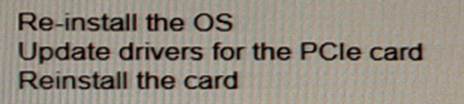
B)
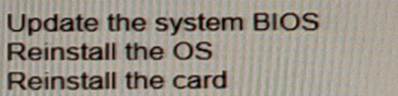
C)
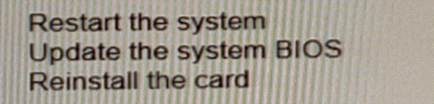
D)
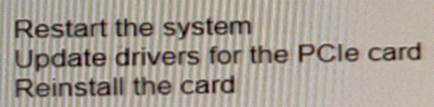
- A . Option A
- B . Option B
- C . Option C
- D . Option D
Under which heading can the user locate Lifecycle logs in the iDRAC Ul?
- A . System
- B . System event log
- C . Diagnostics
- D . Maintenance
D
Explanation:
ocating Lifecycle Logs in the iDRAC UI
Server Troubleshooting (32%)
Explain the server logs and memory error
Understanding Lifecycle Logs
The Lifecycle Controller logs (Lifecycle Logs) are essential for tracking system events related to hardware configuration, firmware updates, and system health. These logs provide valuable information for troubleshooting and auditing purposes. Accessing Lifecycle Logs in iDRAC UI
In the iDRAC web interface, administrators can navigate through various sections to access system information and logs.
To locate the Lifecycle Logs:
Log into the iDRAC Web Interface using your administrative credentials.
Navigate to the "Maintenance" Tab:
This section is dedicated to maintenance tasks and logs.
Select "System Event Log" or "Lifecycle Log" under the Maintenance section to view the detailed logs.
Explanation of Options
Option A: System
Incorrect: This section provides system overview and hardware information but does not contain the Lifecycle Logs.
Option B: System Event Log
Incorrect: While this log contains events, the Lifecycle Logs are specifically found under the Maintenance section.
Option C: Diagnostics
Incorrect: This area is used for running diagnostic tests, not for accessing Lifecycle Logs.
Option D: Maintenance
Correct Answer. The Lifecycle Logs are located under the Maintenance heading in the iDRAC UI.
Dell Operate Reference
Server Troubleshooting (32%): Accessing and interpreting server logs is vital for diagnosing issues. Explain the server logs and memory error: Understanding where logs are stored helps in efficient troubleshooting.
Server Management and Configuration Tools (14%): Navigating the iDRAC UI is crucial for system
administration tasks.
Conclusion
By knowing that the Lifecycle Logs are located under the Maintenance section, administrators can quickly access important system event information necessary for troubleshooting and maintaining server health.
A technician needs to install a PCIe NIC into a production server. Six of the seven PCI slots are already populated.
What does the technician need to verify before installing the PCIe NIC?
- A . Slot priority for the PCIe NIC to be installed
Physical slot specifications - B . Physical slot specifications only
- C . Server is connected to 220V power
Slot priority for the PCIe NIC to be installed - D . CPU configuration
Server is connected to 220V power
What are two use cases for using a graphic processing unit (GPU)? (Select 2)
- A . Programmable for a particular application-specific purpose.
- B . Improve performance by accelerating networking hardware.
- C . Model and analyze signal data streams in real time.
- D . Isolate tenants from host management in a cloud landlord-tenant setting.
- E . Accelerate HPC and Al by using financial data for analysis of risk and return.
C, E
Explanation:
Understanding GPU Use Cases
Server Components (26%)
Explain how expansion cards are connected and the features of the GPU
Overview of GPUs in Servers
Graphics Processing Units (GPUs) are specialized processors designed to handle complex mathematical computations, particularly those involving parallel processing.
Use Cases:
High-Performance Computing (HPC)
Artificial Intelligence (AI) and Machine Learning
Real-Time Data Processing
Modeling and Simulation
Evaluation of Options
Option A: Programmable for a particular application-specific purpose
This describes Field-Programmable Gate Arrays (FPGAs), not GPUs. FPGAs can be programmed for specific tasks at the hardware level.
Conclusion: Not a typical GPU use case.
Option B: Improve performance by accelerating networking hardware
Network acceleration is typically achieved using specialized network interface cards (NICs) or SmartNICs, not GPUs.
Conclusion: Not a GPU use case.
Option C: Model and analyze signal data streams in real time
GPUs excel at processing large amounts of data in parallel, making them ideal for real-time signal processing and data stream analysis.
Conclusion: Correct Answer
Option D: Isolate tenants from host management in a cloud landlord-tenant setting
This pertains to virtualization and security features, such as virtual machines and hypervisors, not specifically GPUs.
Conclusion: Not a GPU use case.
Option E: Accelerate HPC and AI by using financial data for analysis of risk and return
GPUs accelerate HPC and AI workloads by handling complex computations efficiently. Analyzing financial data for risk and return is a common AI application that benefits from GPU acceleration.
Conclusion: Correct Answer
Dell Operate Reference
Server Components (26%)
Explain how expansion cards are connected and the features of the GPU: Understanding the role of GPUs in enhancing server capabilities for specific workloads.
Conclusion
The two correct use cases for GPUs are:
Option C: Modeling and analyzing signal data streams in real time.
Option E: Accelerating HPC and AI tasks, such as analyzing financial data for risk assessment. These use cases leverage the GPU’s ability to process large volumes of data efficiently, improving performance for compute-intensive applications.
What are two use cases for using a graphic processing unit (GPU)? (Select 2)
- A . Programmable for a particular application-specific purpose.
- B . Improve performance by accelerating networking hardware.
- C . Model and analyze signal data streams in real time.
- D . Isolate tenants from host management in a cloud landlord-tenant setting.
- E . Accelerate HPC and Al by using financial data for analysis of risk and return.
C, E
Explanation:
Understanding GPU Use Cases
Server Components (26%)
Explain how expansion cards are connected and the features of the GPU
Overview of GPUs in Servers
Graphics Processing Units (GPUs) are specialized processors designed to handle complex mathematical computations, particularly those involving parallel processing.
Use Cases:
High-Performance Computing (HPC)
Artificial Intelligence (AI) and Machine Learning
Real-Time Data Processing
Modeling and Simulation
Evaluation of Options
Option A: Programmable for a particular application-specific purpose
This describes Field-Programmable Gate Arrays (FPGAs), not GPUs. FPGAs can be programmed for specific tasks at the hardware level.
Conclusion: Not a typical GPU use case.
Option B: Improve performance by accelerating networking hardware
Network acceleration is typically achieved using specialized network interface cards (NICs) or SmartNICs, not GPUs.
Conclusion: Not a GPU use case.
Option C: Model and analyze signal data streams in real time
GPUs excel at processing large amounts of data in parallel, making them ideal for real-time signal processing and data stream analysis.
Conclusion: Correct Answer
Option D: Isolate tenants from host management in a cloud landlord-tenant setting
This pertains to virtualization and security features, such as virtual machines and hypervisors, not specifically GPUs.
Conclusion: Not a GPU use case.
Option E: Accelerate HPC and AI by using financial data for analysis of risk and return
GPUs accelerate HPC and AI workloads by handling complex computations efficiently. Analyzing financial data for risk and return is a common AI application that benefits from GPU acceleration.
Conclusion: Correct Answer
Dell Operate Reference
Server Components (26%)
Explain how expansion cards are connected and the features of the GPU: Understanding the role of GPUs in enhancing server capabilities for specific workloads.
Conclusion
The two correct use cases for GPUs are:
Option C: Modeling and analyzing signal data streams in real time.
Option E: Accelerating HPC and AI tasks, such as analyzing financial data for risk assessment. These use cases leverage the GPU’s ability to process large volumes of data efficiently, improving performance for compute-intensive applications.
A technician builds a bootable ISO with Repository Manager, and then mounts the ISO via the iDRAC virtual console. After the updates have completed, the technician reboots the server to apply the updates. When reviewing the updates, the technician determines NOT all updates were applied.
What is causing this issue?
- A . The iDRAC update caused virtual media disconnect.
- B . A SUU repository must be used to update the firmware instead of the bootable ISO.
- C . An OS was NOT installed prior to upgrading the firmware.
- D . The firmware must be manually updated from the iDRAC.
A technician builds a bootable ISO with Repository Manager, and then mounts the ISO via the iDRAC virtual console. After the updates have completed, the technician reboots the server to apply the updates. When reviewing the updates, the technician determines NOT all updates were applied.
What is causing this issue?
- A . The iDRAC update caused virtual media disconnect.
- B . A SUU repository must be used to update the firmware instead of the bootable ISO.
- C . An OS was NOT installed prior to upgrading the firmware.
- D . The firmware must be manually updated from the iDRAC.
A technician needs to configure the Lifecycle Controller network settings with a static IP address. A limited number of static IP addresses are available for use.
Which previously assigned IP address can also be used for the Lifecycle Controller?
- A . The host operating system’s IP address
- B . The iDRAC IP address
- C . The IP address of a different server on the network
- D . The default gateway IP address
A technician deletes the iDRAC Express license on a R440 server.
Which license type is then enabled?
- A . iDRAC Enterprise license
- B . iDRAC Basic license
- C . iDRAC will not have a license until a new one is installed
- D . iDRAC Express license cannot be deleted