
DELL EMC D-PE-OE-23 Practice Exams
Last updated on Oct 23,2026- Exam Code: D-PE-OE-23
- Exam Name: Dell Technologies PowerEdge Operate 2023
- Certification Provider: DELL EMC
- Latest update: Oct 23,2026
A technician is tasked to perform a RAID Level Migration (RLM) of a RAID 5 array to a RAID 6 array. The technician backs up data and looks in OpenManage Server Administrator to find that the current RAID 5 array is sliced into two virtual disks.
What should the technician do to achieve the desired RAID level?
- A . Delete the arrays and recreate new RAID 6 arrays
- B . Use iDRAC GUI under Storage > Virtual disks to complete RLM
- C . Use SupportAssist for Servers to complete RLM
- D . Delete the RAID 5 array and complete RLM using iDRAC GUI under Storage > Virtual disks
An administrator is in a non-secure location with a high latency connection.
What option should be used to recover a PowerEdge server using an existing server profile?
- A . iDRAC
- B . Redfish
- C . IPMI
- D . RACADM
D
Explanation:
Selecting the Appropriate Recovery Tool
Server Management and Configuration Tools (14%)
Explain the management interface options – LCC, racadm, OMSA, iSM, OME
Scenario Analysis
Constraints:
Non-secure location: Security of the connection is a concern.
High latency connection: Requires a tool that operates efficiently over slow networks.
Objective: Recover a PowerEdge server using an existing server profile.
Option Evaluations
Option A: iDRAC
Analysis: While iDRAC provides remote management, accessing it via a web interface may be slow and less secure in high latency and non-secure environments.
Option B: Redfish
Analysis: Redfish uses HTTPS, which is secure but may not perform well over high latency
connections and requires more overhead.
Option C: IPMI
Analysis: IPMI lacks robust security features and is not recommended in non-secure locations.
Option D: RACADM
Correct Answer
Advantages:
Secure: Can use SSH for secure command-line access.
Efficient: Command-line interface minimizes bandwidth usage, suitable for high latency.
Powerful: Allows full management of the server, including applying existing server profiles.
Scriptable: Enables automation and faster recovery processes.
Understanding RACADM
RACADM (Remote Access Controller Admin):
A command-line utility for managing Dell servers via iDRAC. Supports both local and remote management.
Ideal for automated scripts and low-bandwidth situations. Dell Operate Reference
Server Management and Configuration Tools (14%)
Emphasizes understanding different management tools and their appropriate use cases. System Administration (18%)
Covers configuring and managing servers in various environments. Conclusion
Given the need for a secure and efficient tool in a high latency and non-secure location, RACADM is the optimal choice for recovering the PowerEdge server using an existing server profile.
SPECIAL INSTRUCTIONS
The remaining Part1 questions are associated with four case studies that describe various environments or settings. Each case study appears on its own display screen. Questions for each case study will appear on separate display screens. When displaying a question, you can easily review the related case study by clicking on the ‘Review Case Study’ icon shown below:
Case Study 5 – Refer to the Exhibit.
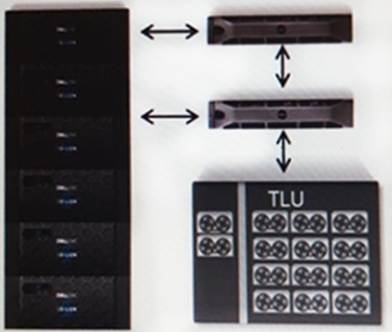
Backing up data from a Dell EMC Isilon cluster exceeds the company’s backup window. Because the company has a large amount of data with a continuous high growth rate, they want to change their backup strategy. The Gen 6 Isilon cluster consists of 24 nodes.
Their current backup strategy is an NDMP three-way backup performing weekly full backups to tape and incremental backups each night. The strategy uses Dell EMC Net Worker. The DMA uses Include paths to specify what data to backup. All data on the cluster must remain accessible.
The company’s IT team is now looking for a method to increase the performance of their backups. After some investigations, you notice that the backup job quiesces the file system. This is creating lock contention issues on open files and not allowing users full access to data when the backup job runs.
What advice should be provided to the team to eliminate lock contention and allow full access to users?
- A . Create a cron job to remove all locks before each backup.
- B . Add A100 Backup Accelerators and configure for three-way NDMP
- C . Stop using an NDMP-based backup strategy.
- D . Enhance the backup strategy using snapshots for backups.
When does configuration validation run?
- A . Dell diagnostics is run
- B . Entering the BIOS
- C . Loading into Lifecycle Controller
- D . Each time the host powers on
D
Explanation:
Understanding Configuration Validation in Dell PowerEdge Servers
Server Troubleshooting (32%)
Explain Configuration Validation, crash capture, and minimum to POST
What is Configuration Validation?
Configuration Validation is a diagnostic process performed by Dell PowerEdge servers to ensure that all hardware components and firmware configurations are compatible and functioning correctly. This process checks for any mismatches or errors in the server’s hardware configuration that could prevent the system from booting properly.
When Does Configuration Validation Run?
Each Time the Host Powers On:
Configuration Validation runs automatically during the Power-On Self-Test (POST) sequence every time the server is powered on or rebooted.
The server’s BIOS performs a series of checks to validate the hardware configuration, ensuring that all components are present, properly connected, and compatible.
If any discrepancies or issues are detected, the server may halt the boot process and display error messages or indicators to alert the administrator. Importance of Configuration Validation at Power-On:
Hardware Integrity:
Verifies that CPUs, memory modules, storage devices, and other peripherals are correctly installed
and operational.
Firmware Compatibility:
Ensures that firmware versions are compatible across components, which is crucial for system stability.
Preventing Boot Failures:
Identifies configuration issues early to prevent system crashes or data loss.
Explanation of Options
Option A: Dell diagnostics is run
Analysis:
Dell Diagnostics is a set of utilities that can be run manually to test hardware components.
It is not automatically executed unless initiated by an administrator.
Conclusion: Incorrect.
Option B: Entering the BIOS
Analysis:
While entering the BIOS allows administrators to view and modify system settings, configuration validation is not specifically triggered by accessing the BIOS. Conclusion: Incorrect.
Option C: Loading into Lifecycle Controller
Analysis:
The Lifecycle Controller is a management tool for deploying, updating, and configuring servers.
Configuration validation is not exclusively run when accessing the Lifecycle Controller.
Conclusion: Incorrect.
Option D: Each time the host powers on
Analysis:
Configuration validation is inherently part of the POST sequence that runs every time the server powers on.
Conclusion: Correct Answer.
Dell Operate Reference
Server Troubleshooting (32%)
Explain Configuration Validation, crash capture, and minimum to POST:
Understanding when and how configuration validation occurs is essential for troubleshooting boot-related issues.
Recognizing that this process runs at power-on helps administrators diagnose hardware problems early in the boot sequence.
System Administration (18%)
Verify health status and iDRAC license:
Regular health checks and monitoring complement the automated configuration validation performed during boot.
Conclusion
Configuration Validation runs each time the host powers on as part of the POST process. This ensures that any hardware or configuration issues are detected immediately, allowing administrators to address them promptly and maintain system stability.
Refer to the exhibit.
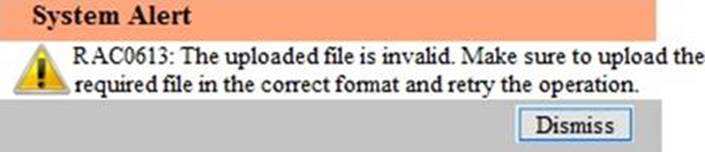
A technician tries to apply a BIOS update through the iDRAC web interface on a server using the Linux Dell Update Package file BIOS_2H4CC_LN_2 0.2.BIN. The error shown occurs.
How should this error be fixed?
- A . Download and apply the Windows Dell Update Package file
- B . Extract the Linux Dell Update Package and apply payload file
- C . Redownload the file to replace corrupted version and reinstall
- D . Reset the iDRAC and reapply the update
A server is configured in a 1+1 power configuration with both PSUs connected to a single PDU.
Which redundancy options does this configuration supply?
- A . PSU redundancy only
- B . PSU redundancy and PDU redundancy
- C . No redundancy unless each PSU is connected to a separate PDU
- D . PSU redundancy and Grid redundancy
A technician is on-site to update firmware on a server for which the iDRAC is not configured. In addition, the technician does not have access to the OS.
However, the site does have DHCP available on the production network as well as on an available workstation. The technician has access to the rack-mounted KVM.
How should the technician update the firmware on the server?
- A . Reboot the server, select F10, configure the network, and run Firmware Update
- B . Reboot the server, select F2, configure the network, and run Firmware Update
- C . Log in via telnet through a serial cable and configure the workstation as a proxy, then downloaded the firmware
- D . Log in via SSH through a serial cable and configure the workstation as a proxy, then download the firmware
A technician is on-site to update firmware on a server for which the iDRAC is not configured. In addition, the technician does not have access to the OS.
However, the site does have DHCP available on the production network as well as on an available workstation. The technician has access to the rack-mounted KVM.
How should the technician update the firmware on the server?
- A . Reboot the server, select F10, configure the network, and run Firmware Update
- B . Reboot the server, select F2, configure the network, and run Firmware Update
- C . Log in via telnet through a serial cable and configure the workstation as a proxy, then downloaded the firmware
- D . Log in via SSH through a serial cable and configure the workstation as a proxy, then download the firmware
A company has an existing Dell EMC 4-node X410 Gen 5 cluster with approximately 100TB of SMB shares connected using two InfiniBand 8-port switches.
The company wants a technical refresh of the cluster with a new 4-node H500 Gen 6 cluster with two 16-port InfiniBand switches. The existing cluster has SyncIQ, SmartConnect Advanced, and SmartPools licenses installed.
To move the data from the existing modes to the new nodes, which migration plan is recommended?
- A . Setup a new cluster with the new Gen 6 nodes and its InfiniBand switches Use SyncIQ to migrate the data and then SmartFail the existing cluster
- B . Setup a new cluster with the new Gen 6 nodes and its InfiniBand switches Use EMCopy to migrate the data and then use “sharedup” to create the shares
- C . Modify the default file pool policy to move the data Swap the existing InfiniBand switches with the new switches
- D . Add the new nodes to the existing cluster Modify the default file pool policy to move the data and then SmartFail the existing nodes
A company has an existing Dell EMC 4-node X410 Gen 5 cluster with approximately 100TB of SMB shares connected using two InfiniBand 8-port switches.
The company wants a technical refresh of the cluster with a new 4-node H500 Gen 6 cluster with two 16-port InfiniBand switches. The existing cluster has SyncIQ, SmartConnect Advanced, and SmartPools licenses installed.
To move the data from the existing modes to the new nodes, which migration plan is recommended?
- A . Setup a new cluster with the new Gen 6 nodes and its InfiniBand switches Use SyncIQ to migrate the data and then SmartFail the existing cluster
- B . Setup a new cluster with the new Gen 6 nodes and its InfiniBand switches Use EMCopy to migrate the data and then use “sharedup” to create the shares
- C . Modify the default file pool policy to move the data Swap the existing InfiniBand switches with the new switches
- D . Add the new nodes to the existing cluster Modify the default file pool policy to move the data and then SmartFail the existing nodes