
CyberArk PAM-DEF-SEN Practice Exams
Last updated on Oct 22,2026- Exam Code: PAM-DEF-SEN
- Exam Name: CyberArk Defender – PAM & Sentry – PAM
- Certification Provider: CyberArk
- Latest update: Oct 22,2026
Which item is an option for PSM recording customization?
- A . Windows events text recorder with automatic play-back
- B . Windows events text recorder and universal keystrokes recording simultaneously
- C . Universal keystrokes text recorder with windows events text recorder disabled
- D . Custom audio recording for windows events
C
Explanation:
For PSM recording customization, one of the options is to use the Universal keystrokes text
recorder with the Windows events text recorder disabled. This configuration allows for the recording
of all keystrokes that are typed during privileged sessions on all supported connections. However, it
is important to note that Universal keystroke recording and Windows events recordings cannot be
configured for the same PSM-RDP connection. By default, Windows events text recording is enabled
for PSM-RDP connections, so to enable universal keystrokes text recording, the Windows events text
recording must first be disabled1.
Reference: CyberArk’s official documentation on configuring recordings and audits in PSM, which includes details on how to customize text recorders and the limitations of configuring multiple recorders for the same connection1
An auditor needs to login to the PSM in order to live monitor an active session.
Which user ID is used to establish the RDP connection to the PSM server?
- A . PSMConnect
- B . PSMMaster
- C . PSMGwUser
- D . PSMAdminConnect
A
Explanation:
The PSMConnect user is a local user on the PSM server that is used to establish RDP connections to the PSM server. The PSMConnect user has the following permissions: Log on locally, Log on as a batch job, and Allow log on through Remote Desktop Services. The PSMConnect user is also a member of the local group PSMUsers, which has access to the PSM web console. The other user IDs are not used for RDP connections to the PSM server. The PSMMaster user is a local user on the PSM server that is used to run the PSM services. The PSMGwUser user is a local user on the PSM server that is used to run the PSM Gateway service. The PSMAdminConnect user is a local user on the PSM server that is used to connect to the PSM web console as an administrator.
Reference: Privileged Session Manager, Defender – PAM, PSM for Web Console, Connect through PSM for SSH
Which option in the Private Ark client is used to update users’ Vault group memberships?
- A . Update > General tab
- B . Update > Authorizations tab
- C . Update > Member Of tab
- D . Update > Group tab
C
Explanation:
In the Private Ark client, to update users’ Vault group memberships, you use the Update > Member Of tab. This tab allows administrators to manage which groups a user is a member of. By adding or removing groups in this tab, you can effectively update the user’s group memberships and, consequently, their access permissions within the Vault1.
Reference: CyberArk’s official documentation on managing users in the Private Ark client, which includes instructions on how to update users’ group memberships
Ad-Hoc Access (formerly Secure Connect) provides the following features. Choose all that apply.
- A . PSM connections to target devices that are not managed by CyberArk.
- B . Session Recording.
- C . Real-time live session monitoring.
- D . PSM connections from a terminal without the need to login to the PVWA.
A, B, C
Explanation:
Ad-Hoc Access (formerly Secure Connect) is a feature that allows users to connect to target devices that are not managed by CyberArk through the PSM. Users can specify the address, username, and password of the target device, and select a client to launch the connection. Ad-Hoc Access sessions benefit from the standard PSM features, such as session recording, detailed auditing, and real-time live session monitoring. However, Ad-Hoc Access does not allow users to connect from a terminal without logging in to the PVWA, as this would bypass the authentication and authorization mechanisms of CyberArk.
Reference: Configure ad hoc connections
Ad Hoc Connections
Privileged Remote Access Management C PAM Remote Access
DRAG DROP
For each listed prerequisite, identify if it is mandatory or not mandatory to run the PSM Health Check.
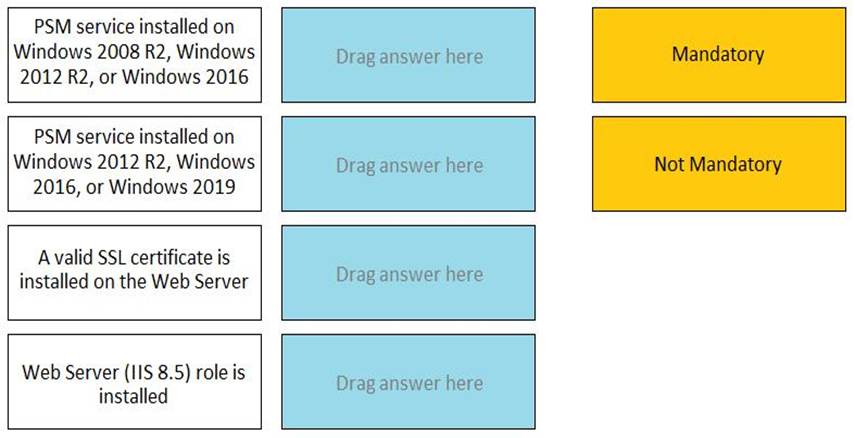
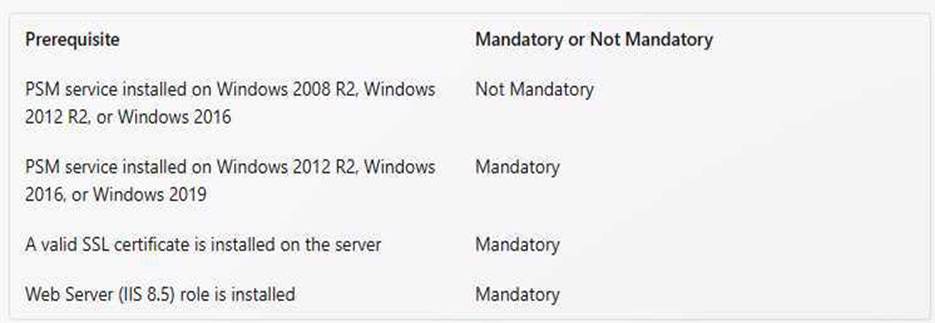
According to the CyberArk documentation1, the prerequisites for running the PSM Health Check are:
PSM service installed on Windows 2016 or Windows 2019
Web Server (IIS 8.5) role is installed
A valid SSL certificate is installed on the Web Server
Therefore, these prerequisites are mandatory for the PSM Health Check to work properly. The PSM service installed on Windows 2008 R2 is not mandatory, as it is not supported by the PSM Health Check2.
Reference: PSM Health Check, PSM Health Check – CyberArk
A newly created platform allows users to access a Linux endpoint. When users click to connect, nothing happens.
Which piece of the platform is missing?
- A . PSM-SSH Connection Component
- B . UnixPrompts.ini
- C . UnixProcess.ini
- D . PSM-RDP Connection Component
A
Explanation:
A platform is a set of parameters that defines how CyberArk manages passwords and sessions for a
specific type of account or system. To allow users to access a Linux endpoint, the platform needs to have a PSM-SSH connection component, which enables transparent connections to Linux machines using the SSH protocol. The PSM-SSH connection component is configured in the Master Policy and defines the settings for the PSM connection, such as the port, the authentication method, and the terminal type. If the platform is missing the PSM-SSH connection component, the users will not be able to click to connect to the Linux endpoint.
Reference: Connection Components, PSM-SSH Connection Component
When managing SSH keys, the CPM stored the Private Key
- A . In the Vault
- B . On the target server
- C . A&B
- D . Nowhere because the private key can always be generated from the public key.
A
Explanation:
When managing SSH keys, the CPM stores the private key in the Vault. The CPM generates a new random SSH key pair and updates the public SSH key on the target server. The new private SSH key is then stored in the Digital Vault where it benefits from all the accessibility and security features of the Vault. The private SSH key is never stored on the target server, as this would expose it to unauthorized access or theft. The private SSH key cannot be generated from the public key, as this would defeat the purpose of asymmetric encryption.
Reference: Manage SSH Keys
SSH Key Manager
Use SSH Keys
Which dependent accounts does the CPM support out-of-the-box? (Choose three.)
- A . Solaris Configuration file
- B . Windows Services
- C . Windows Scheduled
- D . Windows DCOM Applications
- E . Windows Registry
- F . Key Tab file
B, C, E
Explanation:
Dependent accounts are accounts that represent resources such as Windows Services, Windows Scheduled Tasks, and others, which are accessed from a target machine and require the same credentials as the target machine. The CyberArk Privileged Account Security Solution’s Central Policy Manager (CPM) supports out-of-the-box dependent accounts for Windows Services, Windows Scheduled Tasks, and Windows Registry. When changing a password, the CPM synchronizes the target account password with all other occurrences of that password in any related dependent accounts. This ensures that all dependent accounts are updated simultaneously to maintain security and functionality12.
Reference: CyberArk Docs: Manage dependent accounts1
CyberArk Docs: Supported dependent accounts
Which of the following statements are NOT true when enabling PSM recording for a target Windows server? (Choose all that apply)
- A . The PSM software must be instated on the target server
- B . PSM must be enabled in the Master Policy (either directly, or through exception)
- C . PSMConnect must be added as a local user on the target server
- D . RDP must be enabled on the target server
A, C
Explanation:
The following statements are not true when enabling PSM recording for a target Windows server: A. The PSM software must be instated on the target server. This is not true, because the PSM software is installed on a dedicated server that acts as a proxy between the user and the target server. The PSM server intercepts the user’s connection request, initiates the connection to the target server, and records the privileged session. The target server does not need to have the PSM software installed on it1.
C. PSMConnect must be added as a local user on the target server. This is not true, because PSMConnect is a predefined user that is created on the PSM server during the installation. This user is used to establish the connection between the PSM server and the target server, and to run the PSM processes. The target server does not need to have a local user named PSMConnect on it2. The following statements are true when enabling PSM recording for a target Windows server:
B. PSM must be enabled in the Master Policy (either directly, or through exception). This is true, because the Master Policy is a centralized overview of the security and compliance policy of privileged accounts in the organization. It allows the administrator to configure compliance driven rules that are defined as the baseline for the enterprise. One of the rules in the Master Policy is the Session Isolation rule, which determines whether or not privileged sessions are isolated and recorded by PSM. This rule can be enabled either directly in the Master Policy, or through an exception for a specific scope of accounts3.
D. RDP must be enabled on the target server. This is true, because RDP is the protocol that is used by PSM to connect to Windows servers. The target server must have RDP enabled and configured properly to allow the PSM server to access it. The PSM server must also have the RDP client installed on it4.
Reference: 1: Privileged Session Manager
2: PSMConnect and PSMAdminConnect
3: Session Isolation
4: Configure RDP for PSM
A logon account can be specified in the platform settings.
- A . True
- B . False
A
Explanation:
A logon account can be specified in the platform settings of CyberArk, a security software that manages privileged accounts and credentials. According to the CyberArk documentation1, "In the Account Details window, in the CPM pane, in the accounts section, you can associate either a logon account or a reconciliation account. If a default logon account has been configured for the platform that manages this account, that account is listed. You can associate another logon account or leave the default account as it is."1 A logon account is an account that is used to log on to a target system and perform password management operations on other accounts. A reconciliation account is an account that is used to restore access to a target system when the logon account fails.