
CyberArk PAM-DEF-SEN Practice Exams
Last updated on Oct 22,2026- Exam Code: PAM-DEF-SEN
- Exam Name: CyberArk Defender – PAM & Sentry – PAM
- Certification Provider: CyberArk
- Latest update: Oct 22,2026
Which one the following reports is NOT generated by using the PVWA?
- A . Accounts Inventory
- B . Application Inventory
- C . Sales List
- D . Convince Status
C
Explanation:
The PVWA can generate various reports on the privileged accounts and applications in the system, based on different filters and criteria. However, the Safes List report is not one of them. The Safes List report is generated by using the PrivateArk Client, and it provides a list of Safes and their properties according to location.
Reference: Defender-PAM Study Guide, Reports and Audits
You received a notification from one of your CyberArk auditors that they are missing Vault level audit permissions. You confirmed that all auditors are missing the Audit Users Vault permission. Where do you update this permission for all auditors?
- A . Private Ark Client > Tools > Administrative Tools > Directory Mapping > Vault Authorizations
- B . Private Ark Client > Tools > Administrative Tools > Users and Groups > Auditors > Authorizations tab
- C . PVWA User Provisioning > LDAP integration > Vault Auditors Mapping > Vault Authorizations
- D . PVWA> Administration > Configuration Options > LDAP integration > Vault Auditors Mapping > Vault Authorizations
B
Explanation:
To update the Vault level audit permissions for all auditors, you would use the Private Ark Client. Specifically, you would navigate to the Tools menu, select Administrative Tools, then Users and Groups. Within the Users and Groups section, you would select the Auditors group and go to the Authorizations tab. Here, you can manage and update the permissions for the Auditor group, including the Audit Users Vault permission. This ensures that all members of the Auditors group have the necessary permissions to perform their audit functions within the Vault1.
Reference: CyberArk’s official documentation on predefined users and groups, which includes information on the Auditor user and the permissions associated with this role1.
Information on the administrative tools available in the Private Ark Client, which are used for managing users and groups, including auditors2.
DRAG DROP
Match the log file name with the CyberArk Component that generates the log.
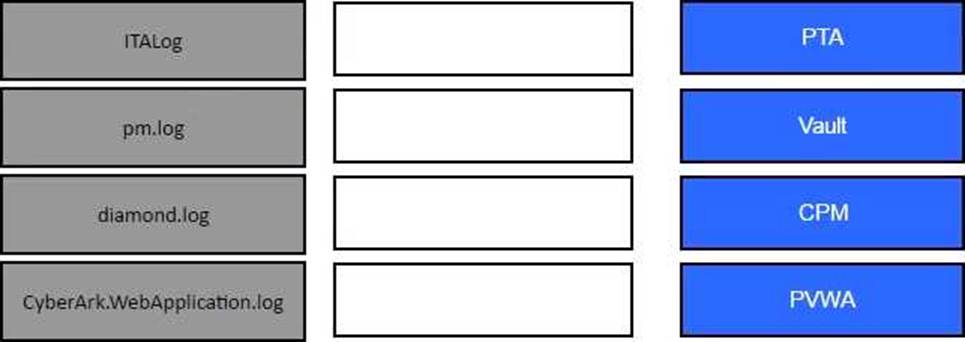
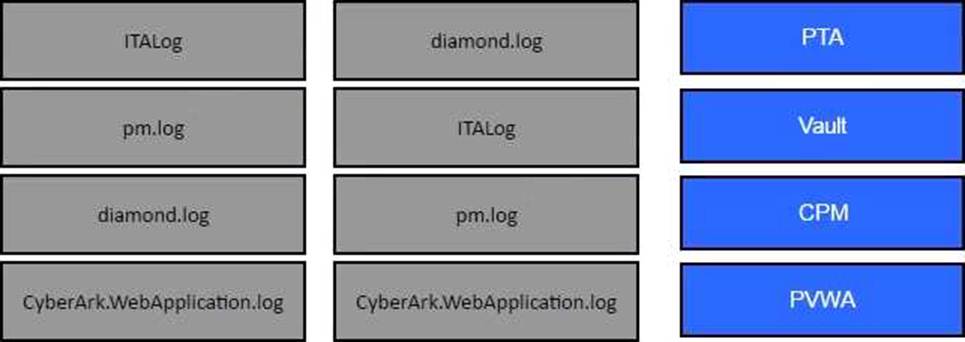
Explanation:
Reference: Log Files
[Defender PAM Sample Items Study Guide], Question 46, page 16
Which onboarding method would you use to integrate CyberArk with your accounts provisioning process?
- A . Accounts Discovery
- B . Auto Detection
- C . Onboarding RestAPI functions
- D . PTA Rules
C
Explanation:
The Onboarding RestAPI functions are a set of web services that allow you to integrate CyberArk with your accounts provisioning process. You can use the Onboarding RestAPI functions to create, update, delete, or verify accounts in the CyberArk Vault, as well as to retrieve information about accounts, platforms, and safes. The Onboarding RestAPI functions are part of the Central Credential Provider component, which is installed on a dedicated server that communicates with the Vault.
Reference: [Defender PAM Course], Module 4: Onboarding Accounts, Lesson: Onboarding RestAPI Functions [Onboarding RestAPI Functions Guide], Introduction
You are creating a Dual Control workflow for a team’s safe.
Which safe permissions must you grant to the Approvers group?
- A . List accounts, Authorize account request
- B . Retrieve accounts, Access Safe without confirmation
- C . Retrieve accounts, Authorize account request
- D . List accounts, Unlock accounts
C
Explanation:
When setting up a Dual Control workflow for a team’s safe in CyberArk’s Privileged Access Management (PAM), the Approvers group must be granted specific permissions to function effectively within the workflow. The permissions required for the Approvers group are to ‘Retrieve accounts’ and ‘Authorize account request’. This allows the Approvers to retrieve the necessary account details and also to authorize requests for access as part of the dual control mechanism. These permissions ensure that the workflow operates smoothly and securely, with the Approvers having the ability to review and approve access requests as needed.
Reference: The answer is derived from the best practices and guidelines provided in the CyberArk Defender PAM course and learning resources, which include the official CyberArk documentation and study guides. Specifically, the CyberArk documentation outlines the importance of the ‘Retrieve accounts’ and ‘Authorize account request’ permissions for Approvers in a Dual Control workflow
Which of the following Privileged Session Management solutions provide a detailed audit log of session activities?
- A . PSM (i.e., launching connections by clicking on the "Connect" button in the PVWA)
- B . PSM for Windows (previously known as RDP Proxy)
- C . PSM for SSH (previously known as PSM SSH Proxy)
- D . All of the above
D
Explanation:
All of the Privileged Session Management solutions provide a detailed audit log of session activities. PSM, PSM for Windows, and PSM for SSH enable organizations to secure, control and monitor privileged access to network devices by using Vaulting technology to manage privileged accounts and create detailed session audits and video recordings of all IT administrator privileged sessions on remote machines1. PSM also provides additional audit features such as SQL Command Level Audit, Windows Events Audit, and Universal Keystrokes Audit1. PSM for Web captures a detailed transcript of cloud application user activity to enable a security manager or auditor the ability to monitor sessions for suspicious or restricted operations2.
Reference: Monitor Privileged Sessions – CyberArk
Privileged Session Manager for Web – CyberArk
You created a new safe and need to ensure the user group cannot see the password, but can connect through the PSM.
Which safe permissions must you grant to the group? (Choose two.)
- A . List Accounts Most Voted
- B . Use Accounts Most Voted
- C . Access Safe without Confirmation
- D . Retrieve Files
- E . Confirm Request
B, D
Explanation:
To ensure that a user group can connect through the Privileged Session Manager (PSM) without seeing the password, you must grant the Use Accounts and Retrieve Files permissions to the group for the safe. The Use Accounts permission allows users to initiate sessions using accounts without viewing the account details or passwords. The Retrieve Files permission enables users to retrieve files during PSM sessions without having access to the passwords1.
Reference: CyberArk Docs – Safe Permissions
Time of day or day of week restrictions on when password verifications can occur configured in ____________________.
- A . The Master Policy
- B . The Platform settings
- C . The Safe settings
- D . The Account Details
C
Explanation:
Time of day or day of week restrictions on when password verifications can occur are configured in the Safe settings. This is a security feature that prevents Safes from being opened except at certain times (e.g., 8 a.m. to 5 p.m.). If a user tries to enter at a time that has not been designated for access, they will receive a message that informs them that the Safe is unavailable.
Reference: Advanced Safe Management
Which combination of Safe member permissions will allow end users to log in to a remote machine transparently but NOT show or copy the password?
- A . Use Accounts, Retrieve Accounts, List Accounts
- B . Use Accounts, List Accounts
- C . Use Accounts
- D . List Accounts, Retrieve Accounts
B
Explanation:
The Use Accounts permission enables Safe members to log in to a remote machine through a PSM connection from the Accounts List or the Account Details page. The List Accounts permission enables Safe members to view the Accounts list. However, to show or copy the password, the Safe members also need the Retrieve Accounts permission, which allows them to view and copy the account value in the Account Details page or the Accounts list. Therefore, the combination of Use Accounts and List Accounts will allow end users to log in to a remote machine transparently but not show or copy the password.
Reference: Safe Members – CyberArk1, section “Permissions”
Safes and Safe members – CyberArk2, section “Safe members overview”