
CyberArk PAM-DEF-SEN Practice Exams
Last updated on Oct 22,2026- Exam Code: PAM-DEF-SEN
- Exam Name: CyberArk Defender – PAM & Sentry – PAM
- Certification Provider: CyberArk
- Latest update: Oct 22,2026
In order to connect to a target device through PSM, the account credentials used for the connection must be stored in the vault?
- A . True.
- B . False. Because the user can also enter credentials manually using Secure Connect.
- C . False. Because if credentials are not stored in the vault, the PSM will log into the target device as PSM Connect.
- D . False. Because if credentials are not stored in the vault, the PSM will prompt for credentials.
B
Explanation:
In order to connect to a target device through PSM, the account credentials used for the connection do not necessarily have to be stored in the vault. The user can also enter credentials manually using Secure Connect, which is a feature that enables users to connect to target systems through PSM without storing the account credentials in the vault. Secure Connect allows users to provide their own credentials at the time of connection, and these credentials are not saved or managed by CyberArk. Secure Connect can be used with any connection component that supports PSM, such as RDP, SSH, WinSCP, etc. To use Secure Connect, the user needs to specify the target system address and the connection component ID in the URL, and then enter the credentials in the PSM login screen1.
The other options are not correct, because:
You created a new platform by duplicating the out-of-box Linux through the SSH platform. Without any change, which Text Recorder Type(s) will the new platform support? (Choose two.)
- A . SSH Text Recorder
- B . Universal Keystrokes Text Recorder
- C . Events Text Recorder
- D . SQL Text Recorder
- E . Telnet Commands Text Recorder
A, B
Explanation:
When a new platform is created by duplicating the out-of-the-box Linux through the SSH platform, it will support the SSH Text Recorder and the Universal Keystrokes Text Recorder by default. The SSH Text Recorder is designed to record all the keystrokes that are typed during privileged sessions on SSH connections1. The Universal Keystrokes Text Recorder can record all the keystrokes that are typed during privileged sessions on all supported connections1. These text recorders are automatically enabled at the Master Policy level and can be customized at the platform level1.
Reference: CyberArk Docs: Recordings and Audits
In PVWA, you are attempting to play a recording made of a session by user jsmith, but there is no option to “Fast Forward” within the video. It plays and only allows you to skip between commands instead. You are also unable to download the video.
What could be the cause?
- A . Recording is of a PSM for SSH session.
- B . The browser you are using is out of date and needs an update to be supported.
- C . You do not have the “View Audit” permission on the safe where the account is stored.
- D . You need to update the recorder settings in the platform to enable screen capture every 10000 ms or less.
A
Explanation:
The inability to “Fast Forward” within a video recording in the PVWA and the restriction to only skip
between commands suggests that the recording is of a PSM for SSH session. PSM for SSH sessions
are typically recorded as text-based logs that capture command-level activities, which allows for
skipping between commands but not fast-forwarding through a video timeline. Additionally, the lack
of an option to download the video is consistent with the behavior of text-based session recordings,
which do not provide a video file for download1.
Reference: CyberArk’s official documentation on Recorded Sessions, which explains the playback functionalities and limitations of different types of session recordings1.
Information on configuring video and text recordings in PSM, which details how recordings are managed and the options available for different session types2.
DRAG DROP
Arrange the steps to restore a Vault using PARestore for a Backup in the correct sequence.
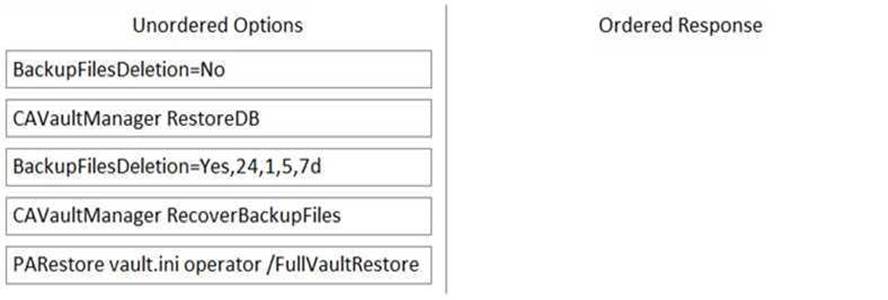
BackupFilesDeletion=No
PARestore vault.ini operator /FullVaultRestore
CAVaultManager RecoverBackupFiles
CAVaultManager RestoreDB
BackupFilesDeletion=Yes,24,1,5,7d
https://docs.cyberark.com/Product-Doc/OnlineHelp/PAS/Latest/en/Content/PASIMP/Restoring-Safes-or-the-Vault.htm
CyberArk recommends implementing object level access control on all Safes.
- A . True
- B . False
B
Explanation:
CyberArk does not recommend implementing object level access control on all Safes. According to the CyberArk documentation1, enabling object level access control impacts Vault performance. Therefore, it should be used only when necessary and with caution. Object level access control is useful when you need to give granular permissions to specific passwords or files in a Safe, regardless of the Safe level member authorizations. For example, you can use it to grant access to an external vendor or technician for a specific password only, without exposing any other passwords or files in the Safe. However, if you do not need this level of granularity, you can use the regular Safe member authorizations to control user access to the Safe and its contents.
Which usage can be added as a service account platform?
- A . Kerberos Tokens
- B . IIS Application Pools
- C . PowerShell Libraries
- D . Loosely Connected Devices
B
Explanation:
A service account platform is a type of platform that defines how CyberArk manages passwords for service accounts, which are accounts that run applications or services on remote machines. A usage
is a configuration that allows CyberArk to manage passwords for files, such as XML or INI files, that are stored on remote machines. A usage is associated with a parent account, which is the account that has access to the file. A usage can be added as a service account platform if the file contains the password of a service account. For example, IIS Application Pools is a usage that can be added as a service account platform, because it manages the passwords of the application pools that run on IIS servers. The other options, Kerberos Tokens, PowerShell Libraries, and Loosely Connected Devices, are not usages that can be added as service account platforms, because they do not manage passwords for service accounts.
Reference: Usages, Service Account Platforms
If PTA is integrated with a supported SIEM solution, which detection becomes available?
- A . unmanaged privileged account
- B . privileged access to the Vault during irregular days
- C . riskySPN
- D . exposed credentials
D
Explanation:
When Privileged Threat Analytics (PTA) is integrated with a supported Security Information and
Event Management (SIEM) solution, the detection of exposed credentials becomes available. This
integration allows PTA to detect when a user is connected to a machine with a privileged account
without first retrieving the credential from the CyberArk Digital Vault. In such cases, PTA can prompt
an immediate credential rotation and send an alert to the SIEM, indicating a suspected credential
theft1.
Reference: CyberArk Docs – SIEM Integration2
CyberArk Blog – Integrate CyberArk with a SIEM Solution1
What does the Export Vault Data (EVD) utility do?
- A . exports data from the Vault to TXT or CSV files, or to MSSQL databases
- B . generates a backup file that can be used as a cold backup
- C . exports all passwords and imports them into another instance of CyberArk
- D . keeps two active vaults in sync
A
Explanation:
The Export Vault Data (EVD) utility is used to export data from the CyberArk Vault to TXT or CSV files, or to MSSQL databases. This utility enables the creation of reports such as a list of Safes or incoming requests by exporting data from the Vault. Each report is saved in a separate file, which can then be imported into third-party applications or databases for further analysis or reporting purposes12.
Reference: CyberArk Docs – Export Vault Data (EVD) utility1
CyberArk Docs – Export data to files
DRAG DROP
ADR Vault became active due to a failure of the primary Vault. Service on the primary Vault has now been restored. Arrange the steps to return the DR vault to its normal standby mode in the correct sequence.
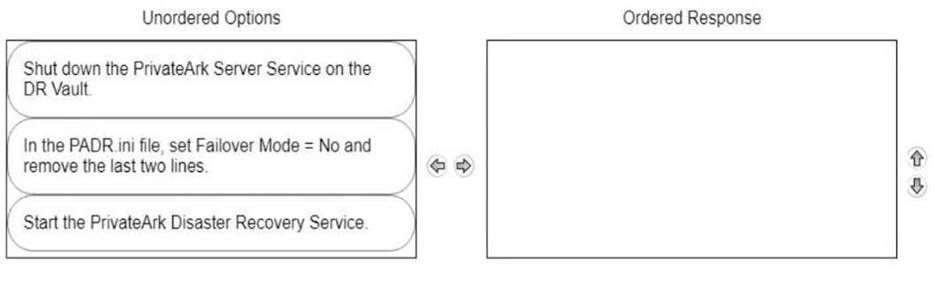
Shut down the PrivateArk Server Service on the DR Vault.
In the PADR.ini file, set Failover Mode = No and remove the last two lines.
Start the PrivateArk Disaster Recovery Service.
Comprehensive When the primary Vault service has been restored and you need to return the DR Vault to its normal standby mode, the steps are as follows:
Shut down the PrivateArk Server Service on the DR Vault to stop the Vault from being active. Modify the PADR.ini file by setting Failover Mode to No and removing the last two lines that were added during the failover process. This reconfigures the DR Vault to standby mode.
Start the PrivateArk Disaster Recovery Service to complete the transition back to standby mode1.
Reference: CyberArk Docs – Initiate a DR Failback to the Production Vault1
Which is the primary purpose of exclusive accounts?
- A . Reduced risk of credential theft
- B . More frequent password changes
- C . Non-repudiation (individual accountability)
- D . To force a ‘collusion to commit’ fraud ensuring no single actor may use a password without authorization
D
Explanation:
According to the web search results, exclusive accounts are a feature of CyberArk Defender PAM that enables organizations to permit users to check out a ‘one-time’ password and lock it so that no other users can retrieve it at the same time1. After the user has used the password, the user checks the password back into the Vault. This ensures exclusive usage of the privileged account, enabling full control and tracking for the password. The duration of the check-out period can be configured in the platform settings for each account1.
The primary purpose of exclusive accounts is to prevent a single user from accessing a sensitive account without authorization, which could lead to fraud or misuse of privileges. By requiring a check-out and check-in process, exclusive accounts ensure that there is a ‘collusion to commit’ fraud, meaning that at least two users are involved in the malicious activity and are accountable for it. One user must check out the password and use it, while another user must approve the check-in and
verify the password change. This way, exclusive accounts add an additional measure of protection and accountability for accessing sensitive accounts.