
CyberArk PAM-DEF-SEN Practice Exams
Last updated on Oct 22,2026- Exam Code: PAM-DEF-SEN
- Exam Name: CyberArk Defender – PAM & Sentry – PAM
- Certification Provider: CyberArk
- Latest update: Oct 22,2026
You have been asked to secure a set of shared accounts in CyberArk whose passwords will need to be used by end users. The account owner wants to be able to track who was using an account at any given moment.
Which security configuration should you recommend?
- A . Configure one-time passwords for the appropriate platform in Master Policy.
- B . Configure shared account mode on the appropriate safe.
- C . Configure both one-time passwords and exclusive access for the appropriate platform in Master Policy.
- D . Configure object level access control on the appropriate safe.
C
Explanation:
One-time passwords and exclusive access are security features that can be configured for a platform in the Master Policy. These features enhance the security and accountability of shared accounts by ensuring that each password is used only once and by only one user at a time. One-time passwords generate a new password for each check-out and check-in of an account, preventing password reuse and exposure. Exclusive access prevents multiple users from accessing the same account simultaneously, avoiding conflicts and confusion. By configuring both one-time passwords and exclusive access for the appropriate platform, the account owner can track who was using an account at any given moment and ensure that the passwords are always secure and unique.
Reference: One-Time Passwords, Exclusive Access, Master Policy
A user with administrative privileges to the vault can only grant other users privileges that he himself has.
- A . TRUE
- B . FALSE
B
Explanation:
A user with administrative privileges to the vault can grant other users privileges that he himself
does not have, as long as he has the Authorize Users authorization on the Vault. The Authorize Users authorization enables a user to add or remove other users or groups as Vault members, and assign or revoke their authorizations. A user with this authorization can grant any privilege to any other user or group, regardless of his own privileges. However, this authorization does not allow a user to change his own privileges or the privileges of other users who have the same authorization1.
Reference: 1: Vault Member Authorizations
According to the DEFAULT Web Options settings, which group grants access to the REPORTS page?
- A . PVWAUsers
- B . Vault Admins
- C . Auditors
- D . PVWAMonitor
C
Explanation:
According to the CyberArk Defender-PAM study guide, the REPORTS page is used to generate reports on various aspects of the CyberArk Privileged Access Management Solution, such as user activity, password usage, and compliance status. The default group that grants access to the REPORTS page is the Auditors group, which is a built-in group in the Vault that has the AuditUsers authorization. Members of the Auditors group can view and generate reports, but cannot modify them.
Reference: CyberArk Defender-PAM study guide, page 17, section 3.2.1
CyberArk Privileged Access Security Documentation, page 48, section 2.3.2.1
What are the mandatory fields when onboarding from Pending Accounts? (Choose two.)
- A . Address
- B . Safe
- C . Account Description
- D . Platform
- E . CPM
B, D
Explanation:
When onboarding accounts from the Pending Accounts list, the mandatory fields that must be
specified are the Safe where the account will be stored and the Platform that the account will be
associated with. The Safe is crucial as it determines the secure location within the CyberArk Vault
where the account’s credentials will be kept. The Platform is essential because it defines the set of
policies and behaviors that will be applied to the account, such as password rotation and session
monitoring12.
Reference: CyberArk Docs – Pending accounts1
CyberArk Docs – Onboarding rules
You need to enable the PSM for all platforms.
Where do you perform this task?
- A . Platform Management > (Platform) > UI & Workflows
- B . Master Policy > Session Management
- C . Master Policy > Privileged Access Workflows
- D . Administration > Options > Connection Components
A
Explanation:
To enable PSM for specific platforms, you need to go to Platform Management, select the platform you want to configure, click Edit, expand UI & Workflows, and select Privileged Session Management. There you can customize the PSM settings for that platform, such as the PSM server ID, the connection components, the PSM connection method, and the PSM recording options. You can also disable dual control for PSM connections if needed.
Reference: Configure PSM for Specific Platforms
Where can PTA be configured to send alerts? (Choose two.)
- A . SIEM
- B . Email
- C . Google Analytics
- D . EVD
- E . PAReplicate
A, B
Explanation:
CyberArk’s Privileged Threat Analytics (PTA) can be configured to send alerts to a Security Information and Event Management (SIEM) system and via Email. SIEM systems are used for real-time analysis of security alerts generated by applications and network hardware, while email alerts can be sent to individual or group email addresses for immediate notification1.
Reference: CyberArk Docs: Send PTA Alerts to Email1
DRAG DROP
Match the connection component to the corresponding OS/Function.
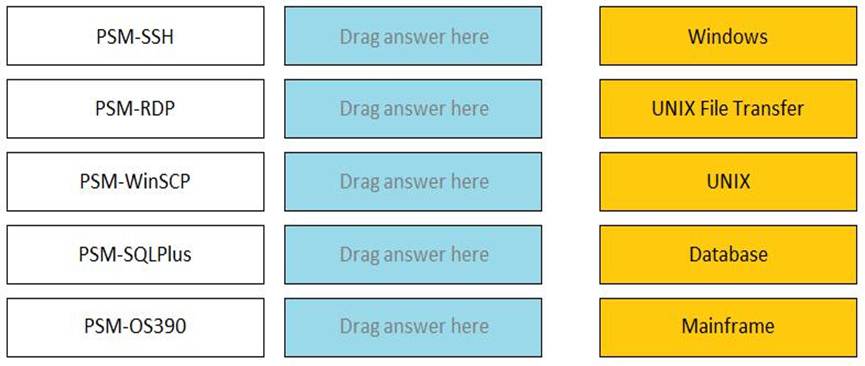
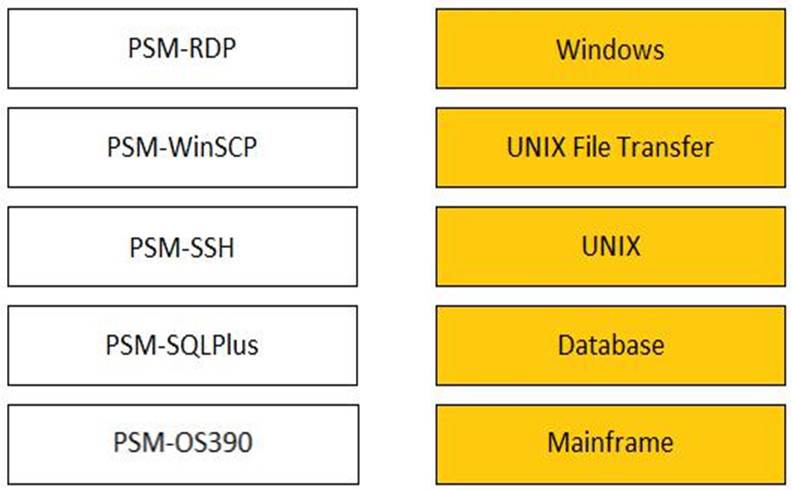
A connection component is a set of parameters that defines how PSM connects to a target system using a specific protocol or application. Different connection components are suitable for different types of systems or functions. The correct matches are as follows: PSM-SSH: This connection component enables transparent connections to UNIX machines using the
SSH protocol. It supports various UNIX flavors, such as Linux, Solaris, AIX, and HP-UX. PSM-RDP: This connection component enables transparent connections to Windows machines using the RDP protocol. It supports various Windows versions, such as Windows Server, Windows 10, and Windows 7.
PSM-WinSCP: This connection component enables transparent connections to UNIX machines using the WinSCP application. It supports file transfer operations, such as upload, download, delete, and rename, between the local and remote machines.
PSM-SQLPlus: This connection component enables transparent connections to Oracle databases using the SQL*Plus application. It supports various Oracle versions, such as Oracle 12c, Oracle 11g, and Oracle 10g.
PSM-OS390: This connection component enables transparent connections to IBM mainframes using the OS/390 protocol. It supports various mainframe applications, such as TSO, CICS, and IMS.
Reference: Connection Components, Connection Component Parameters
Customers who have the ‘Access Safe without confirmation’ safe permission on a safe where accounts are configured for Dual control, still need to request approval to use the account.
- A . TRUE
- B . FALSE
B
Explanation:
Customers who have the ‘Access Safe without confirmation’ safe permission on a safe where accounts are configured for Dual control, do not need to request approval to use the account. The ‘Access Safe without confirmation’ safe permission allows users to access accounts without confirmation from authorized users, even if the Master Policy or an exception enforces Dual Control1. This means that users who have this permission can bypass the workflow process and access the account password or connect to the target system immediately. This permission can be granted to users or groups on a safe level by the safe owner or another user with the Manage Safe authorization2.
Reference: 1: Dual Control, Advanced Settings subsection
2: CyberArk Privileged Access Security Implementation Guide, Chapter 3: Managing Safes, Section:
Safe Authorizations, Table 2-1: Safe Authorizations
Which master policy settings ensure non-repudiation?
- A . Require password verification every X days and enforce one-time password access.
- B . Enforce check-in/check-out exclusive access and enforce one-time password access.
- C . Allow EPV transparent connections (‘Click to connect’) and enforce check-in/check-out exclusive access.
- D . Allow EPV transparent connections (‘Click to connect’) and enforce one-time password access.
B
Explanation:
Non-repudiation in the context of CyberArk Master Policy settings refers to the assurance that a user cannot deny the validity of their actions. The settings that ensure non-repudiation are those that enforce accountability and traceability of actions. Enforcing check-in/check-out exclusive
access ensures that only one user can access an account at a time, and their actions can be traced back to themEnforcing one-time password access means that passwords are used only once and then changed, which prevents the reuse of credentials and ties actions to specific instances of access12.
Reference: CyberArk Docs: Master Policy Rules2
CyberArk Docs: The Master Policy1
By default, members of which built-in groups will be able to view and configure Automatic Remediation and Session Analysis and Response in the PVWA?
- A . Vault Admins
- B . Security Admins
- C . Security Operators
- D . Auditors
B
Explanation:
Security Admins are the built-in group that can view and configure Automatic Remediation and Session Analysis and Response in the PVWA. These features are part of the Privileged Threat Analytics (PTA) module, which is designed to detect and respond to anomalous activities and risky behaviors in the privileged environment. Security Admins have the permissions to access the PTA settings and configure the policies and actions for Automatic Remediation and Session Analysis and Response.
Reference: Defender PAM Sample Items Study Guide, page 18, question 49
Privileged Threat Analytics Implementation Guide, page 9, section “Security Admins”