
CyberArk PAM-DEF-SEN Practice Exams
Last updated on Oct 22,2026- Exam Code: PAM-DEF-SEN
- Exam Name: CyberArk Defender – PAM & Sentry – PAM
- Certification Provider: CyberArk
- Latest update: Oct 22,2026
Where can reconcile and/or logon accounts be linked to an account? (Choose two.)
- A . account settings
- B . platform settings
- C . master policy
- D . safe settings
- E . service account settings
D, B
Explanation:
Reconcile and logon accounts can be linked to an account within the platform settings and safe settings. The platform settings define the parameters for its linked accounts in either the Target Account or Service Account that requires them. When linked accounts are specified in the Target Account platform, they appear in the CPM pane of the Account Details page. Similarly, when they are specified in the Service Account platform, they appear in the CPM pane of the Service Account Details page1. Safe settings are also involved in the process of linking accounts, as they determine where the accounts are stored and managed within the CyberArk Vault.
Reference: CyberArk Docs – Linked Accounts1
CyberArk REST API documentation on adding Reconcile and Login Accounts to an Account
To ensure all sessions are being recorded, a CyberArk administrator goes to the master policy and
makes configuration changes.
Which configuration is correct?
- A . Require privileged session monitoring and isolation = inactive; Record and save session activity = active.
- B . Require privileged session monitoring and isolation = inactive; Record and save session activity = inactive.
- C . Require privileged session monitoring and isolation = active; Record and save session activity = active.
- D . Require privileged session monitoring and isolation = active; Record and save session activity = inactive.
C
Explanation:
This configuration ensures that privileged sessions are monitored and isolated, and all session activities are recorded and saved for future reference 1.
When running a “Privileged Accounts Inventory” Report through the Reports page in PVWA on a specific safe, which permission/s are required on that safe to show complete account inventory information?
- A . List Accounts, View Safe Members
- B . Manage Safe Owners
- C . List Accounts, Access Safe without confirmation
- D . Manage Safe, View Audit
A
Explanation:
The Privileged Accounts Inventory Report provides information about all the privileged accounts in the system, based on different filters, such as safe, platform, policy, and owner. To run this report through the Reports page in PVWA on a specific safe, the user needs to have the following permissions on that safe:
List Accounts: This permission allows the user to view the accounts in the safe and their properties, such as name, address, platform, and policy.
View Safe Members: This permission allows the user to view the members of the safe and their authorizations, such as owners, users, and groups.
These permissions are required to show complete account inventory information for the specific safe. Other permissions, such as Manage Safe Owners, Access Safe without confirmation, Manage Safe, and View Audit, are not relevant for this report.
Reference: Reports and Audits – CyberArk, Safe Member Authorizations
When a group is granted the ‘Authorize Account Requests’ permission on a safe Dual Control requests must be approved by
- A . Any one person from that group
- B . Every person from that group
- C . The number of persons specified by the Master Policy
- D . That access cannot be granted to groups
C
Explanation:
When a group is granted the ‘Authorize Account Requests’ permission on a safe, dual control requests must be approved by the number of persons specified by the Master Policy. This means that the request will be sent to all the members of the group, but only a certain number of them need to confirm it for the request to be authorized. The Master Policy defines the number of required approvers for each level of confirmation, as well as the number of levels. For example, if the Master Policy requires two approvers at the first level and one approver at the second level, then the request will be sent to the group and two members of the group must confirm it before it is sent to the second level of confirmation, where one more approver is needed.
Reference: Request access
Safe Members
CyberArk Defender – PAM Exam Practice Test
Which of the following files must be created or configured m order to run Password Upload Utility? Select all that apply.
- A . PACli.ini
- B . Vault.ini
- C . conf.ini
- D . A comma delimited upload file
A, C, D
Explanation:
: To run the Password Upload Utility, you need to create or configure the following files:
A comma delimited upload file: This is a text file that contains the passwords and their properties that will be uploaded to the Vault. The file must have a .csv extension and follow a specific format. The first line in the file defines the names of the password properties as specified in the Password Vault. Every other line represents a single password object and its property values, according to the properties specified in the first line1.
PACli.ini: This is a configuration file that stores the parameters for the PACli, which is a command-line interface that enables communication between the Password Upload Utility and the Vault. The PACli.ini file must be located in the same folder as the Password Upload Utility executable file. The file must contain the following parameters: Vault, User, Password, and LogFile2.
conf.ini: This is a configuration file that stores the parameters for the Password Upload Utility. The conf.ini file must be located in the same folder as the Password Upload Utility executable file. The file must contain the following parameters: InputFile, LogFile, and ErrorFile3.
You do not need to create or configure the following file to run the Password Upload Utility: Vault.ini: This is a configuration file that stores the parameters for the Vault server, such as the database name, port, and password. This file is not used by the Password Upload Utility, and it is not located in the same folder as the Password Upload Utility executable file. The Vault.ini file is located in the Vault installation folder, and it is used by the Vault service and the PrivateArk Client4.
Reference: 1: Create the Password File
2: PACli.ini
3: Password Upload Utility Parameter File (conf.ini)
4: [CyberArk Privileged Access Security Implementation Guide], Chapter 2: Installing the Vault,
Section: Configuring the Vault, Subsection: Vault.ini
It is possible to restrict the time of day, or day of week that a [b]verify[/b] process can occur
- A . TRUE
- B . FALSE
A
Explanation:
It is possible to restrict the time of day, or day of week that a verify process can occur by using the Verify Time Window parameter in the Platform Management page. This parameter allows the administrator to define a time window for each platform, during which the verify process can be performed. The verify process will not run outside of this time window, unless it is manually initiated by the administrator. This feature can help reduce the load on the target systems and the network during peak hours.
Reference: [Defender PAM Course], Module 4: Managing Accounts, Lesson 2: Account Verification, Slide 8: Verify Time Window
[Defender PAM Documentation], Version 12.3, Administration Guide, Chapter 4: Managing
Platforms, Section: Verify Time Window
What must you specify when configuring a discovery scan for UNIX? (Choose two.)
- A . Vault Administrator
- B . CPM Scanner
- C . root password for each machine
- D . list of machines to scan
- E . safe for discovered accounts
B, D
Explanation:
When configuring a discovery scan for UNIX, you must specify the CPM Scanner and the list of
machines to scan. The CPM Scanner is the component responsible for executing the discovery
process, and it requires a list of target machines to scan for new and modified accounts and their
dependencies. This list can be provided in the form of a CSV file for UNIX machines1. The discovery
process will then scan the predefined machines to identify privileged accounts that should be
onboarded into the Vault for secure and automated management according to enterprise
compliance policies2.
Reference: CyberArk Docs – Manage discovery processes1
CyberArk Docs – Scan for accounts using Account Discovery
DRAG DROP
Which authorizations are required in a recording safe to allow a group to view recordings?
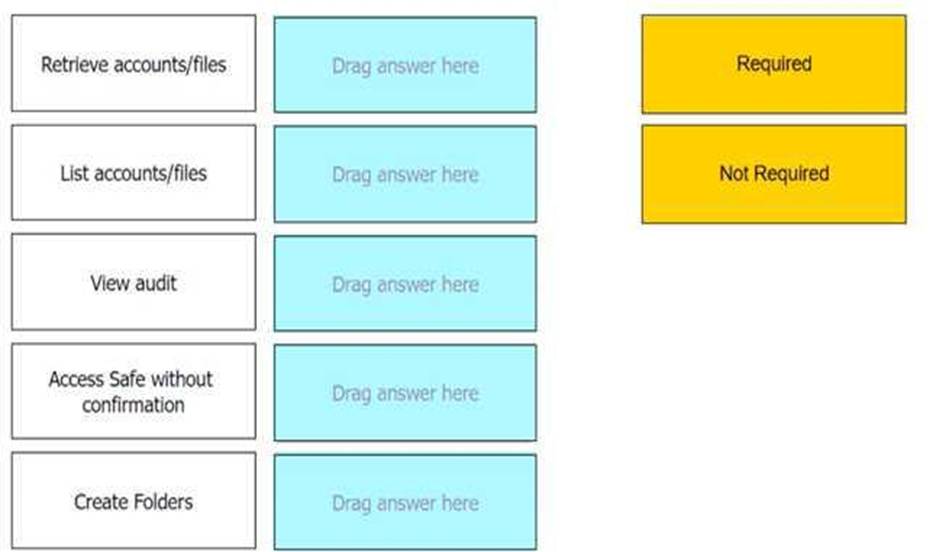
Retrieve accounts/files: Required
List accounts/files: Required
View audit: Required
Access Safe without confirmation: Not Required
Create Folders: Not Required
Comprehensive To allow a group to view recordings in a recording safe, the required authorizations
are Retrieve accounts/files, List accounts/files, and View audit. These authorizations enable the
group members to access and view the session recordings stored within the safe. The Retrieve
accounts/files permission allows users to retrieve files during PSM sessions. The List
accounts/files permission enables users to see the list of accounts and files within the safe. The View
audit authorization is necessary for users to view the audit records associated with the recordings1.
Reference: CyberArk Docs – Monitor Privileged Sessions
When Dual Control is enabled a user must first submit a request in the Password Vault Web Access (PVWA) and receive approval before being able to launch a secure connection via PSM for Windows (previously known as RDP Proxy).
- A . True
- B . False, a user can submit the request after the connection has already been initiated via the PSM for Windows
A
Explanation:
According to the CyberArk Defender PAM documentation1, when Dual Control is enabled, a user must first submit a request in the Password Vault Web Access (PVWA) and receive approval before being able to launch a secure connection via PSM for Windows (previously known as RDP Proxy). This is a security feature that ensures that passwords can only be retrieved after permission or ‘confirmation’ has been granted from an authorized Safe Owner(s). The user must specify the reason for accessing the account, whether they will access it once or multiple times, and the time period during which they will access it. The request is then sent to the authorized Safe Owners, who can either confirm or reject it. The number of confirmations required is defined in the Master Policy. Only after the user receives the required confirmations, they can activate the request and access the account through PSM for Windows. This way, Dual Control adds an additional measure of protection and accountability for accessing sensitive accounts.
To use PSM connections while in the PVWA, what are the minimum safe permissions a user or group will need?
- A . List Accounts, Use Accounts
- B . List Accounts, Use Accounts, Retrieve Accounts
- C . Use Accounts
- D . List Accounts, Use Accounts, Retrieve Accounts, Access Safe without confirmation
B
Explanation:
To use PSM connections within the PVWA, a user or group needs to have permissions that allow them to list and use accounts, as well as retrieve account details. These permissions ensure that the user can view the accounts within a safe, initiate sessions using those accounts, and retrieve the necessary credentials for authentication during the session initiation process1.
Reference: CyberArk’s official documentation on Safe Settings and permissions required for each safe in CyberArk’s Enterprise Password Vault (EPV) components provides detailed information on the
default safe configuration and permissions1.
For more information on best practices for safe and safe member design, including the minimum permissions required for PSM connections, refer to CyberArk’s best practices articles and study guides