
CyberArk PAM-DEF-SEN Practice Exams
Last updated on Oct 22,2026- Exam Code: PAM-DEF-SEN
- Exam Name: CyberArk Defender – PAM & Sentry – PAM
- Certification Provider: CyberArk
- Latest update: Oct 22,2026
DRAG DROP
Match each permission to where it can be found.
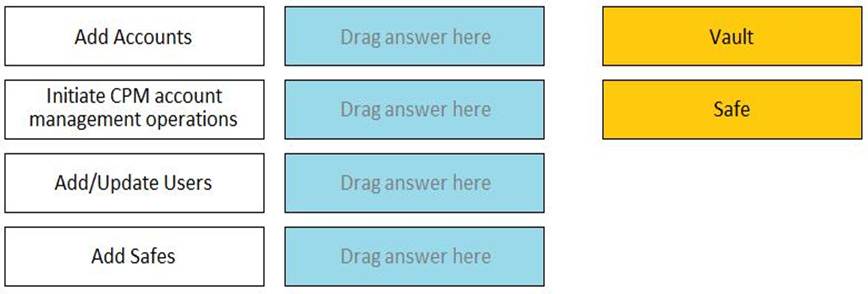
Add Accounts –> Safe
Initiate CPM account management operations -> Safe
Add/Update Users -> Vault
Add Safes -> Vault
Comprehensive
Add Accounts: This permission is associated with the ability to add new accounts to the CyberArk Vault. It is typically found in the Vault’s administrative settings where account management is handled.
Initiate CPM account management operations: This permission allows users to initiate operations related to the Central Policy Manager (CPM) for account management within a Safe. It is found in the Safe’s permissions settings.
Add/Update Users: This permission enables the addition or updating of user information in the Vault.
It is found in the Vault’s user management settings.
Add Safes: This permission is related to the creation of new Safes in the Vault. It is found in the Vault’s administrative settings where Safe management is conducted.
Reference: The permissions and their locations can be referenced in the CyberArk Defender PAM course materials and official documentation, which provide detailed information on the management of permissions within the CyberArk solution.
Which of the following are secure options for storing the contents of the Operator CD, while still allowing the contents to be accessible upon a planned Vault restart? (Choose three.)
- A . Store the CD in a physical safe and mount the CD every time Vault maintenance is performed
- B . Copy the entire contents of the CD to the system Safe on the Vault
- C . Copy the entire contents of the CD to a folder on the Vault Server and secure it with NTFS permissions
- D . Store the server key in a Hardware Security Module (HSM) and copy the rest the keys from the CD to a folder on the Vault Server and secure it with NTFS permissions
A, B, D
Explanation:
Which report could show all accounts that are past their expiration dates?
- A . Privileged Account Compliance Status report
- B . Activity log
- C . Privileged Account Inventory report
- D . Application Inventory report
A
Explanation:
The Privileged Account Compliance Status report shows the compliance status of all privileged accounts in the Vault, based on the expiration date and password change policy. This report can help identify accounts that are past their expiration dates and need to be updated or removed.
Reference: [Defender PAM Sample Items Study Guide], page 18, question 90
[CyberArk Privileged Access Security Documentation], version 12.3, Reports Guide, page 27, Privileged Account Compliance Status report
What does the minvalidity parameter on a platform policy determine?
- A . time between a password retrieval and the account becoming eligible for a password change
- B . timeout for users signed into the PVWA as configured in the global settings
- C . minimum amount of time that Just in Time access is valid
- D . time in minutes before an empty safe will be automatically deleted
A
Explanation:
The minvalidity parameter on a platform policy in CyberArk determines the minimum amount of time that must pass between the retrieval of a password and when the account becomes eligible for a password change. This parameter ensures that a user has a guaranteed period to use the password before it is changed again, providing stability and predictability in password
management1.
Reference: The information provided is based on general knowledge of CyberArk PAM best practices and the functionality of the minvalidity parameter as outlined in CyberArk’s official documentation
You have been asked to identify the up or down status of Vault services.
Which CyberArk utility can you use to accomplish this task?
- A . Vault Replicator
- B . PAS Reporter
- C . Remote Control Agent
- D . Syslog
C
Explanation:
The Remote Control Agent (PARAgent) is a CyberArk utility that can be used to monitor the status of Vault services remotely. It can also perform other tasks, such as starting and stopping the Vault, backing up and restoring the Vault, and running other utilities. The PARAgent communicates with the Remote Control Client (PARClient), which is a graphical user interface that displays the Vault status and allows the user to execute commands on the Vault. The PARAgent can also send SNMP traps to a remote terminal if the Vault service is down.
Reference: How do I monitor the Vault status remotely?, Monitor system health
Which parameter controls how often the CPM looks for accounts that need to be changed from recently completed Dual control requests.
- A . HeadStartInterval
- B . Interval
- C . ImmediateInterval
- D . The CPM does not change the password under this circumstance
B
Explanation:
This parameter controls how often the CPM looks for accounts that need to be changed from recently completed Dual control requests. It is set in the Master Policy under the Dual Control section. The value of this parameter determines the frequency of the CPM’s verification process for accounts that have been accessed by users who have received confirmation from authorized Safe owners. The CPM will change the password of these accounts according to the value of this parameter.
Reference: Dual Control – CyberArk
Dual control in V10 Interface – docs.cyberark.com
PAM-DEF CyberArk Defender C PAM Questions and Answers – Marks4sure
You are onboarding 5,000 UNIX root accounts for rotation by the CPM. You discover that the CPM is unable to log in directly with the root account and will need to use a secondary account.
How should this be configured to allow for password management using least privilege?
- A . Configure each CPM to use the correct logon account.
- B . Configure each CPM to use the correct reconcile account.
- C . Configure the UNIX platform to use the correct logon account.
- D . Configure the UNIX platform to use the correct reconcile account.
C
Explanation:
When onboarding a large number of UNIX root accounts for password rotation by the Central Policy
Manager (CPM), and the CPM cannot log in directly with the root account, it is necessary to configure
the UNIX platform to use a secondary logon account that has the appropriate privileges. This
secondary account should have the minimum necessary permissions to perform password
management tasks, adhering to the principle of least privilege1. By configuring the UNIX platform
with the correct logon account, the CPM can use this account to manage the root accounts securely
and efficiently.
Reference: CyberArk’s official documentation on Least Privileges and Privileged Access Manager provides guidance on configuring on-demand privileges for UNIX environments, which includes setting up the correct logon account for tasks that require elevated privileges1.
Additional information on managing UNIX and Linux accounts, including the configuration of logon and reconcile accounts, can be found in the Unix plugin documentation for CyberArk
If the AccountUploader Utility is used to create accounts with SSH keys, which parameter do you use to set the full or relative path of the SSH private key file that will be attached to the account?
- A . KeyPath
- B . KeyFile
- C . ObjectName
- D . Address
B
Explanation:
When using the AccountUploader Utility to create accounts with SSH keys, the parameter used to set the full or relative path of the SSH private key file that will be attached to the account is KeyFile. This parameter specifies the location of the SSH private key file, which is then associated with the account being onboarded into the CyberArk Privileged Access Security system. The correct configuration of this parameter is crucial for the successful attachment of the SSH key to the account1.
Reference: CyberArk’s official documentation on the AccountUploader Utility, which provides detailed information on the parameters and usage for onboarding accounts with SSH keys1.
When onboarding multiple accounts from the Pending Accounts list, which associated setting must be the same across the selected accounts?
- A . Platform
- B . Connection Component
- C . CPM
- D . Vault
A
Explanation:
: When onboarding multiple accounts from the Pending Accounts list, all the selected accounts must be associated with the same platform. This is necessary because the platform setting determines how the accounts will be managed within CyberArk, including the policies and behaviors that apply to those accounts. If an account contains dependencies, those dependencies are automatically onboarded with the account. This ensures that all accounts and their dependencies are managed consistently and according to the correct policies1.
Reference: CyberArk’s official documentation on Onboarding Accounts and SSH Keys1.
In a default CyberArk installation, which group must a user be a member of to view the “reports” page in PVWA?
- A . PVWAMonitor
- B . ReportUsers
- C . PVWAReports
- D . Operators
A
Explanation:
In a default CyberArk installation, to view the “reports” page in the PVWA (Privileged Web Access), a user must be a member of the PVWAMonitor group1. This group is specified in
the ManageReportsGroup parameter in the Reports section of the Web Access Options in the System
Configuration page. Being a member of this group grants the user the necessary permissions to
generate and view reports within the PVWA.
Reference: CyberArk’s official documentation on Reports in PVWA outlines the requirement for users to belong to the PVWAMonitor group to access the reports page and generate reports1.