
CyberArk PAM-DEF-SEN Practice Exams
Last updated on Oct 22,2026- Exam Code: PAM-DEF-SEN
- Exam Name: CyberArk Defender – PAM & Sentry – PAM
- Certification Provider: CyberArk
- Latest update: Oct 22,2026
Which of the following PTA detections require the deployment of a Network Sensor or installing the PTA Agent on the domain controller?
- A . Suspected credential theft
- B . Over-Pass-The-Hash
- C . Golden Ticket
- D . Unmanaged privileged access
C
Explanation:
According to the CyberArk Defender PAM documentation1, the PTA detection that requires the deployment of a Network Sensor or installing the PTA Agent on the domain controller is Golden Ticket. A Golden Ticket is a type of attack that involves creating a forged Kerberos Ticket Granting Ticket (TGT) that grants the attacker access to any resource in the domain. The attacker needs to compromise the domain controller and steal the KRBTGT account password hash to create the Golden Ticket. The PTA Network Sensor or the PTA Agent can detect this attack by analyzing the network traffic and identifying anomalies in the Kerberos protocol, such as TGTs with abnormal lifetime, encryption type, or renewal time. The PTA Server then alerts the security team and provides details about the attack, such as the source IP, the target domain, and the ticket properties.
Reference: PTA Network Sensors – CyberArk
An auditor initiates a live monitoring session to PSM server to view an ongoing live session. When the auditor’s machine makes an RDP connection the PSM server, which user will be used?
- A . PSMAdminConnect
- B . Shadowuser
- C . PSMConnect
- D . Credentials stored in the Vault for the target machine
A
Explanation:
According to the web search results, when an auditor initiates a live monitoring session to PSM server to view an ongoing live session, the auditor’s machine makes an RDP connection to the PSM server using the PSMAdminConnect user. The PSMAdminConnect user is a local or domain user that starts PSM sessions on the PSM machine for authorized users who want to monitor or terminate active sessions1. The PSMAdminConnect user has limited permissions and access rights on the PSM server, and its credentials are managed by the CPM. The PSMAdminConnect user retrieves the credentials of the target account from the vault and uses them to establish a secure connection to the target machine. The auditor can then view the live session through the PSM session, while the PSM server records and audits the session activity.
What is the correct process to install a custom platform from the CyberArk Marketplace?
- A . Locate the custom platform in the Marketplace and click Import.
- B . Download the platform from the Marketplace and import it using the PVWA.
- C . Contact CyberArk Support for guidance on how to import the platform.
- D . Duplicate an existing platform and align the setting to match the platform from the Marketplace.
B
Explanation:
The correct process to install a custom platform from the CyberArk Marketplace involves downloading the platform package from the Marketplace and then importing it using the Privileged Vault Web Access (PVWA). This process allows you to add new platforms that are not included in the default installation directly into the CyberArk Privileged Access Manager (PAM) – Self-Hosted1.
Reference: CyberArk Docs – Add New Platforms1
CyberArk Docs – Manage platforms2
DRAG DROP
A new HTML5 Gateway has been deployed in your organization.
From the PVWA, arrange the steps to configure a PSM host to use the HTML5 Gateway in the correct sequence.
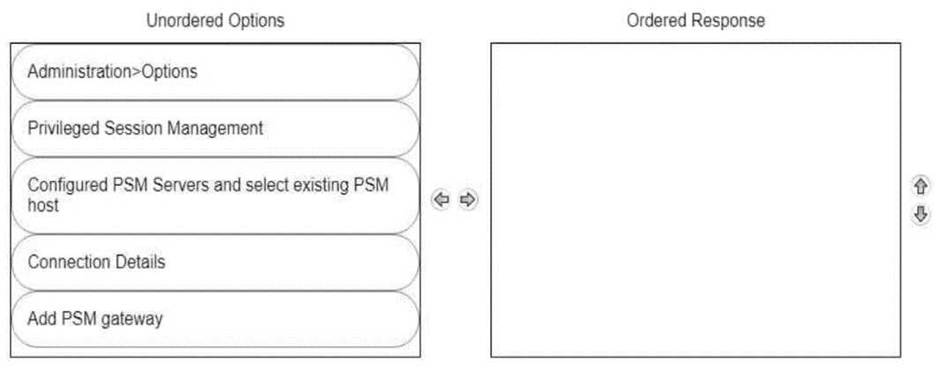
To configure a PSM host to use the HTML5 Gateway from the PVWA, you would typically follow these steps:
Log into the PVWA with an administrative user.
Navigate to Administration > Options.
Right-click on Privileged Session Management and select Add Configured PSM Gateway Servers.
Right-click Configured PSM Gateway Servers, then Add PSM Gateway Server.
Select the newly added gateway server and enter a unique ID for the PSM HTML5 Gateway.
Expand the newly created gateway server and enter the necessary configuration details.
Please note that these steps are based on general procedures for configuring a PSM host with an HTML5 Gateway and should be verified against the official CyberArk documentation or by a qualified CyberArk professional. For detailed instructions and best practices, refer to the CyberArk documentation123.
When an account is unable to change its own password, how can you ensure that password reset with the reconcile account is performed each time instead of a change?
- A . Set the parameter RCAllowManualReconciliation to Yes.
- B . Set the parameter ChangePasswordinResetMade to Yes.
- C . Set the parameter IgnoreReconcileOnMissingAccount to No.
- D . Set the UnlockUserOnReconcile to Yes.
C
Explanation:
In CyberArk’s Privileged Access Management (PAM), when an account cannot change its own password, setting the parameter IgnoreReconcileOnMissingAccount to No ensures that the reconcile account is used for password reset. This is because the reconcile account has the necessary permissions to reset the password when the primary account cannot do so.
Reference: The information provided is based on general knowledge of CyberArk PAM best practices and is not taken from any specific CyberArk Defender PAM course or learning resources.
According to CyberArk, which issues most commonly cause installed components to display as disconnected in the System Health Dashboard? (Choose two.)
- A . network instabilities/outages
- B . vault license expiry
- C . credential de-sync
- D . browser compatibility issues
- E . installed location file corruption
A, C
Explanation:
The System Health Dashboard in CyberArk provides a visual representation of the health status of different CyberArk components. When components are displayed as disconnected, the most common issues are network instabilities/outages and credential de-sync. Network issues can disrupt the connectivity between components and the Vault, while credential de-sync indicates that a component is no longer able to authenticate to the Vault due to synchronization problems with the credentials12.
Reference: CyberArk Docs: Monitor system health1
CyberArk Docs: System Health Dashboard details
Which parameters can be used to harden the Credential Files (CredFiles) while using CreateCredFile Utility? (Choose three.)
- A . Operating System Username
- B . Host IP Address
- C . Client Hostname
- D . Operating System Type (Linux/Windows/HP-UX)
- E . Vault IP Address
- F . Time Frame
B, C, E
Explanation:
When using the CreateCredFile Utility to harden Credential Files (CredFiles), it is important to include parameters that enhance security. The Host IP Address, Client Hostname, and Vault IP Address are parameters that can be used to specify the environment in which the CredFile is valid, thereby restricting its use to specific machines or networks1. This helps prevent unauthorized access to the CredFile and ensures that it is only used in the intended context.
Reference: CyberArk’s official documentation on the CreateCredFile utility provides insights into the security mechanisms used to protect credential files, including the use of environmental key materials such as application-based, machine-based, and component-based materials1.
For a deeper understanding of how to secure Credential Files and the use of the CreateCredFile Utility, refer to the CyberArk Defender PAM course materials and study guide2.
What is the easiest way to duplicate an existing platform?
- A . From PrivateArk, copy/paste the appropriate Policy.ini file; then rename it.
- B . From the PVWA, navigate to the platforms page, select an existing platform that is similar to the new target account platform and then click Duplicate; name the new platform.
- C . From PrivateArk, copy/paste the appropriate settings in PVConfiguration.xml; then update the policyName variable.
- D . From the PVWA, navigate to the platforms page, select an existing platform that is similar to the new target account platform, manually update the platform settings and click “Save as” INSTEAD of save to duplicate and rename the platform.
B
Explanation:
The easiest way to duplicate an existing platform is to use the PVWA, which is the web interface that allows users to access and manage the CyberArk Defender PAM system. The PVWA has a platforms page that displays all the platforms that are available in the system, categorized by platform types. Users can duplicate an existing platform by selecting it, clicking the ellipsis button next to it, and then clicking Duplicate. This will create a copy of the platform with the same settings and properties, which can be customized according to the user’s needs. Users can name the new platform and save it in the system.
Reference: Manage platforms – CyberArk
The Privileged Access Management solution provides an out-of-the-box target platform to manage
SSH keys, called UNIX Via SSH Keys.
How are these keys managed?
- A . CyberArk stores Private keys in the Vault and updates Public keys on target systems.
- B . CyberArk stores Public keys in the Vault and updates Private keys on target systems.
- C . CyberArk does not store Public or Private keys and instead uses a reconcile account to create keys on demand.
- D . CyberArk stores both Private and Public keys and can update target systems with either key.
A
Explanation:
SSH keys are a way to authenticate to a target machine with a privileged account, and are subject to the same risks and challenges as privileged passwords. CyberArk provides an out-of-the-box target platform to manage SSH keys, called UNIX Via SSH Keys, which simplifies and automates SSH keys lifecycle management. This platform works as follows:
CyberArk stores the private keys in the Vault, where they benefit from all the security and accessibility features of the Vault, such as encryption, auditing, and backup.
CyberArk updates the public keys on the target systems, using a parent account that has access to the file that contains the public key, such as ~/.ssh/authorized_keys. CyberArk can generate new random SSH key pairs and update the public keys on the target systems according to the organizational policy, such as after a single use, after a predefined period, or manually.
CyberArk can also verify that the private and public keys are synchronized, and reconcile them if they are not, using a reconcile account that can reset the SSH key pairs on the target systems.
Reference: Manage SSH Keys, Use SSH Keys
Which CyberArk utility allows you to create lists of Master Policy Settings, owners and safes for output to text files or MSSQL databases?
- A . Export Vault Data
- B . Export Vault Information
- C . PrivateArk Client
- D . Privileged Threat Analytics
B
Explanation:
The Export Vault Information utility is a CyberArk tool that allows you to create lists of Master Policy settings, owners and safes for output to text files or MSSQL databases. This utility can be used to export various types of information from the Vault, such as accounts, safes, platforms, policies, users, groups, and audit records. The utility can also generate reports based on predefined templates or custom queries. The utility can be run from the command line or the graphical user interface.
Reference: Export Vault Information, Export Vault Information Utility