
CyberArk PAM-DEF-SEN Practice Exams
Last updated on Oct 22,2026- Exam Code: PAM-DEF-SEN
- Exam Name: CyberArk Defender – PAM & Sentry – PAM
- Certification Provider: CyberArk
- Latest update: Oct 22,2026
In your organization the “click to connect” button is not active by default.
How can this feature be activated?
- A . Policies > Master Policy > Allow EPV transparent connections > Inactive
- B . Policies > Master Policy > Session Management > Require privileged session monitoring and isolation > Add Exception
- C . Policies > Master Policy > Allow EPV transparent connections > Active
- D . Policies > Master Policy > Password Management
C
Explanation:
The “click to connect” button is a feature that allows users to connect to target systems without entering their credentials manually. It is also known as EPV transparent connections or PSM transparent connections. To activate this feature, you need to enable the Allow EPV transparent connections parameter in the Master Policy. This parameter determines whether users can use the “click to connect” button to initiate a privileged session from the PVWA. If the parameter is set to Active, the button is enabled and users can connect to target systems with one click. If the parameter is set to Inactive, the button is disabled and users need to copy the credentials and paste them in the target system login screen.
Reference: Connect and configure – CyberArk, How to enable/disable Connect button in PVWA console – force.com
Which built-in report from the reports page in PVWA displays the number of days until a password is due to expire?
- A . Privileged Accounts Inventory
- B . Privileged Accounts Compliance Status
- C . Activity Log
- D . Privileged Accounts CPM Status
A
Explanation:
The Privileged Accounts Inventory report in PVWA includes a column that displays the Age of the
password, which indicates the number of days since the password was created1. This information
can be used to determine how many days are left until a password is due to expire, based on the
password policy’s expiration settings.
Reference: CyberArk’s official documentation on PVWA reports provides a list of available reports and their descriptions, including the Privileged Accounts Inventory report which contains details about password age and other relevant information1.
What is the name of the Platform parameters that controls how long a password will stay valid when One Time Passwords are enabled via the Master Policy?
- A . Min Validity Period
- B . Interval
- C . Immediate Interval
- D . Timeout
A
Explanation:
The name of the Platform parameter that controls how long a password will stay valid when One Time Passwords are enabled via the Master Policy is Min Validity Period. This parameter defines the number of minutes to wait from the last retrieval of the account until it is replaced. This gives the user a minimum period to be able to use the password before it is changed by the CPM. The Min Validity Period parameter can be configured in the Platform Management settings for each platform that supports One Time Passwords. The default value is 60 minutes, but it can be modified according to the organization’s security policy1. The Min Validity Period parameter is also used to release exclusive accounts automatically1.
Reference: 1: Privileged Account Management, Min Validity Period subsection
DRAG DROP
Match the built-in Vault User with the correct definition.
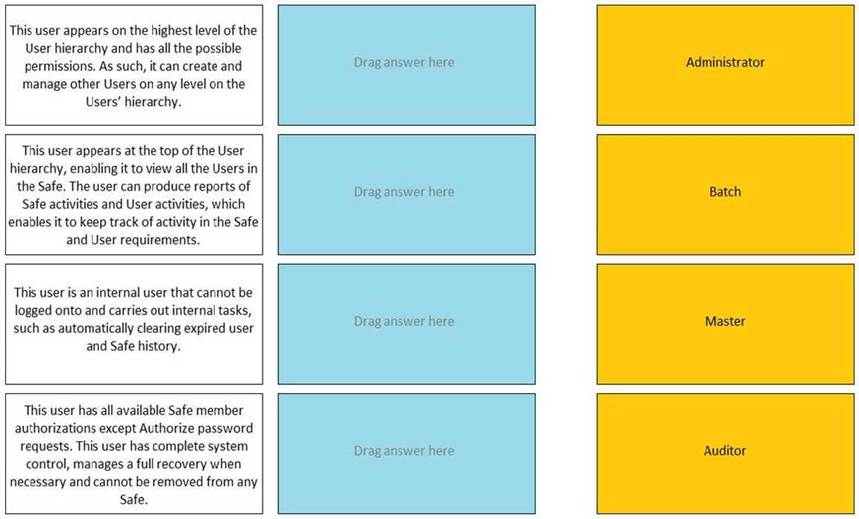
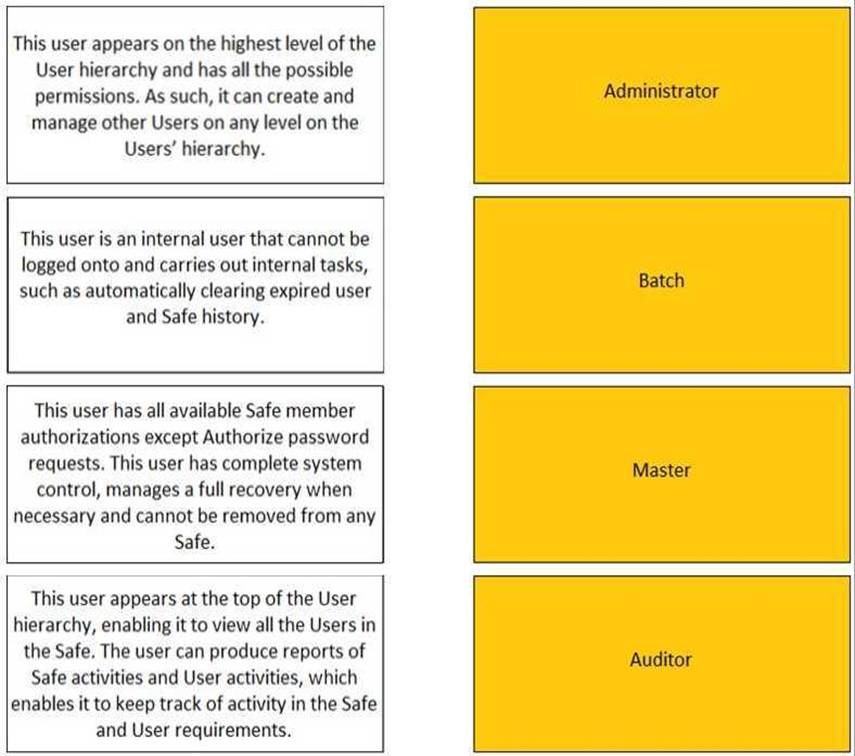
Reference: https://docs.cyberark.com/Product-Doc/OnlineHelp/PAS/Latest/en/Content/PASIMP/Predefined-
Users-and-Groups.htm?TocPath=Administration%7CUser%20Management%7C_____7
A user is receiving the error message “ITATS006E Station is suspended for User jsmith” when
attempting to sign into the Password Vault Web Access (PVWA).
Which utility would a Vault administrator use to correct this problem?
- A . createcredfile.exe
- B . cavaultmanager.exe
- C . PrivateArk
- D . PVWA
C
Explanation:
The PrivateArk is a utility that allows the Vault administrator to access and manage the Vault data, users, groups, policies, and settings. The PrivateArk can be used to correct the problem of a user receiving the error message “ITATS006E Station is suspended for User jsmith” when attempting to sign into the PVWA. The error message means that the user has exceeded the number of invalid password attempts and has been locked out from the Vault. To unlock the user, the Vault administrator can use the PrivateArk to activate the suspended station for the user in the Trusted Net Areas1.
The other options are not utilities that can be used to correct this problem. The createcredfile.exe is a utility that creates a credential file for the CPM to connect to the target systems2. The cavaultmanager.exe is a utility that performs various Vault maintenance tasks, such as backup, restore, and encryption3. The PVWA is not a utility, but a web interface that allows the users to access and use the Vault features, such as managing accounts, requesting passwords, and initiating sessions.
Reference: Vault – ITATS006E Station is suspended for User Administrator – force.com, section “Resolution” Create a Credential File – CyberArk, section “Create a Credential File” Vault Maintenance – CyberArk, section “Vault Maintenance”
[Password Vault Web Access – CyberArk], section “Password Vault Web Access”
What is the maximum number of levels of authorization you can set up in Dual Control?
- A . 1
- B . 2
- C . 3
- D . 4
B
Explanation:
Dual Control is a feature that allows you to set up a workflow for approving access requests to sensitive accounts. You can configure up to two levels of authorization for each account, meaning that you need up to two different authorizers to approve the request before the user can access the account. The authorizers can be either users or groups, and they can have different approval methods, such as email, SMS, or CyberArk interface.
Reference: [Defender PAM] course, Module 5: Privileged Session Management, Lesson 5.2: Dual Control [Defender PAM Sample Items Study Guide], Question 31 [CyberArk Documentation], Dual Control
Which of the following properties are mandatory when adding accounts from a file? (Choose three.)
- A . Safe Name
- B . Platform ID
- C . All required properties specified in the Platform
- D . Username
- E . Address
- F . Hostname
A, B, C
Explanation:
When adding accounts from a file, certain properties are mandatory to ensure that the accounts can
be properly managed within the CyberArk Privileged Access Security system. The Safe Name is
required to determine where the account will be stored. The Platform ID is necessary to apply the
correct management policies to the account. Additionally, all required properties specified in the
Platform must be included to meet the specific requirements for account management as defined by
the platform configuration1.
Reference: CyberArk’s official documentation on adding multiple accounts from a file, which outlines the mandatory information needed for each account, including Safe Name, Platform ID, and other required properties based on the account’s policy requirements1.
In the Private Ark client under the Tools menu > Administrative Tools > Users and Groups, which option do you use to update users’ Vault group memberships?
- A . Update > General tab
- B . Update > Authorizations tab
- C . Update > Member Of tab
- D . Update > Group tab
C
Explanation:
In the PrivateArk client, to update users’ Vault group memberships, you use the Member Of tab. After logging in as an administrative user and navigating to the Users and Groups window, you select a user and click Update. In the Member Of tab, you can manage the user’s group memberships by adding or removing them from groups within the Vault1.
Reference: CyberArk Docs – Manage users in PrivateArk client1
What is the purpose of the HeadStartlnterval setting m a platform?
- A . It determines how far in advance audit data is collected tor reports
- B . It instructs the CPM to initiate the password change process X number of days before expiration.
- C . It instructs the AIM Provider to ‘skip the cache’ during the defined time period
- D . It alerts users of upcoming password changes x number of days before expiration.
B
Explanation:
The purpose of the HeadStartInterval setting in a platform is to instruct the CPM to initiate the password change process X number of days before expiration. This setting is used when the platform has the One Time Password feature enabled, which means that the passwords are changed every time they are retrieved by a user. The HeadStartInterval setting defines the number of days before the password expires (according to the ExpirationPeriod parameter) that the CPM will start the password change process. This gives the CPM enough time to change the password before it becomes invalid, and ensures that the user will always receive a valid password when they request it1. The HeadStartInterval setting can be configured in the Platform Management settings for each platform that supports One Time Passwords. The default value is 0, which means that the CPM will start the password change process on the same day as the password expiration date1. The other options are not the purpose of the HeadStartInterval setting in a platform:
You have been asked to turn off the time access restrictions for a safe.
Where is this setting found?
- A . PrivateArk Client
- B . RestAPI
- C . PVWA
- D . Vault
C
Explanation:
The setting to turn off the time access restrictions for a safe is found in the Password Vault Web Access (PVWA). The PVWA provides a web interface through which users can manage safes, including setting and modifying various safe properties such as access restrictions. By accessing the safe settings in the PVWA, you can adjust the time access restrictions as required1.
Reference: CyberArk Docs: Safe Settings1