
CompTIA N10-009 Practice Exams
Last updated on Nov 16,2026- Exam Code: N10-009
- Exam Name: CompTIA Network+ Certification
- Certification Provider: CompTIA
- Latest update: Nov 16,2026
Which of the following protocols provides remote access utilizing port 22?
- A . SSH
- B . Telnet
- C . TLS
- D . RDP
A
Explanation:
SSH (Secure Shell) is a protocol used to securely connect to a remote server/system over a network.
It operates on port 22 and provides encrypted communication, unlike Telnet which operates on port 23 and is not secure. TLS is used for securing HTTP connections (HTTPS) and operates on ports like 443, while RDP (Remote Desktop Protocol) is used for remote desktop connections and operates on port 3389.
Reference: The CompTIA Network+ materials and tutorials cover SSH as the standard protocol for secure remote access, highlighting its operation on port 22.
Which of the following is the most secure way to provide site-to-site connectivity?
- A . VXLAN
- B . IKE
- C . GRE
- D . IPsec
D
Explanation:
IPsec (Internet Protocol Security) is the most secure way to provide site-to-site connectivity. It provides robust security services, such as data integrity, authentication, and encryption, ensuring that data sent across the network is protected from interception and tampering. Unlike other options, IPsec operates at the network layer and can secure all traffic that crosses the IP network, making it the most comprehensive and secure choice for site-to-site VPNs.
Reference: CompTIA Network+ study materials and NIST Special Publication 800-77.
A network administrator wants to increase network security by preventing client devices from communicating directly with each other on the same subnet.
Which of the following technologies should be implemented?
- A . ACL
- B . Trunking
- C . Port security
- D . Private VLAN
D
Explanation:
Private VLANs (PVLANs) are used to segment devices on the same subnet and switch so they cannot communicate with each other, while still accessing a shared resource like a router or gateway.
This is often used in shared hosting or DMZ environments.
A wireless technician wants to implement a technology that will allow user devices to automatically navigate to the best available frequency standard.
Which of the following technologies should the technician use?
- A . Band steering
- B . Wireless LAN controller
- C . Directional antenna
- D . Autonomous access point
A
Explanation:
Band Steering: This technology enables wireless devices to connect to the most optimal frequency band (2.4 GHz or 5 GHz) by encouraging capable devices to switch to the less congested 5 GHz band. This improves overall network performance and prevents overcrowding on the 2.4 GHz band. Wireless LAN controller (B): This manages multiple access points in a network but does not handle frequency optimization.
Directional antenna (C): This focuses the signal in a specific direction but does not affect frequency selection.
Autonomous access point (D): This operates independently but lacks advanced features like band steering.
Reference: CompTIA Network+ Official Study Guide, Domain 1.6 (Wireless Standards and
Technologies).
A client with a 2.4GHz wireless network has stated that the entire office is experiencing intermittent issues with laptops after the WAP was moved.
Which of the following is the most likely reason for these issues?
- A . The network uses a non-overlapping channel.
- B . The signal is reflecting too much.
- C . The network has excessive noise.
- D . A microwave is in the office.
D
Explanation:
Microwaves are known to interfere with the 2.4GHz frequency, which is the same frequency used by many wireless networks. This can cause signal degradation and intermittent connectivity issues, especially if the WAP is placed near such devices.
A client with a 2.4GHz wireless network has stated that the entire office is experiencing intermittent issues with laptops after the WAP was moved.
Which of the following is the most likely reason for these issues?
- A . The network uses a non-overlapping channel.
- B . The signal is reflecting too much.
- C . The network has excessive noise.
- D . A microwave is in the office.
D
Explanation:
Microwaves are known to interfere with the 2.4GHz frequency, which is the same frequency used by many wireless networks. This can cause signal degradation and intermittent connectivity issues, especially if the WAP is placed near such devices.
Which of the following should a network administrator configure when adding OT devices to an organization’s architecture?
- A . Honeynet
- B . Data-at-rest encryption
- C . Time-based authentication
- D . Network segmentation
D
Explanation:
Network segmentation involves dividing a network into smaller segments or subnets. This is particularly important when integrating OT (Operational Technology) devices to ensure that these devices are isolated from other parts of the network. Segmentation helps protect the OT devices from potential threats and minimizes the impact of any security incidents. It also helps manage traffic and improves overall network performance.
Reference: CompTIA Network+ study materials.
A company recently implemented a videoconferencing system that utilizes large amounts of bandwidth. Users start reporting slow internet speeds and an overall decrease in network performance.
Which of the following are most likely the causes of the network performance issues? (Select two)
- A . DNS misconfiguration
- B . Inadequate network security
- C . Malware or a virus
- D . Outdated software
- E . Incorrect QoS settings
- F . Network congestion
E, F
Explanation:
When high-bandwidth services like videoconferencing are introduced, two primary factors may degrade performance:
Incorrect QoS Settings (E):
QoS (Quality of Service) is used to prioritize traffic. If not configured correctly, critical services like video may not get the necessary bandwidth and prioritization.
Network Congestion (F):
Video services consume large amounts of data. If the network doesn’t have sufficient bandwidth or is not segmented properly, congestion will slow down all services.
DNS misconfiguration (A) would affect name resolution, not bandwidth.
Malware (C) could degrade performance, but is not tied to the described scenario.
Outdated software (D) may affect performance in some cases, but not directly linked to network congestion in this case.
Inadequate network security (B) isn’t likely to cause general slowness related to video traffic.
✅ So, the most likely culprits are
E. Incorrect QoS settings and
F. Network congestion.
Reference: CompTIA Network+ N10-009 Official Study Guide ― Objective 2.5: "Explain common performance concepts and issues."
A customer needs six usable IP addresses.
Which of the following best meets this requirement?
- A . 255.255.255.128
- B . 255.255.255.192
- C . 255.255.255.224
- D . 255.255.255.240
D
Explanation:
Reference: CompTIA Network+ Certification Exam Objectives – IP Addressing section.
SIMULATION
A network technician replaced an access layer switch and needs to reconfigure it to allow the connected devices to connect to the correct networks.
INSTRUCTIONS
Click on the appropriate port(s) on Switch 1 and Switch 3 to verify or reconfigure the correct settings:
・ Ensure each device accesses only its correctly associated network.
・ Disable all unused switchports.
. Require fault-tolerant connections between the switches.
. Only make necessary changes to complete the above requirements.
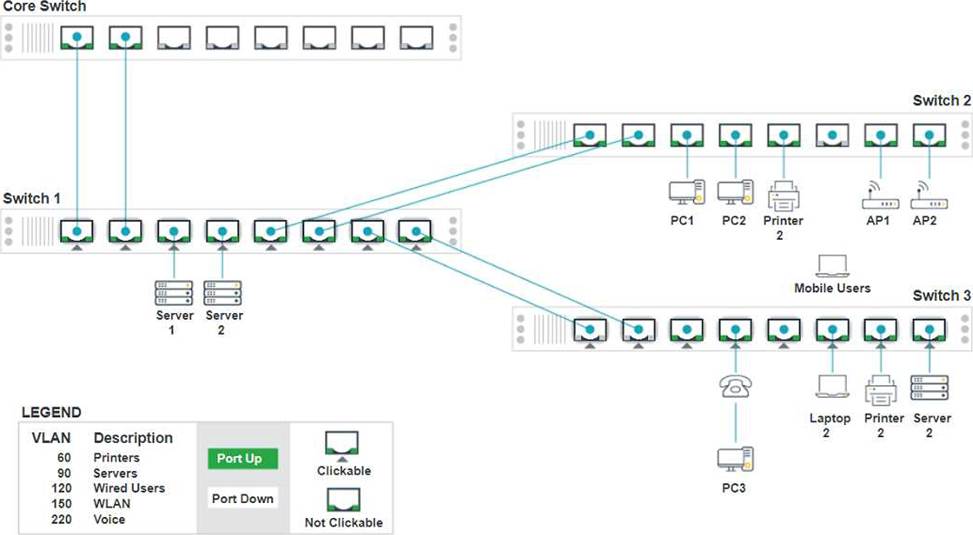
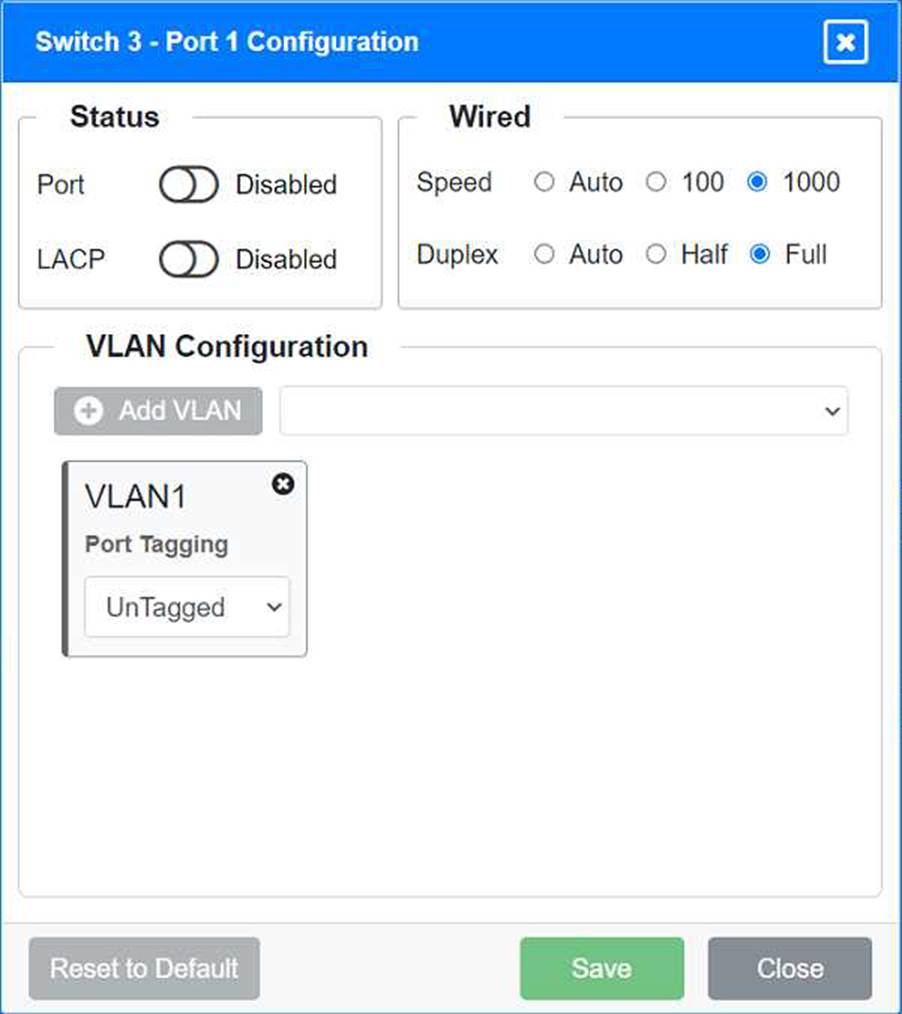
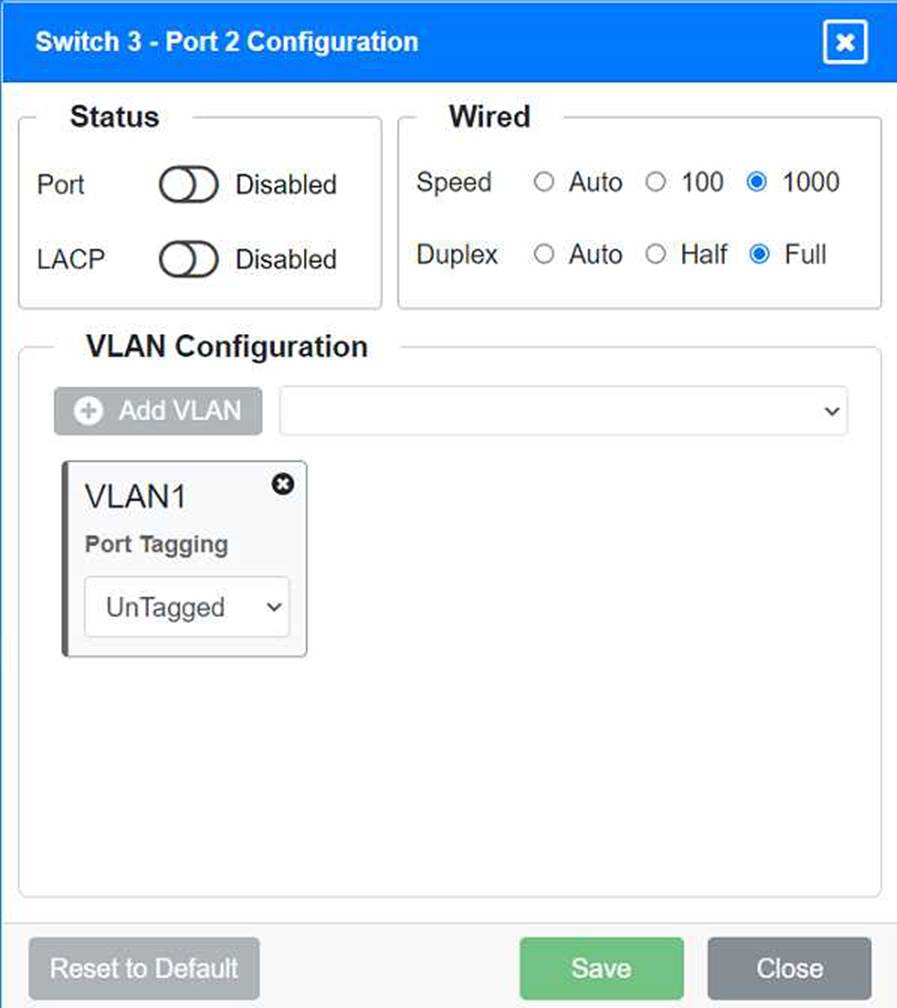
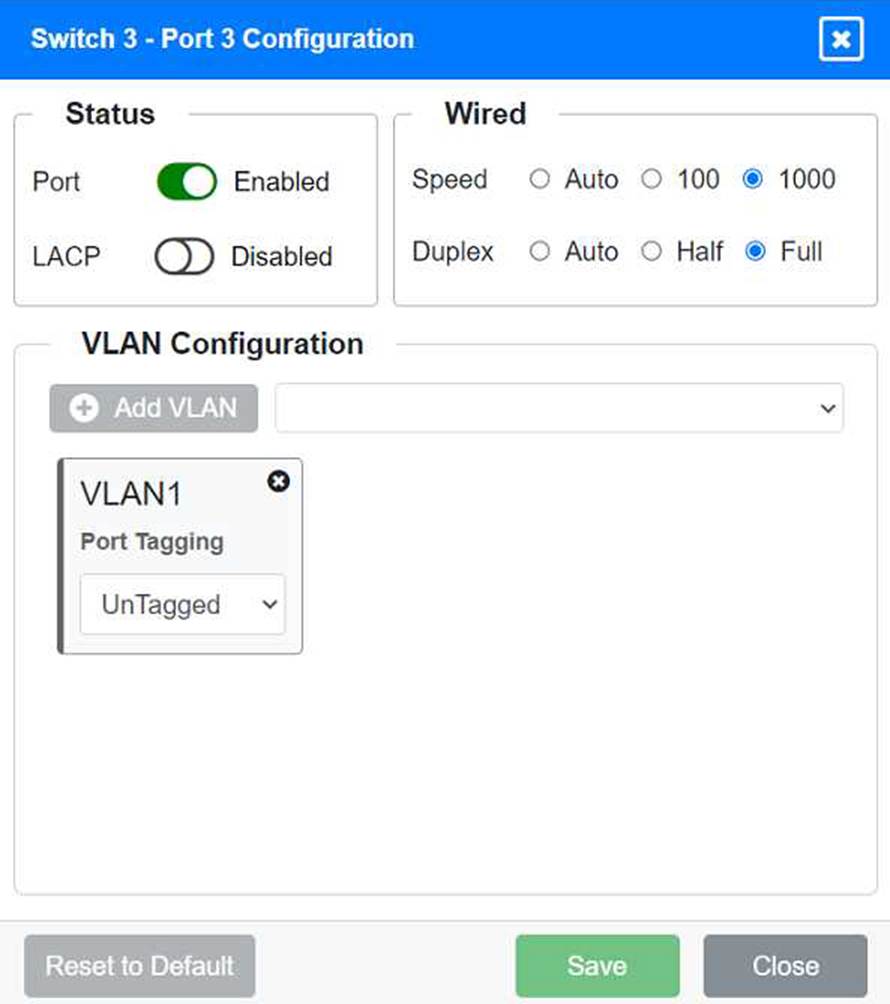
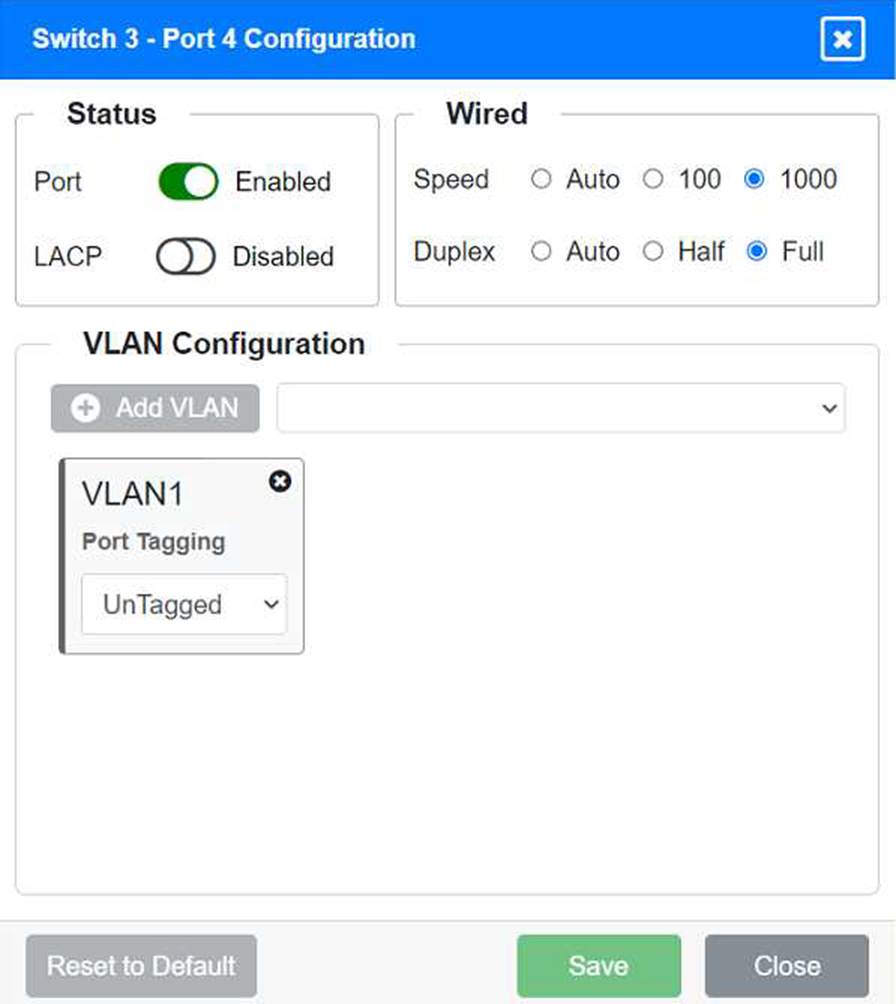
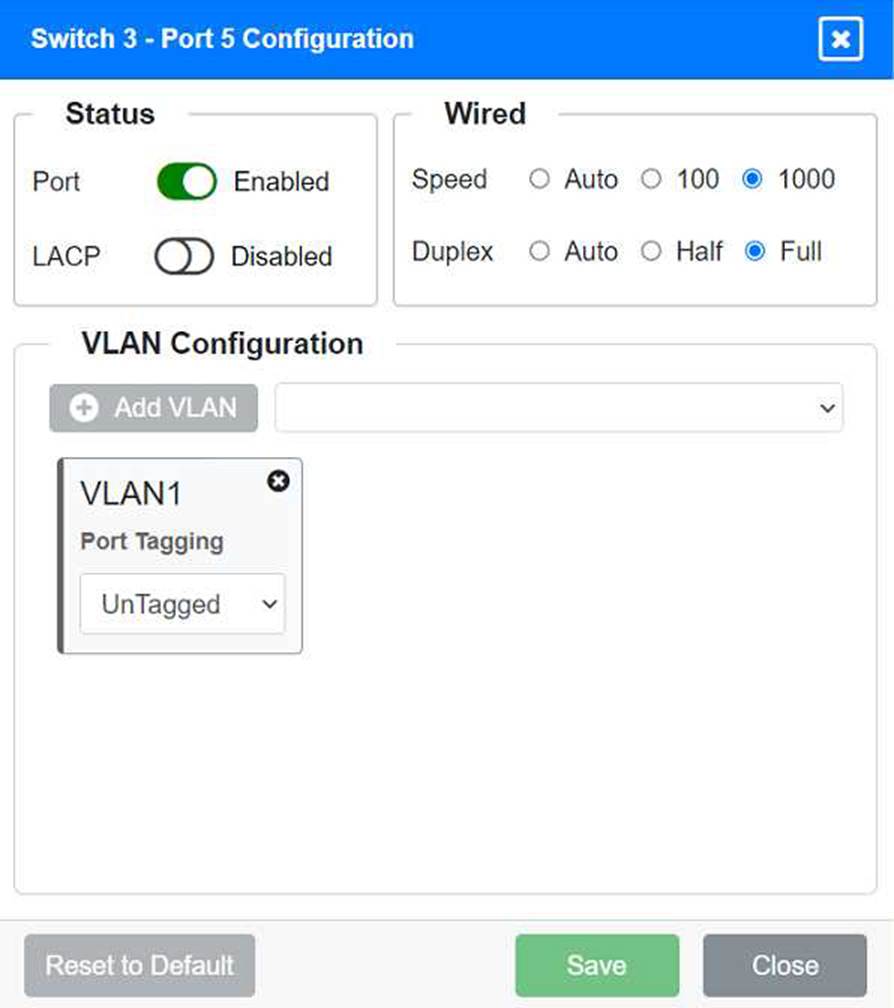
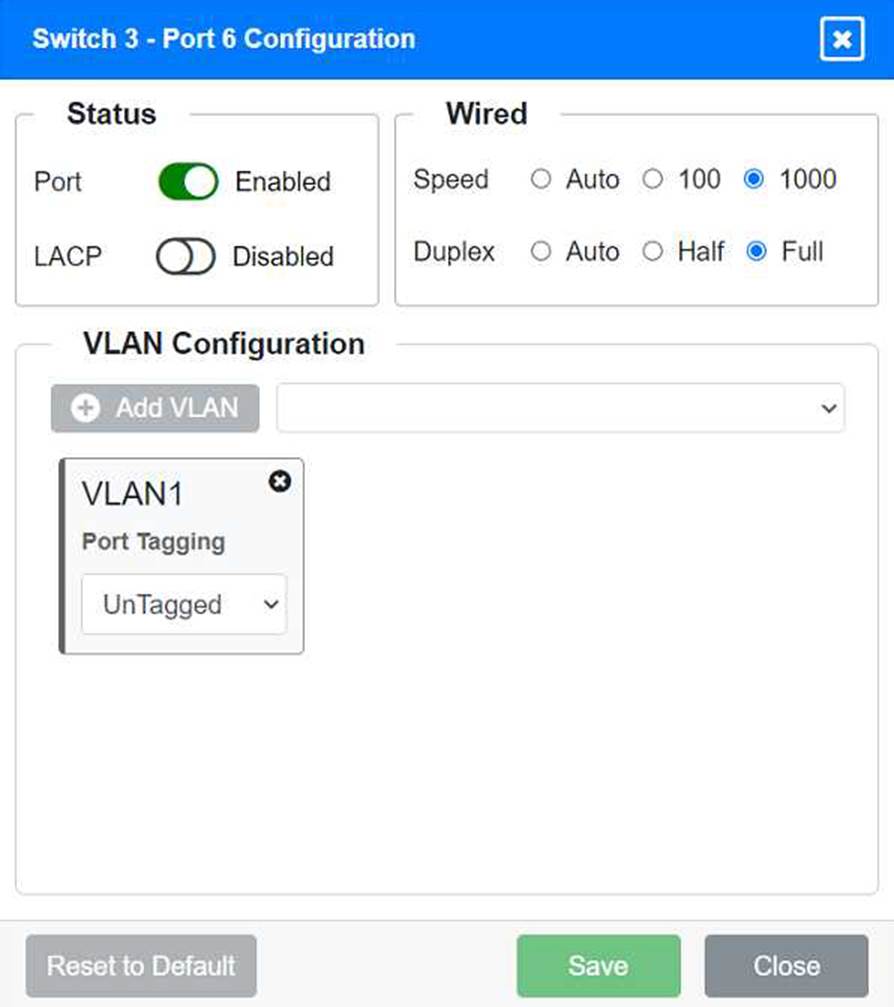
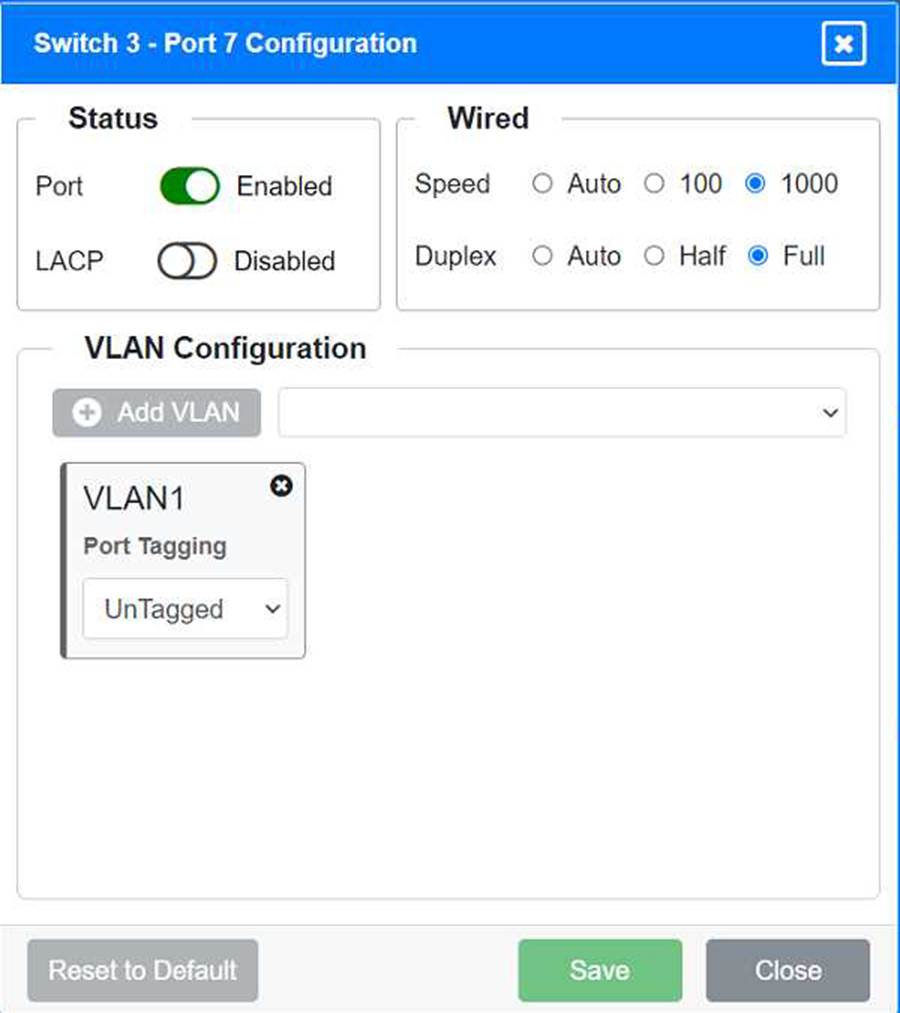
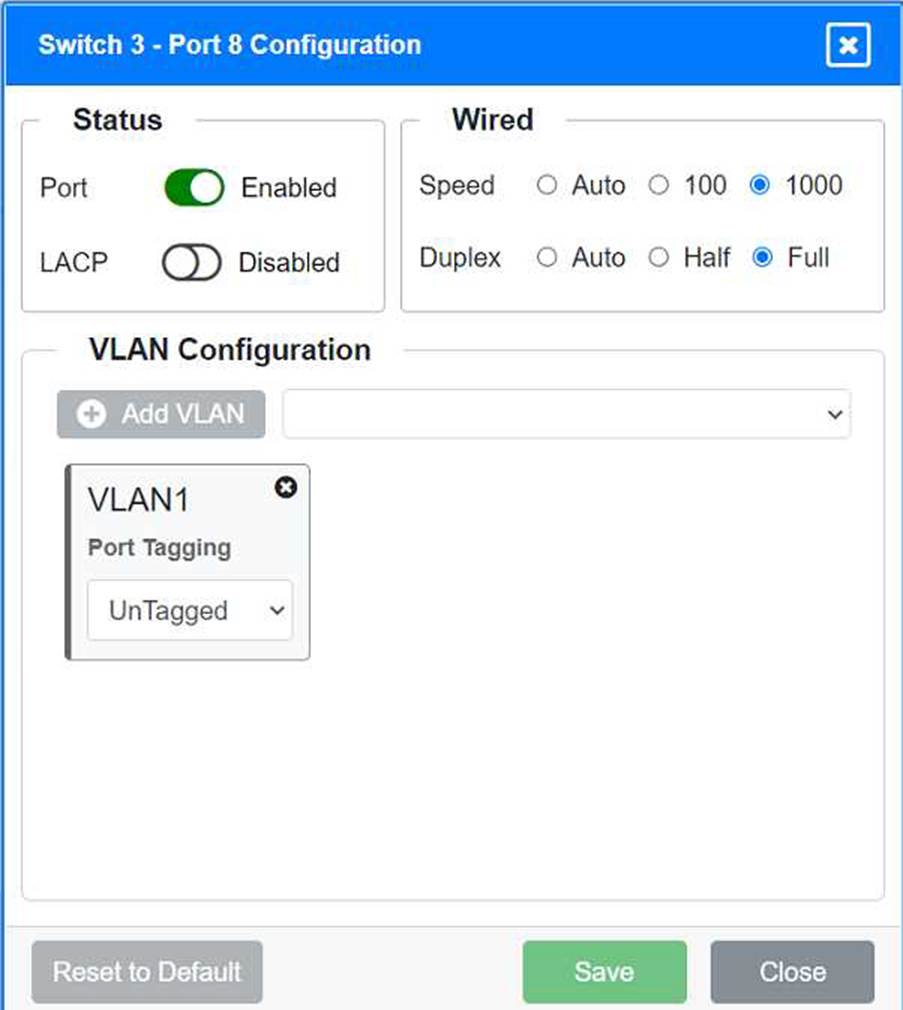
Identify the correct VLANs for each device and port.
Enable necessary ports and disable unused ports.
Configure fault-tolerant connections between the switches.
Configuration Details
Switch 1
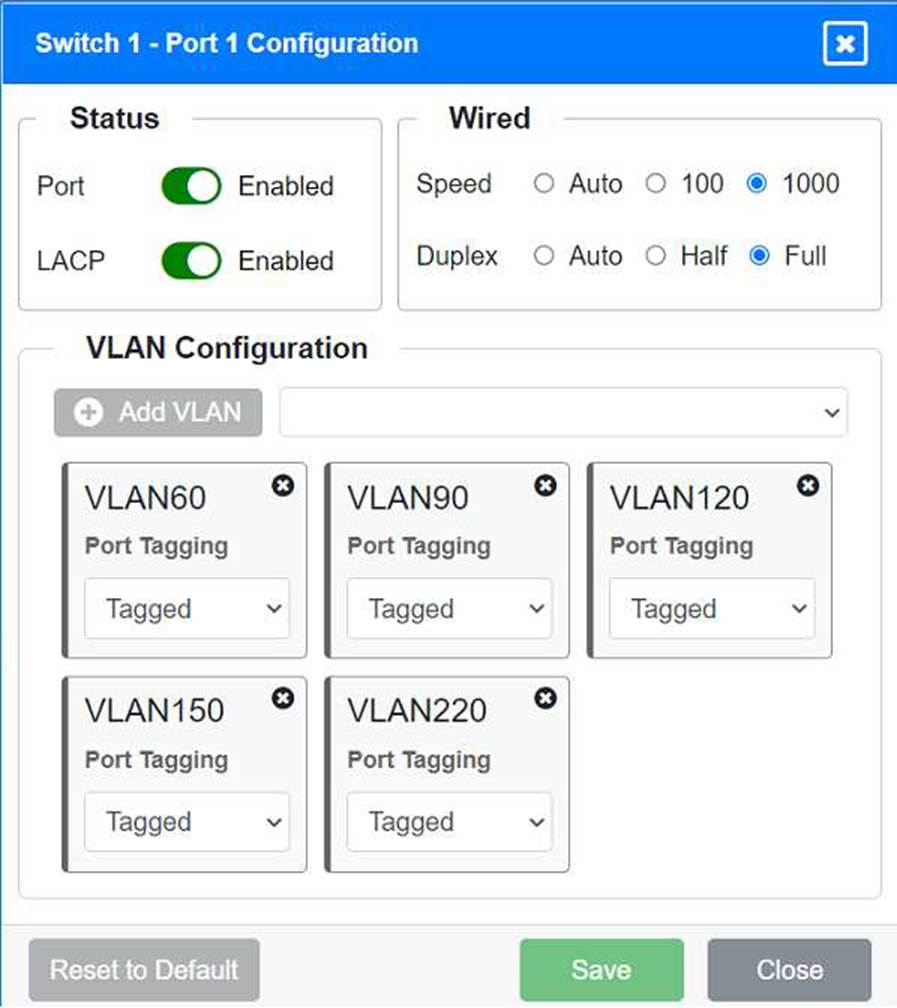
Port 1 Configuration (Uplink to Core Switch)
Status: Enabled
LACP: Enabled
Speed: 1000
Duplex: Full
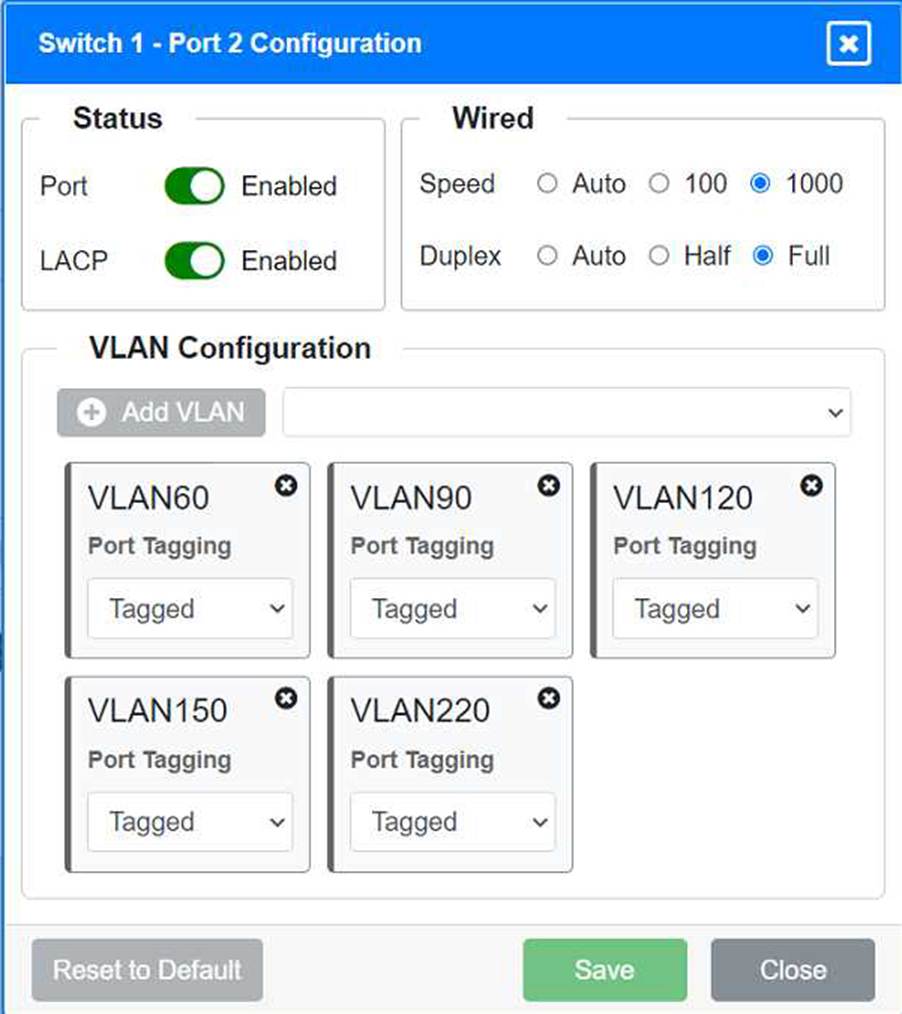
VLAN Configuration: Tagged for VLAN60, VLAN90, VLAN120, VLAN150, VLAN220 Port 2 Configuration (Uplink to Core Switch) Status: Enabled
LACP: Enabled
Speed: 1000
Duplex: Full
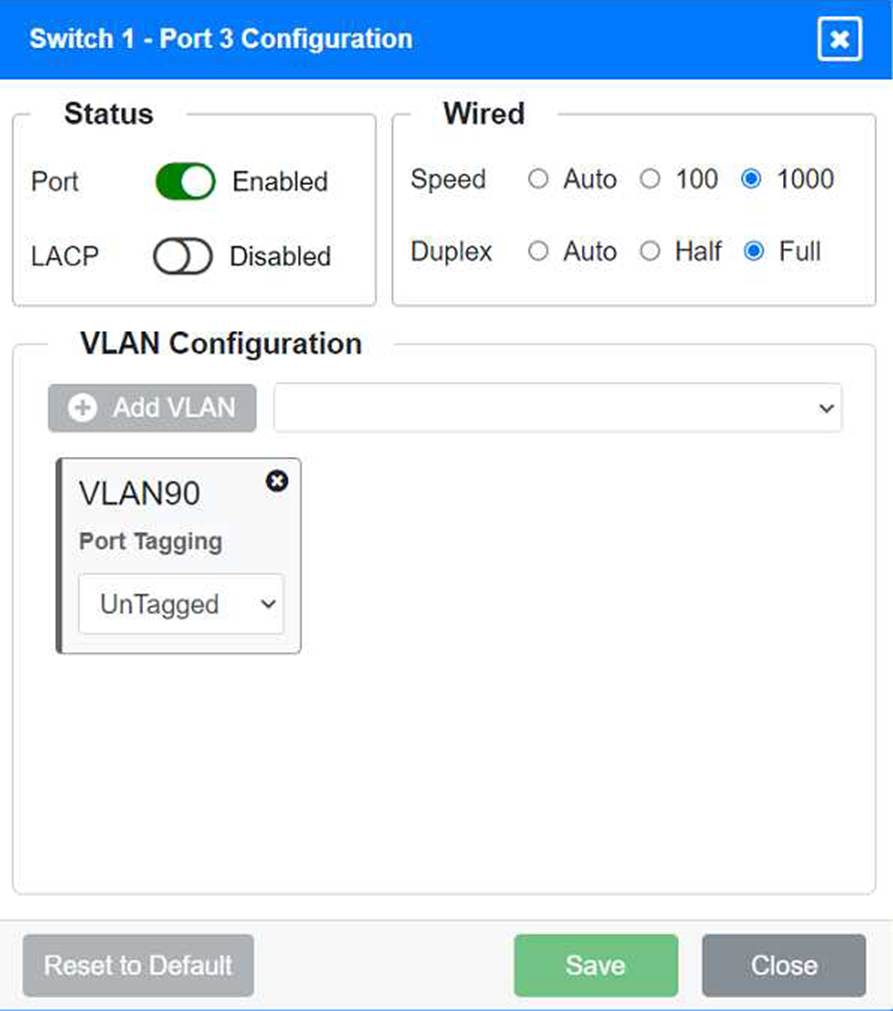
VLAN Configuration: Tagged for VLAN60, VLAN90, VLAN120, VLAN150, VLAN220 Port 3 Configuration (Server Connection) Status: Enabled
LACP: Disabled
Speed: 1000
Duplex: Full
VLAN Configuration: Untagged for VLAN90 (Servers)
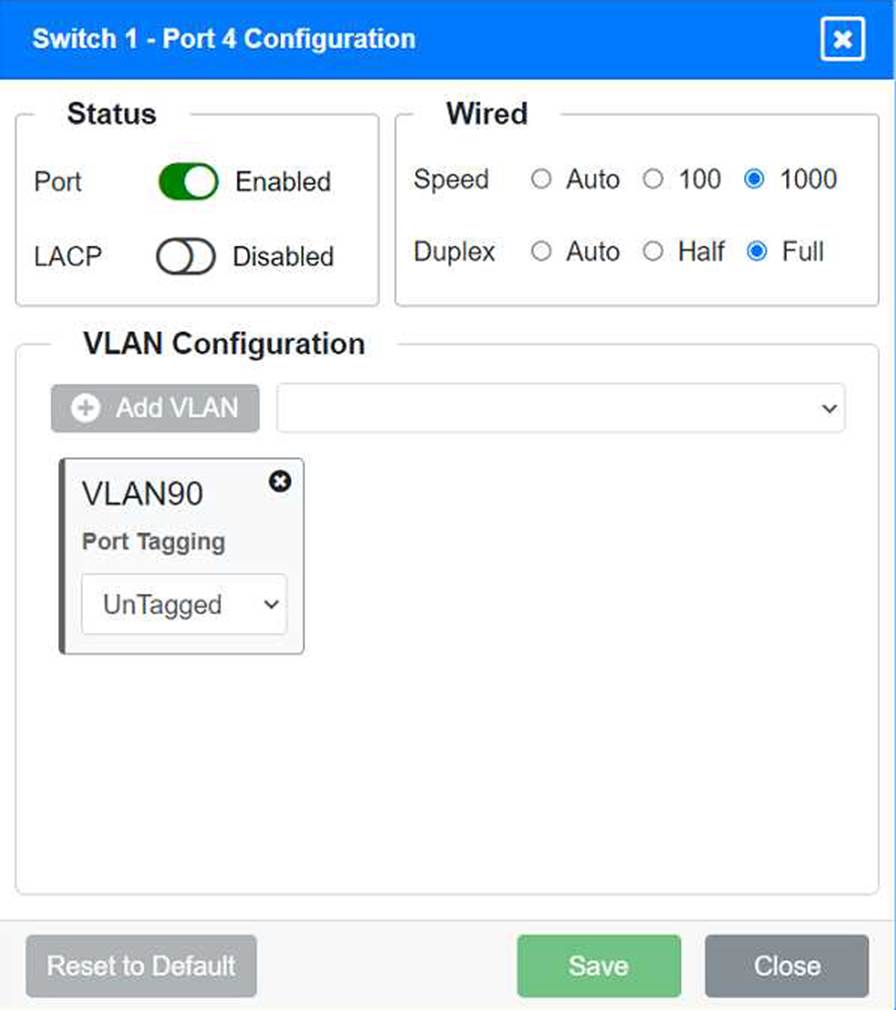
Port 4 Configuration (Server Connection)
Status: Enabled
LACP: Disabled
Speed: 1000
Duplex: Full
VLAN Configuration: Untagged for VLAN90 (Servers)
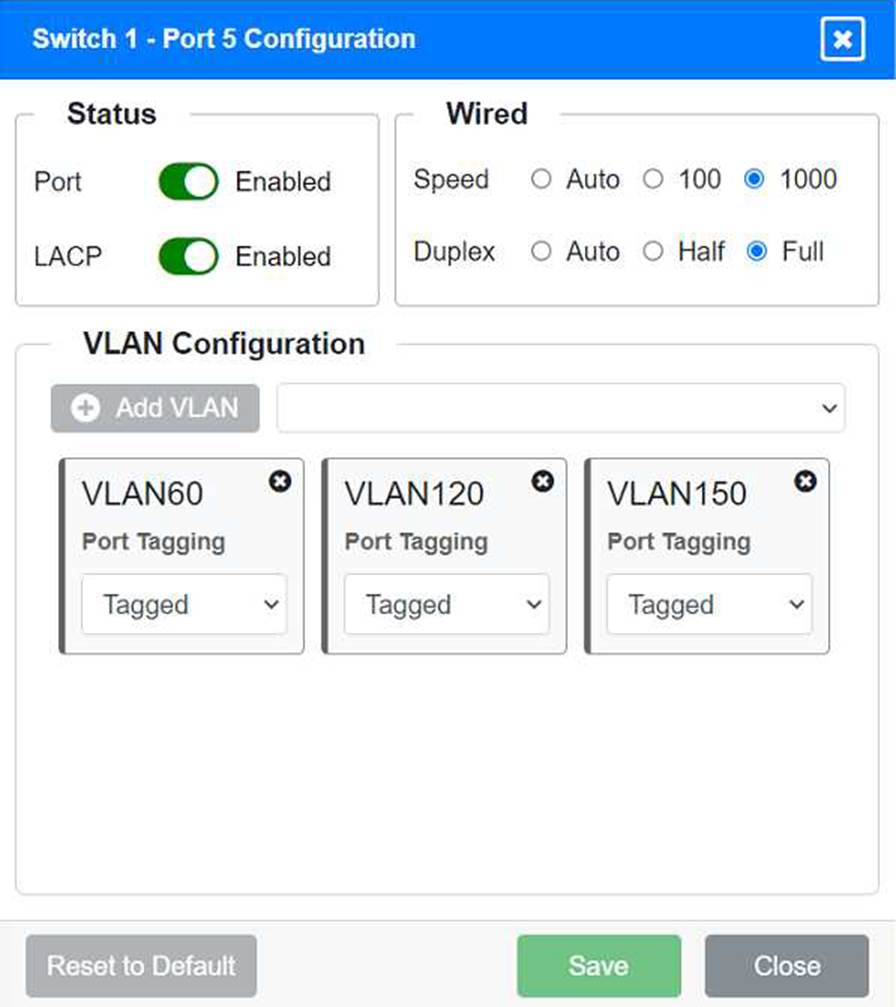
Port 5 Configuration (Wired Users and WLAN)
Status: Enabled
LACP: Enabled
Speed: 1000
Duplex: Full
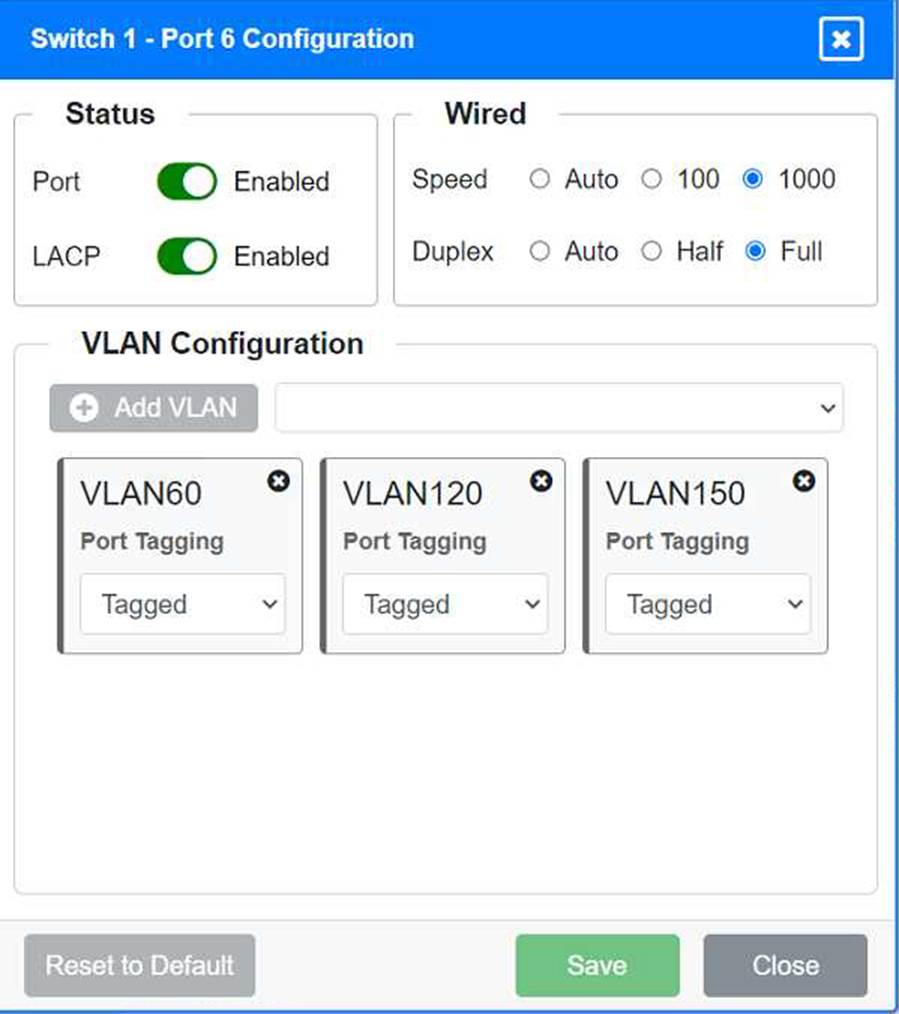
VLAN Configuration: Tagged for VLAN60, VLAN120, VLAN150 Port 6 Configuration (Wired Users and WLAN) Status: Enabled
LACP: Enabled
Speed: 1000
Duplex: Full
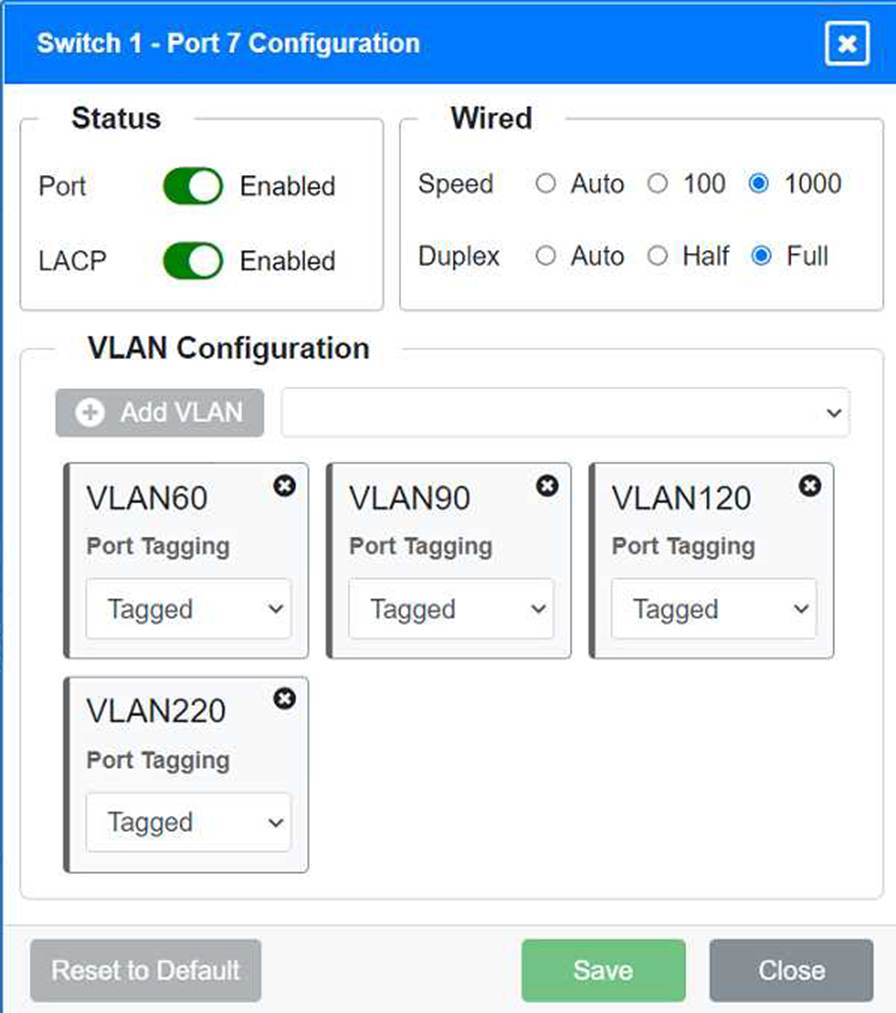
VLAN Configuration: Tagged for VLAN60, VLAN120, VLAN150 Port 7 Configuration (Voice and Wired Users) Status: Enabled
LACP: Enabled
Speed: 1000
Duplex: Full
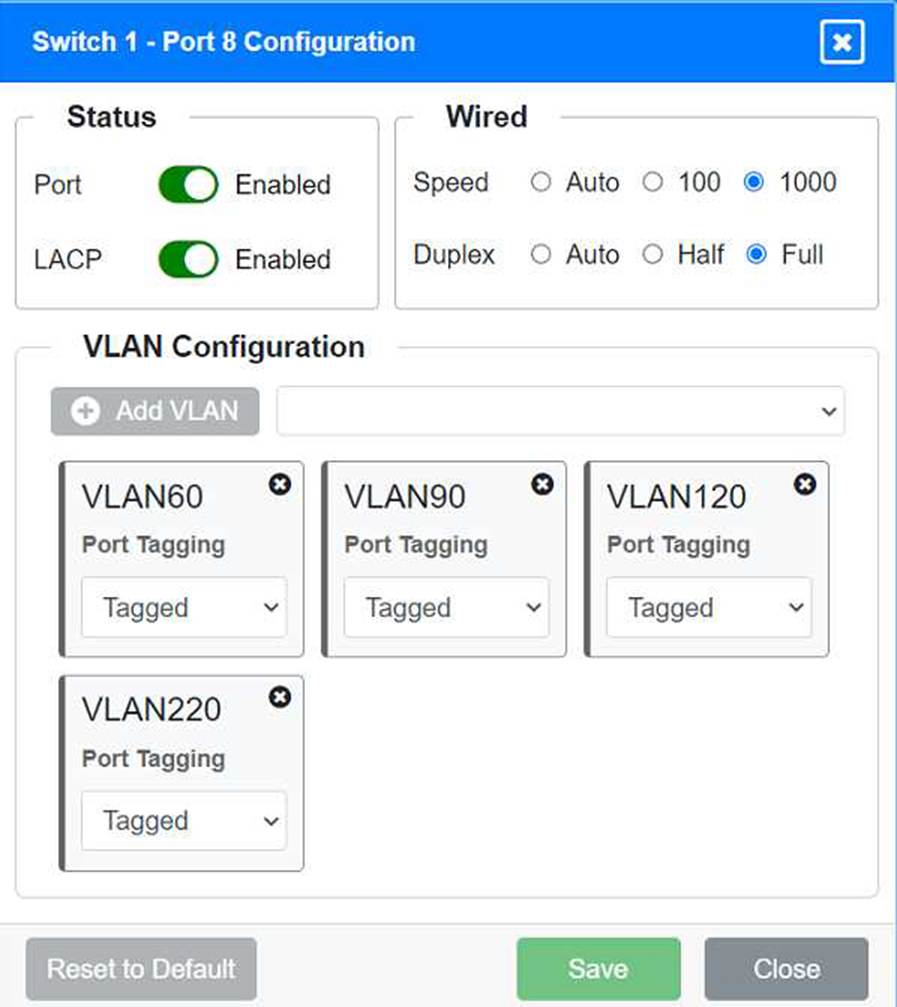
VLAN Configuration: Tagged for VLAN60, VLAN90, VLAN120, VLAN220 Port 8 Configuration (Voice, Printers, and Wired Users) Status: Enabled
LACP: Enabled
Speed: 1000
Duplex: Full
VLAN Configuration: Tagged for VLAN60, VLAN90, VLAN120, VLAN220 Switch 3
Port 1 Configuration (Unused)
Status: Disabled
LACP: Disabled
Port 2 Configuration (Unused)
Status: Disabled
LACP: Disabled
Port 3 Configuration (Connection to Device)
Status: Enabled
LACP: Disabled
Speed: 1000
Duplex: Full
VLAN Configuration: Untagged for VLAN1 (Default)
Port 4 Configuration (Connection to Device)
Status: Enabled
LACP: Disabled
Speed: 1000
Duplex: Full
VLAN Configuration: Untagged for VLAN1 (Default)
Port 5 Configuration (Connection to Device)
Status: Enabled
LACP: Disabled
Speed: 1000
Duplex: Full
VLAN Configuration: Untagged for VLAN1 (Default)
Port 6 Configuration (Connection to Device)
Status: Enabled
LACP: Disabled
Speed: 1000
Duplex: Full
VLAN Configuration: Untagged for VLAN1 (Default)
Port 7 Configuration (Connection to Device)
Status: Enabled
LACP: Disabled
Speed: 1000
Duplex: Full
VLAN Configuration: Untagged for VLAN1 (Default)
Summary of Configurations
Ports 1 and 2 on Switch 1 are configured as trunk ports with VLAN tagging enabled for all necessary VLANs.
Ports 3 and 4 on Switch 1 are configured for server connections with VLAN 90 untagged.
Ports 5, 6, 7, and 8 on Switch 1 are configured for devices needing access to multiple VLANs.
Unused ports on Switch 3 are disabled.
Ports 3, 4, 5, 6, and 7 on Switch 3 are enabled for default VLAN1. Ensure All Switches and Ports are Configured as per the Requirements: Core Switch Ports should be configured as needed for uplinks to Switch 1. Ensure LACP is enabled for redundancy on trunk ports between switches.
By following these configurations, each device will access only its correctly associated network, unused switch ports will be disabled, and fault-tolerant connections will be established between the switches.