
CompTIA 220-1201 Practice Exams
Last updated on Nov 16,2026- Exam Code: 220-1201
- Exam Name: CompTIA A+ Certification Exam: Core 1
- Certification Provider: CompTIA
- Latest update: Nov 16,2026
A user is having issues when charging a device with a Lightning cable. The cable is not recognized when it is plugged into the device. This issue is usually resolved by flipping the cable over. This issue does not occur with other devices of the same type.
Which of the following would most likely cause the issue?
- A . The device needs to be restarted.
- B . The battery may be swelling and needs inspection.
- C . The cable is failing and needs to be replaced
- D . The charging port is dirty or damaged
D
Explanation:
When a Lightning cable works only when flipped a certain way or doesn’t function consistently, it is typically due to debris or damage in the charging port. Cleaning the port or inspecting it for wear resolves the issue.
#Reference: "CompTIA A+ Complete Practice Tests" by Jeff T. Parker C Chapter 1, Question 7, page 7.
Which of the following could a user employ to maximize module bandwidth when selecting memory for a high-end gaming computer?
- A . Error correction
- B . RAM voltage
- C . Channel configuration
- D . Physical module size
C
Explanation:
Channel configuration(e.g.,dual-channel,quad-channel) determines how memory modules communicate with the memory controller. Usingmatched pairs in dual- or quad-channel setupscan significantlyincrease memory bandwidth, improving performance ― especially for gaming and video-intensive tasks.
Option A (Error correction): ECC RAM is used in servers for reliability, not performance or gaming.
Option B (RAM voltage): Affects compatibility and overclocking but not bandwidth.
Option D (Physical size): Refers to module form factor (e.g., DIMM, SO-DIMM) and does not impact bandwidth.
CompTIA A+ Core 1 Exam Objective
Reference:
Objective 3.2: Given a scenario, install RAM types.
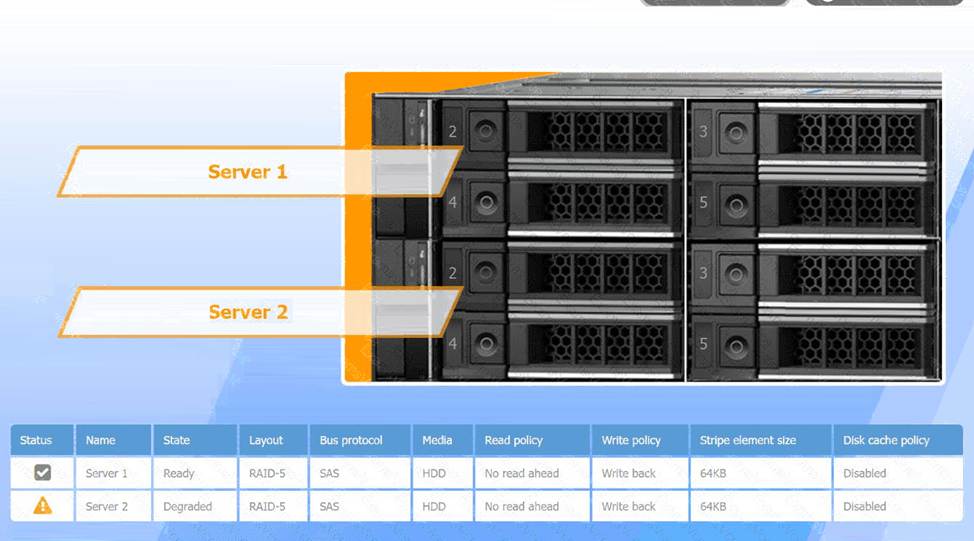
A user reports poor performance on the application server.
INSTRUCTIONS
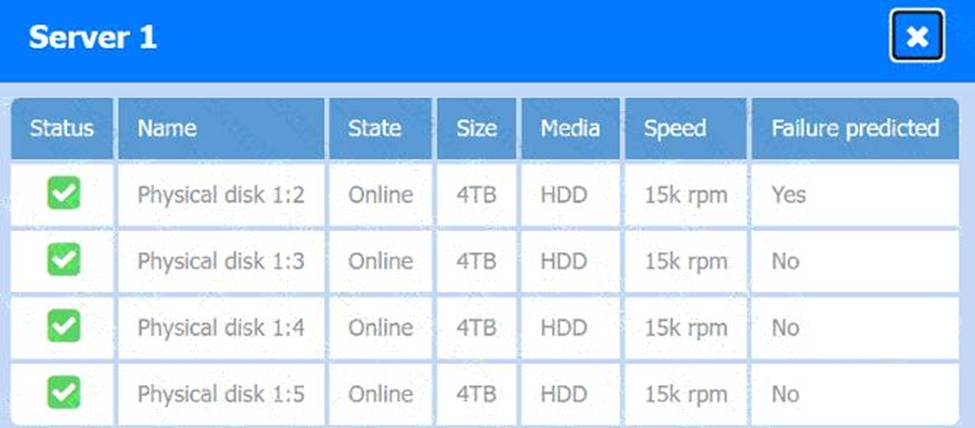
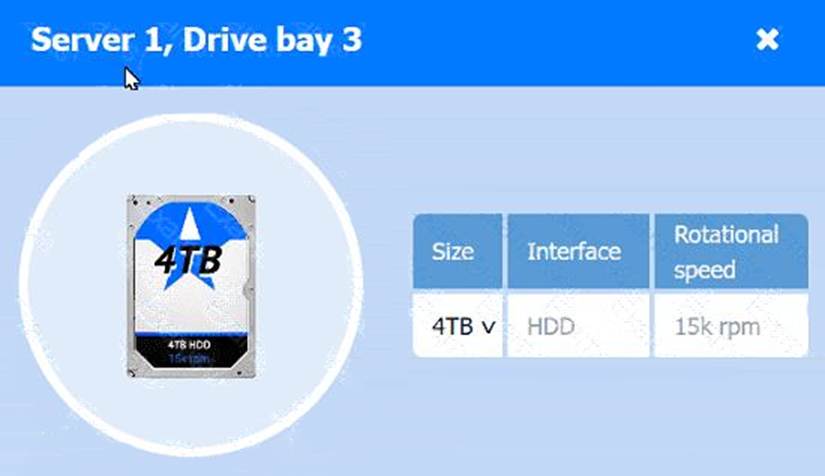
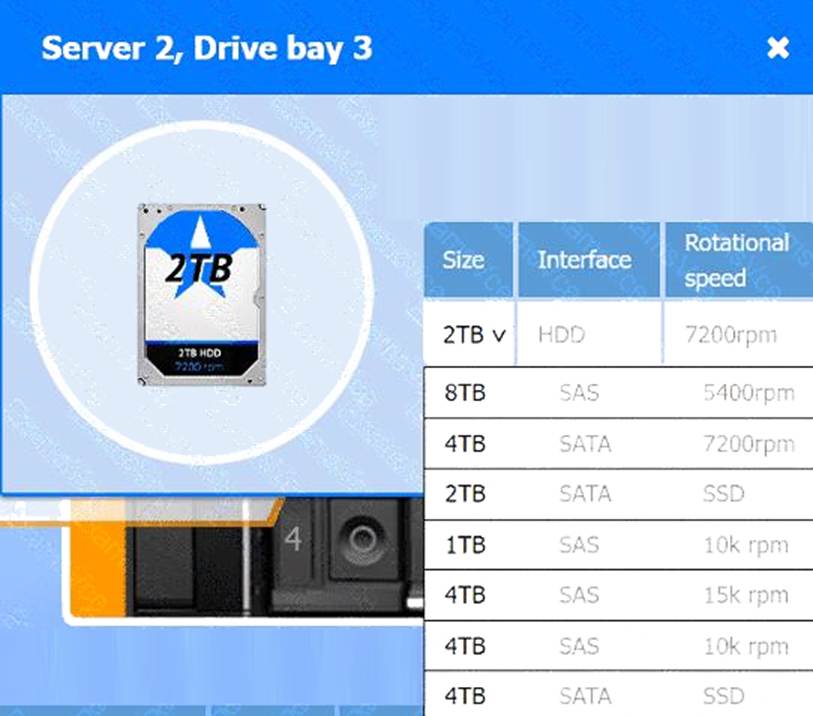
Click on Server 1 and Server 2 and review the information presented in each chart to determine which drives need to be replaced.
Select the appropriate replacement drive that should be used, for the least performance degradation to the server.
If at any time you would like to bring back the initial state of the simulation, please click the Reset All button.
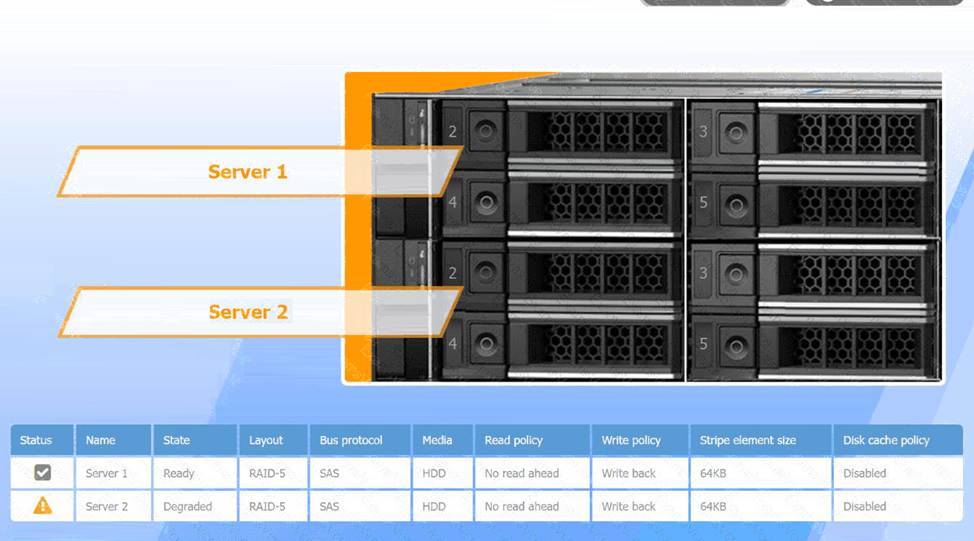
See the detailed solution in explanation below.
Recommended Replacement Drive:
To minimize performance degradation, the replacement drive should be:
SAS HDD with the same specifications (64KB stripe size, no read-ahead, and write-back policy).
Matching the configuration exactly ensures seamless integration and optimizes recovery speed in the RAID-5 array.
In RAID-5, degraded performance is expected when one drive fails, as parity data needs to rebuild missing information during each read/write process. Replacing the failed drive restores the RAID array to optimal status, reducing the load on existing drives and returning the system to normal read/write performance. The write-back policy and disabled disk cache settings are designed to reduce latency and increase efficiency, essential for handling real-time applications.
A user reports poor performance on the
application server.
INSTRUCTIONS
Click on Server 1 and Server 2 and review
the information presented in each chart to
determine which drives need to be replaced.
Select the appropriate replacement drive
that should be used, for the least
performance degradation to the server.
A computer server with many black and silver parts AI-generated content may be incorrect.A computer server with many black boxes Description automatically generated with medium confidence
A screen shot of a computer AI-generated content may be incorrect.
A screen shot of a computer Description automatically generated
A computer screen shot of a computer AI-generated content may be incorrect.
A computer screen shot of a computer Description automatically generated
A computer screen shot of a computer AI-generated content may be incorrect.
A computer screen shot of a computer Description automatically generated
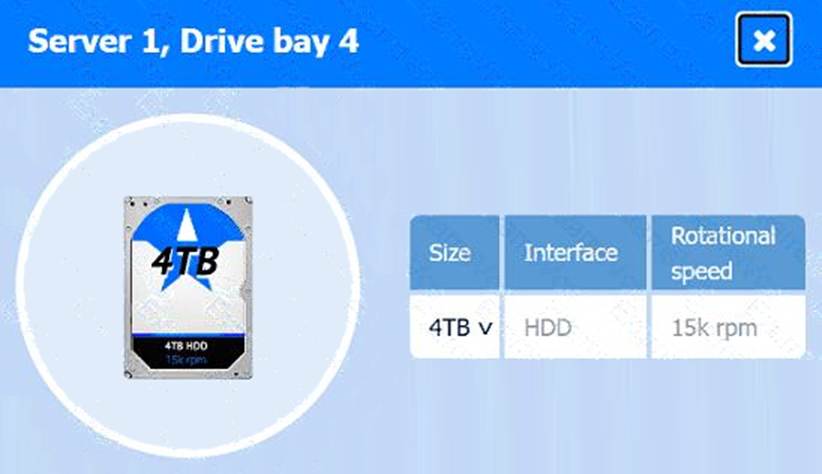
A computer screen shot of a computer AI-generated content may be incorrect.A computer screen shot of a computer Description automatically generated
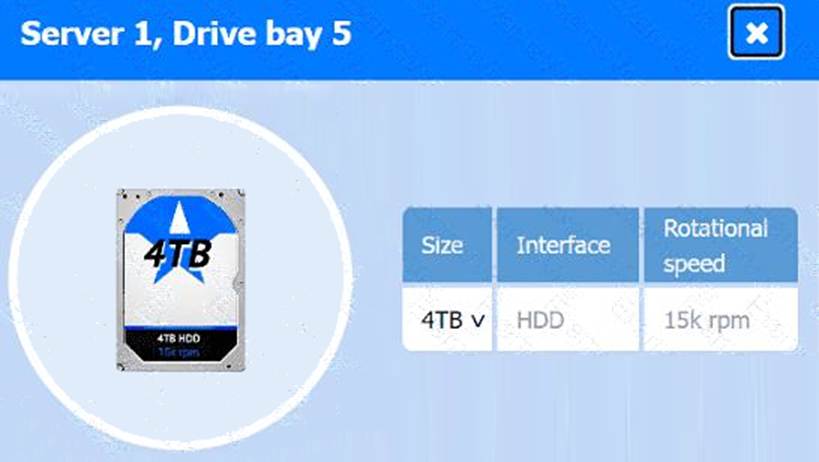
A screenshot of a computer AI-generated content may be incorrect.
A screenshot of a computer Description automatically generated
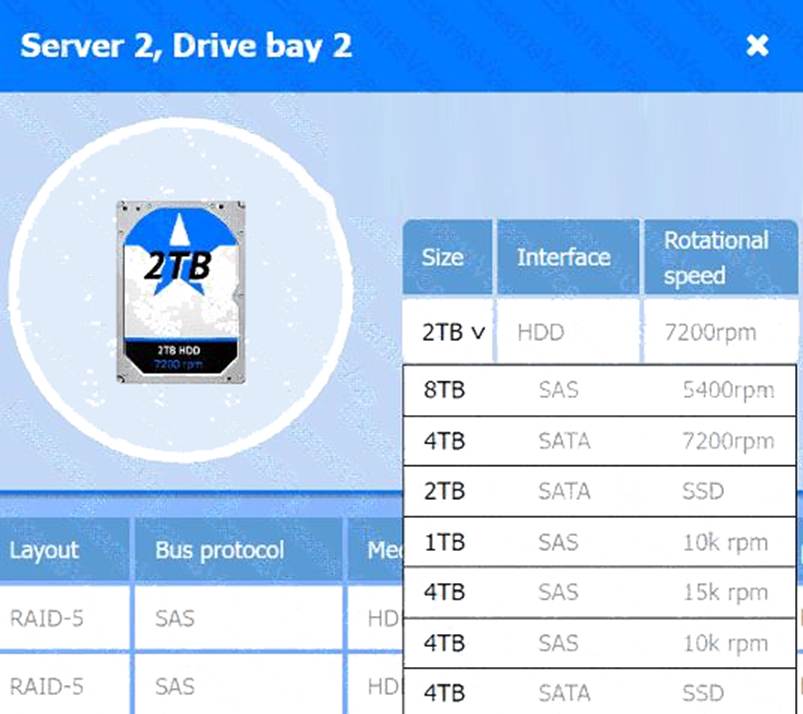
A screenshot of a computer AI-generated content may be incorrect.
A screenshot of a computer Description automatically generated
Laura, a customer, has instructed you to configure her home office wireless access point.
She plans to use the wireless network for finances and has requested that the network be setup with the highest encryption possible.
Additionally, Laura knows that her neighbors have wireless networks and wants to ensure that her network is not being interfered with by the other networks.
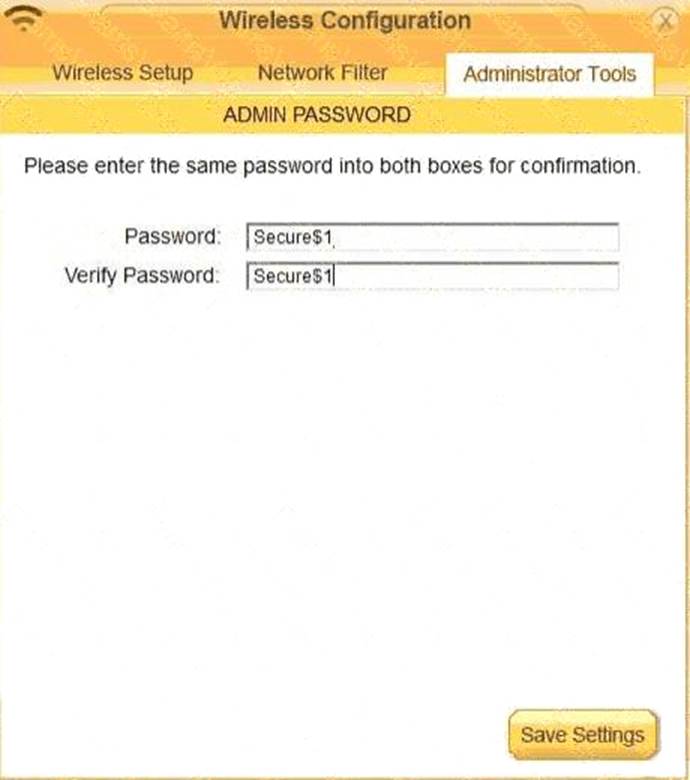
She requests that the default settings be changed to the following.
Wireless Name: HomeWiFi
Shared Key: CompTIA
Router Password: Secure$1
Finally, Laura wants to ensure that only her laptop and Smartphone can connect to the network.
Laptop: IP Address 192.168.1.100
Hardware Address: 00: 0A: BF: 03: C4: 54
Smartphone: IP Address 192.168.1.101
Hardware Address: 09: 2C: D0: 22: 3F: 11
INSTRUCTIONS
Configure Laura’s wireless network using the network adapter window.
If at any time you would like to bring back the initial state of the situation, please click the Reset All button.
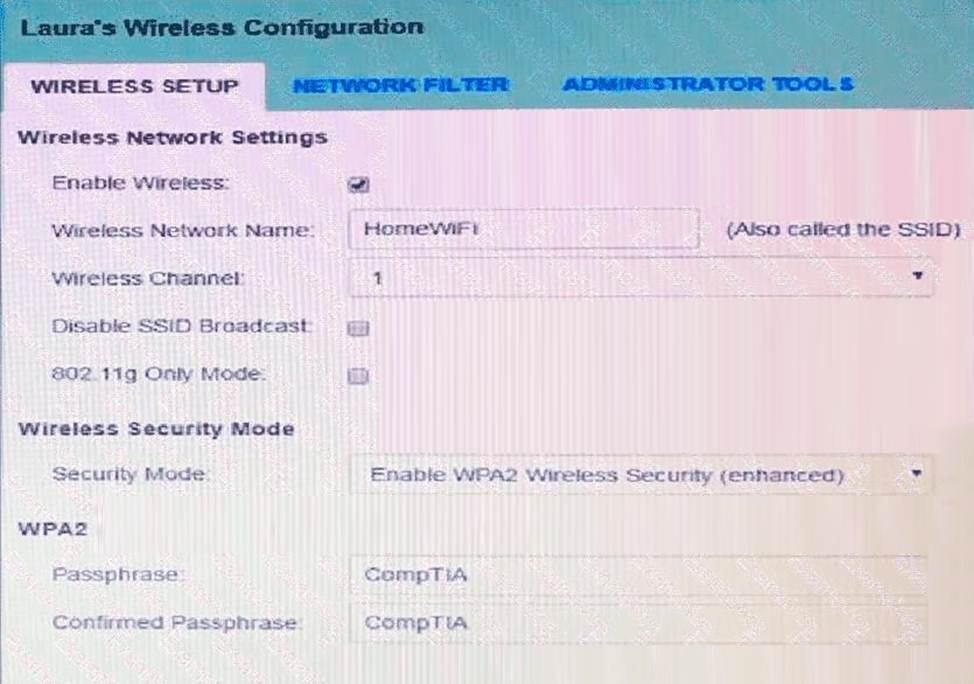
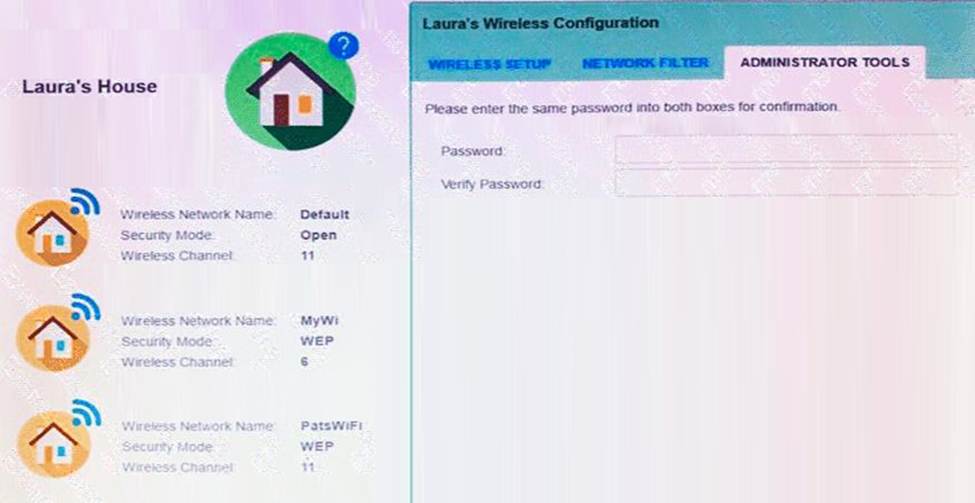
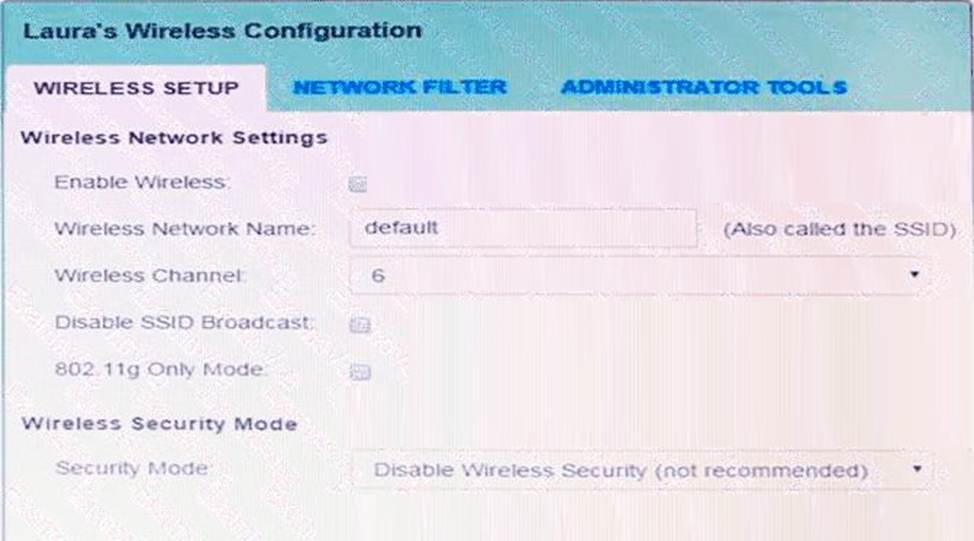
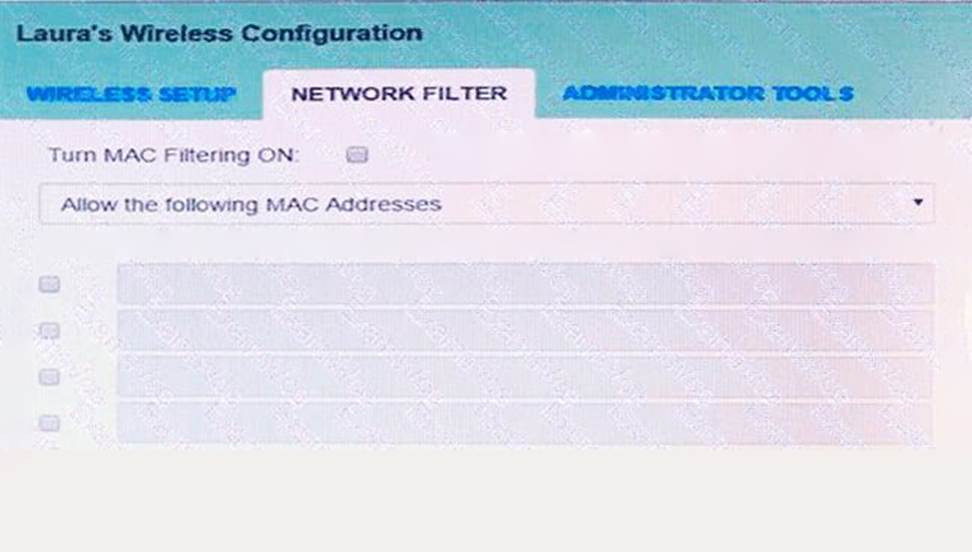
See the explanation below
A screenshot of a network settings AI-generated content may be incorrect.
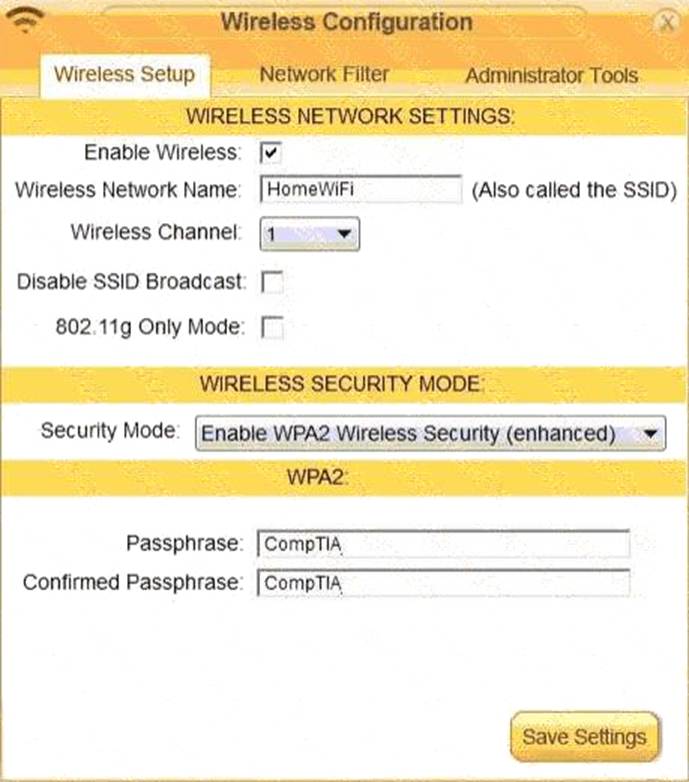
A screenshot of a computer AI-generated content may be incorrect.
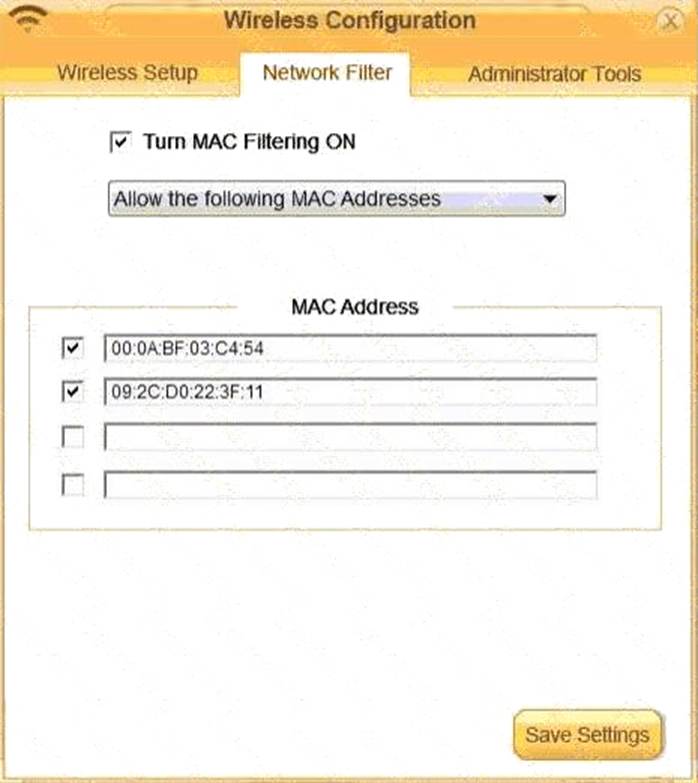
A screenshot of a computer AI-generated content may be incorrect.
Which of the following cloud models exclusively utilizes a local data center?
- A . Private
- B . Public
- C . Hybrid
- D . Community
A
Explanation:
A Private Cloud is operated solely for a single organization. It is hosted on-premises or in a dedicated off-site data center, giving the company full control over data, security, and compliance ― often hosted in the organization’s own local data center.
Option B (Public): Hosted by third-party providers and shared by multiple clients.
Option C (Hybrid): Combines private and public cloud resources.
Option D (Community): Shared by several organizations with similar goals.
CompTIA A+ Core 1 Exam Objective
Reference:
Objective 4.1: Compare and contrast cloud computing concepts.
Which of the following DNS records would an administrator change to redirect email flow?
- A . MX
- B . TXT
- C . SPF
- D . CNAME
A
Explanation:
AnMX (Mail Exchange)record defineswhich mail servers are responsible for receiving emailfor a domain. If you want to change or redirect email traffic, theMX recordmust be updated with the correct server information.
Option B (TXT): Stores text-based info ― used for SPF, DKIM, etc.
Option C (SPF): Part of email authentication stored in a TXT record; doesn’t redirect traffic.
Option D (CNAME): Alias for another domain name ― not used for email routing.
CompTIA A+ Core 1 Exam Objective
Reference:
Objective 2.4: Compare and contrast common networking hardware.
While reviewing options in the BIOS/UEFI settings page to fix a laptop issue, a support technician notices an option to clear existing TPM keys.
Which of the following would most likely happen if the TPM is cleared?
- A . Encrypted hard drives would probably not be accessible.
- B . All security certificates would need to be reinstalled from trusted roots.
- C . The device would need to be reenrolled in the MDM platform
- D . The laptop would need to be registered to the domain as a new client.
A
Explanation:
The Trusted Platform Module (TPM) is a hardware-based security feature used to store cryptographic keys, such as those used for encryption, authentication, or device identification. It plays a critical role in ensuring secure operations for encrypted drives, BitLocker, and secure boot processes. Clearing TPM keys involves wiping all stored cryptographic data, which can lead to several consequences depending on what the TPM was being used for. Let’s break it down:
Correct Answer
A user reports that a software application functioned as expected the previous day, but this morning, the user is unable to launch the application.
Which of the following describe what the technician should do next?
- A . Research the symptoms
- B . Identify any changes the user has made
- C . Determine which steps need to be performed.
- D . Check the vendor’s website for guidance.
B
Explanation:
Identifying changes made to the system is the next step to troubleshoot why an application no longer launches, as recent changes often cause such issues.
Why Not A (Research the symptoms): Research is broader and should come after identifying changes.
Why Not C (Determine which steps need to be performed): This comes after identifying the issue.
Why Not D (Check the vendor’s website): This is a later step if further guidance is needed.
CompTIA A+ Exam
Reference: Core 2 (220-1102), Section 3.1, troubleshooting methodology.
Which of the following devices is used to implement ACL polices for an environment?
- A . Managed switch
- B . Gateway
- C . Repeater
- D . Firewall
D
Explanation:
A firewall implements ACLs (Access Control Lists) to filter traffic and enforce policies based on rules such as IP address, port, or protocol.
Why Not A (Managed switch): A managed switch supports VLANs and QoS but does not enforce ACLs at the network perimeter.
Why Not B (Gateway): Gateways connect networks and translate protocols but don’t typically implement ACLs.
Why Not C (Repeater): Repeaters extend signal range but don’t enforce policies.
CompTIA A+ Exam
Reference: Core 1 (220-1201), Section 2.2, firewall concepts.
A technician is troubleshooting an all-in-one laser printer that prints a vertical line when making copies and scans. When users print or receive faxes, the output from the printer is correct.
Which of the following should the technician examine to determine the cause of the issue?
- A . The pickup rollers
- B . The corona wire
- C . The document feeder
- D . The drum assembly
C
Explanation:
Since the issue only occurs during scanning and copying (not printing or faxing), the problem is isolated to the document feeder. A vertical line is typically caused by debris or damage on the glass under the ADF (Automatic Document Feeder), not on components related to printing.
#Reference: "CompTIA A+ Complete Study Guide" by Quentin Docter C Chapter 4, page 261.