CompTIA 220-1201 Practice Exams
Last updated on Nov 16,2026- Exam Code: 220-1201
- Exam Name: CompTIA A+ Certification Exam: Core 1
- Certification Provider: CompTIA
- Latest update: Nov 16,2026
A technician has just installed a new SSD into a computer, but the drive is not appearing.
Which of the following is most likely the reason’s?
- A . The SSD is faulty and should be replaced by the manufacturer
- B . The SSD has not been properly formatted and is not readable
- C . The SSD is incompatible with the motherboard
- D . The SSD has not boon installed properly and should be reseated
D
Explanation:
Improper seating is the most common reason an SSD isn’t recognized. Ensuring it is correctly connected resolves the issue.
Why Not A (Faulty SSD): A faulty SSD is possible but less likely than an installation issue.
Why Not B (Not formatted): Formatting affects data usability, not drive detection.
Why Not C (Incompatibility): SSD compatibility issues are rare with modern hardware.
CompTIA A+ Exam
Reference: Core 1 (220-1201), Section 3.3, storage troubleshooting.
A technician is troubleshooting a PoE phone that will not turn on. When a laptop is plugged directly into the switchport for the phone the technician sees a data link LED and activity.
Which of the following tools should the technician use to verify PoE availability to the phone?
- A . Network tap
- B . Cable tester
- C . Loopback plug
- D . Toner probe
B
Explanation:
Reasoning: A cable tester capable of testing Power over Ethernet (PoE) functionality can verify whether the switchport is providing the required power to the phone. This tool measures both the presence of data and the voltage or wattage being provided through the Ethernet cable.
This is the most effective way to confirm that PoE is available on the port.
Why the Other Options Are Incorrect:
A technician wants to upgrade a computer to a new Windows version. The Windows Upgrade Advisor states that the computer is not compatible with the new Windows version due to a lack of TPM 2.0 support.
Which of the following should the technician do next?
- A . Enable the module in the UEFI BIOS.
- B . Install an HSM in the computer.
- C . Perform a clean Install of the new Windows version.
- D . Implement BitLocker on the computer.
A
Explanation:
TPM 2.0 (Trusted Platform Module) is often disabled by default in the UEFI BIOS. Enabling it is necessary to meet the requirements for certain Windows installations, including Windows 11.
Why Not B (Install an HSM): A Hardware Security Module (HSM) is a separate device used for cryptographic functions and is not related to TPM on the motherboard.
Why Not C (Perform a clean install): A clean installation will not bypass the TPM 2.0 requirement.
Why Not D (Implement BitLocker): BitLocker requires TPM but does not resolve its absence or lack of activation.
CompTIA A+ Exam
Reference: Core 1 (220-1201), Section 3.4, BIOS/UEFI configuration.
A technician is working on a RAID 1 array that is apparently degraded. The technician verifies the RAM and power are both operating as expected.
Which of the following can the technician do to further isolate the issue?
- A . Perform individual drive diagnostics.
- B . Run the chkdsk /i command.
- C . Rebuild the RAID array.
- D . Reconfigure the array as RAID 0.
A
Explanation:
Adegraded RAID 1array usually meansone of the drives has failed or is failing. The correctnext step is torun diagnostics on each driveto identify the faulty one. RAID 1 uses mirroring, so one good drive should still contain all the data.
Option B: chkdsk checks file system integrity, not hardware drive health.
Option C: Rebuilding should only occurafteridentifying and replacing a faulty drive.
Option D: RAID 0 offers no redundancy and would destroy data in this context.
CompTIA A+ Core 1 Exam Objective
Reference:
Objective 3.5: Given a scenario, troubleshoot problems related to storage devices.
A user prints a job from a laser printer. The user wipes the page, and the words and images come off of it. The technician replaces the toner cartridge, but the issue persists.
Which of the following components should the technician replace next?
- A . Fuser
- B . Drum
- C . Developer roller
- D . Discharge lamp
A
Explanation:
Inlaser printers, thefuser unitis responsible formelting the toner onto the paperusing heat and pressure. If the toner rubs off easily, it’s a clear sign thefuser is failing or not heating properly. Replacing the fuser will ensure the toner bonds correctly to the paper.
Option B (Drum): Transfers the image, but doesn’t fuse the toner.
Option C (Developer roller): Applies toner to the drum ― wouldn’t cause toner to rub off.
Option D (Discharge lamp): Prepares the drum for a new image; not related to toner adhesion.
CompTIA A+ Core 1 Exam Objective
Reference:
Objective 3.7: Given a scenario, troubleshoot common printer problems.
A user’s wireless headset shows a "connected" status when turned on, but the Bluetooth list on the user’s phone shows that the headset is "not connected.".
Which of the following should the technician do?
- A . Enter the PIN.
- B . Turn off Wi-Fi.
- C . Re-pair the devices.
- D . Enable Bluetooth.
C
Explanation:
When a device shows asnot connectedeven though it previously paired, the most effective action is tore-pair the devices. This resets the Bluetooth connection, clears any corruption in pairing profiles, and re-establishes communication.
Option A: Entering a PIN is only relevant during initial pairing and may not be prompted again.
Option B: Turning off Wi-Fi doesn’t typically affect Bluetooth; they operate on similar frequencies but don’t conflict this way in normal use.
Option D: If Bluetooth were disabled, the device wouldn’t appear at all, not just show as “not connected.”
CompTIA A+ Core 1 Exam Objective
Reference: Objective 1.5: Given a scenario, connect and configure accessories and ports of mobile devices.
Which of the following is a Bluetooth network an example of?
- A . PAN
- B . LAN
- C . WAN
- D . SAN
A
Explanation:
Bluetooth is a wireless technology designed for short-range communication between devices. It is a classic example of a Personal Area Network (PAN), which supports communication between devices like smartphones, headsets, keyboards, and mice within a few meters. PANs are smaller in scope compared to LANs or WANs.
#Reference: "CompTIA A+ Complete Study Guide" by Quentin Docter C Chapter 5, "Networking Fundamentals", page 275.
A technician has discovered that some users are connected to a network that is not available on the user interface.
Which of the following is the most effective tool the technician can use to identify networks that are not broadcasting SSIDs?
- A . Cable tester
- B . Toner probe
- C . Wi-Fi analyzer
- D . Loopback plug
C
Explanation:
Wi-Fi Analyzer:
A Wi-Fi analyzer is a tool used to detect and analyze wireless networks, even those that are not broadcasting their SSIDs (hidden networks).
It provides detailed information about nearby networks, including signal strength, channel usage, and security protocols.
In this case, the Wi-Fi analyzer can identify the hidden networks that users are connected to, which are not visible on the standard user interface.
Incorrect Options:
A computer displays an error message indicating there is insufficient storage when installing applications. The user reports slow application load times.
Which of the following replacement components would best resolve this issue?
- A . SSD
- B . USB
- C . HDD
- D . RAM
A
Explanation:
Upgrading to asolid-state drive (SSD) provides more storage space and faster read/write speeds, which resolves both the “insufficient storage” error and slow application loads.
Option B (USB): Not intended for permanent application storage or performance improvements.
Option C (HDD): Could solve storage capacity but would not improve speed.
Option D (RAM): Affects multitasking and memory-intensive tasks, not storage capacity directly.
CompTIA A+ Core 1 Exam Objective
Reference:
Objective 3.5: Given a scenario, troubleshoot problems related to storage devices.
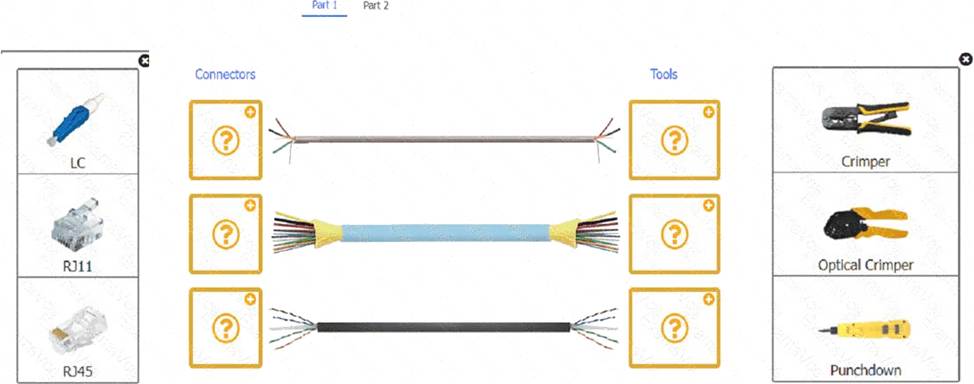
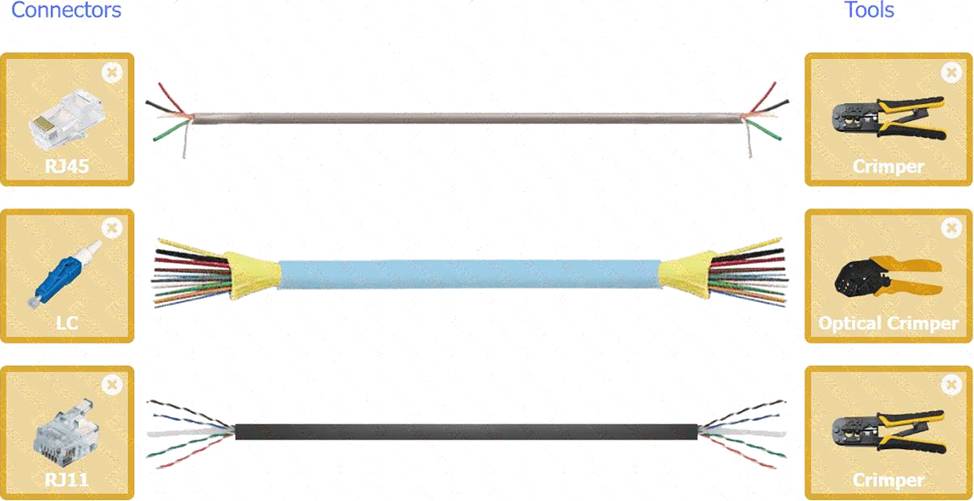
A technician is installing a wireless access point and is required to run all cabling and make patch cords if necessary.
INSTRUCTIONS
Part 1
For each cable type, click the (+) to select the appropriate connector and tool.
part 2
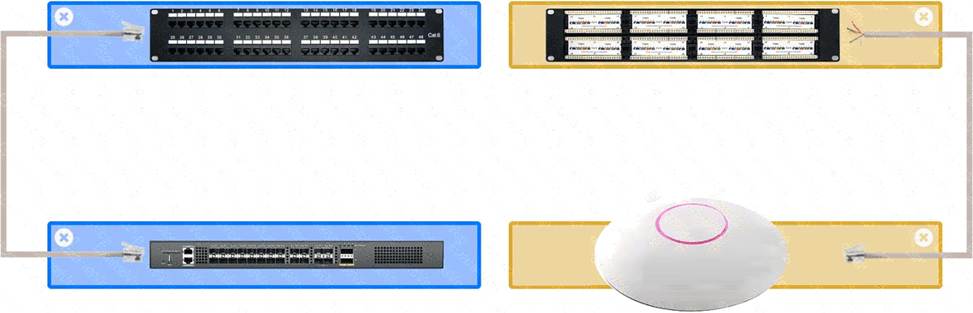
An access point was moved and no longer has connectivity. Connect the access point, patch panel, and switch by clicking the (+) to select the appropriate cable end for each corresponding location to create a link.
The link will be visible after making the second selection of each pair.
Cable ends may be used multiple times, and all placeholders will be filled.
A close-up of several cables AI-generated content may be incorrect.
Part 2
A group of different colored rectangular objects AI-generated content may be incorrect.