
CompTIA 220-1201 Practice Exams
Last updated on Nov 16,2026- Exam Code: 220-1201
- Exam Name: CompTIA A+ Certification Exam: Core 1
- Certification Provider: CompTIA
- Latest update: Nov 16,2026
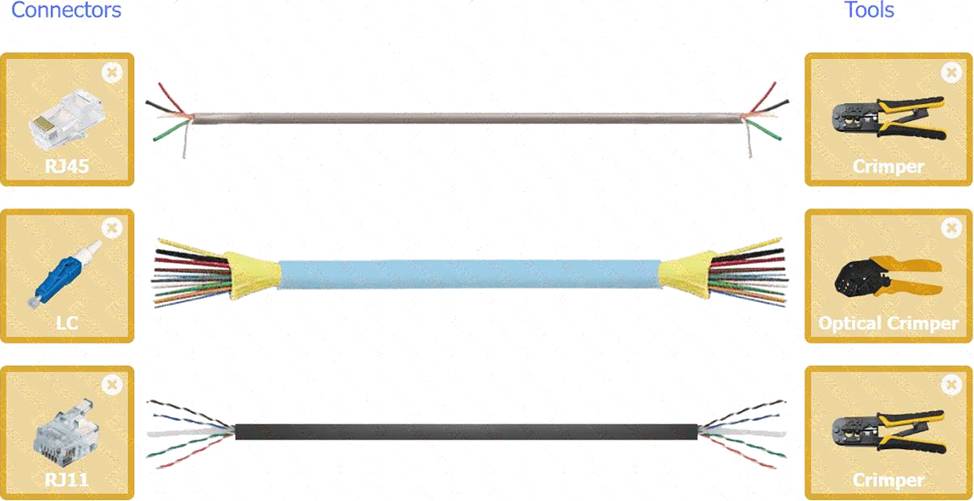
A technician is installing a wireless access point and is required to run all cabling and make patch cords if necessary.
INSTRUCTIONS
Part 1
For each cable type, click the (+) to select the appropriate connector and tool.
part 2
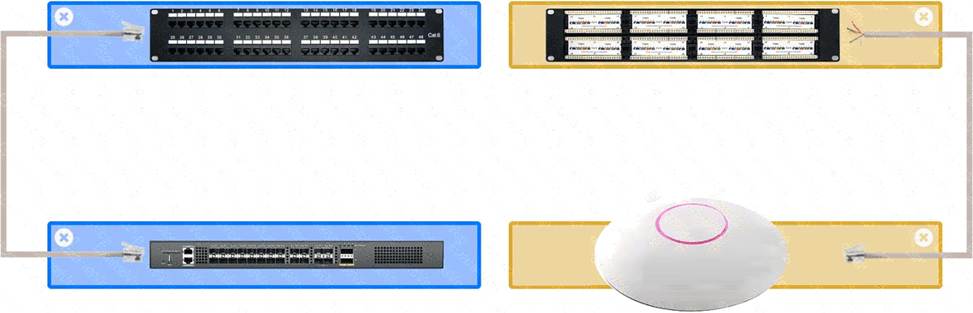
An access point was moved and no longer has connectivity. Connect the access point, patch panel, and switch by clicking the (+) to select the appropriate cable end for each corresponding location to create a link.
The link will be visible after making the second selection of each pair.
Cable ends may be used multiple times, and all placeholders will be filled.
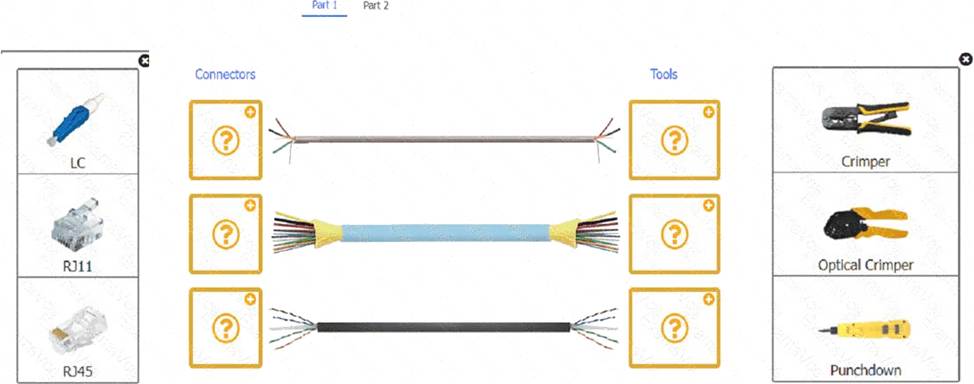
A close-up of several cables AI-generated content may be incorrect.
Part 2
A group of different colored rectangular objects AI-generated content may be incorrect.
Users working with large files back up the files to external hard drives. One user’s files take longer to back up than other users’ files. The user has tried backing up the files to other users’ drives with the same results.
Which of the following steps should the technician take first to correct this issue?
- A . Replace the hard drive’s USB cable.
- B . Defragment the user’s external hard drive.
- C . Update the storage drivers on the user’s system.
- D . Instruct the user to compress the files.
B
Explanation:
If a hard drive is heavily fragmented, file read/write operations can take significantly longer, causing slow backup speeds. Defragmenting the drive organizes the data for more efficient access.
Why Not A (Replace the hard drive’s USB cable): A faulty cable would typically cause disconnections or errors, not just slower speeds.
Why Not C (Update the storage drivers): This might help if the issue is with system drivers, but the described symptoms point to a fragmentation issue.
Why Not D (Compress the files): Compression reduces file size but does not address the root cause of the slow backups.
CompTIA A+ Exam
Reference: Core 2 (220-1102), Section 3.1, storage troubleshooting.
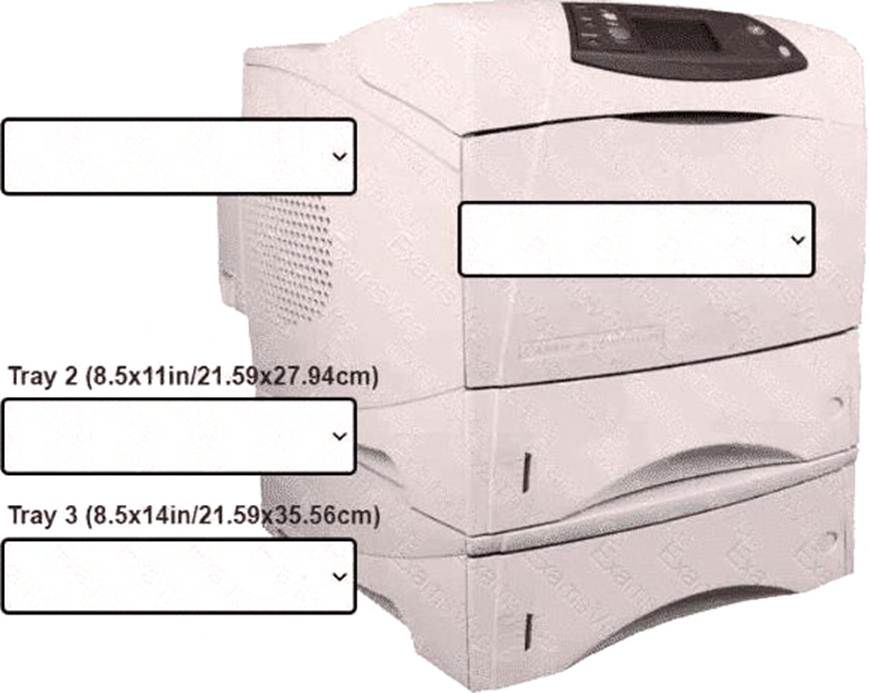
An office manager reports that a printer is experiencing performance issues. Printouts are smudging when they are handled, and, recently whenever they need to print legal sized documents, the paper jams before anything is printed on it.
The following paper sizes are used:
Letter (8.5x11in/21.59×27.94cm)
Legal (8.5x14in/21.59×35.56cm)
Oversized (11x17in/27.94×43.18cm)
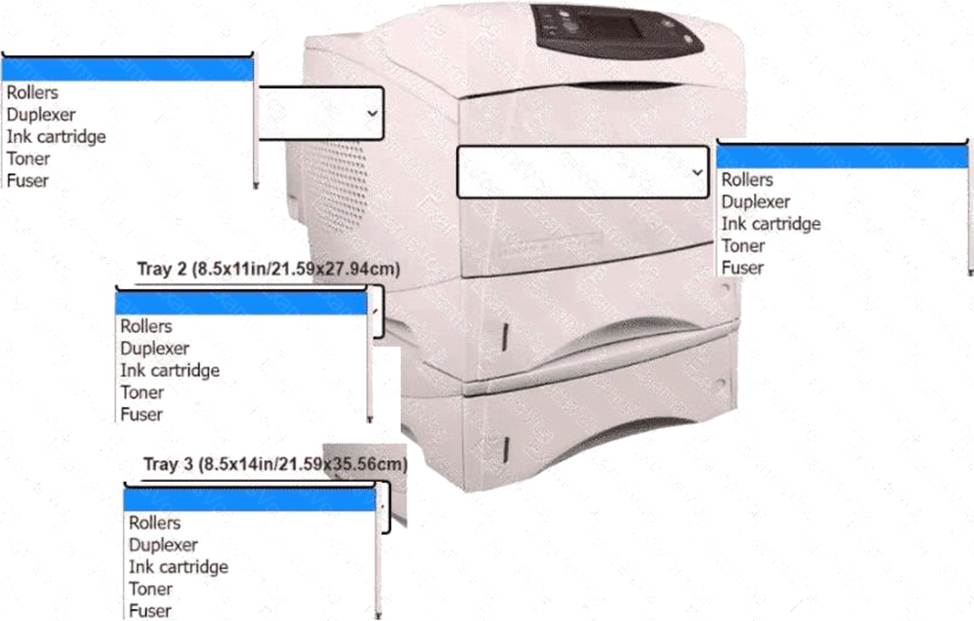
INSTRUCTIONS
Using the dropdown menus, select from the
available printer parts to replace only the
faulty components on the office printer to
resolve the stated issues.
If at any time you would like to bring back
the initial state of the simulation, please click
the Reset All button.
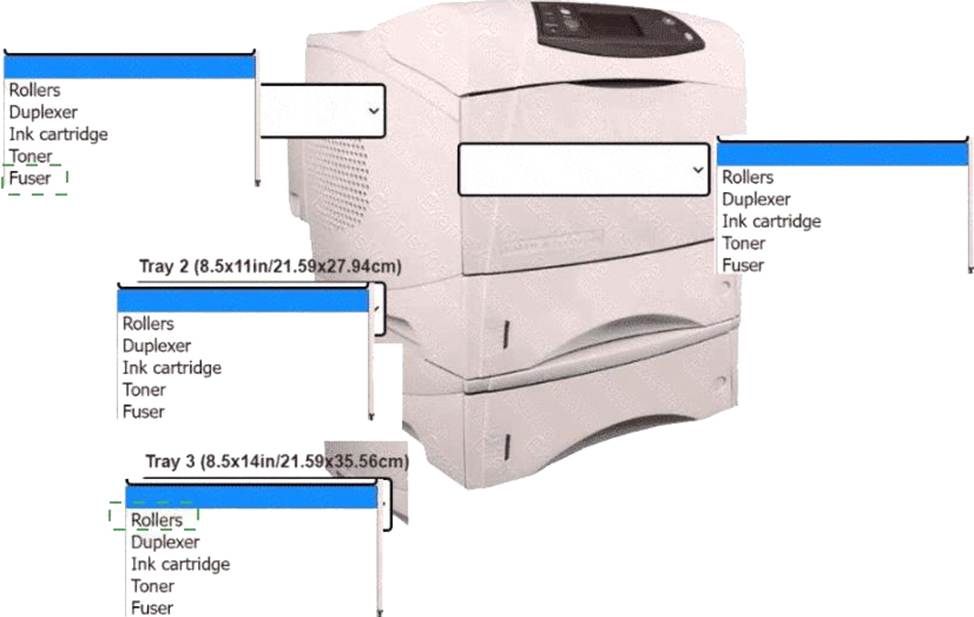
Explanation:
A printer with text boxes AI-generated content may be incorrect.
A technician is troubleshooting stylus issues on identical, company-provided tablets. Users can purchase their own accessories. Some users have no issues, but others report that their styluses charge intermittently and die frequently.
Which of the following is the most likely cause of this issue?
- A . Certain cases are causing charging issues.
- B . The tablets need to be updated.
- C . Some of the tablets have manufacturing defects.
- D . The malfunctioning styluses need firmware updates.
A
Explanation:
The most likely cause is third-party or ill-fitting cases obstructing the contact between the stylus and the tablet charging mechanism. Some cases may not be designed with stylus charging in mind, particularly if users are purchasing their own accessories.
Option B: A software update might fix OS-related issues, but would not typically affect physical charging.
Option C: If some devices had defects, the issue would likely be consistent, not isolated to some users.
Option D: Firmware issues could be a factor but are less likely than physical obstructions when users are using different accessories.
CompTIA A+ Core 1 Exam Objective
Reference:
Objective 1.4: Given a scenario, configure settings and use cases for laptops and mobile devices.
Which of the following port numbers are associated with email traffic? (Select two).
- A . 23
- B . 25
- C . 67
- D . 110
- E . 137
- F . 443
B D
Explanation:
To answer this question, we need to identify the port numbers associated with email protocols used in client-server communication.
Port 25 (SMTP – Simple Mail Transfer Protocol):
This port is primarily used for sending emails between mail servers and from mail clients to mail servers (sending outbound mail).
SMTP is an essential protocol for email traffic.
Reference: CompTIA A+ Core 1 Exam Objectives (220-1201), Domain 2.5 C Explain basic wired and wireless networking concepts, including ports and protocols.
Port 110 (POP3 – Post Office Protocol v3):
POP3 is used for retrieving emails from a mail server. It is commonly used for downloading email messages to a local client, after which the messages are deleted from the server.
While not as commonly used today (due to IMAP being preferred), POP3 is still a recognized email protocol, and its association with port 110 makes it a valid answer.
Reference: CompTIA A+ Core 1 Exam Objectives (220-1201), Domain 2.5 C Explain basic wired and wireless networking concepts, including ports and protocols.
Incorrect Options:
Which of the following tools would a technician use to connect wires to an RJ45 connector?
- A . Crimper
- B . Cable stripper
- C . Punchdown
- D . Loopback plug
A
Explanation:
A crimper is specifically used to attach RJ45 connectors to the ends of network cables. It presses the connector pins into the cable’s wires, establishing a secure electrical connection. A punch down tool is used for wiring patch panels or keystone jacks, not for attaching connectors.
#Reference: "CompTIA A+ Complete Study Guide" by Quentin Docter C Chapter 3, "Cables and Connectors", page 162. Also outlined in the220-1201objectives under 3.1.
When installing a network printer, a technician needs to ensure the printer is available after a network is restarted.
Which of the following should the technician set up on the printer to meet this requirement?
- A . Static IP address
- B . Private address
- C . Wi-Fi on the printer
- D . Dynamic addressing
A
Explanation:
Assigning astatic IP addressto a network printer ensures it always retains the same address, allowing users and print servers to consistently reach it even after a reboot or network refresh.
Option B (Private address): Refers to address ranges (e.g., 192.168.x.x) ― doesn’t guarantee address persistence.
Option C (Wi-Fi): Is a connection method, not a method of IP assignment.
Option D (Dynamic addressing): Via DHCP, which can change over time unless reservations are made (less reliable).
CompTIA A+ Core 1 Exam Objective
Reference:
Objective 3.4: Given a scenario, install and configure printers.
A technician needs to confirm that desktop PCs can be deployed to a global, remote workforce.
Which of the following specifications should the technician validate?
- A . Input voltage
- B . BIOS language support
- C . Supply chain security
- D . Power efficiency
A
Explanation:
Input voltage must be validated to ensure desktop PCs can operate in different regions with varying power standards (e.g., 110V in North America vs. 220V in Europe). Failure to verify input voltage compatibility can lead to hardware damage or operational issues.
Option B (BIOS language support): Incorrect. While language support may be helpful, it is not critical for hardware deployment across regions.
Option C (Supply chain security): Incorrect. This refers to ensuring secure sourcing of components but does not directly impact deployment.
Option D (Power efficiency): Incorrect. Power efficiency may be important for energy savings but is not relevant to regional compatibility.
References:
CompTIA A+ Core 1 Objectives: 3.5 (Power supply requirements)
A user experiences a random BSOD while using a computer, but the operating system recovers as expected.
Which of the following symptoms would indicate the issue is related to RAM?
- A . Wrong BIOS configurations
- B . Continuous reboots
- C . Distended capacitors
- D . POST code beeps
D
Explanation:
D. POST Code Beeps:
During the Power-On Self-Test (POST), the BIOS performs checks on system hardware, including RAM. If the RAM is faulty, POST may produce a series of beep codes indicating memory issues.
These beep codes are often the first sign of RAM-related problems, especially if the BSOD occurs randomly.
Incorrect Options:
A user is receiving many unsolicited emails.
Which of the following controls can be configured to best reduce these types of emails?
- A . Load balancer
- B . Spam gateway
- C . Mail forwarding
- D . Proxy servers
B
Explanation:
A spam gateway filters unsolicited emails at the server level, significantly reducing spam before it reaches user inboxes.
Why Not A (Load balancer): Load balancers distribute traffic but don’t filter spam.
Why Not C (Mail forwarding): Forwarding doesn’t filter spam.
Why Not D (Proxy servers): Proxies control web traffic, not email filtering.
CompTIA A+ Exam
Reference: Core 2 (220-1102), Section 2.10, email security controls.