
Cisco 500-220 Practice Exams
Last updated on Nov 16,2026- Exam Code: 500-220
- Exam Name: Engineering Cisco Meraki Solutions v1.0
- Certification Provider: Cisco
- Latest update: Nov 16,2026
A Cisco Meraki MX security appliance is trying to route a packet to the destination IP address of 172.18.24.12.
Which routes contained in its routing table does it select?
- A . Auto VPN route 172.18.0.0/16
- B . static route 172.16.0.0/12
- C . non-Meraki VPN route 172.18.24.0/24
- D . directly connected 172.18.16.0/20
C
Explanation:
Route Priority
Each type of route configured on the MX has a specific priority in comparison with other types of routes. The priority is as follows:
Directly Connected
Client VPN
Static Routes
AutoVPN Routes
Non-Meraki VPN Peers
BGP learned Routes
NAT*
https://documentation.meraki.com/MX/Networks_and_Routing/MX_Routing_Behavior
Refer to the exhibit.
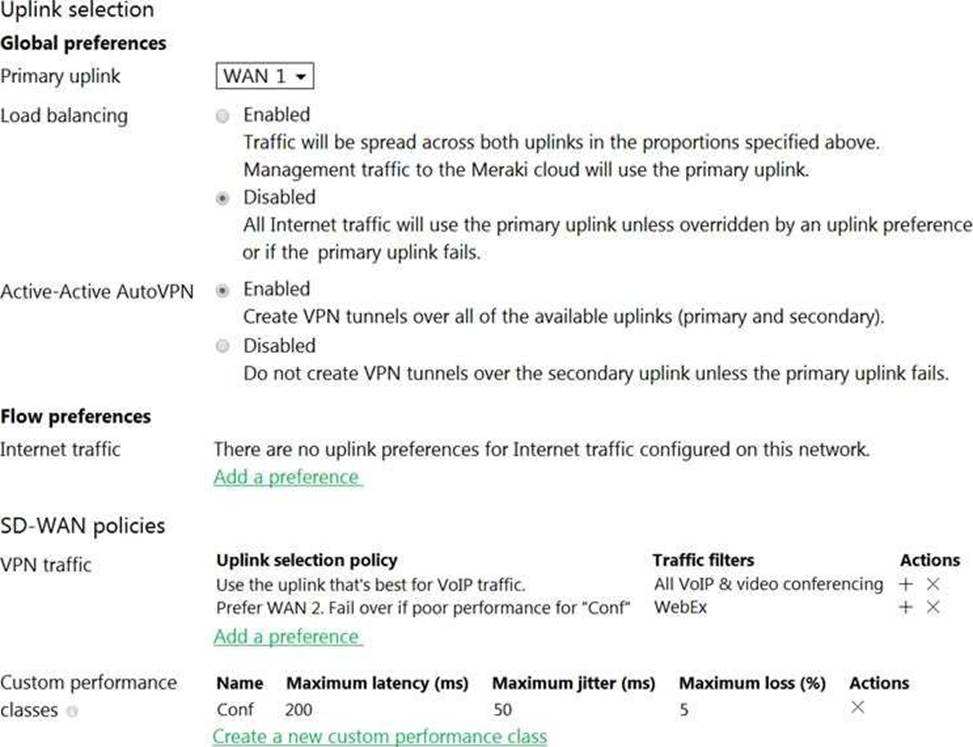
Assuming this MX has established a full tunnel with its VPN peer, how will the MX route the WebEx traffic?
- A . WebEx traffic will prefer WAN 2 as long as it meets the thresholds in the “Conf” performance class.
- B . WebEx traffic will prefer WAN 1 as it is the primary uplink.
- C . WebEx traffic will prefer WAN 2 as long as it is up.
- D . WebEx traffic will be load-balanced between both active WAN links.
A
Explanation:
Assuming this MX has established a full tunnel with its VPN peer, the MX will route the WebEx traffic based on the SD-WAN policy configured in the exhibit. The SD-WAN policy has two performance classes: Conf and Default. The Conf performance class matches the traffic with destination port 9000, which is used by WebEx for VoIP and video RTP3. The Conf performance class has a preferred uplink of WAN 2 and a failover uplink of WAN 1. It also has thresholds for latency, jitter, and loss that determine when to switch from the preferred uplink to the failover uplink. Therefore, the WebEx traffic will prefer WAN 2 as long as it meets the thresholds in the Conf performance class. If WAN 2 exceeds the thresholds or goes down, the WebEx traffic will switch to WAN 1 as the failover uplink.
What are two roles of the network and device tags in a Dashboard? (Choose two.)
- A . Tags enable administrators to configure a combination of network and device specific tags to create summary reports filtered for specific devices across multiple networks.
- B . Network tags can be used to assign networks to separate Auto VPN domains in an Organization with many networks.
- C . Network tags can be used to simplify the assignment of network-level permissions in an Organization with many networks.
- D . Device tags can be used to simplify the assignment of device-level permissions in an Organization with many administrators.
- E . Device tags can be assigned to MR APs to influence the gateway selection for repeaters in a mesh wireless network.
AC
Explanation:
See Permissions by Network Tag section To simplify the assignment of network-level permissions in an organization with many networks, permissions can be granted to users for a given network tag. https://documentation.meraki.com/General_Administration/Managing_Dashboard_Access/Managing_Dashboard_Administrators_and_Permissions
The Organization > Configure > Manage Tags page allows Administrators to configure a combination of Network and Device specific tags to create Summary Reports filtered for specific devices across multiple networks.
https://documentation.meraki.com/General_Administration/Organizations_and_Networks/Organization_Menu/Manage_Tags
Which Cisco Meraki product must be deployed in addition to Systems Manager so that Systems Manager Sentry enrollment can be used?
- A . MS Switch
- B . Meraki Insight
- C . MR Access Point
- D . MV Smart Camera
C
Explanation:
https://documentation.meraki.com/MR/MR_Splash_Page/Systems_Manager_Sentry_Enrollment
Reference: https://meraki.cisco.com/blog/tag/systems-manager/page/4/
An organization requires that BYOD devices be enrolled in Systems Manager before they gain access to the network. Part of the enrollment includes pushing out the corporate SSID preshared key, corporate email settings, and some business-sensitive PDFs.
When a user leaves the organization, which Systems Manager feature allows the removal of only the MDM-delivered content from the user’s device?
- A . Erase Device
- B . Clear Pushed Data
- C . Unenroll Device
- D . Selective Wipe
D
Explanation:
https://documentation.meraki.com/SM/Monitoring_and_Reporting/Selective_Wipe_and_Device_Quarantine_in_Systems_Manager
How is high-availability supported for Cisco Meraki devices?
- A . Only the MX Security Appliances that use VRRP support high availability.
- B . An active/active high-availability pair is recommended for MX Security Appliances.
- C . The MX Security Appliances and MS Series Switches that use VRRP support an active/passive high-
availability pair. - D . The MX Security Appliances and MS Series Switches that use HSRP support an active/passive high-availability pair.
C
Explanation:
https://documentation.meraki.com/MS/Layer_3_Switching/MS_Warm_Spare_(VRRP)_Overview
Which requirement is needed to implement Fast Lane on Cisco Meraki APs?
- A . wireless profile installed on an Apple iOS device
- B . wireless profile installed on a Cisco iOS access point
- C . adaptive 802.11r disabled
- D . traffic shaping rule tagging traffic with a DSCP value of 46 to Apple.com
A
Explanation:
Meraki MR Access Points, in combination with a wireless profile installed on the iOS device, will enable the Fast Lane technologies. The fastest way to install a wireless profile on an iOS device is via Meraki EMM.
https://documentation.meraki.com/MR/Wi-Fi_Basics_and_Best_Practices/Wireless_QoS_and_Fast_Lane
Reference: https://documentation.meraki.com/MR/WiFi_Basics_and_Best_Practices/Wireless_QoS_and_Fast_Lane
Refer to the exhibit.
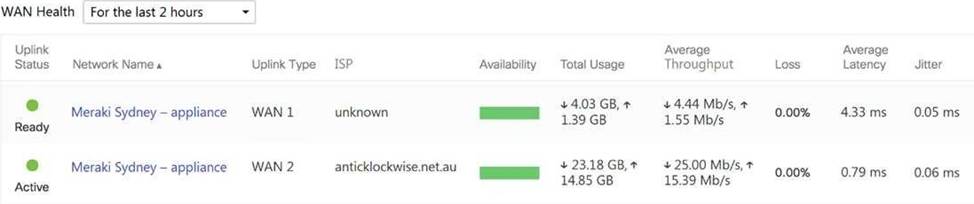
What are the Loss and Average Latency statistics based on?
- A . responses that the MX appliance receives on the connectivity-testing hostnames on the Insight > Web App Health page
- B . responses that the MX appliance receives on the connectivity-testing IP addresses on the Security & SD- WAN > Firewall page
- C . responses that the MX appliance receives on the connectivity-testing IP address that is configured on the Security & SD-WAN > SD-WAN & Traffic Shaping page
- D . responses that the MX appliance receives on the connectivity-testing IP addresses on the Help > Firewall info page
C
Explanation:
Quote from referred documentation-Link: Loss and latency will be determined over the configured IP address under Security and SD-WAN > SD-WAN and Traffic Shaping > Uplink Statistics. If no IP is configured, these values will be measured against 8.8.8.8 by default. On the WAN Health page, all the configured IP address statistics can be reviewed by changing the destination under the "Ping Destination" column.
https://documentation.meraki.com/MI/MI_WAN_Health#:~:text=Current%20loss%20and%20latency%20statistics,address%20is%20set%20to%208.8.
Which two actions can extend the video retention of a Cisco Meraki MV Smart Camera? (Choose two.)
- A . enabling audio compression
- B . installing an SSD memory extension
- C . enabling motion-based retention
- D . enabling maximum retention limit
- E . configuring a recording schedule
CE
Explanation:
https://documentation.meraki.com/MV/Advanced_Configuration/Scheduled_Recording
By default, the Meraki security camera’s will record continuously 24/7. In some situations, certain times of day are not allowed to be recorded. Scheduled recording covers this requirement as well as improve the video retention capabilities of the camera.
Reference: https://documentation.meraki.com/MV/Initial_Configuration/Video_Retention
DRAG DROP
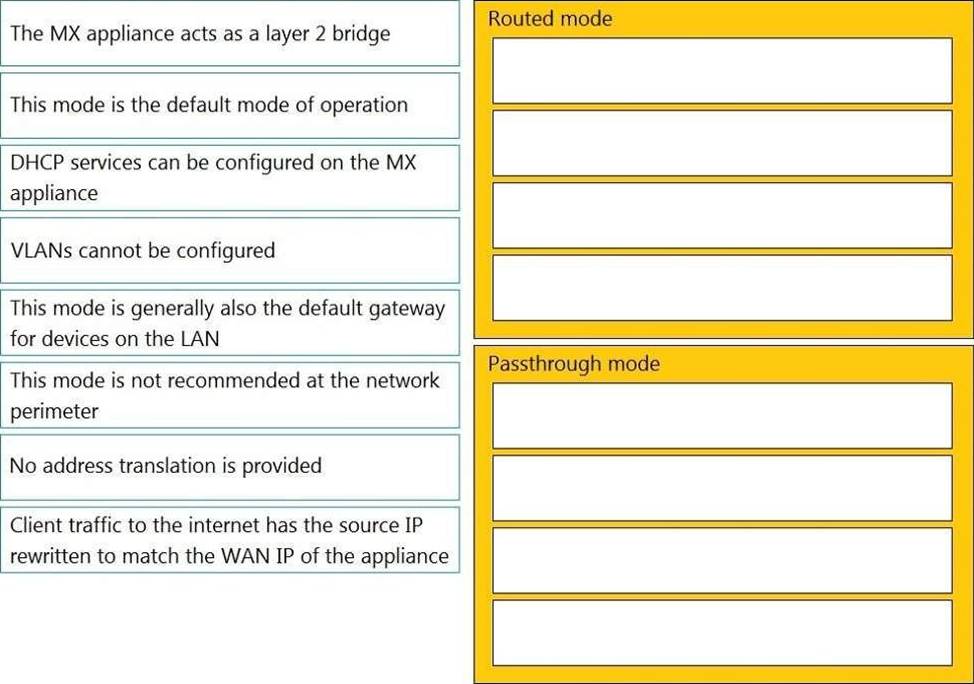
Drag and drop the descriptions from the left onto the corresponding MX operation mode on the right.
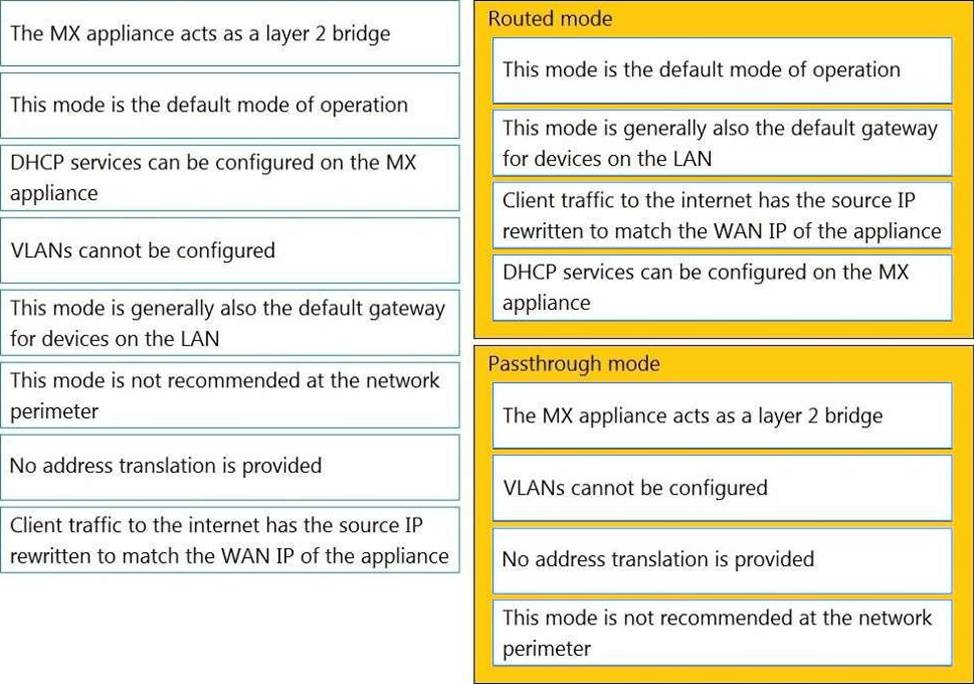
Explanation:
Routed Mode:
This mode is the default mode of operation
This mode is generally also the default gateway for devices on the LAN
Client traffic to the internet has the source IP rewritten to match the WAN IP of the appliance
DHCP services can be configured on the MX appliance
Passthrough Mode:
The MX appliance acts as a layer 2 bridge
VLANs cannot be configured
No address translation is provided
This mode is not recommended at the network perimeter
This question is related to the topic of MX Addressing and VLANs in the Cisco Meraki documentation. You can find more information about this topic in the MX Addressing and VLANs article or the General MX Best Practices page.