
Cisco 500-220 Practice Exams
Last updated on Nov 16,2026- Exam Code: 500-220
- Exam Name: Engineering Cisco Meraki Solutions v1.0
- Certification Provider: Cisco
- Latest update: Nov 16,2026
Question #71
Refer to the exhibit.
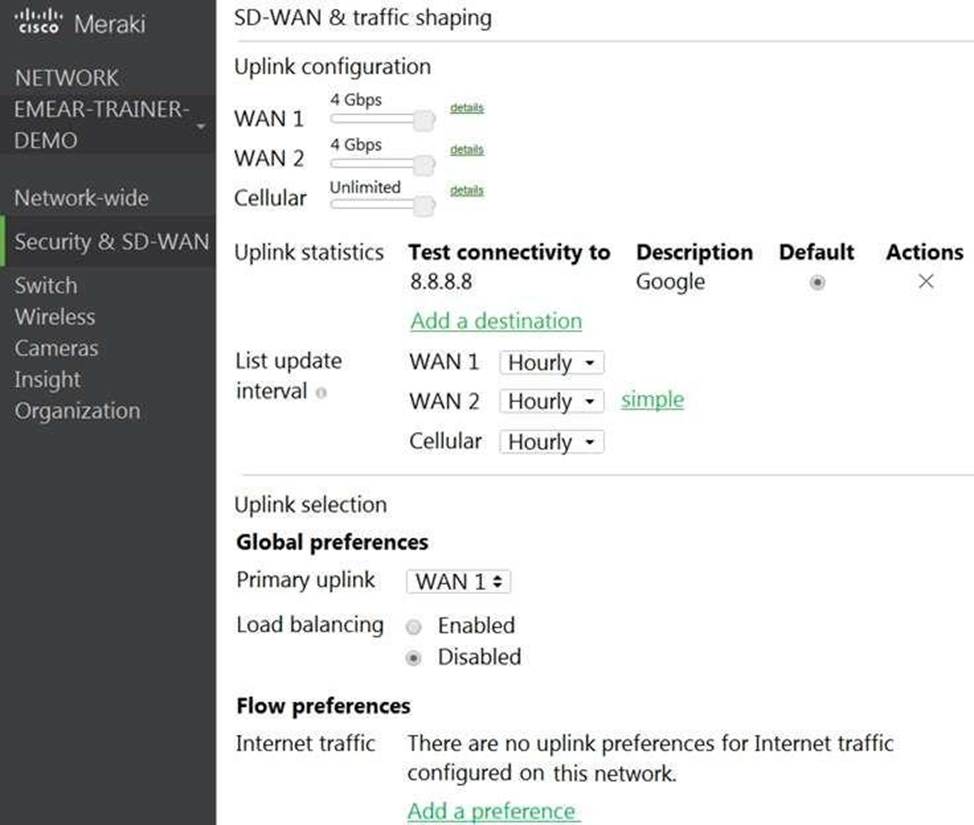
Which two actions are required to optimize load balancing asymmetrically with a 4:1 ratio between links? (Choose two.)
- A . Change the primary uplink to "none".
- B . Add an internet traffic preference that defines the load-balancing ratio as 4:1.
- C . Enable load balancing.
- D . Set the speed of the cellular uplink to zero.
- E . Change the assigned speeds of WAN 1 and WAN 2 so that the ratio is 4:1.
Correct Answer: CE
CE
Explanation:
To clarify, to optimize load balancing asymmetrically with a 4:1 ratio between links, two actions that are required are:
Enable load balancing: This option allows the MX to use both of its uplinks for load balancing. When load balancing is enabled under Security & SD-WAN > Configure > SD-WAN & Traffic shaping, traffic flows will be distributed between the two uplinks proportional to the WAN 1 and WAN 2 bandwidths specified under Uplink configuration1.
Change the assigned speeds of WAN 1 and WAN 2 so that the ratio is 4:1: The assigned speed of a WAN link is a value that indicates the bandwidth available on that link. By changing the assigned speeds of WAN 1 and WAN 2 so that they reflect the desired load-balancing ratio, the administrator can ensure that the MX uses both links efficiently and proportionally1. For example, if WAN 1 has a bandwidth of 100 Mbps and WAN 2 has a bandwidth of 25 Mbps, then setting their assigned speeds to 100 Mbps and 25 Mbps respectively will achieve a 4:1 load-balancing ratio.
CE
Explanation:
To clarify, to optimize load balancing asymmetrically with a 4:1 ratio between links, two actions that are required are:
Enable load balancing: This option allows the MX to use both of its uplinks for load balancing. When load balancing is enabled under Security & SD-WAN > Configure > SD-WAN & Traffic shaping, traffic flows will be distributed between the two uplinks proportional to the WAN 1 and WAN 2 bandwidths specified under Uplink configuration1.
Change the assigned speeds of WAN 1 and WAN 2 so that the ratio is 4:1: The assigned speed of a WAN link is a value that indicates the bandwidth available on that link. By changing the assigned speeds of WAN 1 and WAN 2 so that they reflect the desired load-balancing ratio, the administrator can ensure that the MX uses both links efficiently and proportionally1. For example, if WAN 1 has a bandwidth of 100 Mbps and WAN 2 has a bandwidth of 25 Mbps, then setting their assigned speeds to 100 Mbps and 25 Mbps respectively will achieve a 4:1 load-balancing ratio.
Question #72
Which configuration step is necessary when automatic updating is required of iOS apps provisioned through Systems Manager that are found in the App Store?
- A . No configuration step is necessary; automatic updating is the default behavior.
- B . Configure automatic updating of iOS devices in the Meraki installed profile.
- C . Create a security policy that enables automatic updates.
- D . Create a profile with automatic update enabled and apply it to iOS devices.
Correct Answer: A
A
Explanation:
By default, iOS apps provisioned through Systems Manager that are found in the App Store will self-update if automatic updates has been turned on in the Settings. For custom iOS apps, or to manually push down updates, check the following steps.
https://documentation.meraki.com/SM/Apps_and_Software/Updating_Managed_iOS_Apps
A
Explanation:
By default, iOS apps provisioned through Systems Manager that are found in the App Store will self-update if automatic updates has been turned on in the Settings. For custom iOS apps, or to manually push down updates, check the following steps.
https://documentation.meraki.com/SM/Apps_and_Software/Updating_Managed_iOS_Apps