
Cisco 500-220 Practice Exams
Last updated on Nov 16,2026- Exam Code: 500-220
- Exam Name: Engineering Cisco Meraki Solutions v1.0
- Certification Provider: Cisco
- Latest update: Nov 16,2026
What occurs when a configuration change is made to an MX network that is bound to a configuration template?
- A . The configuration change in the bound network is combined with the template configuration inside the template.
- B . The more restrictive configuration is preferred.
- C . The configuration change in the bound network overrides the template configuration.
- D . The template configuration overrides the configuration change in the bound network.
C
Explanation:
https://documentation.meraki.com/Architectures_and_Best_Practices/Cisco_Meraki_Best_Practice_Design/Best_Practice_Design_-_MX_Security_and_SD-WAN/MX_Templates_Best_Practices#:~:text=policy%2C%20choose%20Save-,Local%20Overrides,will%20override%20the%20template%20configuration.
Which design requirement is met by implementing syslog versus SNMP?
- A . when automation capabilities are needed
- B . when proactive alerts for critical events must be generated
- C . when organization-wide information must be collected
- D . when information such as flows and client connectivity must be gathered
D
Explanation:
Implementing syslog versus SNMP can meet the design requirement of gathering information such as flows and client connectivity. Syslog can collect and report various types of events, such as VPN connectivity, uplink connectivity, DHCP leases, firewall rules, IDS alerts, and security events. Syslog can also provide detailed information about the flows and client connectivity on the network devices, such as source and destination IP addresses, ports, protocols, bytes transferred, etc. SNMP, on the other hand, can collect and report various statistics and information about the network devices, such as CPU utilization, interface status, memory usage, etc. However, SNMP does not provide as much information about the flows and client connectivity as syslog does.
Reference: https://documentation.meraki.com/General_Administration/Monitoring_and_Reporting/Meraki_Device_Reporting_-_Syslog%2C_SNMP%2C_and_API
Which two Systems Manager Live tools are available only for Apple Macs and Windows PCs and cannot be used on iOS or Android mobile devices? (Choose two.)
- A . OS updates
- B . Send notification
- C . Selective wipe
- D . Screenshot
- E . Remote Desktop
DE
Explanation:
https://documentation.meraki.com/SM/Monitoring_and_Reporting/MDM_Commands_in_Systems_Manager – Under Live Tools Selective Wiping is only for MacOS. Here we have Windows Laptop as well
Reference: https://documentation.meraki.com/SM/Other_Topics/Systems_Manager_FAQ
When wireless SSIDs are configured in Dashboard, which setting on the Access Control page affects the ability of a 2.4 GHz only client device from associating to the WLAN for the first time?
- A . Content filtering
- B . Bridge mode
- C . 802.11r
- D . Dual band operating with Band Steering
D
Explanation:
When band steering is enabled on an SSID, APs will stop advertising that SSID in 2.4GHz beacons. Since 2.4GHz-only clients that rely on a passive scan will not “see” that SSID in beacons, they might not be able to join this SSID unless they do an active scan or have been pre-configured with the SSID name and security settings (for example, a pre-shared key). https://documentation.meraki.com/MR/Radio_Settings/Band_Steering
Refer to the exhibit.
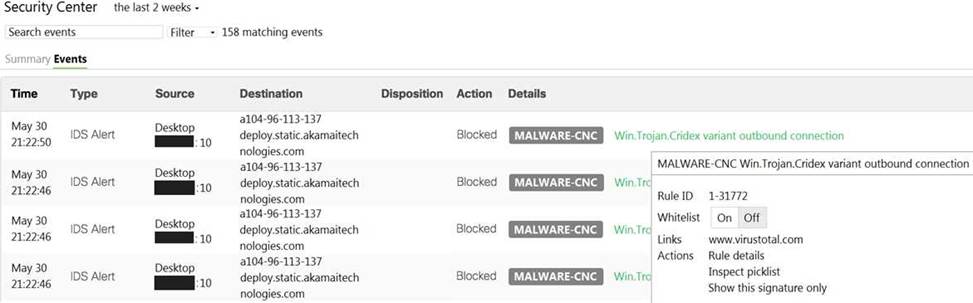
Which IDS/IPS mode is the MX Security Appliance configured for?
- A . quarantine
- B . prevention
- C . detection
- D . blocking
B
Explanation:
You can enable intrusion prevention by setting the Mode drop-down to Prevention under Security & SD-WAN > Configure > Threat protection > Intrusion detection and prevention. Traffic will be automatically blocked by best effort if it is detected as malicious based on the detection ruleset specified above.
https://documentation.meraki.com/MX/Content_Filtering_and_Threat_Protection/Threat_Protectio n
Which order is accurate for a firmware upgrade on MX appliances in a high-availability configuration?
- A . starts on the secondary MX appliance and then occurs on the primary MX appliance
- B . starts on both MX appliances at the same time and then reboots both appliances after traffic on the primary MX appliance ceases
- C . starts on both MX appliances at the same time and then immediately reboots both appliances
- D . starts on the primary MX appliance and then occurs on the secondary MX appliance
D
Explanation:
Reference: https://community.meraki.com/t5/Security-SD-WAN/Firmware-Update-to-HA-unit/td-p/47865
Which enrollment method must be used when containerization is required on BYOD Android devices managed by Systems Manager?
- A . Android Enterprise utilizing a Work Profile
- B . Systems Manager network ID
- C . Android Business utilizing a BYOD Profile
- D . Systems Manager container ID
A
Explanation:
https://documentation.meraki.com/SM/Device_Enrollment/Containerization_with_Systems_Manag er
What are two methods of targeting and applying management profiles to System Manager clients? (Choose two.)
- A . by using Wi-Fi tags
- B . by defining the scope
- C . by defining a range of serial numbers
- D . by using device tags
- E . by using dynamic IP tags
B, D
Explanation:
The correct answer is B and D. These are the two methods of targeting and applying management profiles to System Manager clients, according to the [System Manager: Getting Started] article.
The article explains that:
Defining the scope: This method allows you to target devices based on their network, tag, or owner. You can define the scope of a profile from the Systems Manager > Manage > Settings page or from the Systems Manager > Monitor > Overview page.
Using device tags: This method allows you to target devices based on their attributes, such as OS, model, location, or user. You can use device tags to create dynamic groups of devices that share common characteristics. You can apply device tags from the Systems Manager > Monitor > Devices page or from the Systems Manager > Manage > Tags page.
A customer requires a hub-and-spoke Auto VPN deployment with two NAT-mode hubs with dual uplink connections and 50 remote sites with a single uplink connection.
How many tunnels does each hub need to support?
- A . 52
- B . 54
- C . 100
- D . 104
D
Explanation:
https://documentation.meraki.com/Architectures_and_Best_Practices/Auto_VPN_Hub_Deployment_Recommendations
This is the number of tunnels that each hub needs to support in a hub-and-spoke Auto VPN deployment with two NAT-mode hubs with dual uplink connections and 50 remote sites with a single uplink connection. This can be calculated by using the formula for the hub tunnel count in a hub-and-spoke topology1:
Hub Tunnel Count = (H x (H – 1) / 2 x L1) + (H x S x L1 x L2)
Where H is the number of hubs, S is the number of spokes, L1 is the number of uplinks for the hubs, and L2 is the number of uplinks for the spokes.
In this case, H = 2, S = 50, L1 = 2, and L2 = 1. Therefore, Hub Tunnel Count = (2 x (2 – 1) / 2 x 2) + (2 x 50 x 2 x 1) Hub Tunnel Count = (2 x 1 / 2 x 2) + (200 x 2) Hub Tunnel Count = (2 / 2 x 2) + (400) Hub Tunnel Count = (1 x 2) + (400) Hub Tunnel Count = 2 + 400 Hub Tunnel Count = 402
This question is related to the topic of Auto VPN Hub Deployment Recommendations in the Cisco Meraki documentation. You can find more information about this topic in the Auto VPN Hub Deployment Recommendations article or the Meraki Auto VPN General Best Practices page.
Which two features and functions are supported when using an MX appliance in Passthrough mode? (Choose two.)
- A . intrusion prevention
- B . site-to-site VPN
- C . secondary uplinks
- D . DHCP
- E . high availability
AB
Explanation:
These are the two features and functions that are supported when using an MX appliance in Passthrough mode. According to the [MX Addressing and VLANs] article, Passthrough mode allows the MX appliance to act as a layer 2 bridge, passing traffic between its LAN and WAN ports without performing any routing or address translation. However, some features such as intrusion prevention and site-to-site VPN are still available in this mode.
Reference: https://documentation.meraki.com/MX/Networks_and_Routing/ Passthrough_Mode_on_the_MX_Security_Appliance_and_Z-series_Teleworker_Gateway