
Cisco 500-220 Practice Exams
Last updated on Nov 16,2026- Exam Code: 500-220
- Exam Name: Engineering Cisco Meraki Solutions v1.0
- Certification Provider: Cisco
- Latest update: Nov 16,2026
What is the best practice Systems Manager enrollment method when deploying corporate-owned iOS devices?
- A . manual
- B . Apple Configurator
- C . Sentry enrollment
- D . DEP
D
Explanation:
iOS devices that are using Apple’s Device Enrollment Program (DEP) can be supervised and enrolled over-the-air anytime they are factory reset. DEP is the best way to permanently force your devices to be owned and managed by your organization, and it is important to assign your DEP settings properly before deployment.
https://documentation.meraki.com/SM/Device_Enrollment/Enrolling_and_Supervising_iOS_Devices_using_Apple_Configurator_2.5_or_Later#:~:text=DEP%20is%20the%20best%20way,DEP%20settings%20properly%20before%20deployment.
A Cisco Meraki MV camera is monitoring an office and its field of vision currently captures work desks and employee computer screens. However, recording employee computer screens is prohibited by local regulation.
Which feature in Dashboard can be used to preserve the current position of the camera while also meeting regulation requirements?
- A . zone exclusion
- B . privacy window
- C . area or interest
- D . sensor crop
- E . restricted mode
B
Explanation:
https://documentation.meraki.com/MV/Initial_Configuration/Privacy_Windows
Which Meraki Dashboard menu section is accessed to enable Sentry enrollment on an SSID?
- A . Wireless > Configure > Access Control
- B . Wireless > Configure > Splash page
- C . Wireless > Configure > Firewall & Traffic Shaping
- D . Wireless > Configure > SSIDs
A
Explanation:
SM Sentry enrollment can be enabled on any MR network via the Splash page section of the Wireless > Configure > Access control page.
https://documentation.meraki.com/MR/MR_Splash_Page/Systems_Manager_Sentry_Enrollment
Refer to the exhibit.
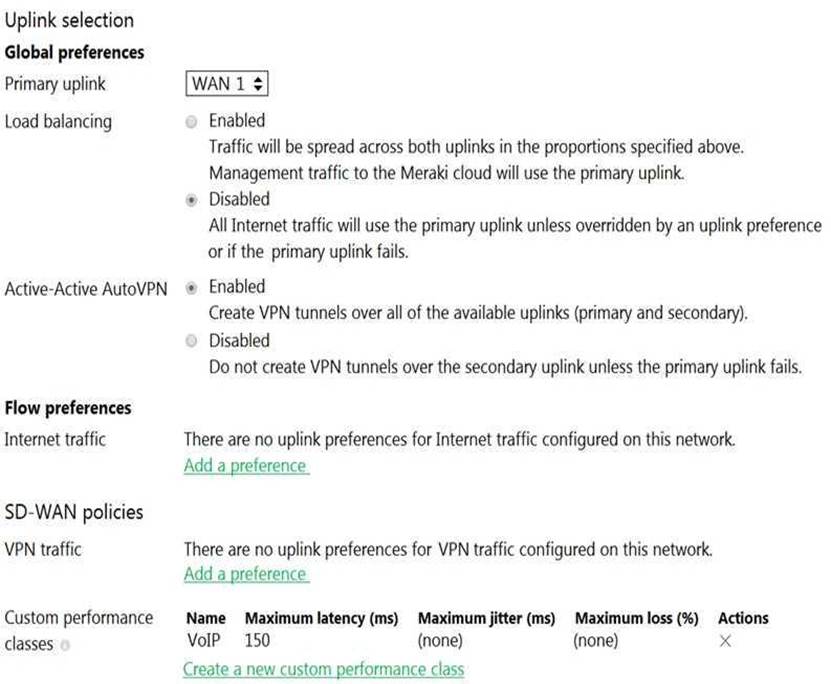
What does the MX Security Appliance send to determine whether VPN traffic exceeds the configured latency threshold in the VoIP custom performance class?
- A . 1000-byte TCP probes every second, through VPN tunnels that are established over the primary WAN link.
- B . 100-byte UDP probes every second, through VPN tunnels that are established over every WAN link.
- C . 100-byte UDP probes every second, through VPN tunnels that are established over the primary WAN link.
- D . 1000-byte TCP probes every second, through VPN tunnels that are established over every WAN link.
B
Explanation:
The performance probe is a small payload (approximately 100 bytes) of UDP data sent over all established VPN tunnels every 1 second. MX appliances track the rate of successful responses and the time that elapses before receiving a response. This data allows the MX to determine the packet loss, latency, and jitter over each VPN tunnel in order to make the necessary performance-based decisions.
https://documentation.meraki.com/Architectures_and_Best_Practices/Cisco_Meraki_Best_Practice_Design/Best_Practice_Design_-_MX_Security_and_SD-WAN/Meraki_SD-WAN#Performance_Probes
What happens to an unsupervised iOS device when the “Meraki management” profile is removed?
- A . The “Meraki management” profile is removed. All configuration profiles that Systems Manager pushed remain.
- B . The “Meraki management” profile is removed. All configuration profiles that Systems Manager pushed are also removed.
- C . The “Meraki management” profile is removed and then pushed automatically by Systems Manager.
- D . The “Meraki management” profile cannot be removed.
Which VLAN is used to source pings across the site-to-site VPN when using the MX Live tools?
- A . highest VLAN ID that is configured and set to NO to use VPN
- B . lowest VLAN ID that is configured and set to YES to use VPN
- C . highest VLAN ID that is configured and set to YES to use VPN
- D . lowest VLAN ID configured and set to NO to use VPN
C
Explanation:
See Behavior – Firmware MX 15.11 or Lower section For MXs running firmware MX15.11 or below, the source IP that MX uses while pinging a destination is the MX IP of highest VLAN ID. If the destination is across a VPN, the MX uses the MX IP of highest VLAN ID participating in VPN. For MXs running firmware MX 15.12+, additional ping options have been added to the live tool. The ping tool now has a drop down to select the source IP address for pinging destinations from the MX. https://documentation.meraki.com/General_Administration/Tools_and_Troubleshooting/Using_the_Ping_Live_Tool
Refer to the exhibit.
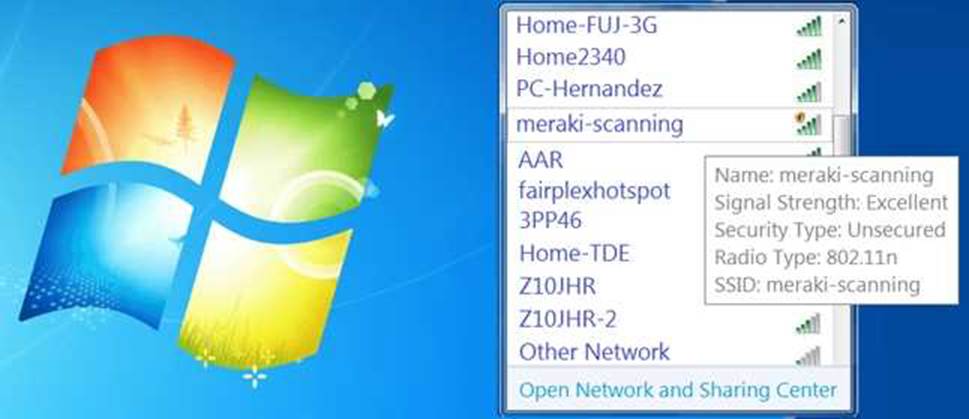
During a Meraki AP deployment, the default SSID that the exhibit shows is broadcast.
What causes this behavior?
- A . An AP does not have a wired connection to the network.
- B . An AP cannot connect to the default gateway.
- C . An AP has never connected to the Meraki Cloud Controller.
- D . An AP has Site Survey mode enabled.
C
Explanation:
If a Meraki Access Point does not have a configuration from the Meraki Cloud Controller it will instead broadcast a default SSID of "Meraki-Scanning." Vs <SSID_name>-scanning
Cause: Similar to ‘bad-gateway’, an AP is unable to connect to its default gateway.
https://documentation.meraki.com/MR/Other_Topics/Troubleshooting_local_connection_issues_usi ng_default_SSID_on_MR_Access_Points
This is because the AP is broadcasting the default SSID “meraki-scanning” which is only broadcast when the AP has never connected to the Meraki Cloud Controller1.
This question is related to the topic of Wireless Access Points Quick Start in the Cisco Meraki documentation. You can find more information about this topic in the Wireless Access Points Quick Start article or the Using the Cisco Meraki Device Local Status Page page.
In an organization that uses the Co-Termination licensing model, which two operations enable licenses to be applied? (Choose two.)
- A . Renew the Dashboard license.
- B . License a network.
- C . License more devices.
- D . Call Meraki support.
- E . Wait for the devices to auto-renew.
A, C
Explanation:
There are two operations in which a license can be applied, License more devices or Renew my dashboard license. This article will compare both operations and describe their behaviors. https://documentation.meraki.com/General_Administration/Licensing/Meraki_Licensing_-_License_More_Devices_vs_Renewal
These are the two operations that enable licenses to be applied in an organization that uses the Co-Termination licensing model. According to the Meraki Co-Termination Licensing Overview, there are two ways to add licenses to an organization:
Renewing the Dashboard license: This option allows you to extend the co-termination date of your organization by purchasing new licenses for the same or longer term as your existing licenses. You can renew your Dashboard license from the Organization > Configure > License Info page or from the Meraki Dashboard homepage.
Licensing more devices: This option allows you to add new devices to your organization by purchasing new licenses for them. You can license more devices from the Organization > Inventory page or from the Meraki Dashboard homepage.
For which two reasons can an organization become “Out of License”? (Choose two.)
- A . licenses that are in the wrong network
- B . more hardware devices than device licenses
- C . expired device license
- D . licenses that do not match the serial numbers in the organization
- E . MR licenses that do not match the MR models in the organization
BC
Explanation:
More hardware devices than device licenses: An organization needs to have enough device licenses to cover all the hardware devices in its network. A device license is consumed by each device that is added to the network. If the number of devices exceeds the number of licenses, the organization will be out of license and will lose access to some features and support until it purchases more licenses or removes some devices4.
Expired device license: A device license has an expiration date that depends on the license term purchased by the organization. If a device license expires, it will no longer be valid and will not count towards the license limit. The organization will need to renew the expired license or purchase a new one to avoid being out of license4.
Reference: https://documentation.meraki.com/General_Administration/Licensing/Meraki_Licensing_FAQs
Refer to the exhibit.
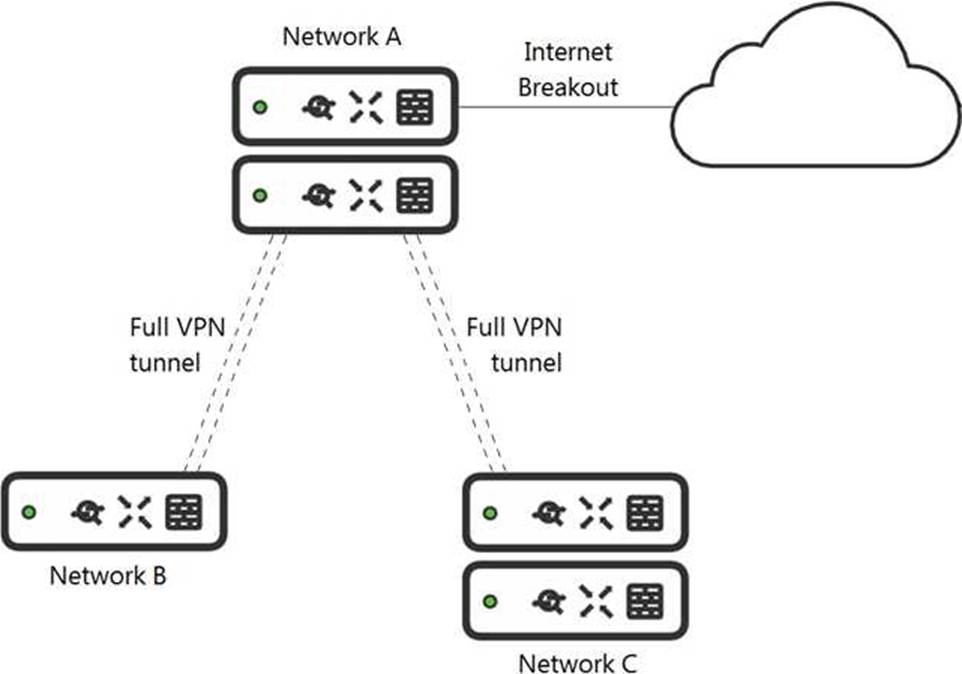
What is the minimal Cisco Meraki Insight licensing requirement?
- A . A single Meraki Insight license must be configured on network A to gain Web App Health visibility on network B.
- B . A single Meraki Insight license must be configured on network B to gain Web App Health visibility on network B.
- C . A single Meraki Insight license must be configured on network A, and a single license must be configured on network B, to gain Web App Health visibility on network B.
- D . Two Meraki Insight licenses must be configured on network A to gain Web App Health visibility on network B.
- E . Two Meraki Insight licenses must be configured on network A and a single license must be configured on network B, to gain Web App Health visibility on network B.
B
Explanation:
If you only need traffic statistics from your spoke site clients then you only need to enable insight on the spoke network as the hub site will not gather data for remote sites. https://community.meraki.com/t5/Wireless-LAN/Meraki-Insight-Licensing/m-p/152684
A license is only required for those networks where Meraki Insight functionality is desired. One license is required per network, regardless of whether that network has a single MX or HA pair. Licenses can be moved between networks, but historical data for the old network will be lost. https://meraki.cisco.com/lib/pdf/meraki_datasheet_mi.pdf