
Cisco 500-220 Practice Exams
Last updated on Nov 16,2026- Exam Code: 500-220
- Exam Name: Engineering Cisco Meraki Solutions v1.0
- Certification Provider: Cisco
- Latest update: Nov 16,2026
Refer to the exhibit.
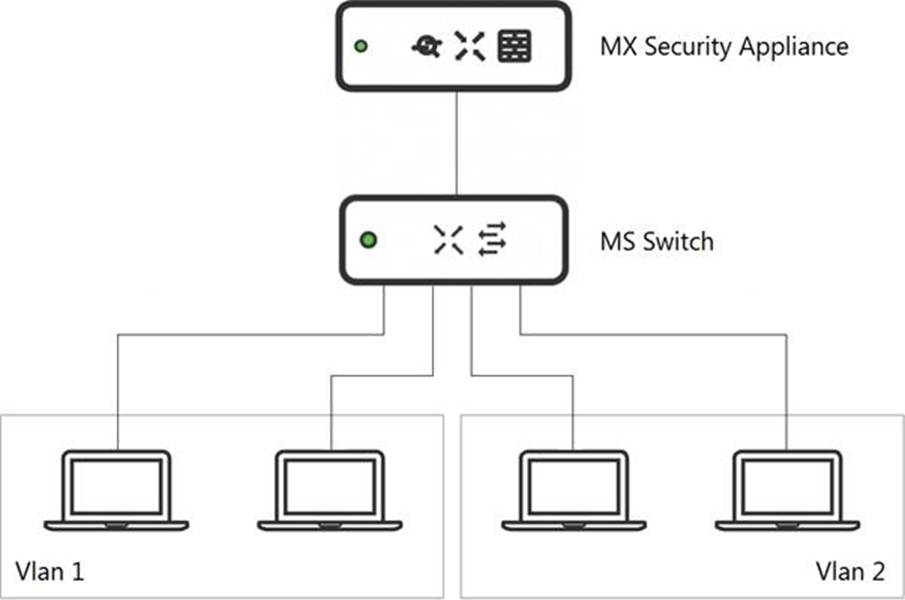
What is an advantage of implementing inter-VLAN routing on an MX Security Appliance rather than performing inter-VLAN routing on an MS Series Switch?
- A . The MX appliance performs IDS/IPS for inter-VLAN traffic.
- B . The MX appliance performs AMP for inter-VLAN traffic.
- C . The MX appliance performs data encryption for inter-VLAN traffic.
- D . The MX appliance performs content filtering for inter-VLAN traffic.
What are two ways peers interact with ports that Auto VPN uses? (Choose two.)
- A . For IPsec tunneling, peers use high UDP ports within the 32768 to 61000 range.
- B . Peers contact the VPN registry at UDP port 9350.
- C . For IPsec tunneling, peers use high TCP ports within the 32768 to 61000 range.
- D . Peers contact the VPN registry at TCP port 9350.
- E . For IPsec tunneling, peers use UDP ports 500 and 4500.
AB
Explanation:
Ports used to contact the VPN registry:
– Source UDP port range 32768-61000
– Destination UDP port 9350 or UDP port 9351
Ports used for IPsec tunneling:
– Source UDP port range 32768-61000
– Destination UDP port range 32768-61000
https://documentation.meraki.com/MX/Site-to-site_VPN/Meraki_Auto_VPN_-_Configuration_and_Troubleshooting
Reference: https://documentation.meraki.com/MX/Site-to-site_VPN/Meraki_Auto_VPN_-_Configuration_and_Troubleshooting
Which Cisco Meraki best practice method preserves complete historical network event logs?
- A . Configuring the preserved event number to maximize logging.
- B . Configuring the preserved event period to unlimited.
- C . Configuring a syslog server for the network.
- D . Configuring Dashboard logging to preserve only certain event types.
C
Explanation:
Configuring a syslog server for the network is the Cisco Meraki best practice method to preserve complete historical network event logs. A syslog server can be configured to store messages for reporting purposes from MX Security Appliances, MR Access Points, and MS switches1. The syslog server can collect various types of events, such as VPN connectivity, uplink connectivity, DHCP leases, firewall rules, IDS alerts, and security events2. The syslog server can also help with troubleshooting and monitoring the network performance and security.
How does a Meraki device behave if cloud connectivity is temporarily lost?
- A . The offline device continues to run with its last known configuration until cloud connectivity is restored.
- B . The offline device reboots every 5 minutes until connection is restored.
- C . The offline device stops passing traffic.
- D . The offline device tries to form a connection with a local backup sever.
A
Explanation:
What happens if a network loses connectivity to the Meraki cloud?
Because of Meraki’s out of band architecture, most end users are not affected if Meraki wireless APs, switches, or security appliances cannot communicate with Meraki’s cloud services (e.g., because of a temporary WAN failure):
• Users can access the local network (printers, file shares, etc.)
• If WAN connectivity is available, users can access the Internet
• Network policies (firewall rules, QoS, etc.) continue to be enforced
• Users can authenticate via 802.1X/RADIUS and can roam wirelessly between access points
• Users can initiate and renew DHCP leases
• Established VPN tunnels continue to operate
• Local configuration tools are available (e.g., device IP configuration
https://meraki.cisco.com/lib/pdf/meraki_datasheet_cloud_management.pdf
Refer to the exhibit.
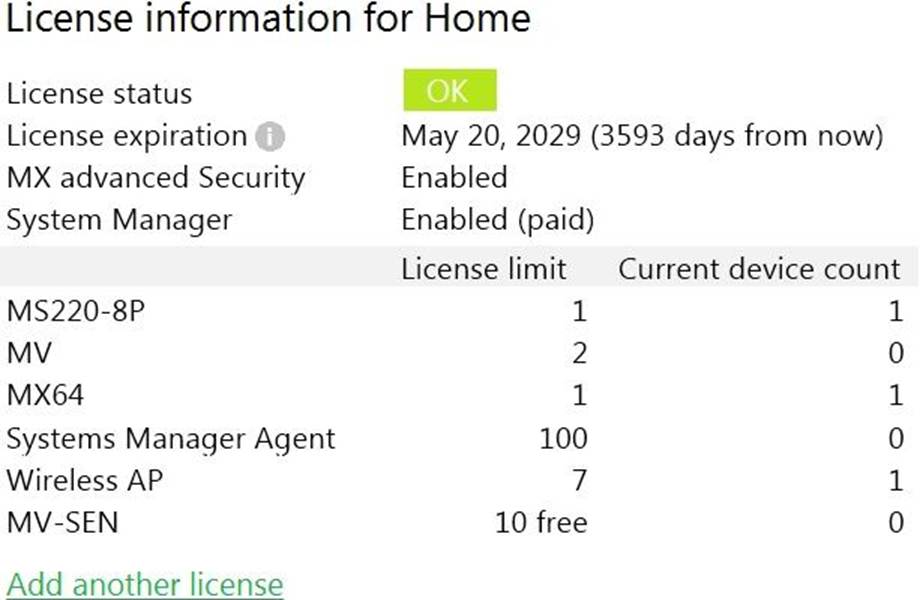
This Dashboard organization uses Co-Termination licensing model.
What happens when an additional seven APs are claimed on this network without adding licenses?
- A . All APs immediately stop functioning.
- B . All network devices stop functioning in 30 days.
- C . One AP Immediately stops functioning.
- D . All APs stop functioning in 30 days.
B
Explanation:
The number of devices in an organization can not exceed the license limits. If this occurs, the organization will enter a 30-day grace period, during which the organization must be brought back into compliance, otherwise it will be shut down until proper licensing is applied to the organization.
https://documentation.meraki.com/General_Administration/Licensing/Meraki_Co-Termination_Licensing_Overview
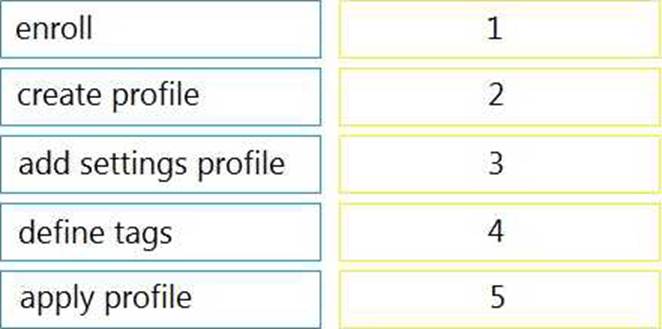
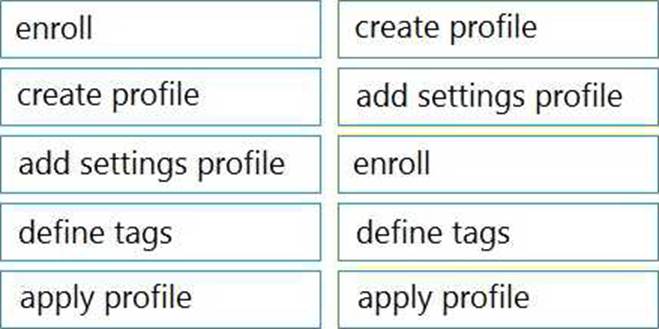
DRAG DROP
Drag and drop the steps from the left into the sequence on the right to manage device control, according to Cisco Meraki best practice.
Which three verbs of request are available in the Cisco Meraki API? (Choose three.)
- A . SET
- B . PUT
- C . PATCH
- D . ADD
- E . POST
- F . GET
BEF
Explanation:
Verbs in the API follow the usual REST conventions:
GET returns the value of a resource or a list of resources, depending on whether an identifier is specified.
POST adds a new resource
PUT updates a resource
DELETE removes a resource
https://documentation.meraki.com/General_Administration/Other_Topics/Cisco_Meraki_Dashboar d_API
Where should a network admin navigate to investigate wireless mesh information between Meraki APs?
- A . Wireless > Monitor > Access Points > AP > RF
- B . Wireless > Configure > Radio Settings
- C . Wireless > Monitor > Wireless Health
- D . Wireless > Monitor > RF Spectrum
A
Explanation:
See Monitoring Mesh section Mesh monitoring tools are located at the bottom of every AP detail page, which can be accessed by navigating to Wireless > Monitor > Access Points, then clicking on an Access Point. https://documentation.meraki.com/MR/Wi-Fi_Basics_and_Best_Practices/Wireless_Mesh_Networking
DRAG DROP
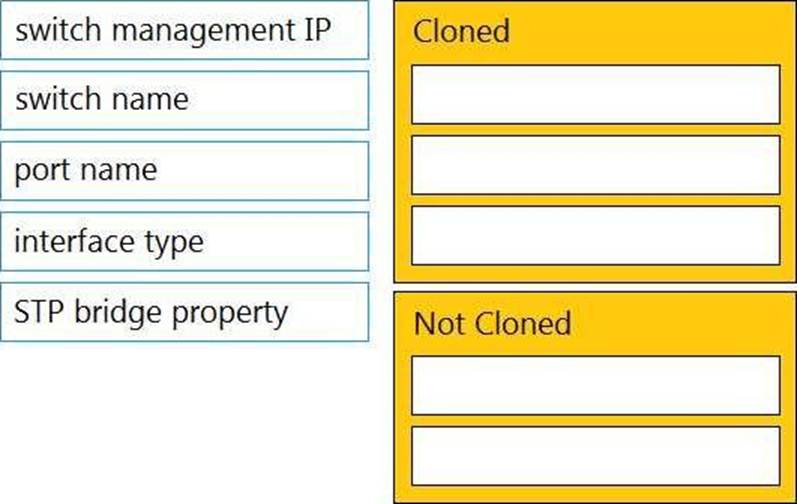
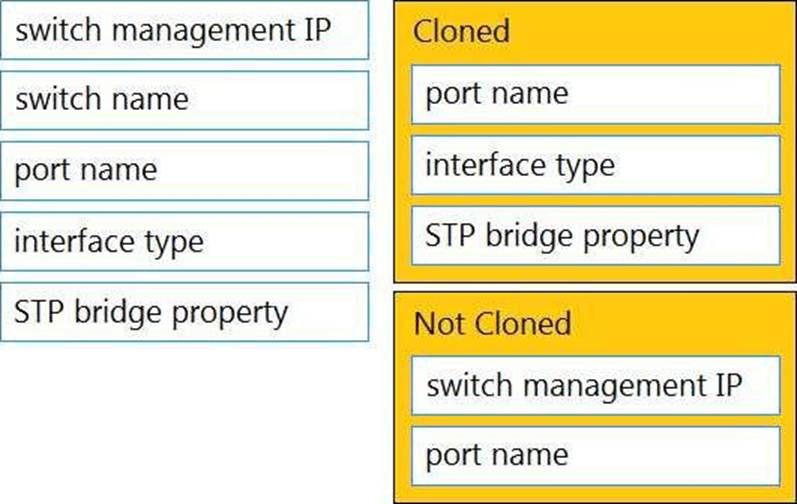
Drag and drop the settings from the left into the boxes on the right to indicate if the setting will be cloned or not cloned using the Cisco Meraki MS switch cloning feature.
Explanation:
The settings that will be cloned using the Cisco Meraki MS switch cloning feature are:
port name
interface type
STP bridge property
The settings that will not be cloned using the Cisco Meraki MS switch cloning feature are:
switch management IP
switch name
Refer to the exhibit.
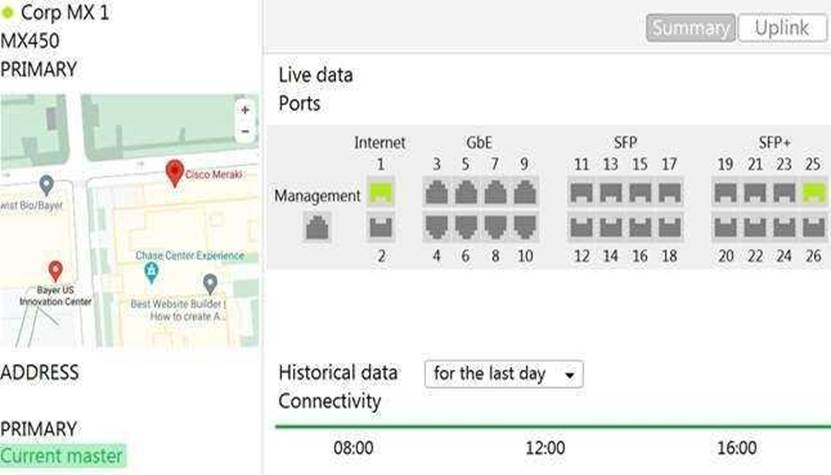
The VPN concentrator is experiencing issues.
Which action should be taken to ensure a stable environment?
- A . Add a deny any/any firewall rule to the end of the firewall rules.
- B . Remove the connection from Internet 1.
- C . Physically disconnect all LAN ports.
- D . Configure the MX appliance to Routed mode on the Addressing & VLANS page.
C
Explanation:
Before deploying MXs as one-arm VPN concentrators, place them into Passthrough or VPN Concentrator mode on the Addressing and VLANs page. In one-armed VPN concentrator mode, the units in the pair are connected to the network "only" via their respective ‘Internet’ ports. Make sure they are NOT connected directly via their LAN ports. Each MX must be within the same IP subnet and able to communicate with each other, as well as with the Meraki dashboard. Only VPN traffic is routed to the MX, and both ingress and egress packets are sent through the same interface.
https://documentation.meraki.com/Architectures_and_Best_Practices/Cisco_Meraki_Best_Practice_Design/Best_Practice_Design_-_MX_Security_and_SD-WAN/Meraki_Auto_VPN_General_Best_Practices