
Cisco 300-410 Practice Exams
Last updated on Nov 16,2026- Exam Code: 300-410
- Exam Name: Implementing Cisco Enterprise Advanced Routing and Services (ENARSI)
- Certification Provider: Cisco
- Latest update: Nov 16,2026
Refer to the exhibit.
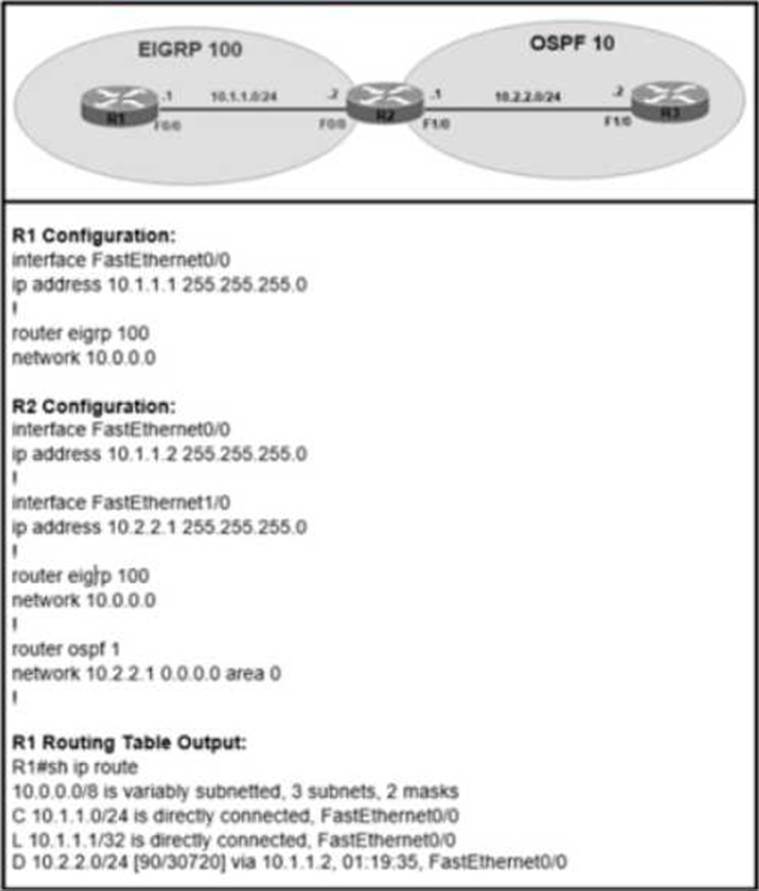
The R2 OSPF route 10 2 2 0/24 shows in the R1 EIGRP routing table without route redistribution performed between OSPF and EIGRP routing protocols.
Which configuration is required on router R2 to resolve the issue?
- A . passive-interface FastEthernet 0/0 command in OSPF1.
- B . Add the no auto-summary command in EIGRP 100.
- C . Replace the network 10.0.0.0 command with FastEthernet0/0 network in EIGRP 100.
- D . Add the passive-interface FastEthernet 1/0 command in EIGRP 100
What is a function of IPv6 ND inspection?
- A . It learns and secures bindings for stateless autoconfiguration addresses in Layer 3 neighbor tables
- B . It learns and secures bindings for stateless autoconfiguration addresses in Layer 2 neighbor tables
- C . It learns and secures bindings for stateful autoconfiguration addresses in Layer 2 neighbor tables.
- D . It learns and secures bindings for stateful autoconfiguration addresses in Layer 3 neighbor tables.
Refer to the exhibit.
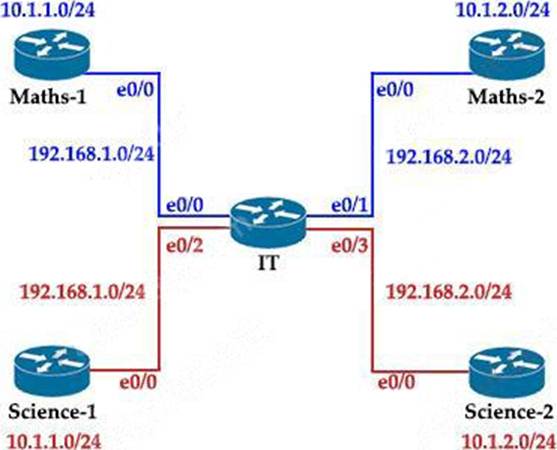
The Math and Science departments connect through the corporate. IT router but users in the Math department must not be able to reach the Science department and vice versa.
Which configuration accomplishes this task?
- A . vrf definition Science
!
interface E 0/2
ip address 192.168.1.1 255.255.255.0
no shut
!
interface E 0/3
ip address 192.168.2.1 255.255.255.0
no shut - B . vrf definition Science
address-family ipv4
!
interface E 0/2
ip address 192.168.1.1 255.255.255.0
vrf forwarding Science
no shut
!
interface E 0/3
ip address 192.168.2.1 255.255.255.0
vrf forwarding Science
no shut - C . vrf definition Science
address-family ipv4
!
interface E 0/2
ip address 192.168.1.1 255.255.255.0
no shut
!
interface E 0/3
ip address 192.168.2.1 255.255.255.0
no shut - D . vrf definition Science
address-family ipv4
!
interface E 0/2
vrf forwarding Science
ip address 192.168.1.1 255.255.255.0
no shut
!
interface E 0/3
vrf forwarding Science
ip address 192.168.2.1
Which feature minimizes DoS attacks on an IPv6 network?
- A . IPv6 Binding Security Table
- B . IPv6 Router Advertisement Guard
- C . IPv6 Prefix Guard
- D . IPv6 Destination Guard
D
Explanation:
The Destination Guard feature helps in minimizing denial-of-service (DoS) attacks. It performs address resolutions only for those addresses that are active on the link, and requires the FHS binding table to be populated with the help of the IPv6 snooping feature. The feature enables the filtering of IPv6 traffic based on the destination address, and blocks the NDP resolution for destination addresses that are not found in the binding table. By default, the policy drops traffic coming for an unknown destination.
Reference: https://www.cisco.com/c/en/us/td/docs/routers/7600/ios/15S/configuration/guide/7600_15_0s_book/IPv6_Security.pdf
Refer to the exhibit.
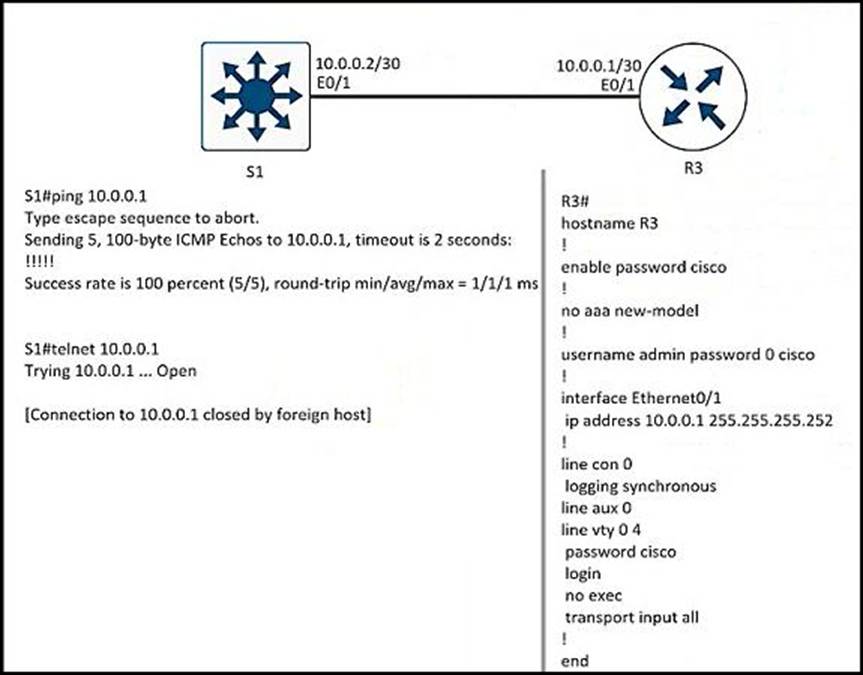
A network engineer cannot remote access R3 using Telnet from switch S1.
Which action resolves the issue?
- A . Allow the inbound connection via the exec command on R3.
- B . Add the transport input telnet command on R3.
- C . Allow to use the ssh -I admin 10.0.0.1 command on the switch.
- D . Add the login admin command on the switch.
Refer to the exhibit.
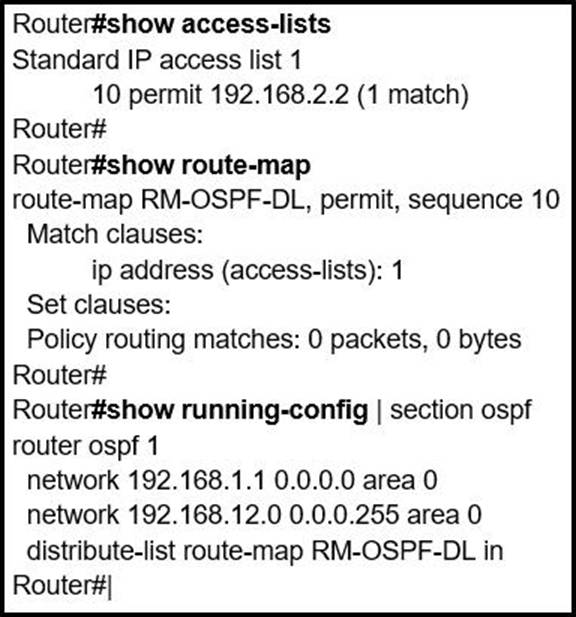
An engineer is trying to block the route to 192.168.2.2 from the routing table by using the configuration that is shown. The route is still present in the routing table as an OSPF route.
Which action blocks the route?
- A . Use an extended access list instead of a standard access list.
- B . Change sequence 10 in the route-map command from permit to deny.
- C . Use a prefix list instead of an access list in the route map.
- D . Add this statement to the route map: route-map RM-OSPF-DL deny 20.
Refer to the exhibit.
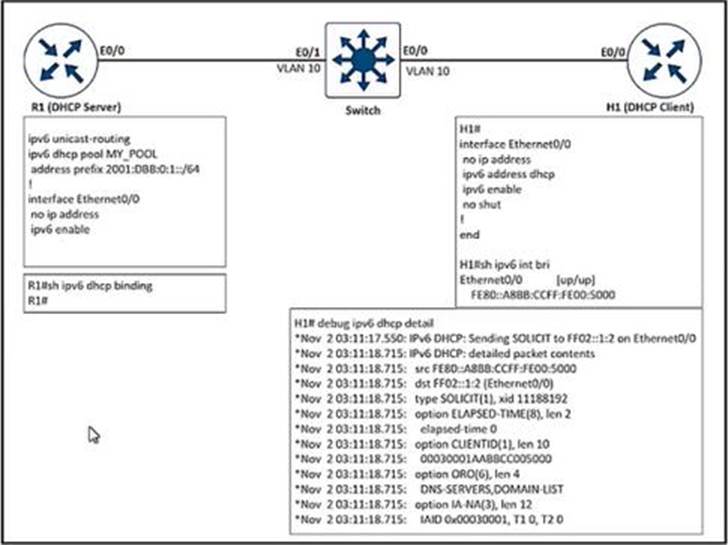
After the network administrator rebuilds the IPv6 DHCP server, clients are not getting the IPv6 address lease.
Which action resolves the issue?
- A . Remove FE80 A8BB CCFF FEOO 5000 assigned by the IPV6 DHCP server.
- B . Add Ipv6 dhcp sarver MY_POOL under the interface ethernet 0/0 on H1.
- C . Add Ipv6 dhcp server MY_POOL under the interface ethernet 0/0 on R1.
- D . Configure FF02::1:2 to discover al IPv6 OHCP cfcents
Refer to the exhibit.
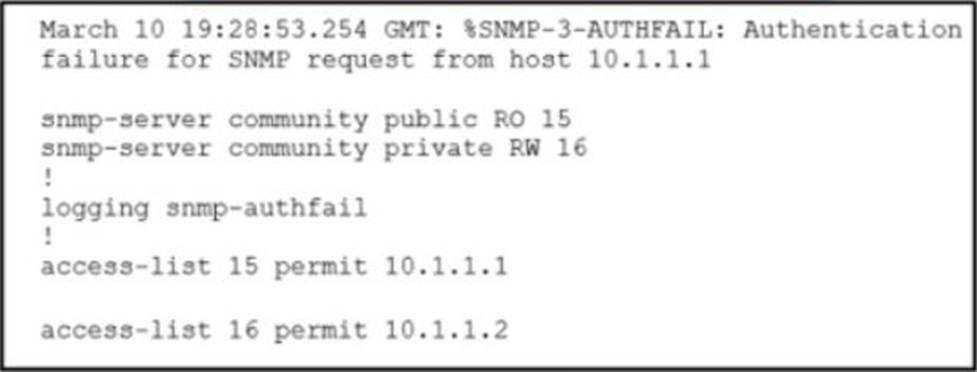
Which action resolves the issue?
- A . Configure host IP address in access-list 16
- B . Configure SNMPv3 on the router
- C . Configure SNMP authentication on the router
- D . Configure a valid SNMP community string
Refer to the exhibit.
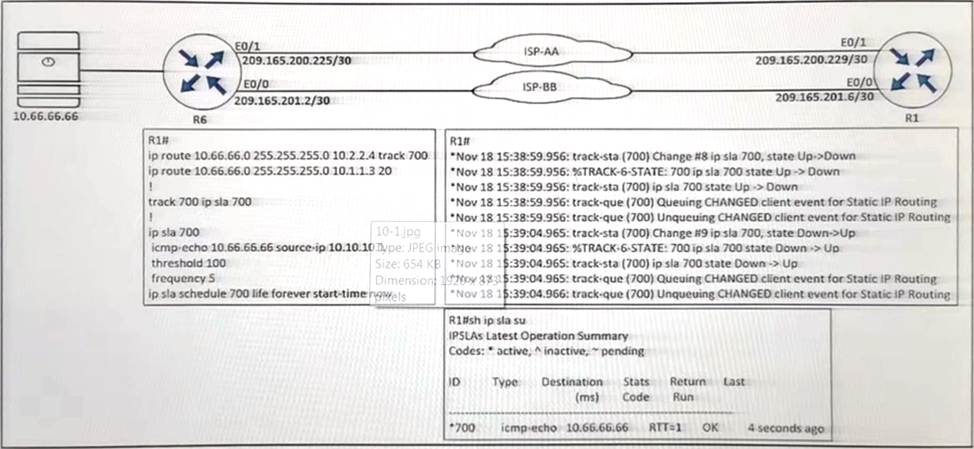
An engineer configured IP SLA on R1 to avoid the ISP link flapping problem. but it is not working as designed IP SLA should wait 30 seconds before switching traffic to a secondary connection and then revert to the primary link after waning 20 seconds, when the primary link is available and stabilized.
Which configuration resolves the issue?
- A . R1(config)#ip sla 700
R1(config-ip-sla)#delay down 30 up 20 - B . R1(config)#ip sla 700
R1(config-ip-sla)#delay down 20 up 30 - C . R1(config)#track 700 ip sla 700
R1(config-track)#delay down 30 up 20 - D . R1(config)#track 700 ip sla 700
R1(config-track)#delay down 20 up 30
C
Explanation:
“wait 30 seconds before switching traffic to a secondary connection” -> delay down 30 “then revert to the primary link after waiting 20 seconds” -> up 20
Under the track object, you can specify delays so we have to configure delay under “track 700 ip sla 700” (not under “ip sla 700”).
Refer to the exhibit.
An engineer configured IP SLA on R1 to avoid the ISP link flapping problem. but it is not working as designed IP SLA should wait 30 seconds before switching traffic to a secondary connection and then revert to the primary link after waning 20 seconds, when the primary link is available and stabilized.
Which configuration resolves the issue?
- A . R1(config)#ip sla 700
R1(config-ip-sla)#delay down 30 up 20 - B . R1(config)#ip sla 700
R1(config-ip-sla)#delay down 20 up 30 - C . R1(config)#track 700 ip sla 700
R1(config-track)#delay down 30 up 20 - D . R1(config)#track 700 ip sla 700
R1(config-track)#delay down 20 up 30
C
Explanation:
“wait 30 seconds before switching traffic to a secondary connection” -> delay down 30 “then revert to the primary link after waiting 20 seconds” -> up 20
Under the track object, you can specify delays so we have to configure delay under “track 700 ip sla 700” (not under “ip sla 700”).