
Check Point 156-315.81.20 Practice Exams
Last updated on Oct 22,2026- Exam Code: 156-315.81.20
- Exam Name: Check Point Certified Security Expert - R81.20
- Certification Provider: Check Point
- Latest update: Oct 22,2026
Sieve is a Cyber Security Engineer working for Global Bank with a large scale deployment of Check Point Enterprise Appliances Steve’s manager. Diana asks him to provide firewall connection table details from one of the firewalls for which he is responsible.
Which of these commands may impact performance briefly and should not be used during heavy traffic times of day?
- A . fw tab -t connections -s
- B . fw tab -t connections
- C . fw tab -t connections -c
- D . fw tab -t connections -f
B
Explanation:
The command that may impact performance briefly and should not be used during heavy traffic times of day is fw tab -t connections. This command displays all the entries in the connections table, which can be very large and consume a lot of CPU resources. The other commands are less intensive and can be used safely. The command fw tab -t connections -s displays only the statistics of the connections table, such as number of entries, peak size, etc. The command fw tab -t connections -c clears all the entries in the connections table. The command fw tab -t connections -f displays only the entries that match a filter expression.
Reference: [fw tab Command]
Which command would you use to set the network interfaces’ affinity in Manual mode?
- A . sim affinity -m
- B . sim affinity -l
- C . sim affinity -a
- D . sim affinity -s
D
Explanation:
The command that would be used to set the network interfaces’ affinity in Manual mode is sim affinity -s. Sim affinity is a command that allows administrators to view and modify the CPU core affinity of network interfaces and SecureXL instances. Core affinity is a feature that binds network interfaces and SecureXL instances to specific CPU cores, which improves the performance and load balancing of the Security Gateway. Sim affinity -s sets the network interfaces’ affinity in Manual mode, which means that administrators can manually assign network interfaces to CPU cores. The other options are either invalid or perform different functions.
Which configuration file contains the structure of the Security Server showing the port numbers, corresponding protocol name, and status?
- A . $FWDIR/database/fwauthd.conf
- B . $FWDIR/conf/fwauth.conf
- C . $FWDIR/conf/fwauthd.conf
- D . $FWDIR/state/fwauthd.conf
C
Explanation:
The configuration file that contains the structure of the Security Server showing the port numbers, corresponding protocol name, and status is $FWDIR/conf/fwauthd.conf. This file is used for configuring authentication services in Check Point Security Servers.
Reference: Check Point documentation or training materials related to Security Server configuration.
In CoreXL, the Firewall kernel is replicated multiple times. Each replicated copy or instance can perform the following:
- A . The Firewall kernel only touches the packet if the connection is accelerated
- B . The Firewall kernel is replicated only with new connections and deletes itself once the connection times out
- C . The Firewall can run the same policy on all cores
- D . The Firewall can run different policies per core
C
Explanation:
CoreXL is a performance-enhancing technology that enables the Security Gateway to utilize multiple
CPU cores for processing traffic. CoreXL creates multiple instances of the Firewall kernel, each
running on a separate CPU core. Each Firewall instance can handle traffic concurrently and
independently, applying the same security policy to the packets that are assigned to it. CoreXL does
not allow different policies per core, as this would create inconsistency and complexity in the
security enforcement.
The references are:
Best Practices – Security Gateway Performance
Check Point Certified Security Expert R81.20 (CCSE) Core Training, slide 16 Check Point R81 Quantum Security Gateway Guide, page 42
Within the Check Point Firewall Kernel resides Chain Modules, which are individually responsible for the inspection of a specific blade or feature that has been enabled in the configuration of the gateway. For Wire mode configuration, chain modules marked with _______ will not apply.
- A . ffffffff
- B . 00000001
- C . 00000002
- D . 00000003
B
Explanation:
For Wire mode configuration, chain modules marked with 00000001 will not apply. Wire mode is a special configuration that allows a Security Gateway to pass traffic without inspection, acting as a bridge between two network segments. In Wire mode, only chain modules that are essential for basic functionality are applied, such as VPN, QoS, ClusterXL, and SecureXL. Chain modules that are related to inspection-based Software Blades, such as Firewall, IPS, Application Control, and so on, are skipped. The chain modules that are skipped are marked with 00000001 in the output of fw ctl chain command.
Reference: Wire Mode
To fully enable Dynamic Dispatcher with Firewall Priority Queues on a Security Gateway, run the following command in Expert mode then reboot:
- A . fw ctl multik set_mode 1
- B . fw ctl Dynamic_Priority_Queue on
- C . fw ctl Dynamic_Priority_Queue enable
- D . fw ctl multik set_mode 9
D
Explanation:
Dynamic Dispatcher is a feature that optimizes the performance of Security Gateways with multiple CPU cores by dynamically allocating traffic to different cores based on their load and priority. Firewall Priority Queues is a feature that prioritizes traffic based on its type and importance by assigning it to different queues with different weights and limits. To fully enable Dynamic Dispatcher with Firewall Priority Queues on a Security Gateway, you need to run the following command in Expert mode then reboot:

This command sets the multi-core mode to 9, which means that Dynamic Dispatcher is enabled with Firewall Priority Queues. The other commands are not valid or do not enable both features.
Reference: R81 Performance Tuning Administration Guide
What is required for a certificate-based VPN tunnel between two gateways with separate management systems?
- A . Mutually Trusted Certificate Authorities
- B . Shared User Certificates
- C . Shared Secret Passwords
- D . Unique Passwords
A
Explanation:
A certificate-based VPN tunnel between two gateways with separate management systems requires mutually trusted certificate authorities. This means that each gateway must have a certificate issued by a certificate authority (CA) that the other gateway trusts. The CA can be either an internal CA or an external CA. The CA issues certificates that contain the public key and identity information of the gateway. The gateway uses its private key to sign and encrypt the VPN traffic. The other gateway can verify the signature and decrypt the traffic using the public key in the certificate. This ensures the authenticity, integrity, and confidentiality of the VPN tunnel.
Reference: Remote Access VPN R81.20 Administration Guide, page 12
DeepDive Webinar – R81.20 Seamless VPN Connection to Public Cloud, slide 9
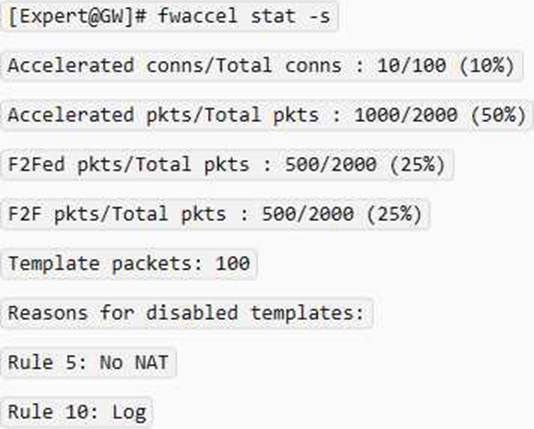
An administrator would like to troubleshoot why templating is not working for some traffic.
How can he determine at which rule templating is disabled?
- A . He can use the fw accel stat command on the gateway.
- B . He can use the fw accel statistics command on the gateway.
- C . He can use the fwaccel stat command on the Security Management Server.
- D . He can use the fwaccel stat command on the gateway
D
Explanation:
The fwaccel stat command on the gateway shows the status of SecureXL acceleration, including the number of accelerated and non-accelerated connections, and the reason for non-acceleration. The reason for non-acceleration can be either a rule that disables templating, or a feature that is not supported by SecureXL. To determine which rule disables templating, the administrator can use the – s option to show the rule numbers and names.
For example:
Fill in the blank: The R81 feature _____ permits blocking specific IP addresses for a specified time
period.
- A . Block Port Overflow
- B . Local Interface Spoofing
- C . Suspicious Activity Monitoring
- D . Adaptive Threat Prevention
C
Explanation:
Suspicious Activity Rules Solution
Suspicious Activity Rules is a utility integrated into SmartView Monitor that is used to modify access privileges upon detection of any suspicious network activity (for example, several attempts to gain unauthorized access).
The detection of suspicious activity is based on the creation of Suspicious Activity rules. Suspicious Activity rules are Firewall rules that enable the system administrator to instantly block suspicious connections that are not restricted by the currently enforced security policy. These rules, once set (usually with an expiration date), can be applied immediately without the need to perform an Install Policy operation.
By default, what type of rules in the Access Control rulebase allow the control connections?
- A . Implicit Rules
- B . Explicitly Implied Rules
- C . Implied Rules
- D . Explicit Rules