
Check Point 156-315.81.20 Practice Exams
Last updated on Oct 22,2026- Exam Code: 156-315.81.20
- Exam Name: Check Point Certified Security Expert - R81.20
- Certification Provider: Check Point
- Latest update: Oct 22,2026
Which two Cluster Solutions are available under R81.20?
- A . ClusterXL and NSRP
- B . VRRPandHSRP
- C . VRRP and IP Clustering
- D . ClusterXL and VRitP
D
Explanation:
ClusterXL and VRRP are the two cluster solutions that are available under R81.20. According to the ClusterXL R81.20 Administration Guide1, ClusterXL is a Check Point software-based clustering solution that provides high availability and load sharing for Check Point Security Gateways and Cluster Members. ClusterXL supports two modes: High Availability and Load Sharing. In High Availability mode, all Cluster Members are connected to the same network segment and share a virtual IP address. One member is active and handles all traffic, while the others are in standby mode and ready to take over in case of a failure. In Load Sharing mode, all Cluster Members are active and share the traffic load according to a predefined algorithm. ClusterXL supports both unicast and multicast modes for Load Sharing1.
VRRP (Virtual Router Redundancy Protocol) is an industry standard protocol that provides high availability for routers or firewalls by creating a virtual router with a virtual IP address that is shared by a group of routers or firewalls. One router or firewall is elected as the master and handles all traffic directed to the virtual IP address, while the others are backups that monitor the master and take over if it fails. VRRP can be used with Check Point Security Gateways to provide redundancy and failover for external interfaces1.
NSRP (NetScreen Redundancy Protocol) is a proprietary protocol developed by Juniper Networks that provides high availability and load balancing for NetScreen firewalls. NSRP is not supported by Check Point products2.
HSRP (Hot Standby Router Protocol) is a Cisco proprietary protocol that provides high availability for routers by creating a virtual router with a virtual IP address that is shared by a group of routers. One router is elected as the active router and handles all traffic directed to the virtual IP address, while another router is elected as the standby router and monitors the active router and takes over if it fails. HSRP is not supported by Check Point products.
IP Clustering is a feature of Linux Virtual Server (LVS) that provides high availability and load balancing for IP-based services by creating a cluster of real servers that are accessed through a virtual IP address. The cluster is managed by a director that routes requests to the real servers according to a scheduling algorithm. IP Clustering is not supported by Check Point products.
Reference: ClusterXL R81.20 Administration Guide: Check Point R81.20: Solved: R81.20 C Check Point CheckMates: [Hot Standby Router Protocol – Wikipedia]: [Linux Virtual Server – Wikipedia]
In Advanced Permanent Tunnel Configuration, to set the amount of time the tunnel test runs without a
response before the peer host is declared ‘down’, you would set the_________?
- A . life sign polling interval
- B . life sign timeout
- C . life_sign_polling_interval
- D . life_sign_timeout
D
Explanation:
In Advanced Permanent Tunnel Configuration, the life_sign_timeout parameter sets the amount of time the tunnel test runs without a response before the peer host is declared ‘down’. The life_sign_polling_interval parameter sets the interval between each tunnel test packet sent to the peer host.
Reference: https://sc1.checkpoint.com/documents/R77/CP_R77_VPN_AdminGuide/html_frameset.htm? topic=documents/R77/CP_R77_VPN_AdminGuide/14018
: Advanced Permanent Tunnel Configuration
In Advanced Permanent Tunnel Configuration, to set the amount of time the tunnel test runs without a
response before the peer host is declared ‘down’, you would set the_________?
- A . life sign polling interval
- B . life sign timeout
- C . life_sign_polling_interval
- D . life_sign_timeout
D
Explanation:
In Advanced Permanent Tunnel Configuration, the life_sign_timeout parameter sets the amount of time the tunnel test runs without a response before the peer host is declared ‘down’. The life_sign_polling_interval parameter sets the interval between each tunnel test packet sent to the peer host.
Reference: https://sc1.checkpoint.com/documents/R77/CP_R77_VPN_AdminGuide/html_frameset.htm? topic=documents/R77/CP_R77_VPN_AdminGuide/14018
: Advanced Permanent Tunnel Configuration
Kurt is planning to upgrade his Security Management Server to R81.X.
What is the lowest supported version of the Security Management he can upgrade from?
- A . R76 Splat
- B . R77.X Gaia
- C . R75 Splat
- D . R75 Gaia
D
Explanation:
The lowest supported version of the Security Management that can be upgraded to R81.X is R75 Gaia. This means that the Security Management Server must be running on the Gaia Operating System and have a version of R75 or higher. R76 Splat, R77.X Gaia, and R75 Splat are not supported for upgrading to R81.X1.
Reference: 1: Check Point Software, Getting Started, Supported Upgrade Paths.
What is the command switch to specify the Gaia API context?
- A . You have to specify it in the YAML file api.yml which is located underneath the /etc. directory of the security management server
- B . You have to change to the zsh-Shell which defaults to the Gaia API context.
- C . No need to specify a context, since it defaults to the Gaia API context.
- D . mgmt_cli –context gaia_api <Command>
D
Explanation:
The command switch to specify the Gaia API context is mgmt_cli –context gaia_api <Command>. This switch allows the user to execute Gaia OS commands through the management API. The Gaia API context is different from the default management API context, which is used to execute commands related to the security policy and objects1.
Reference: Check Point R81 Management API Reference Guide
What kind of information would you expect to see when using the "sim affinity -I" command?
- A . Overview over SecureXL templated connections
- B . The VMACs used in a Security Gateway cluster
- C . Affinity Distribution
- D . The involved firewall kernel modules in inbound and outbound packet chain
C
Explanation:
The “sim affinity -I” command is a command that displays the affinity distribution of the Security Gateway’s interfaces. Affinity distribution is the assignment of CPU cores to handle the traffic from different interfaces. The “sim affinity -I” command shows the following information for each interface:
The interface name, such as eth0, eth1, etc.
The interface index, such as 0, 1, 2, etc.
The interface type, such as physical, bond, VLAN, etc.
The interface state, such as up or down
The interface speed, such as 1000 Mbps, 10000 Mbps, etc.
The interface MTU, such as 1500, 9000, etc.
The interface MAC address, such as 00:11:22:33:44:55 The interface IP address, such as 192.168.1.1, 10.0.0.1, etc.
The interface affinity mask, such as 0x00000001, 0x00000002, etc. The affinity mask is a hexadecimal value that represents the CPU cores that are assigned to handle the traffic from the interface.
For example, 0x00000001 means that only CPU core 0 is assigned, 0x00000003 means that CPU cores 0 and 1 are assigned, and so on.
The “sim affinity -I” command can help you to monitor and optimize the performance of your Security Gateway by showing you how the traffic load is distributed among the CPU cores. You can also use the “sim affinity” command with other options to change the affinity settings of the interfaces or the firewall instances. For more information, you can refer to the Check Point R81.20 (Titan) Resolved Issues and Enhancements1 or the Solved: Sim Affinity – Check Point CheckMates2.
What will be the effect of running the following command on the Security Management Server?
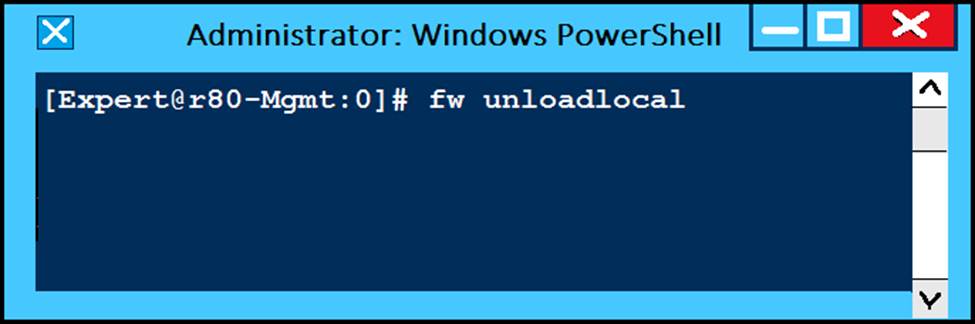
- A . Remove the installed Security Policy.
- B . Remove the local ACL lists.
- C . No effect.
- D . Reset SIC on all gateways.
A
Explanation:
Running the command fw unloadlocal on the Security Management Server will remove the installed Security Policy from the local firewall module. This command is useful for troubleshooting purposes when there is a problem with the policy installation or enforcement. However, it will also expose the Security Management Server to potential attacks, so it should be used with caution.
Reference: Training & Certification | Check Point Software, R81 CCSA & CCSE exams released featuring Promo for… – Check Point …
How would you enable VMAC Mode in ClusterXL?
- A . Cluster Object -> Edit -> ClusterXL and VRRP -> Use Virtual MAC
- B . fw ctl set int vmac_mode 1
- C . cphaconf vmac_mode set 1
- D . Cluster Object -> Edit -> Cluster Members -> Edit -> Use Virtual MAC
A
Explanation:
To enable VMAC Mode in ClusterXL, you need to go to Cluster Object -> Edit -> ClusterXL and VRRP -> Use Virtual MAC. VMAC Mode is a feature that allows ClusterXL to use a virtual MAC address for cluster interfaces instead of physical MAC addresses. This simplifies the cluster configuration and avoids issues with MAC address flapping or spoofing on switches.
Reference: [VMAC Mode]
The fwd process on the Security Gateway sends logs to the fwd process on the Management Server via which 2 processes?
- A . fwd via cpm
- B . fwm via fwd
- C . cpm via cpd
- D . fwd via cpd
A
Explanation:
The fwd process on the Security Gateway sends logs to the fwd process on the Management Server via the cpm process. The cpm process is the main management process that handles database operations, policy installation, and communication with GUI clients via TCP port 190093. The other options are either incorrect or irrelevant to the log flow.
Reference: Certified Security Expert (CCSE) R81.20 Course Overview, Check Point Ports Used for Communication by Various Check Point Modules
What must you do first if “fwm sic_reset” could not be completed?
- A . Cpstop then find keyword “certificate” in objects_5_0.C and delete the section
- B . Reinitialize SIC on the security gateway then run “fw unloadlocal”
- C . Reset SIC from Smart Dashboard
- D . Change internal CA via cpconfig
D
Explanation:
The first thing that must be done if “fwm sic_reset” could not be completed is to change internal CA via cpconfig. Fwm sic_reset is a command that allows administrators to reset Secure Internal Communication (SIC) between Security Management Server and Security Gateways or other Check Point modules. SIC is a mechanism that ensures secure and authenticated communication between Check Point components by using certificates issued by an internal Certificate Authority (ICA). If fwm sic_reset fails, it means that there is a problem with the ICA or the certificates that prevents SIC from being reset. To resolve this problem, administrators need to change internal CA via cpconfig, which is a command that allows administrators to configure various settings on Security Gateways or Management Servers, including the ICA. Changing internal CA via cpconfig will create a new ICA with a new certificate, and allow SIC to be reset with the new certificate.