
Atlassian ACP-610 Practice Exams
Last updated on Oct 22,2026- Exam Code: ACP-610
- Exam Name: Managing Jira Projects for Data Center and Server
- Certification Provider: Atlassian
- Latest update: Oct 22,2026
Depending on the project configuration, a project administrator might be able to perform some tasks, instead of escalating them to the Jira administrator. Identic one such task.
- A . Remove Watchers from project notifications.
- B . Remove a priority value used by the project.
- C . Update permissions for a project user.
- D . Limit who can bulk edit project issues.
A
Explanation:
A project administrator can remove watchers from project notifications, if they have the Manage Watchers permission. This is a task that does not require Jira administrator access, and can be done by the project administrator from the issue view. Removing a priority value used by the project, updating permissions for a project user, and limiting who can bulk edit project issues are all tasks that require Jira administrator access, and cannot be done by the project administrator.
Reference: Managing watchers, Managing Jira Projects Data Center and Server: Certification Bundle
You are reviewing the Velocity Chart for your team and notice that they completed more story points than they committed in their last sprint. You are definitely the only person who can add issues to sprints in your project.
How did your learn complete more story points than they committed?
- A . The sprint was completed early.
- B . An epic with a story point estimate was completed during the sprint.
- C . Someone increased the story point value on an issue mid-sprint.
- D . A sub-task was in an unmapped status at the start of the sprint.
- E . A new sub-task was created drying the sprint
C
Explanation:
The reason why your team completed more story points than they committed in their last sprint is that someone increased the story point value on an issue mid-sprint. This will increase the total story points completed at the end of the sprint, but not affect the total story points committed at the start of the sprint. Therefore, it will result in a positive scope change. The other reasons mentioned in the question do not explain why your team completed more story points than they committed, as they either do not affect story points at all, or affect both committed and completed story points equally.
Reference: Viewing the Velocity Chart, Scope change
The team wants to flag issues using a category.
Their requirements are:
• more than one category value can be selected on an issue
• new category values can be added by any user
• category values can be selected via a dropdown menu
• category values can be re-used across all projects
Which field meets their requirements?
- A . text field
- B . component
- C . user picket
- D . label
- E . checkboxes
D
Explanation:
The label field meets the team’s requirements for flagging issues using a category. Labels are a type of custom field that allow users to add one or more descriptive tags to issues. Users can add new labels on the fly, and select existing labels from a dropdown menu. Labels can be re-used across all projects, and can be searched and filtered easily. A text field does not allow multiple values or a dropdown menu. A component does not allow multiple values or adding new values by any user. A user picker does not allow multiple values or adding new values by any user. Checkboxes do not allow adding new values by any user.
Reference: [Adding, removing and searching for labels], [Managing Jira Projects Data Center and Server: Certification Bundle]
Development team A is consistently overestimating the work they can complete per sprint. They want to be able to compare work committed and work completed in sprints over time.
Which single report provides this information?
- A . Control Chart
- B . Sprint Report
- C . Cumulative Flow Diagram
- D . Created vs Resolved Issues Report
- E . Velocity Chart
E
Explanation:
The Velocity Chart is the best report to compare work committed and work completed in sprints over time. It shows the average amount of work that a team can complete in a sprint, based on the historical data of previous sprints. It also shows how much work was planned and how much was actually completed in each sprint. By looking at the Velocity Chart, a team can see if they are overestimating or underestimating their capacity, and adjust their planning accordingly. Therefore, option E is correct.
Reference: Velocity Chart, Managing Jira Projects Data Center and Server: Certification Bundle
Gen prioritizes and triages support requests as soon as they come in.
She now wants to use drag-and-drop to:
• quickly assign and transition them to in Progress
• instantly associate them with Epics
Which board view will meet these requirements?
- A . Scrum backlog
- B . Kanban board
- C . Kanban backlog
- D . Active sprints
B
Explanation:
A Kanban board is the best option for Gen to prioritize and triage support requests using drag-and-drop. A Kanban board allows Gen to quickly assign issues to herself or other team members by dragging them to the appropriate column. She can also transition issues to In Progress by moving them across the workflow. Additionally, she can instantly associate issues with Epics by dragging them to the Epic panel on the right side of the board. A Kanban board also provides a visual overview of the current status and progress of the support requests.
Reference: Managing Jira Projects Data Center and Server: Certification Bundle, Configuring projects | Administering Jira applications Data Center and …, [Working with issues | Jira Software Cloud]
You want to report on your team’s performance to the stakeholders.
View one of the reports for your team:
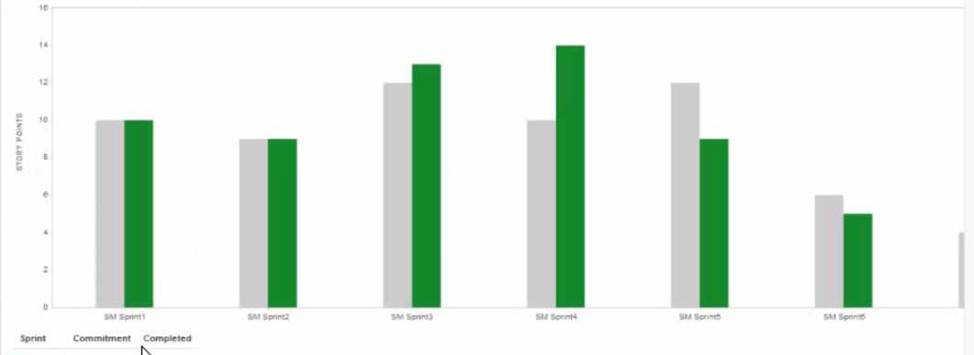
Based only on the report shown, which statement about your teams performance is definitely true?
- A . Your team is not estimating their work accurately.
- B . Your team sometimes commits more work than it can complete in an iteration.
- C . Your team is committing unestimated work to an iteration.
- D . Scope change is affecting the team’s ability to complete work on time.
- E . Your team is using sprint duration inconsistently
B
Explanation:
Based on the report shown, which is a Velocity Chart, the only statement that is definitely true about the team’s performance is that they sometimes commit more work than they can complete in an iteration. This can be seen by comparing the green bars (completed work) and the gray bars (estimated work) in each sprint. For example, in Sprint 4, the team committed 10 story points but only completed 8 story points. The other statements are not necessarily true based on the report alone. For example, the team may be estimating their work accurately, but facing other challenges or impediments that prevent them from completing their work on time. Or, the team may not be committing unestimated work to an iteration, but rather re-estimating some issues during the sprint. Or, scope change may not be affecting the team’s ability to complete work on time, but rather reflecting changes in priorities or requirements. Or, the team may be using sprint duration consistently, but varying the amount of work they commit to each sprint based on their capacity or velocity. For more information on how to interpret and use the Velocity Chart, see Velocity Chart.
Reference: Velocity Chart
The team requests that you update the name of your project.
What impact will this have on Jira?
- A . The URL for issues will change.
- B . The project key will change.
- C . Issue filters may need to be updated.
- D . Issue search will not find issues from that project until Jira is re indexed.
C
Explanation:
Updating the name of your project will not affect the URL for issues, as they are based on the project key, not the name. The project key will also remain unchanged unless you explicitly change it. Issue search will still find issues from that project regardless of the name change. However, issue filters may need to be updated if they use the project name as a criterion. Therefore, the correct answer is C.
Reference: Editing a project’s details, Changing the project key, Searching for issues using filters
A Scrum board contains issues from a single project.
An extract of the project’s permission scheme is shown.
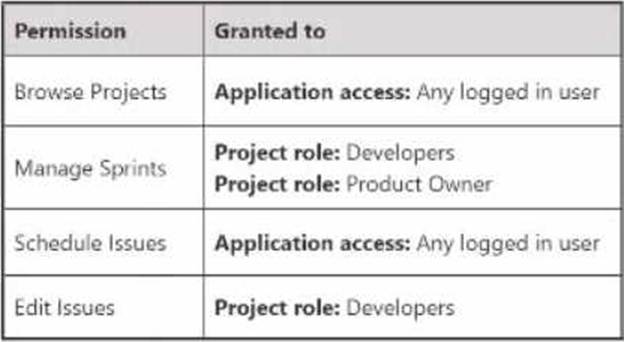
Who can definitely see the Scrurn board and rank issues?
- A . any member of Developers role with Jira Software application access
- B . any logged in user
- C . member of both Developers role and Product Owner role
- D . any member of Developers role
B
Explanation:
The only users who can definitely see the Scrum board and rank issues are the members of the Developers role with Jira Software application access. This is because the Browse Projects permission, which allows users to see the project and its issues, is granted to the Developers role, and the Schedule Issues permission, which allows users to rank issues on a Scrum board, is granted to any logged in user who has Jira Software application access. The other options are incorrect because they either do not have Jira Software application access, which is required for both permissions, or they do not belong to the Developers role, which is required for the Browse Projects permission. For more information on project permissions and roles, see Understand project permissions and roles and Manage project permissions.
Reference: Manage project permissions, Understand project permissions and roles
Which statement is definitely true about priorities in Jira?
- A . Project administrators can re-order existing priorities in their projects.
- B . Project administrators can create new priorities in their projects.
- C . The same set of priorities is always available in each project.
- D . Jira administrators can create and update global priorities.
D
Explanation:
Jira administrators can create and update global priorities, which are the default set of priorities available in each project. Project administrators cannot re-order, create, or update priorities in their projects, unless they have Jira administrator access. The same set of priorities is not always available in each project, as Jira administrators can configure priority schemes to assign different priorities to different projects.
Reference: [Configuring priorities], [Managing Jira Projects Data Center and Server: Certification Bundle]
An issue was created with the following attributes:
• Issue type: Story
• Priority: Blocker
• Labels: Tools, DevOps
• Reporter: A.Grant
An excerpt of the board’s swimlane configuration is shown.
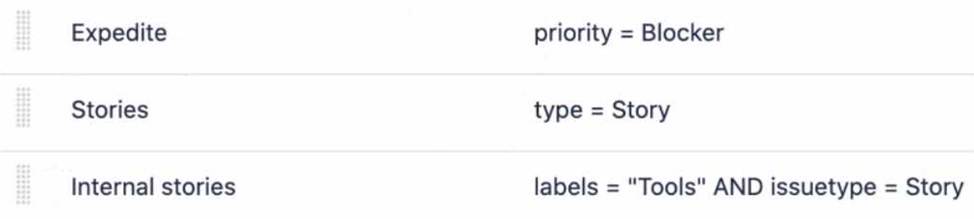
In which swimlane will the issue appear?
- A . Change requests
- B . Expedite
- C . Internal stories
- D . Everything Else
- E . Stories
B
Explanation:
The issue will appear in the Expedite swimlane, because it matches the query priority = Blocker. Swimlanes are used to group issues on the board based on a common attribute, such as assignee, epic, or a custom query. The board’s swimlane configuration shows that the first swimlane is Expedite, which has the query priority = Blocker. This means that any issue with a blocker priority will be placed in this swimlane, regardless of its other attributes. The other swimlanes have different queries that do not match the issue’s attributes, such as type, labels, or reporter. Therefore, the issue will not appear in those swimlanes. The last swimlane is Everything Else, which is the default swimlane for any issue that does not match any of the previous queries. However, since the issue matches the Expedite query, it will not fall into this swimlane either. Hence, the correct answer is B.
Reference: [Configuring swimlanes], [Using swimlanes]