
Atlassian ACP-610 Practice Exams
Last updated on Oct 22,2026- Exam Code: ACP-610
- Exam Name: Managing Jira Projects for Data Center and Server
- Certification Provider: Atlassian
- Latest update: Oct 22,2026
Jon notices that an issue was created incorrectly in project A. He needs to move it to project B.
Which permissions are required to complete that move?
- A . Move Issues. Transition Issues
- B . Administer Projects. Assign Issues
- C . Move Issues, Create Issues
- D . Administer Projects, Create Issues
C
Explanation:
Jon needs Move Issues and Create Issues permissions to move an issue from project A to project B. Move Issues permission allows him to initiate the move operation, while Create Issues permission allows him to create the issue in the destination project. Transition Issues permission is not relevant for moving issues, as it only affects workflow transitions. Administer Projects permission is not required for moving issues, unless the issue type or workflow needs to be changed during the move. Assign Issues permission is not required for moving issues, unless the assignee needs to be changed during the move.
Reference: [Moving an issue], [Managing Jira Projects Data Center and Server: Certification Bundle]
Jon can already see issues in a particular project.
But he also needs to:
• work on setting Due Date on issues
• transition issues from the Resolved column to the Closed column
His project was created using the Scrum project template and the simplified workflow has not been modified.
Which three additional permissions does he definitely need? (Choose three.)
- A . Work On Issues
- B . Browse Projects
- C . Close Issues
- D . Transition Issues
- E . Schedule Issues
CDE
Explanation:
To perform the tasks that Jon needs, he requires three additional permissions: Close Issues, Transition Issues, and Schedule Issues. The Close Issues permission allows Jon to transition issues from the Resolved column to the Closed column on the Scrum board. The Transition Issues permission allows Jon to move issues through any workflow transition on the Scrum board. The Schedule Issues permission allows Jon to set or edit the Due Date of an issue. The other permissions are not additional or necessary for Jon’s tasks. The Work On Issues permission allows Jon to log work on an issue, but not to set or edit the Due Date. The Browse Projects permission is already granted to Jon, since he can see the issues in the project. For more information on how to manage project permissions, see Manage project permissions and Understand project permissions and roles.
Reference: Manage project permissions, Understand project permissions and roles
Your project will be audited. You need to grant specific permissions to the auditors through a project role.
The auditors do not have any Jira global permissions granted.
Which two permissions can be granted through a project role? (Choose two.)
- A . see issues with a security level
- B . see issues that have been archived
- C . share a dashboard with other auditors
- D . subscribe other auditors to a search result
- E . use bulk change to update seven issues
A, C
Explanation:
https://support.atlassian.com/jira-software-cloud/docs/understand-project-permissions-and-roles/
The two permissions that can be granted through a project role are:
A) see issues with a security level
C) share a dashboard with other auditors
These permissions are related to the project level and can be configured by the project administrator using the permission scheme or the dashboard settings.
According to the documentation1, a project role can be granted the following permissions:
Browse Projects: View the project and its issues.
Create Issues: Create new issues.
Edit Issues: Edit existing issues.
Schedule Issues: Edit the Due Date of an issue, or rank issues on a Scrum board.
Move Issues: Move issues from one project to another, or change the issue type.
Assignable User: Be assigned issues.
Assign Issues: Assign issues to other users.
Resolve Issues: Resolve or reopen issues, or set a resolution when closing issues.
Close Issues: Close issues.
Modify Reporter: Modify the Reporter field of an issue.
Delete Issues: Delete issues from the project.
Link Issues: Link issues to each other, or create sub-tasks under an issue.
Set Issue Security: Set a security level on an issue to control who can see it.
View Voters and Watchers: View the list of voters and watchers for an issue.
Manage Watchers: Add or remove watchers for an issue.
View Read-Only Workflow: View the workflow diagram for an issue, but not edit it.
Manage Sprints: Start, complete, or edit sprints on a Scrum board.
Additionally, a project role can be given access to share a dashboard with other users or groups2.
To do this, the project administrator needs to:
Go to Dashboards > View all dashboards
Find the dashboard to share and click > Share
Click Edit permissions
Under Add Permissions, select Group or Project Role
Choose the auditors project role from the dropdown menu
Click Add
The other options are not correct because:
B) see issues that have been archived is not a permission that can be granted through a project role. Archived issues are hidden from all users except Jira administrators3. To view archived issues, the auditors would need to have the Administer Jira global permission, which is not related to project roles.
D) subscribe other auditors to a search result is not a permission that can be granted through a project role. Subscribing other users to a search result is a feature that requires the Manage Group Filter Subscriptions global permission4. This permission is not related to project roles and can only be granted by Jira administrators to individual users or groups.
E) use bulk change to update seven issues is not a permission that can be granted through a project role. Bulk change is an operation that requires the Bulk Change global permission5. This permission is not related to project roles and can only be granted by Jira administrators to individual users or groups.
A project was created with a shared configuration.
Which two configurations were shared? (Choose two.
- A . component lead assignments
- B . versions
- C . transition screens
- D . project role membership
- E . project permissions
C, E
Explanation:
When a project is created with a shared configuration, it inherits the configurations of an existing project. This includes the workflow, issue types, screens, fields, permissions, notifications, and schemes associated with them. However, the component lead assignments and versions are specific to each project and are not shared. Therefore, the correct answer is C and E.
Reference: Creating a project, Configuring projects
A Scrum team working on multiple epics complains that they are constantly being pushed to complete more work than they think can be completed. Apparently, the product owner has constantly overloaded each of the past 8 sprints.
Which single report can instantly prove their statement?
- A . Velocity Chart
- B . Cumulative Flow Diagram
- C . Sprint Report
- D . Control Chart
- E . Epic Burndown
You want to remove some epics from your personal Scrum board, without impacting any other boards. Identify the correct solution.
- A . Exclude them via a quick filter.
- B . Mark them as Done via the Epics panel
- C . Exclude them via the board filter
- D . Exclude them via the board sub filter.
- E . Transition them into an unmapped status.
Review the Version Report:
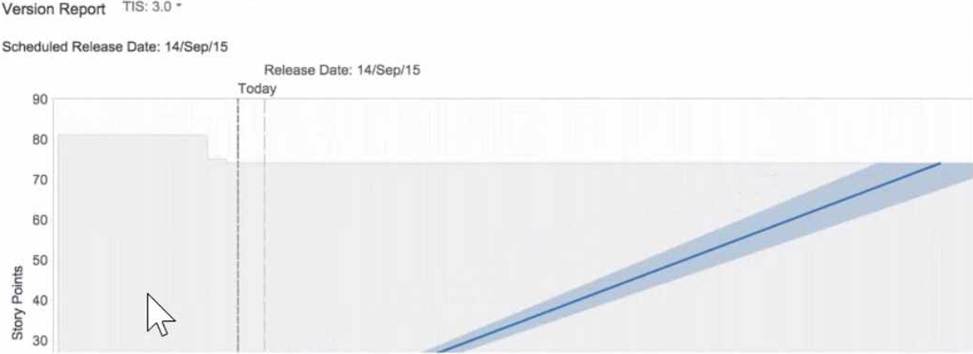
- A . The release date that has been added to this version should be reconsidered.
- B . More than 20 story points were burned when this chart was reviewed in July 2015.
- C . Only three issues have been completed in the version, so a predicted end date is not possible.
- D . The team should use time-based estimation, not story points.
- E . There are too many unestimated issues in this version, so any predictions are inaccurate.